





Nodiaque
Members
-
Joined
-
Last visited
Everything posted by Nodiaque
-
Well the samething happen on my cache/array combination and there is no warning. Empty folder and files exists on the cache that aren't move yet. As for the cachedownload and such, all there is on it right now are non empty folder that we're created after mover ran.
-
No problem. Right now, it's uninstalled but since it ran with the plugin and moved everything, I'll have to wait for next schedule to see if there's still file remaining on the cache since now it's empty.
-
Diagnostic was posted after installing tuner and while it was running. I though diagnostic would give you more history like how it was at the mover that ran at 6am without tuner.
-
Hello, I'm on 7.0.1 and I'm having these warning in the plugin Apr 11 09:31:08 ServRaid root: Fix Common Problems: Warning: Share download set to use pool cachedownload, but files / folders exist on the downloads pool Apr 11 09:31:08 ServRaid root: Fix Common Problems: Warning: Share Torrent set to use pool cachedownload, but files / folders exist on the downloads pool Thing is, I'm configured for these share to use cachedownload as primary pool and download as secondary pool. Thus, it's normal. I think the plugin between pool storage and not just the array. THank you
-
Hmmm... Maybe I wasn't clear. The mover tuning plugin was removed when I had the issue. The issue was solved once I installed the plugin with no filtering. I installed it to see if it would make a difference. I do not plan on keeping it since I'm using none of the feature. The file that were skipped were in the same folder as other file. There was enough space to copy the files (over 1tb) on the secondary storage.
-
Hello everyone, I'm on unraid 7.0.1 and I'm using different pool as ssd cache for other pool. I notice that mover isn't moving all file so I enabled logging. And now, I'm seeing that mover is skipping some files. I did used ot have mover tuner in 6.12.14 but it wasn't set for anything. I removed it before switching to 7. I reinstall mover tuning and set it to move all file as original mover (thus making the plugin useless) and now it moved all file. I'm not sure what's going on. Thank you servraid-diagnostics-20250411-0850.zip
-
I cannot say to be honest. I know when I did this docker, it was how the original software was supported but the dev said he was working on something else. I haven't visited back since it's working. Might want to check on the project page
-
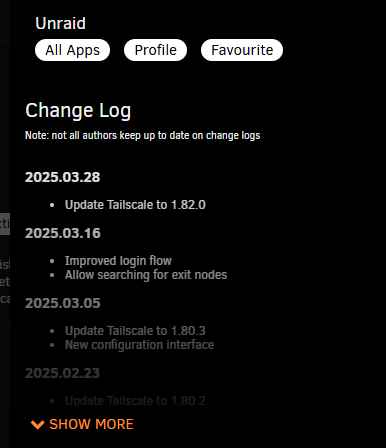
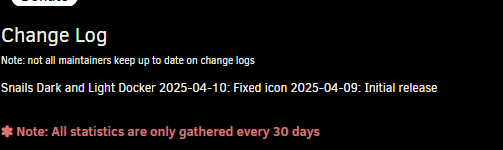
Ok, I don't know why my formating doesn't work since it's markdown. Unless it's not what I though. Any reference for markdown?
-
Hello, I'm looking on how to create the changes section of the docker template. In the documentation ( it says: <Changes> This entry contains a changelog for the container. http://lime-technology.com/forum/index.php?topic=40111.msg379576#msg379576 Thing is that link doesn't work anymore. I tried to do some change but it didn't work What I'm expecting to see: And what I get: How do I format it like in the first one? Thank you
-
Ah, ok, I delete it since it's been a while and I was able to upgrade. thanks!
-
Yeah I just remove some plugin but it didn't free much. The update assistant didn't note anything unless it's after checking for enough free space that it's doing that. I see there's a previous folder that use 439MB. What is that?
-
Hello everyone, I just tried to update and got greated with a not enough space. I got only 500mb left on the 2gb flash drive. Is there a way to free up space on the flash or I'm stuck finding a new key? Thank you! edit: dfu -h /boot 616K ./EFI/boot 620K ./EFI 8.0K ./System Volume Information 1.1M ./config/plugins/dockerMan/templates-user 12K ./config/plugins/dockerMan/templates/unraid-templates/emby 16K ./config/plugins/dockerMan/templates/unraid-templates 28K ./config/plugins/dockerMan/templates/limetech 48K ./config/plugins/dockerMan/templates 1.2M ./config/plugins/dockerMan 44K ./config/plugins/dynamix/users 12K ./config/plugins/dynamix/notifications/agents 16K ./config/plugins/dynamix/notifications 136K ./config/plugins/dynamix 156K ./config/plugins/community.applications 20K ./config/plugins/user.scripts/scripts/delete.ds_store 12K ./config/plugins/user.scripts/scripts/delete_dangling_images 12K ./config/plugins/user.scripts/scripts/viewDockerLogSize 12K ./config/plugins/user.scripts/scripts/Palworld shutdown 16K ./config/plugins/user.scripts/scripts/Restart_ConanExiles_Siptah 16K ./config/plugins/user.scripts/scripts/Certificate_Manager 12K ./config/plugins/user.scripts/scripts/Create users and groups 16K ./config/plugins/user.scripts/scripts/clear an array drive 12K ./config/plugins/user.scripts/scripts/Allow docker custom network 16K ./config/plugins/user.scripts/scripts/start Free Game Claimer 16K ./config/plugins/user.scripts/scripts/Create downloads link 16K ./config/plugins/user.scripts/scripts/Set download permission 16K ./config/plugins/user.scripts/scripts/reset_mnt 12K ./config/plugins/user.scripts/scripts/Create Docker custom Network 12K ./config/plugins/user.scripts/scripts/Redis overcommit fix 16K ./config/plugins/user.scripts/scripts/Get evcc Token 236K ./config/plugins/user.scripts/scripts 1.1M ./config/plugins/user.scripts 261M ./config/plugins/nvidia-driver/packages/6.1.118 261M ./config/plugins/nvidia-driver/packages 262M ./config/plugins/nvidia-driver 24K ./config/plugins/file.activity 8.0K ./config/plugins/disklocation/backup/20240209-000009 8.0K ./config/plugins/disklocation/backup/20240222-000008 4.0K ./config/plugins/disklocation/backup/boot/config/plugins/disklocation 8.0K ./config/plugins/disklocation/backup/boot/config/plugins 12K ./config/plugins/disklocation/backup/boot/config 16K ./config/plugins/disklocation/backup/boot 8.0K ./config/plugins/disklocation/backup/20230913-000000 8.0K ./config/plugins/disklocation/backup/20241026-000010 8.0K ./config/plugins/disklocation/backup/20241028-081556 60K ./config/plugins/disklocation/backup 308K ./config/plugins/disklocation 3.1M ./config/plugins/unassigned.devices-plus/packages 3.1M ./config/plugins/unassigned.devices-plus 4.0K ./config/plugins/folder.view/styles 4.0K ./config/plugins/folder.view/scripts 180K ./config/plugins/folder.view 4.0K ./config/plugins/ca.update.applications/scripts/stopping 4.0K ./config/plugins/ca.update.applications/scripts/starting 12K ./config/plugins/ca.update.applications/scripts 52K ./config/plugins/ca.update.applications 28K ./config/plugins/dynamix.system.temp 232K ./config/plugins/dynamix.system.stats 24K ./config/plugins/dynamix.system.info 17M ./config/plugins/NerdPack/packages/6.9 4.0K ./config/plugins/NerdPack/packages/6.11 17M ./config/plugins/NerdPack/packages 17M ./config/plugins/NerdPack 332K ./config/plugins/NerdTools 140K ./config/plugins/networkstats 152K ./config/plugins/unassigned.devices 8.0K ./config/plugins/dynamix.apcupsd 4.0K ./config/plugins/fix.common.problems/scripts 76K ./config/plugins/fix.common.problems 12K ./config/plugins/ipmi 9.2M ./config/plugins/lxc/packages 12M ./config/plugins/lxc 2.1M ./config/plugins/tips.and.tweaks 84K ./config/plugins/dynamix.date.time 2.4M ./config/plugins/dynamix.file.integrity/logs 62M ./config/plugins/dynamix.file.integrity/export 4.0K ./config/plugins/dynamix.file.integrity/saved 64M ./config/plugins/dynamix.file.integrity 60K ./config/plugins/dynamix.local.master 4.0K ./config/plugins/dynamix.my.servers 16K ./config/plugins/dynamix.schedules 32K ./config/plugins/enhanced.log 2.0M ./config/plugins/gpustat 60K ./config/plugins/ca.cleanup.appdata 944K ./config/plugins/dynamix.file.manager 68K ./config/plugins/appdata.backup 128K ./config/plugins/dwmemtester 20K ./config/plugins/dynamix.active.streams 16K ./config/plugins/open.files 32K ./config/plugins/ca.turbo 6.0M ./config/plugins/unassigned.devices.preclear 2.2M ./config/plugins/rcon 8.0K ./config/plugins/compose.manager/projects 13M ./config/plugins/compose.manager 168K ./config/plugins/parity.check.tuning 20K ./config/plugins/dynamix.system.autofan 4.0K ./config/plugins/tailscale/state/files/nodiaque-msn.com-uid-35286693430297532 8.0K ./config/plugins/tailscale/state/files 16K ./config/plugins/tailscale/state/certs 48K ./config/plugins/tailscale/state 31M ./config/plugins/tailscale 8.0K ./config/plugins/disklocation-master 7.9M ./config/plugins/unbalanced 12K ./config/plugins/unraid.patch 8.0K ./config/plugins/disklocation-2024-edition 124K ./config/plugins/nut-dw/ups 9.2M ./config/plugins/nut-dw 435M ./config/plugins 4.0K ./config/wireguard/peers 8.0K ./config/wireguard 12K ./config/ssh/root 48K ./config/ssh 4.0K ./config/modprobe.d 28K ./config/pools 192K ./config/shares 28K ./config/ssl/certs 36K ./config/ssl 4.0K ./config/plugins-error 96K ./config/plugins-removed 436M ./config 1.2M ./syslinux 44K ./preclear_reports 6.9M ./logs 992K ./packages 352K ./extra 439M ./previous 1.4G .
-
yeah, I had binhex all the way cause in the past, it was one of the most recommended. I just switch my sonarr to lscr.
-
I see the difference. Radarr is a lscr.io docker while the other one is a binhex. Binhex generally have a bigger base then lscr
-
sureservraid-diagnostics-20250406-1804.zip
-
Can't say, but now it's back to normal. Reinstalled everything, setting back backup in appdata backup plugin (I'll have to remember that config in there are lost). Docker already running faster. Unsure if it's because of the new pool (was already on a ssd pool) or because recreating from scratch the docker sub help cleared some weird stuff.
-
Yeah I had 1 container that was bad like that, the nextcloud aio container. That thing created named docker volume in the internal compose file which I wasn't able to change. These created a lot of stuff under docker folder and I hated it. I've since move to a real unraid friendly nextcloud container that doesn't do this kind of things.
-
cannot say. Maybe database bigger because of the number of files (tv shows have way more files then movies). If you think put a medium of 10 episodes per series and 1 season each, it give 30 000 video file (plus all the extra file). But since many have way more then 10 episodes and more then 1 seasons, this number is shy from the truth. Although now that I think of it, the database should be in the appdata like the log file. I don't know. Maybe indexer temp. Anyway, it's deleting right now.
-
LYrion is offline. I tried lyrion to replace lms and it wasn't working at all. So I just kept it to update later and try switching back. Only LMS is used for now. My sonarr is handling over 3000 tv shows while my radarr only 1000, that might be why. edit: I think radarr and sonarr here are not from the same person, might have different base. I'll check once I restore everything. Still waiting on the delete to finish
-
I'm going to clear my docker folder. I think it's the best thing to just recreate it.
-
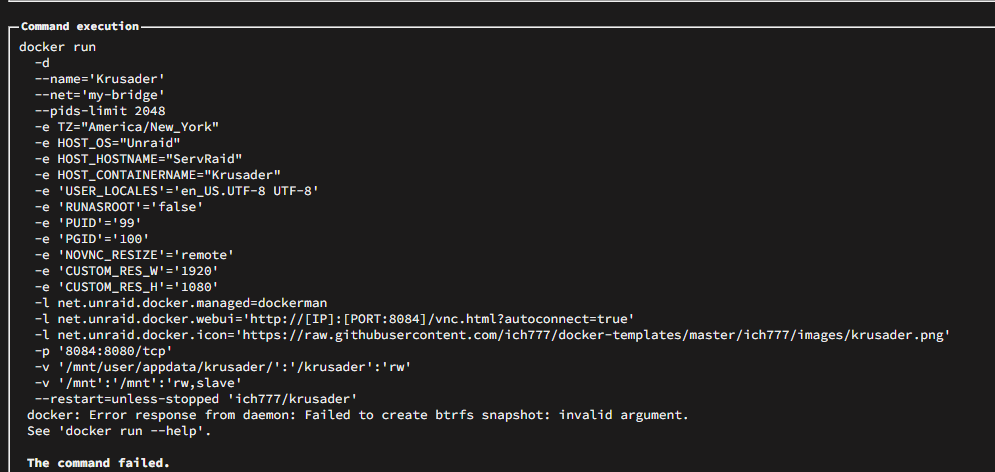
I wanted to upgrade some share cause some point to cache directly, and I get a btrfs snapshot error Name Container Writable Log CodeProject.AI_ServerGPU 25.6 GB 14.1 GB 8.31 MB CloudflareBypassForScraping 5.71 GB 1.62 GB 6.60 kB immich 5.62 GB 80.4 MB 496 kB homeassistant 3.43 GB 1.60 GB 23.8 kB sonarr 3.13 GB 1.23 GB 1.04 MB calibre 2.94 GB 34.4 kB 23.7 kB FileFlows 2.69 GB 786 MB 134 kB duplicati 2.44 GB 1.97 GB 82.8 kB ConanExiles 2.37 GB 3.16 MB 4.63 MB V-Rising 2.35 GB 0 B 120 MB calibre-web-automated 2.21 GB 333 MB 819 kB Enshrouded 2.18 GB 2.69 MB 5.20 MB epicgames-freegames 1.54 GB 30.6 MB 427 kB nextcloud 1.39 GB 267 MB 20.5 kB Jellyfin 1.27 GB 22.1 MB 6.21 MB LyrionMusicServer 1.11 GB 0 B 120 MB free-games-claimer 1.03 GB 0 B 120 MB spotizerr 1.02 GB 2.69 kB 2.29 kB emulatorjs 866 MB 0 B 120 MB calibre-web-automated-book-downloader 863 MB 37.2 MB 3.52 MB calibre-web-automated-book-downloader-fr 863 MB 37.1 MB 3.52 MB LMS 859 MB 339 MB 7.12 kB youtube-dl-material 806 MB 115 MB 51.4 kB openHAB 799 MB 124 MB 496 kB flaresolverr 709 MB 162 kB 2.29 MB postgresql_immich 692 MB 63 B 31.4 kB Emby 679 MB 4.54 MB 1.05 MB All-The-Mods-9 675 MB 0 B 466 kB grafana 663 MB 0 B 858 kB swag 658 MB 254 MB 105 kB code-server 629 MB 25.1 kB 56.6 kB NodeRed 601 MB 0 B 1.66 MB unifi-network-application 591 MB 58.2 kB 46.2 kB romm 562 MB 2.48 kB 2.81 MB telegraf 551 MB 30.4 MB 147 kB cups 530 MB 12.6 kB 1.14 kB hydroqc2mqtt 495 MB 0 B 8.16 MB GameVault 470 MB 2.27 MB 8.82 MB mariadb-nextcloud 465 MB 0 B 50.9 kB UptimeKuma 440 MB 217 kB 860 kB postgresql15-gamevault 429 MB 63 B 926 kB unifi-bd 427 MB 0 B 9.10 MB Influxdb 406 MB 0 B 4.07 MB bazarr 396 MB 76.3 kB 8.88 MB GameManBot 366 MB 0 B 1.17 MB ombi 340 MB 43.0 kB 1.60 MB mariadb 336 MB 2 B 325 kB RedisInsight 304 MB 0 B 282 B jackett 292 MB 113 MB 339 kB MQTTExplorer 282 MB 0 B 26.5 kB MKVToolNix 268 MB 20.9 kB 180 kB MediaInfo 213 MB 42.6 kB 1.06 MB radarr 207 MB 22.6 kB 8.50 MB qbittorrent 196 MB 23.1 kB 13.2 kB QDirStat 184 MB 33.2 kB 495 kB prowlarr 183 MB 22.7 kB 1.12 MB Palworld 164 MB 42.6 MB 42.1 kB cross-seed 164 MB 0 B 3.40 MB Speedtest 148 MB 122 B 988 kB redis-nextcloud 145 MB 109 kB 120 kB redis 144 MB 109 kB 344 kB RustDeskServer-AiO 143 MB 4.37 kB 430 kB pihole 138 MB 48.2 MB 147 kB OpenTTD 126 MB 0 B 120 MB adminer 121 MB 23.1 kB 6.85 kB jellyplex-watched 118 MB 15.1 MB 835 kB netbootxyz 118 MB 23.4 kB 40.7 kB evcc 102 MB 0 B 4.14 MB qbit_manage 97.2 MB 271 kB 818 kB authelia 72.4 MB 199 B 698 kB dockersocket 19.3 MB 4.10 kB 142 kB unpackerr 16.2 MB 0 B 4.32 MB mosquitto 9.90 MB 57 B 4.56 kB nebula-sync 6.13 MB 0 B 234 kB Total size 89.2 GB 23.2 GB 717 MB
-
ok, so everything is working fine. Although I don't like the 70C on my nvme drive though.
-
Nah I know it's not normal, it wasn't taking anything near that before I move them to the new pool while offline. I never boot them back since I did the move. Doing it right now to see at least if they work.

-
yeah, that's what I did each time. It is time consuming.
-
Weirdly is that when I did the move, the cache drive had 380gb used space. I move it to the new folder and bam, it's now 700gb all the while docker was shutdown. Wild. I currently have mover running to put back appdata on ssd pool. I'm starting docker afterward to see if it still start or not.

