





Ender Wiggin
Members
-
Joined
-
Last visited
-
After multiple days of trying different things I was able to resolve the issue. I had run the balance command before set to single mode but it did not work and did not run balance at all. This is something i tried at the beginning. After much messing about and trying other things to save the data I decided to revisit using the single mode. With the server running for a bit and the container running that accesses that pool the balance command errored out (would go into read only mode). The container accessing that pool might be doing some kind of writing that i was not aware of. Booted up the server with the container and SMB disabled for the BTRFS pool and the first thing I did was run the balance command to single mode. This time it ran without erroring out. Took some stressful 5 days but the data is intact and the pool is healthy and working properly in single mode. I wish I would have know that BTRFS needed to be in single mode to use the full space. This was something I specifically looked for when I added the 28tb drive to the other 8tb. The problem was the Unraid GUI lied to me about the amount of free space. I was also not knowledgeable enough at the time to check the correct place for the amount of available free space.
-
This has happened to me a few times. This time i cant seem to fix it. It is quite frustrating how broken basic Btrfs pool is in unraid. I would have used a second unraid pool but that was not supported in 6.X. Last time this happened i was not 3.5TB over.

-
It was cookies for me! Thank you for the help
-
Well I have no idea what was wrong and nothing was showing in the logs but removing UNASSIGNED DEVICES and UD PRECLEAR and reinstalling them they are now working. It had been working before and must have stopped working when I updated. I did not see anything in the logs that would have indicated a problem it would just refuse to start. I think the flag was a red herring but not sure.
-
I am not sure i will try and see if i can stop those messages. The flag I put in the quoted text...? Can you not see it? It is the last thing on this FAQ. https://github.com/binhex/documentation/blob/master/docker/faq/preclear.md
-
For some reason the alignment is not getting chosen automatically. Justed add the flag and it started normally. If i did not add the flag it would not start in binhex preclear or UD preclear. From Binhex-preclear: Preclear Docker FAQ
-
Did you look at the time that had passed? 17 hours had passed till I decided to stop it and realized it was not working. This happen before and list time I add to pass a parameter that is not exposed in the user interface. I believe this is what i had to do last time to get it to start: From Binhex-preclear: Preclear Docker FAQ Alignment Options (-a and -A flags) Below is the logic built into the preclear script when determining the starting sector for the partition:- if preclear -a option chosen and drive < 2.2TB then will set to 63. if preclear -a option chosen and drive > 2.2TB then will set to 64. if preclear -A option chosen and drive < 2.2TB then will set to 64. if preclear -A option chosen and drive > 2.2TB then will set to 64. if preclear -a or -A not defined then 63 or 64 will be chosen based on unraid config, UNLESS the drive is > 2.2TB, in which case it will always be 64. For some reason the aliment is not getting chosen automatically
-
Have not been able to get pre-clear to work with a brand new drive. Got a new drive wanted to stress test it before adding it to my system and i can't seem to get it to start. I solved it last time with using the docker container and adding a Prompt but can remember what it was. How do i pre-clear a brand new drive using the pre-clear plugin? This is what the log shows and the it never gets past starting. Preclear script invoked as: /usr/local/emhttp/plugins/unassigned.devices.preclear/scripts/preclear_disk.sh --cycles 3 --no-prompt /dev/sdk Says success then never starts. Both drivers appear to meet the requirements and give me a start prelear button.

-
Thank you! That fixed it. I think the Hot swap capabilities of the Disk Shelf are not has good or stable as i would have hopped. In the future i will just just do the move while shut down. Thank you! Again. That got a bit scary for a sec there.
-
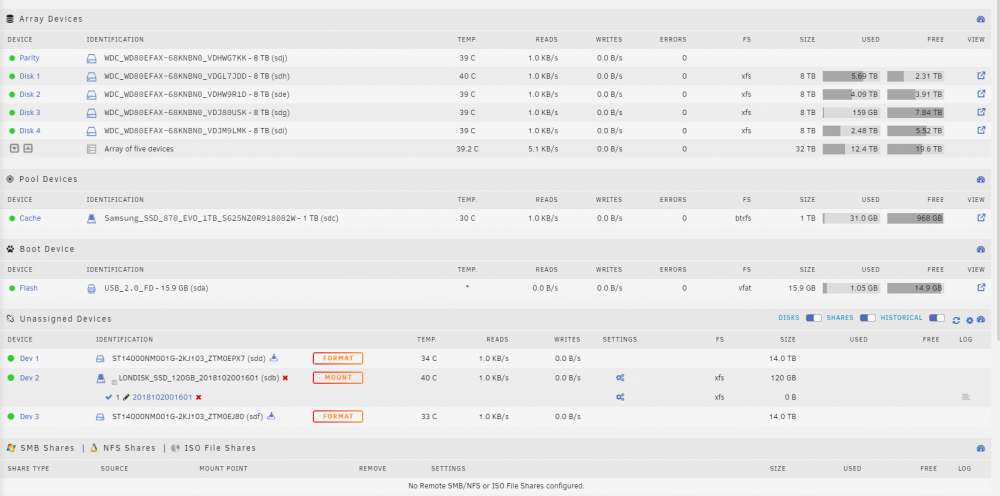
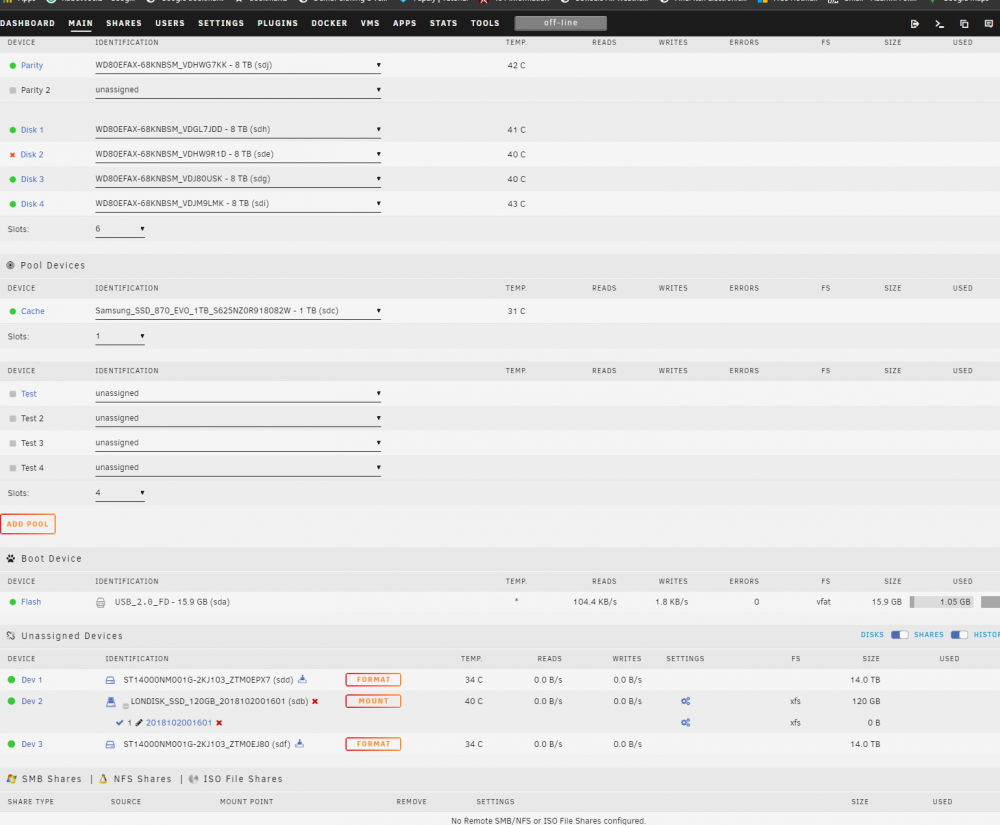
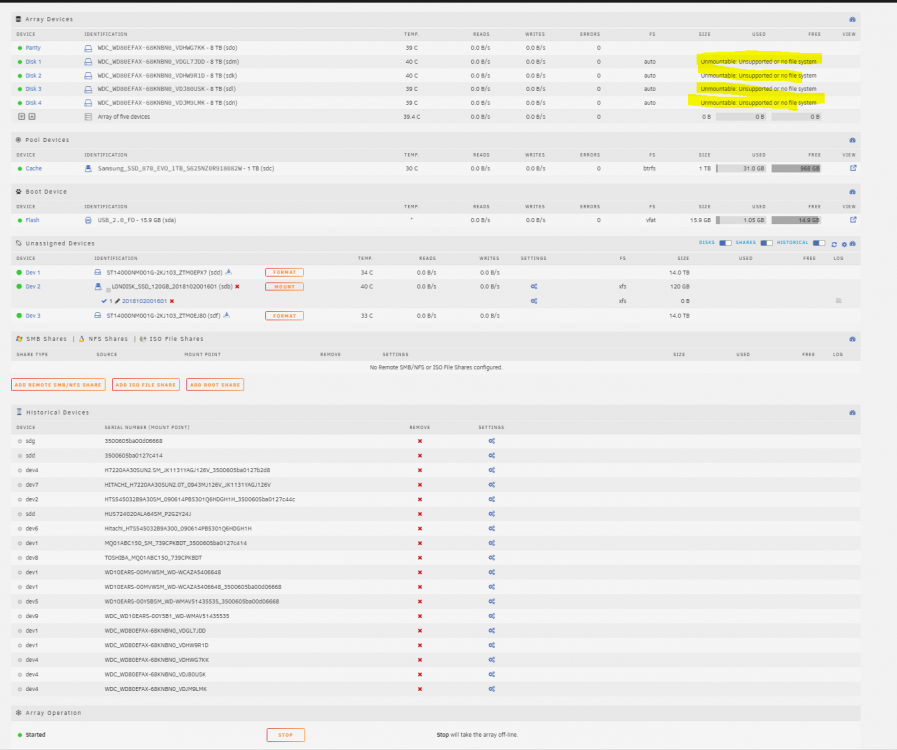
So I realized i did not need a SAS interposer in my disk shelf so today i wanted to switch all my drives from SAS to SATA. I had already done a similar process of switching the drives from STAT to SAS when i got the Disk shelf. I followed the same process i followed last time. use Tools >> New Config to reset the array. Use the option to retain current assignments. go back to the Main tab and select the ‘Parity is Good’ option and start the array. Everything should come back up OK. I then manually added the hard drives back to there specific location. Even though the names of the drives are basically the same Unraid can not tell the difference between a SAS hard drive and the same SATA drive. Now when i started up the array with with the "Parity is good" all my data drives show up as Unmountable: Unsupported or no file system. Also i had a drive i think got bumped and is disabled when i started this. The drive is fine but my cables and PCIe can sometimes be unstable causing write errors. Is there any way to get the drives to mount without having to format them? Did I do something wrong in the process of switching everything over. Before removing the SAS interposer: After removing SAS interposer and restarting the array Here is my diagnostics. Any help would be greatly appreciated! wamred-diagnostics-20220830-1202.zip I am planning to also add 2 more 14Tb drives so i will have to rebuild the parity at some point anyway. During the Preclear process is when my Disk 2 got the error. I think it had to do with me bumped the disk shelf when i inserted the drives.
-
Can you update the FAQ with this info. It is the first place I looked before i can here to ask and it needs to be updated.
-
This is what i had thought has well. I went through the process and did not get a config files they only gave me an IP. They do give detailed instructions on how to add wireguard to a linux in this specific manner but i do not know how to apply this to the unraid wireguard setup. Here are some instrutions : https://www.ivpn.net/setup/linux-wireguard-netman/
-
I am using IVPN and they do not provide a configuration file to import into unraid. They expect you to give them the public key then they assign you an IP address. How can i use the unraid wireguard VPN tunneled access if i do not have a config file from my preferred VPN provider? Here is the relavent documentaion: Not public. Here is what i could find IVPN Wireguard This also applies to trying to setup a docker container like delugevpn that requires a config file.




