





Neo_x
Members
-
Joined
-
Last visited
Everything posted by Neo_x
-
100% the solutions. thank you sir! (one less point for AI)
-
HI Unraid team Knocking on the technical team door here with a weird issue i am having. My system has been running stable on Unraid 6.12.10 for quite a long time now. However, when i try to upgrade to later 6.12 releases, and now more recently, 7.1.4, one of my SAS2008 HBA's does not initialize (which in turn results in missing drives and thus an upgrade failure as the array cannot start). I have thrown this challenge at our AI nemesis aka chatgpt, and it seems like resource allocation could be the cause, where 1 out of my 3 HBA cards did not intialize. I have continued today to firstly upgrade my BIOS, then enabled Above 4G decoding, and disabled all other unneeded hardware (Audio , USB 3.1 ,serial port etc), and retried the update. Same issue repeated. before going down the wrong rabbithole however, i am hoping that more technical guidance can be given. some more detail: Hardware Motherboard AMD Asus PRIME X470-PRO BIOS 6251 CPU AMD Ryzen 9 5950X HBA's SAS2008 (QTY 3) I also have a small GPU installed (as the CPU does not have onboard GPU) NVME x 1 (970pro) I am also using some of the onboard motherboard ports (Believe if memory serves i did this to increase throughput achieved during parity checks, as one of the HBA's was extremely limited in PCIe slot bandwidth) the system is configured to allow me to install up to 24 drives (chassis limit), but i recently reduced it due to failures of some older drives. any recommendations on what i can still try here (hoping someone else had posssibly similar experience) PS currently system is rolled back to verison 6.12.10 (to keep family and friends happy) diagnostics for 7.1.4 and 6.12.10 are included storage-diagnostics-20251004-1140_version6.2.10.zipstorage-diagnostics-20251004_1317_version7.1.4.zip
-
reverted to 2025.04.05 and working fine for now
-
adjusted, same result (usage on /mnt/cache is roughy 8 %)
-
It really seems like it is not running. Installed the plugin again now, and only enabled debug logging (thus threshold is 0%), and clicked on move now. adding some detail SYSLOG TMP folder (Empty)
-
yes i fully follow that (the log's of the previous version shows exactly that and follows my config). reason i know it is broken, is because my cache is currently above the configured threshold, and files should have been moved. new interations of the mover being run does not give any details on thresholds and/or decisions.
-
Seems like after updating to Mover Tuning Plugin version 2025.04.24a from Mover Tuning Plugin version 2025.04.05 something broke, as files are no longer being moved see log output from before and after update https://pastebin.com/KRvvLtuW already tried: enabling debug log running /usr/local/emhttp/plugins/ca.mover.tuning/age_mover reset uninstalling/reinstalling running in test mode disabling the plugin (first option in the config list) nothing seems to generate any additional detail in the syslog that can guide to possible reasons. running unraid 6.12.10 and 6.12.15 (occuring on both systems) any ideas please? *edit* after seeing in above logs, i did a force mover without the pluging installed, and mover seems to be running normally still.
-
ok, that is staring me in the face now. whoops! thank you for spotting that. so that doesn't leave lots of options (moving some drives to SATS might give some bandwidth, but it looks like I will need to consider a 16-port SAS controller (if enough capacity is provided by PCI_E1 slot), or change platform(Threadripper?) I like the intel onboard GPU though. sigh Intel why hast thou forsaken me.
-
Evening unraid peoples I am suffering from slow parity check speeds(<60MB/s) on a 24-bay system. I believe this is not an uncommon setup, thus any ideas as to where the bottleneck could be is welcome. I built this system end of 2023, thus most parts is relatively new and same firmware. MSI PRO Z690-A Intel® Core™ i7-13700K @ 3366 MHz Memory: 64 GiB DDR5 3x SAS2008 PCI-Express 8 port controllers (IT mode) 24 x ST20000NM007D (20TB Seagate EXOS) ( 8 per controller) Running diskspeed docker, it reports that one controller is running slow: Controller 1 Current & Maximum Link Speed: 5GT/s (PCIe 2) width x8 (4 GB/s max throughput) Controller 2 Current & Maximum Link Speed: 5GT/s (PCIe 2) width x1 (4 GB/s max throughput) Controller 3 Current & Maximum Link Speed: 5GT/s (PCIe 2) width x4 (4 GB/s max throughput) I also have two NVME drives connected (first two M2 ports, but had also tried ports 2 and three without speed difference) I am considering that it could be a shortage PCIe lanes, but then other users with similar 13/14th gen systems would have suffered the same. Any ideas as to what could be causing the x1 width on controller 2? faulty controller? or is something amiss on the motherboard Thx! Controller 1 speed results Controller 2 speed results Controller 3 speed results
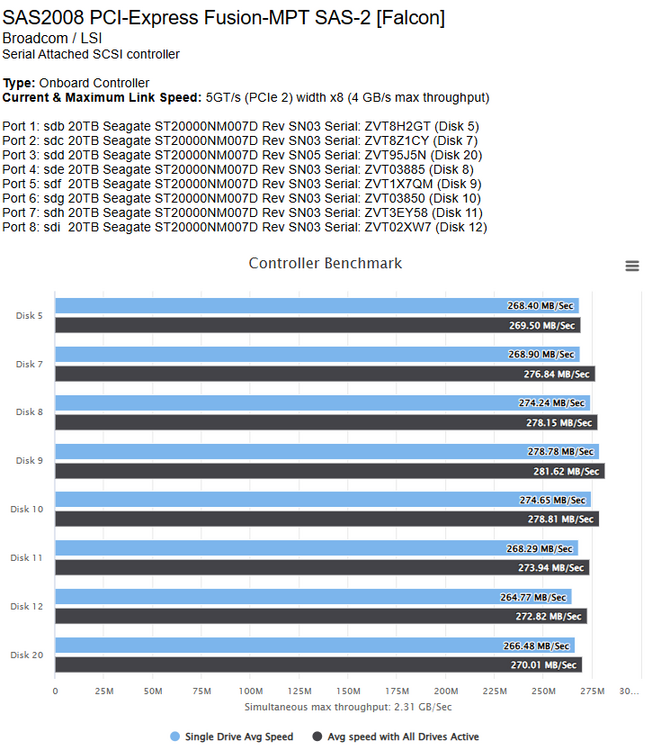
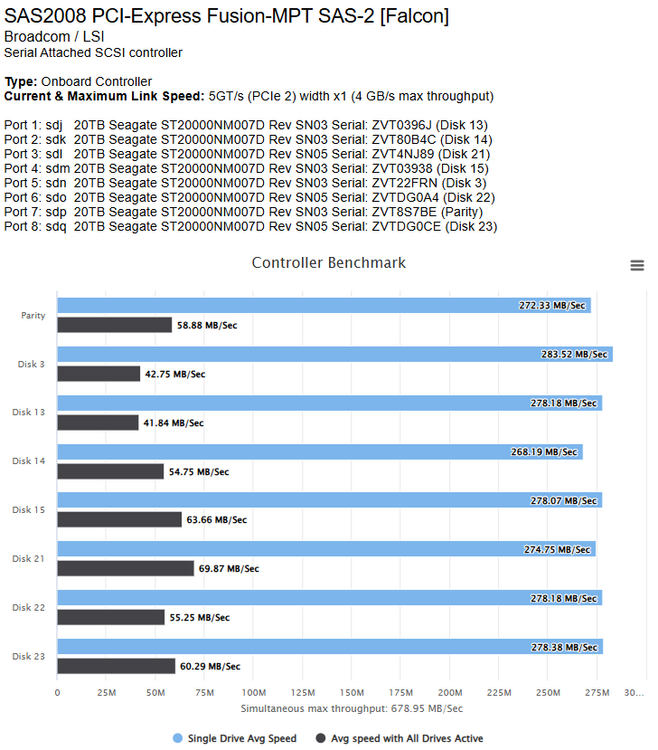
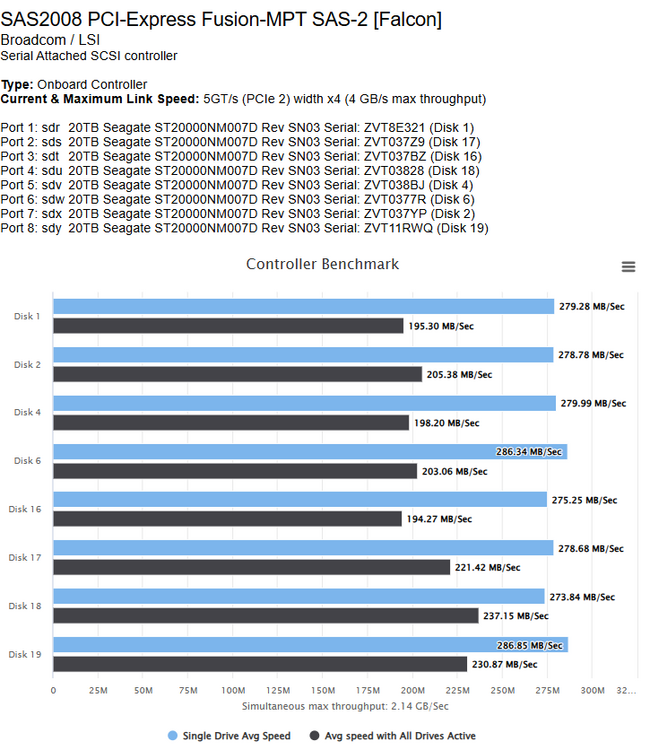
-
Hi Tom /Team 10 years plus user here (struggling to find that email where i bought my pro license). Difficult choice you guys are facing, but a business has to remain afloat. a possible option, for lifetime pro users, is to donate to the limetech project. ie have a website track the upcoming expenses for the year, and showing how much of that total has been met? understand it is a bit of a shift, but i will 100% support your product, witha bit more visibilty on where the money goes (wnat what you are short) even if it is a small amount of maybe 10/20/30USD per year (user choise), i believe it will fill a few holes. keep up the good work! Regards
-
thank you. Typically 4k h265 HDR to 4k h264 -> don't see a reason to go lower Following the thread at a clance it seems tone mapping only recently started working. any detail is welcome! thank you sir
-
can anyone confirm how many 4k transcodes the 12900 can handle? seeing mixed results online, and are looking to see if what combination of hardware would give a cost effective amount of streams. Power usage not that important (<400watt under load should be fine) my alternativate would be to rather go nvidia gpu, but then HDR tone mapping needs to be supported
-
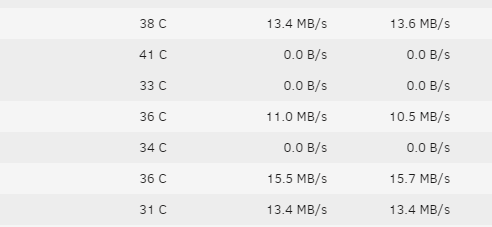
hi guys just checking if this is normal behaviour : somehow, when mover is activated, it writes to multiple drives at the same time. i don't think multiple drive writes is good, especially for the resulting write to parity. any ideas what could cause this? *i understand this might not be related to the scheduler plugin at all -> let me know if it should be moved.
-
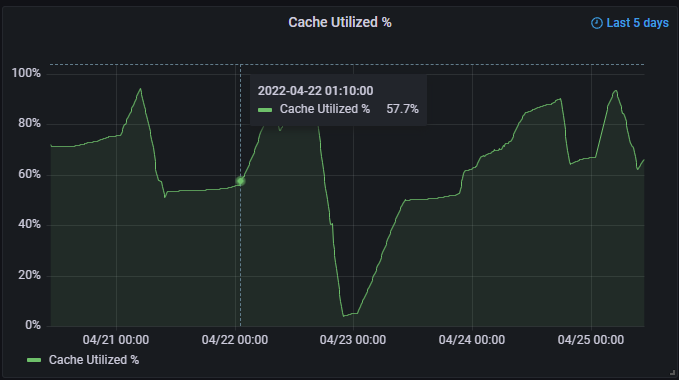
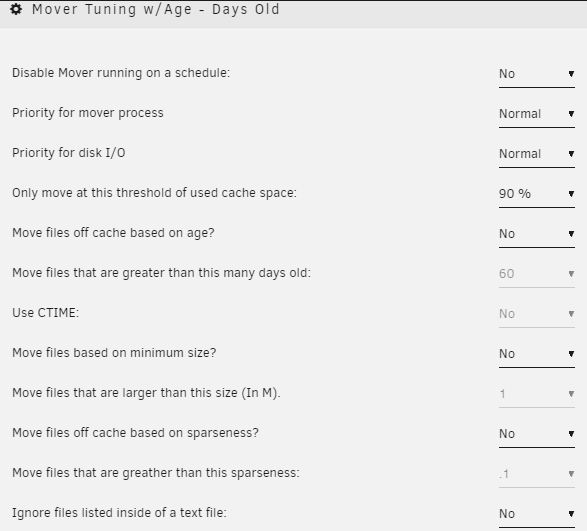
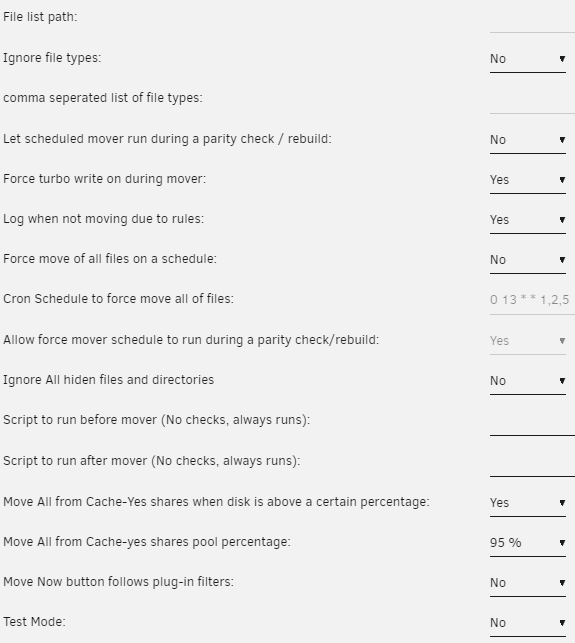
Running in a bit of a challenge here, where mover only seems to move a certain percentage of files. Expected operation -> cache share hits 95% usage, mover then moves all files to array. In stead it only moves roughly 20%. on the 23rd i did a manual move(Main Menu, the Move button) which took it down to +-10%. 24th and 25th was the automaic moves once it hits 95%, but it only moved about 25% configuration as follows : Any ideas? should i enable mover logging and/or test mode for further troubleshooting? Thx!
-
Now this will be interesting. thank you DZMM -> i must admit. trusting your script to perform its magic is really something owe you a beer or three by now!
-
i might be interested in this -> which solution is $80?!?! also currently running plex on unraid , but no amount of explaining can convince the users to not use transcode...sigh. upgrading cpu will only get me so far, and no slots available for an nvidia card (or probably i believe it will limit bandwidth on other slots if i install one)
-
AM I GOING CRAZY? i saw a post yesterday saying that mergerfs did not install after a reboot (have me quite scared lol since we have regular power problems.) assume it resolved itself?
-
Hi guys i might be 90 pages late on this. can someone give pointers on what i should configure the script in the following scenario : have /mnt/user/Movies and mnt/user/Series which still contain files (and will be for the forseeable future) i also have /mnt/disks/google/Movies and /mnt/disks/google/Series (rclone mount) which contains a portion of my data which i loaded the last year. using a variation of the upload script to copy from /mnt/user/Series currently , where i will then selectively delete data on the local share once i am happy full series has been copied over. Plex obviously has both folders added (so some series might show two copies of an episode, but that doesn't affect usage) Sonarr is linked to the local folder only. question: How to move to a mergerfs solution? will i need to create a usershare called "local" and move both my movies and Series into that? or is there a way to use my current folder structure(preferred)? I have a feeling the answer is very simple, but looking through the script i just cant seem t thx team!
-
i am using CA appdata backup it does however seem to be focused on appdata, but includes backup options for flash as well as vm's works very well
-
Hi guys since i am running a RC, i believe it is better to ask for help here. I have a case where my dockers started crashing /misbehaving. i also noted that some data was written to the array even though the shared is set to use cache as preferred. giving the system a reboot last night , i thought that would resolve the issue. no luck this morning i could focus a bit more on the issue, where i found in the syslog that it reports "shfs: cache disk full" this is odd, since the GUI shows that there is more than enough space (i have mover scheduled to run on a daily basis to clear out all data that does not need to be on the cache). I have however had a few high usage days, where i think the cache was pushed beyond its capacity, which might be related (Cache is however set for minimum free space of 20GB, which i believe was sufficient for the Docker appdata) GUI shows the following: Pool is configured to be Raid-0, but the details given via the cache settings on GUI does not seem correct (Data should be 480GB) Data, RAID0: total=130.00GiB, used=128.97GiB System, RAID1: total=32.00MiB, used=16.00KiB Metadata, RAID1: total=5.00GiB, used=3.63GiB GlobalReserve, single: total=282.20MiB, used=0.00B What i have tried : rebalance (a few times -with dockers stopped) Trim, then rebalance again so far nothing seems to reset the total capacity to the correct value. does anybody have an idea as to what could be causing this? i am busy attempting to move appdata to the array, but plex metadata (2mil plus files) is slowing the proces down) diagnostics attached DF -H output : root@Storage:/boot# df -H Filesystem Size Used Avail Use% Mounted on rootfs 17G 917M 16G 6% / tmpfs 34M 934k 33M 3% /run devtmpfs 17G 0 17G 0% /dev tmpfs 17G 0 17G 0% /dev/shm cgroup_root 8.4M 0 8.4M 0% /sys/fs/cgroup tmpfs 135M 3.4M 131M 3% /var/log /dev/sda1 16G 621M 15G 4% /boot /dev/loop0 9.4M 9.4M 0 100% /lib/modules /dev/loop1 5.6M 5.6M 0 100% /lib/firmware /dev/md1 4.0T 4.0T 86G 98% /mnt/disk1 /dev/md2 4.0T 3.9T 155G 97% /mnt/disk2 /dev/md3 4.0T 4.0T 28G 100% /mnt/disk3 /dev/md4 4.0T 3.9T 113G 98% /mnt/disk4 /dev/md5 4.0T 4.0T 84G 98% /mnt/disk5 /dev/md6 3.0T 3.0T 76G 98% /mnt/disk6 /dev/md7 3.0T 3.0T 74G 98% /mnt/disk7 /dev/md8 3.0T 3.0T 90G 98% /mnt/disk8 /dev/md9 3.0T 3.0T 79G 98% /mnt/disk9 /dev/md10 3.0T 3.0T 45G 99% /mnt/disk10 /dev/md11 4.0T 4.0T 78G 99% /mnt/disk11 /dev/md12 3.0T 2.9T 129G 96% /mnt/disk12 /dev/md13 3.0T 2.8T 204G 94% /mnt/disk13 /dev/md15 4.0T 3.9T 138G 97% /mnt/disk15 /dev/md16 4.0T 3.8T 218G 95% /mnt/disk16 /dev/md17 4.0T 3.8T 222G 95% /mnt/disk17 /dev/md18 3.0T 2.9T 125G 96% /mnt/disk18 /dev/md19 2.0T 1.9T 184G 91% /mnt/disk19 /dev/md20 8.0T 7.6T 451G 95% /mnt/disk20 /dev/md21 8.0T 7.9T 190G 98% /mnt/disk21 /dev/md22 4.0T 3.8T 207G 95% /mnt/disk22 /dev/sdt1 481G 147G 331G 31% /mnt/cache shfs 82T 80T 3.0T 97% /mnt/user0 shfs 83T 80T 3.3T 97% /mnt/user google: 1.2P 6.0T 1.2P 1% /mnt/disks/google root@Storage:/boot# other commands : root@Storage:/boot# btrfs fi df /mnt/cache Data, RAID0: total=130.00GiB, used=128.97GiB System, RAID1: total=32.00MiB, used=16.00KiB Metadata, RAID1: total=5.00GiB, used=3.63GiB GlobalReserve, single: total=282.20MiB, used=0.00B root@Storage:/boot# btrfs fi show /mnt/cache Label: none uuid: a38f3698-5c6d-43b0-aa5d-1aaee1e81822 Total devices 2 FS bytes used 132.61GiB devid 1 size 223.57GiB used 70.03GiB path /dev/sdt1 devid 2 size 223.57GiB used 70.03GiB path /dev/sdo1 root@Storage:/boot# Thank you guys much appreciated! storage-diagnostics-20191119-1229.zip
-
thank you sir! Time to watch Library = Movies Days = 748 Library = TV Shows Days = 3203 Library = other videos(view by folder) Days = 24 a cool 10.9 years . I might need to retire sooner than i thought
-
how did you get this measure? checking on tautilli now, it only give me Played statistics. sitting on 10,509 movies and 3042 tvshows(131169 episodes)
-
Nice review above! unfortunately i have had a bad experience, which i am not 100% sure it is related to the plugin but here goes. I helped a friend build a mini server the last week or two, where we picked up a HP gen8 micro server on special, to which we added 3 seagate 8TB archive HDD's. I managed to get the preclear working via the gui after creating an array , and then deleting the config again ( Preclear was complaining about a missing disk.cfg). in any event - we then connected to the gui every few hours - monitoring the progress, and everything went very ok . Preclear finished in about 72 hours which is roughly double the time my 4TB drive took - really ok with that - especially since we performed all three drives at the same time. Problem we encountered - directly after the preclear, the main page showed some strange values for the flash drive. Flash ID was missing ( with unraid requesting us to buy a key again), Flash reported reads of something in the range of 144,000,000 (massive number - i might be missing some zero's ), and writes of about 16,000. restarting the machine confirmed my suspicion - the Flash gave up on us (in hindsight - i should have made a screengrab and captured the syslog) Is there any chance that the plugin performs constant reads from the Flash in any way? i dont think there should be a reason, but just in case. going to return the flash today, and request a replacement key from Limetech - so server should be able to get going soon.
-
hi guys i have recently upgraded the s3_sleep plugin to the latest version, as well as unraid from 6.0.1 to 6.1 RC2. problem is, after that upgrade, i have issues all -over. mostly with drives not spinning down, or if they have spun down, s3_sleep still picks them up as running (as per dashboard status) is there any way to try and troubleshoot? I have rolled back to 6.0.1 some captures below : diagnostics with syslog is attached. Please advise what other troubleshooting i can maybe do? thx Neo_x storage-diagnostics-20150811-2326.zip
-
just wanted to pop in - previos V5 user. having discovered CA just a few minutes earlier - i am AMAZED at how awesome it makes unraid. actually it is tempting me to go an bug limetech for a secondary usb key just to allow me to play around Keep up the good work Squid and guys!! ps i had a DOH!! moment with my first addon begin kodi-headless. clicking create on chrome gave no result. only when i moved to firefox did i see a small notification saying that more details is needed before i can add. Clicked on advanced settings, and voila - i could add the parameters as requested by the docker. *happy days*



