HumanTechDesign
Members
-
Joined
-
Last visited
Everything posted by HumanTechDesign
-
I was searching through some threads after my post and I believe this could be true. I am on 6.12.8, so this change in 6.12.6 could very well affect me, yes. What I don't understand: I was already on 6.12.8 when I installed the board, and I could swear that I had it working with all three. I was trying to retrace the steps and as far as I remember, I might have installed the SR-IOV (and gputop etc.) plugin only after I had it working with all three (so iGPU recognised in Unraid but not using SR-IOV). What now breaks the setup seems to be the modified modprobe from the SR-IOV plugin (this throws an error message in the KVM, if the iGPU is not recognised). Interestingly, I don't have to blacklist the ASPEED GPU like others in this thread have to. I can still get to the point, where the plugins are loaded (after the mcelog line). I hope that either a kernel (or Unraid or BIOS) update fixes it in the future. Could you still tell me what your GPU settings in the BIOS are?
-
For those of you that have the mATX version of the board (ASUS Pro WS W680M-Ace SE): does anyone have the IPMI + iGPU working together? Either I have IPMI all the way to Unraid but get an error for the modprobe of SR-IOV or the updating of the IPMI screen drops out after the initial Unraid boot selection screen (with the SR-IOV working as intended). I don't have a dGPU and on the mATX IPMI is integrated directly into the board, so no external IPMI card. I have tried basically all of the combinations (+ dummy plug) in the BIOS but can't seem to set it up correctly. The frustrating part: I had it working before but lost the configuration after I needed to do a CMOS reset. Now I can't seem to get it back. Could you report, if you have that working together with SR-IOV and if so - what are your BIOS settings?
-
Maybe check this post: Also, I've read a few posts afterward that the use of CSM disables the gpu options you are missing. So that would be my suggestion to check out.
-
Kann berichten: die C-State-Suche hat sich gelohnt: im Disk-Spindown (Lüfter, IPMI, verschiedene laufende Docker etc.) geht es jetzt runter bis auf 22W. Mit aufgeweckten (aber nicht angesprochenen) Platten ~50W. Ist jetzt wirklich kein Energiesparwunder, aber ich denke, grundsätzlich kann ich damit leben. Werde jetzt versuchen, die meisten Dienste wirklich konsequent auf SSDs umzuziehen, sodass die Platten wirklich die meiste Zeit schlafen können. Da die in einem ZFS Pool hängen, bin ich am Überlegen, eine SSD als L2ARC davorzuhängen. Dann könnte es mit Glück sogar so sein, dass die gar nicht anspringen müssten, selbst wenn auf Shares zugegriffen wird, die auf dem Pool liegen. Suspend to RAM schaue ich mir auch auf jeden Fall mal noch an.
-
Mal abgesehen von der Thematik bezüglich mehrerer Server: ich hab meinen Übeltäter bezüglich der C-States in Unraid - es war der fr24feed-piaware docker container. Wenn ich diesen deaktiviere, geht es bei mir im Pkg bis runter auf C6. Beobachte jetzt mal den standarmäßigen Verbrauch.
-
Genau um solche Builds wie bei Dir geht es mir aber auch: ich nehme mal nicht an, dass die 17W bei suspend to RAM sind, sondern bei laufendem System + Disks im Spindown. Wieviel ist es bei Suspend to RAM? Ich habe halt auch bei mir das Gefühl, dass ich irgendwo was übersehe. Oder es ist einfach so und ich müsste es akzeptieren. Was mich halt irritiert: ich bin selbst im Spindown dann bei mehr als dem doppelten als Du. Die 6W vom IPMI mal abgezogen spielen wir trotzdem in unterschiedlichen Hausnummern - und ich weiß nicht wieso. Bleibt wohl wirklich nur abklemmen und neu messen. Hab gestern schon nochmal irgendwo gelesen, dass anscheinend auch die Strommessung an einer USV (also wenn das Messgerät zwischen Server und USV steckt) fehlerhaft sein kann. Aber werde ich wohl mal überprüfen müssen. Ich sage mal so: wäre grundsätzlich schon auch eine Option: aus meinem früheren Build habe ich noch einen 4650G + B550M Steel Legend + 32GB RAM hier rumliegen, bei dem ich noch nicht wusste, was ich damit machen soll. Vielleicht ist das jetzt seine Bestimmung. Läuft bei Deinem Zweitserver auch Unraid?
-
Danke für den Input! Ich werde es jetzt heute über Nacht auch nochmal beobachten, was realistisch drin ist mit den neuen ASPM states. Tagsüber bin ich bei laufenden Platten (ohne Write-Aktivität) jetzt teilweise bei bis zu 56W. Und beizeiten werde ich mal wirklich alles alles abklemmen und im Zweifel auch nochmal ein Ubuntu Live anwerfen. Was mich sehr nervt: das BIOS von dem Board ist extrem buggy. Braucht teilweise 3 Anläufe zum durchbooten (ohne Änderungen dazwischen), was also heißt, dass jegliche Experimente immer sehr lange dauern. 😁 Aber mal schauen, vielleicht reicht es mir auch jetzt. Guter Hinweis auch zu den C-States. Ich denke, man muss wirklich immer nach dem tatsächlichen gezogenen Verbrauch schauen und wohl nicht nur nach C-States geiern. Hab zuerst nicht dran geglaubt, weil ich gefühlt schon alles andere durch hatte, aber damit ging es dann, ja. Danke für den Vergleich. Ich glaube, ich unterschätze möglicherweise auch meine Lüfter: 5 Gehäuselüfter + 1 CPU-Luftkühler - da kommt am Ende auch schon was zusammen. Von Zwischentests im Laufe der Tage weiß ich, dass ich bei laufendem IPMI (+ Lüftern) ohne gestartetes OS bei einer Grundlast von mindestens 6W bin. Ehrlich gesagt muss ich dann wohl vielleicht auch einfach schon zufrieden sein, dass ich jetzt in so einer Größenordnung bin wie jetzt. Man liest halt diese ganzen <30W posts und denkt sich dann so: da muss doch noch was gehen! Wie gesagt: ich schau mal über Nacht, wenn die Platten wirklich schlafen. EDIT: was auf jeden Fall richtig zuschlägt ist die Windows VM, in die per SR-IOV eine VF der iGPU durchgeschleift ist - da pendel ich jetzt gerne mal zwischen 74 und 106W. Hatte ich jetzt tagsüber mal ausgelassen und jetzt mal kurz testweise zugeschaltet. Gut, die bleibt also jetzt zumindest für den idle aus und wird nur angemacht, wenn benötigt. 😉
-
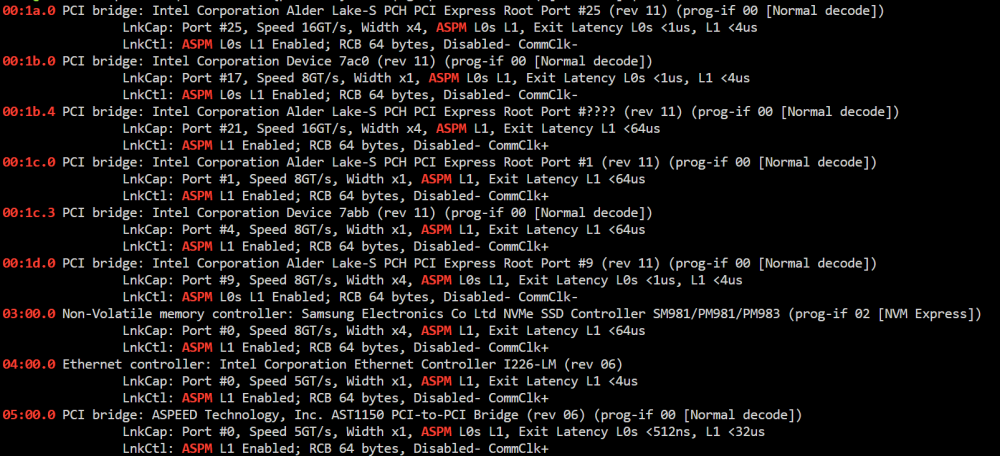
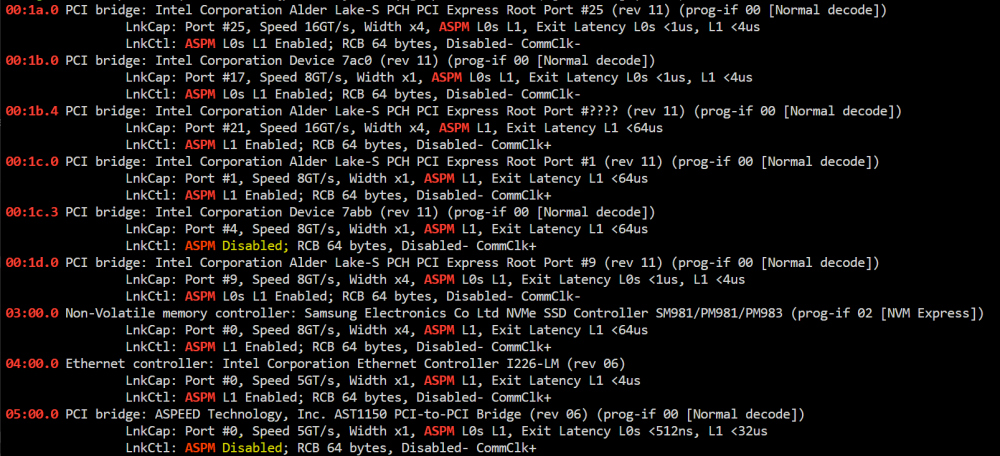
Okay, ASPM war es schonmal nicht. Nach Anwendung von echo -n powersave > /sys/module/pcie_aspm/parameters/policy sieht das ganze jetzt so aus. An den C-States hat das leider nichts geändert. Bin daher auf der Suche nach weiteren Ideen.
-
Moin zusammen, ein klassischer "Was kann ich noch machen bezüglich Stromsparen"-Thread. Konkret geht es insbesondere um höhere C-States und ASPM. Zu den Komponenten: MB: ASUS Pro WS W680M ACE SE CPU: i5-12600K RAM: 2x32GB Kingston Server Premier KSM48E40BD8KM-32HM NT: RM550x 550W HDD: 2x Seagate Exos X18 18TB und 4x Toshiba MG09 18TB als ZFS Pool (angebunden über Slim-SAS und 2 SATA Ports) SSD: 1x Samsung 970 Evo Plus (M.2) im PCH-Slot, 1x 870 Evo als ZFS (wird bald wieder mit 2. Platte im Mirror betrieben) USV: Eaton 3S 850D Messgerät: Tapo P110 mit Verbrauchsmessung (hängt zwischen Server und USV) Zu den Einstellungen: Alle C-States im Bios aktiviert ASPM im BIOS aktiviert Package C State Support auf C10 Intel gpu top installiert Intel Turbo aus CPU Governor auf Performance (laut Tips & Tweaks soll das ja korrekt sein, wenn Intel CPUs 800Hz dauerhaft melden - das war bei mir der Fall) Auto Spin down nach 30 Minuten Boot-Option pcie_aspm=force ist gesetzt Folgendes Skript eingebunden zum automatischen Start nach Array-Start: #!/bin/bash /etc/rc.d/rc.cpufreq powersave ## <- noch drin, wird aber vom Governor von Tips & Tweaks überschrieben [[ -f /sys/devices/system/cpu/intel_pstate/no_turbo ]] && echo "1" > /sys/devices/system/cpu/intel_pstate/no_turbo [[ -f /sys/devices/system/cpu/cpufreq/boost ]] && echo "0" > /sys/devices/system/cpu/cpufreq/boost echo med_power_with_dipm | tee /sys/class/scsi_host/host*/link_power_management_policy echo auto | tee /sys/bus/i2c/devices/i2c-*/device/power/control echo auto | tee /sys/bus/usb/devices/*/power/control echo auto | tee /sys/block/sd*/device/power/control echo auto | tee /sys/bus/pci/devices/????:??:??.?/power/control echo auto | tee /sys/bus/pci/devices/????:??:??.?/ata*/power/control Im Spindown mit einigen laufenden Docker Containern komme ich dabei in einer ruhigen Nacht bis runter auf ~33/34W. Im normalen Betrieb, wenn gerade nicht auf die Platten zugegriffen wird (diese aber laufen), ~62/63W (mit laufenden Docker-Containern). Was mich am meisten wurmt ist allerdings folgendes: ich habe auf dem Server noch nie einen Pkg-C-State unter C2 gesehen. Ich habe dabei auch ASPM im Verdacht. An sich ist an dem Gerät nichts dran (außer die Onboard-Controller mit IPMI etc.), aber es gibt da so zwei Übeltäter: Habe mich schonmal ein wenig umgeschaut: #4 mit 7abb scheint laut dieser Liste der generische "D28:F3 - PCIe Root Port #4" zu sein. Der ASPEED Controller ist ja vom IPMI. In der gleichen IOMMU group hängt auch der "[1a03:2000] 06:00.0 VGA compatible controller: ASPEED Technology, Inc. ASPEED Graphics Family (rev 52)". Vielleicht ist die Bridge (und auch der VGA chip) noch zu neu, dass der Kernel die korrekten Treiber mit allen ASPM-Funktionen hat? Habe beide devices schon versucht über vfio-pci.ids= rauszublocken, aber danach ist Unraid nicht mehr gestartet. Daher wäre für mich die Frage - seht ihr mit euren Augen noch Potenzial, in die höheren C-States zu kommen? Irgendetwas, das ich übersehen habe? Danke euch schonmal!
-
Can you please check, what your BIOS GPU configuration is set to now? I have the mATX version of that board (W680M-ACE SE, which does not have an external IMPI card, but I assume, internally they are linked up the same). What bothers me the most: I had it working the other day but I had to reset the CMOS because of a soft brick (by trying to start the "secure erase" functionality built into the board). Since then, I have been trying a lot of different configurations but somehow it's always the same iKVM vs. iGPU. This BIOS has so many bugs. Sometimes, my board restarts three times just on its own until it finally decides that it is okay to go ahead now. Random "Fb" boot codes (apparently M.2 SSD error messages) just to be fine on the next boot. I'm a private user but if I was a sysadmin that had to use it in a professional context(!) I would return it to the distributor.
-
Perfect! That's great to hear. Thank you very much (also for the quick response). Looking forward to full support!
-
Sorry to bother again, but I wanted to bump this: Apparently @sir_storealot seems to have the same issue. Any workaround/suggestions apart from excluding the containers in question?
-
Thank you so much! I was trying to find out why my userscript was failing with the exact same error. I thought, the occ command had moved again but I just could not pinpoint it. Without your post I wouldn't even have noticed that the whole cloud was essentially down. Downgrading fixed it for me. For everyone wondering how to downgrade MariaDB: just change the Repository in the MariaDB container to something like mariadb:11.2.3 instead of plain mariadb or mariadb:latest.
-
Danke für Deinen Report! Mein Board ist auf dem Weg. Nachdem ich dann gelesen hatte, dass Boards wie z.B. das aktuell unfassbar günstige MC12-LE0 genau damit Probleme hatten, die iGPU zu aktivieren, weil alles in den IPMI/BMC umgeleitet wird, hatte ich gerade ein wenig Magengrummeln, als ich Deinen ersten Post gelesen habe. Bist Du jetzt weiterhin auf dem 4.24 BIOS? Auf der Website gibt es ja noch ein 4.26 BETA BIOS. Hast Du das schon mal getestet bzw. kannst dazu was sagen?
-
Thank you for your input. As you can see in the docker compose mappings, these volumes do in fact live on the exact same /mnt/user path - just like any "vanilla" Unraid docker template. The only difference is that docker compose allows for reusing the mapping by using volumes. You are technically correct that it is not strictly necessary to do it this way (I could mount the paths in the different containers separately), but this way it is just cleaner and apart from the appdata backup plugin has never caused any issues (like @sir_storealot described)
-
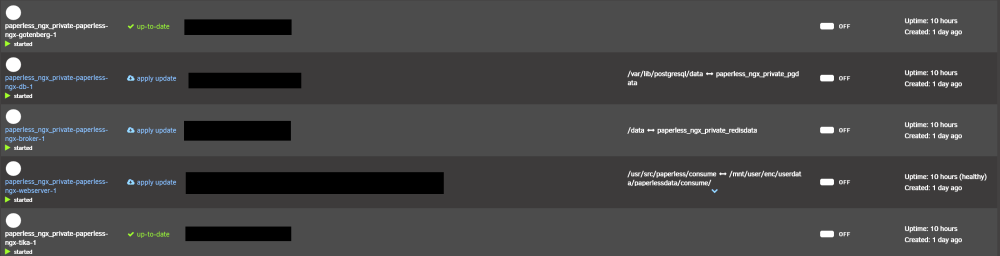
Thank you for a rework on the appdata plugin. I seem to have problems with named bind volumes from the docker compose plugins. First of all, this is the error from the debug log: [17.02.2024 03:06:28][❌][paperless_ngx_private-paperless-ngx-broker-1] 'paperless_ngx_private_redisdata' does NOT exist! Please check your mappings! Skipping it for now. [17.02.2024 03:06:39][ℹ️][paperless_ngx_private-paperless-ngx-broker-1] Should NOT backup external volumes, sanitizing them... [17.02.2024 03:06:39][⚠️][paperless_ngx_private-paperless-ngx-broker-1] paperless_ngx_private-paperless-ngx-broker-1 does not have any volume to back up! Skipping. Please consider ignoring this container. [17.02.2024 03:06:39][❌][paperless_ngx_private-paperless-ngx-db-1] 'paperless_ngx_private_pgdata' does NOT exist! Please check your mappings! Skipping it for now. [17.02.2024 03:06:50][ℹ️][paperless_ngx_private-paperless-ngx-db-1] Should NOT backup external volumes, sanitizing them... [17.02.2024 03:06:50][⚠️][paperless_ngx_private-paperless-ngx-db-1] paperless_ngx_private-paperless-ngx-db-1 does not have any volume to back up! Skipping. Please consider ignoring this container. [17.02.2024 03:06:50][ℹ️][paperless_ngx_private-paperless-ngx-gotenberg-1] Should NOT backup external volumes, sanitizing them... [17.02.2024 03:06:50][⚠️][paperless_ngx_private-paperless-ngx-gotenberg-1] paperless_ngx_private-paperless-ngx-gotenberg-1 does not have any volume to back up! Skipping. Please consider ignoring this container. [17.02.2024 03:06:50][ℹ️][paperless_ngx_private-paperless-ngx-tika-1] Should NOT backup external volumes, sanitizing them... [17.02.2024 03:06:50][⚠️][paperless_ngx_private-paperless-ngx-tika-1] paperless_ngx_private-paperless-ngx-tika-1 does not have any volume to back up! Skipping. Please consider ignoring this container. [17.02.2024 03:06:50][❌][paperless_ngx_private-paperless-ngx-webserver-1] 'paperless_ngx_private_data' does NOT exist! Please check your mappings! Skipping it for now. [17.02.2024 03:07:00][❌][paperless_ngx_private-paperless-ngx-webserver-1] 'paperless_ngx_private_media' does NOT exist! Please check your mappings! Skipping it for now. [17.02.2024 03:07:11][ℹ️][paperless_ngx_private-paperless-ngx-webserver-1] Should NOT backup external volumes, sanitizing them... [17.02.2024 03:07:11][⚠️][paperless_ngx_private-paperless-ngx-webserver-1] paperless_ngx_private-paperless-ngx-webserver-1 does not have any volume to back up! Skipping. Please consider ignoring this container. The volumes mentioned in the error log are named volumes in docker compose template files. This is necessary, because they are used in different containers in the template: volumes: data: driver: local driver_opts: o: bind type: none device: /mnt/user/appdata/paperless-ngx-private/data/ media: driver: local driver_opts: o: bind type: none device: /mnt/user/share/userdata/paperlessdata/media/ pgdata: driver: local driver_opts: o: bind type: none device: /mnt/user/appdata/paperless-ngx-private/pgdata/ redisdata: driver: local driver_opts: o: bind type: none device: /mnt/user/appdata/paperless-ngx-private/redisdata/ These are referenced by the containers in the template like so (only posting one example, the rest is the same): paperless-ngx-broker: image: docker.io/library/redis:7 restart: unless-stopped volumes: - redisdata:/data networks: - backend When running the docker compose template, the Unraid docker overview shows them like this: I therefore assume, the appdata plugin tries to pickup the mapping that Unraid provides in the overview instead of the mapping defined in the docker compose. To avoid the errors, I will exclude the containers now from backups. I was wondering: is there a stable and better way in the plugin to deal with docker compose named volumes? Thank you in advance!
-
Interesting topic! With the current setup, one can only pass the whole iGPU to one VM, correct? With the SR-IOV/GVT-g plugins for Intel on Unraid, one can still use the iGPU for containers (jellyfin etc.) as well as (multiple) VMs. That would not be possible for this AMD setup, correct? If possible: Could someone with a working setup test this?
-
I'm totally in line with your arguments! What I actually meant by my suggestion is to highlight the fact, that even with a (generally probably supported) E-2XXX platform, you might run into problems on the specific E-23XX line. I did not mean, that all E-21XX and E-22XX will be running fine (for the reasons you pointed out), but rather to push users of the E-23XX chip line to be especially cautious. Otherwise, they might check this thread and the first post and think they are fine because it's a E-2XXX chip with them being unaware of the fact that E-2XXX can mean Coffee Lake (Ref.) or Rocket Lake. In any case, thank you for the insights. I have not completely decided yet on buying the MB or not. If I do (with an E-2XXX chip), I will report back.
-
I found that page as well and had the screenshot from it in the section that is now edited. However, even though gvt-g is listed there for 11.Gen/Rocket Lake, I'm pretty sure by now (unless someone else has it running sucessfully in this thread), that E-23XX will not have support for gvt-g or sr-iov (like @alturismo said). I understand that. However (maybe to avoid future confusion), an explicit highlight that E-23XX is probably unsupported (while E-21XX and E-22XX should be fine), could help. What do you think? (here is the official gvt Rocket Lake discussion - issue remains open and there does not seem to be any plan to actually enable gvt-g OR sr-iov: https://github.com/intel/gvt-linux/issues/190 )
-
Thank you for this plugin. Could it be, that there is a minor error in the support list on the first page? It states, that E-2XXX platforms are supported. However, it seems, that the E-23XX line of CPUs is based on Rocket-Lake-E (while the E-21XX and E-22XX lines seem to be based on Coffee Lake (Ref.)) . [EDIT]: UHD 750 in E-23XX chipsets is probably Intel Xe AND Rocket Lake, so I assume missing compatibility. Nevertheless, I was wondering if there there are any reports on the use of gvt-g (and specifically this plugin) or sr-iov for the Xeon E-23XX chips on a C256 chipset. I am considering pulling the trigger on a sweet deal for a mainboard but only if there is Multi-VM support (either via gvt-g or sr-iov).
-
This issue (not spinning up/down) even without the plugin has already been discussed earlier this year (even pre 6.12.x); see for example this I am still on 6.11.5, without the plugin installed and also experience the issue that the disks spin up automatically if I spin them down manually and don't spin down at all based on time. Unfortunately, in April we did not find the culprit (it was NOT the main tab issue), so therefore it is probably also related to the ZFS implementation in Unraid itself or a specific hardware configuration.
-
Then it's really strange - as I said, I currently don't have the Master plugin installed and still see the same behavior. Also, this thread dated from March 2021 (German only unfortunately) describes the exact same behavior (unfortunately no solution):
-
To be honest, I actually don't think it's the Master plugin (but the current ZFS implementation in Unraid). It could also be the ZFS companion plugin, if you have that installed. I had ZFS Master installed but uninstalled it due to the snapshot loading times (see earlier discussion in the thread). If I try to spin down ZFS disks in the UD section of main, I ALWAYS receive the spin up with the SMART message. Therefore, I really would not assume that it's only ZFS master.
-
Thank you @Iker once more for this plugin! I have a small issue to report, when it comes to the loading times on the Main page: I recently attached a zfs-formatted external USB HDD as a backuppool. Because of the nature of this being a backup device, quite a lot more snapshots are being kept there than in my main pool(s) (~12.5k on the HDD vs ~1.2k on the largest main pool). Since I added this backuppool, loading times of the main page have gone up dramatically (up to around a minute or even two). Not surprisingly, the Snapshot Admin UI also takes ages to load. The `system` dataset (with all of the docker stuff) is already excluded via pattern and I noticed this change after hooking up the backup HDD and sending my snapshots over. I was therefore wondering, if there is any way for you to optimize (e.g. maybe "lazy load") the snapshots when loading UI? Comparable to the improvements you made with the general main UI. Thanks already for your hard work!
-
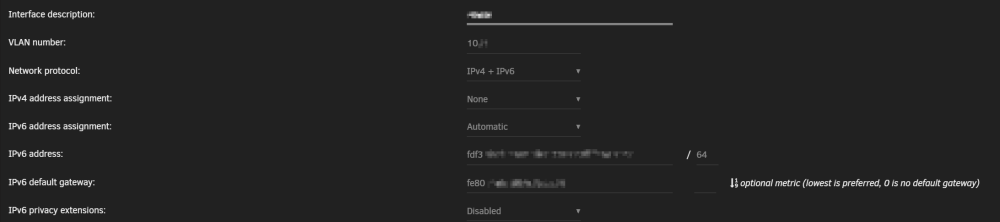
I have a problem setting the following up: Instead of GUA (global routable addresses), I want to use ULA (local adresses from the fc00::/7 range as per RFC4193). I use an Opnsense with the docker containers on a separate VLAN (which creates a custom br0 in the format of br0.<VLAN>). For this VLAN, the ULA prefix has been set up in the firewall, advertising a custom IPv6 prefix (from the ULA range). I now want to use that prefix as the base for the IPv6 adresses generated for the containers using SLAAC. I have therefore setup the VLAN to use v4+v6 and v6 mode set to automatic. The network settings and docker manager correctly pick up the ULA range and gateway and the docker settings offer this as an ipv6 configuration for that VLAN (so far so good). However, when I now go to edit the container, the ipv6 range (which is correctly recognized by the settings page) is not shown next to the "Fixed IP address" entry field (different from the screenshot for example in the first post). The line --sysctl net.ipv6.conf.all.disable_ipv6=0 is added as an additional parameter. When starting the container (it is the pihole container with ipv6 activated in the environment variables), my router picks it up correctly but only reports the GUA (2000:... range). Therefore, apparently, no ULA but only a GUA was generated using SLAAC. Is this a container issue or an Unraid issue? Has anybody successfully implemented ULAs for the use by the docker service on Unraid? EDIT: Some screenshots as clarification EDIT: Nevermind - it actually DOES work with this configuration! Somehow, the ULA was just not showing up in my firewall NDP/MAC table. After pinging the container once more, it now picks it up correctly. For everyone looking for a solution to assign static local addresses via SLAAC to their containers on a separate VLAN here is quick walkthrough: Generate an ULA prefix (preferably actually random e.g. via some online tools) Enter the prefix as an advertised route for the interface in your router (in opnsense - and probably pfsense) this is done via a "Virtual IP" Configure Unraid's networking with automatic IPv6 on the VLAN interface with the docker containers (see above) - preferably turn off privacy extensions to generate "truly stable" addresses - however, I believe that this only affects the IPv6 adress of the interface in Unraid, not of the underlying docker containers Activate IPv6 networking in the docker settings for that interface (this should already show the new ULA prefix from your router prefilled!) add the line --sysctl net.ipv6.conf.all.disable_ipv6=0 as an additional parameter to the container add the line --mac-address xx:xx:xx:xx:xx:xx (with a MAC address of your choosing) as an additional parameter to the container (not sure if that is neccessary, but I wasn't sure if an update/restart of a container might generate new MAC address) Start the container Ping the container (or run something like ifconfig in the container) to find out the ULA of the container (should start with something like fc... or fd... - NOT the fe... address) Use that ULA as a stable IPv6 for that container Depending on the container, you might also run more arguments (e.g. environment variable or commands via the container console) to get full IPv6 support (e.g. in the pihole you would need to activate it via environment variables), but this depends on the container.