





Kees Fluitman
Members
-
Joined
-
Last visited
Everything posted by Kees Fluitman
-
so i got it booted. got my data from my cache pools. only thing left is see if i can see what i lost on the array.
-
btw. i noticed my flash drive doesnt have a efi folder. the usb creation tool didnt add it, although it is in my .zip file. Can i just add it? It seems i can recover all important data easily. Luckily, my nvme xfs drive was not affected by any deletions, and my cache pool was btrfs and seems recoverable. So now it's just a matter of seeing what of my array drives i really wish to recover and what to run without.
-
ill see. as the nvme had no deleted files at all. all appdata, vms, docker file, etc. are still in tact. the cache pool i havent done yet, since it's running on one of the 10tb drives now and it takes a while. But Ill probably backup all my personal data first and see if i can restart the array then. Ive seen some hints on how to boot again, so shouldnt be impossible to boot from a recovery. The recovery always takes place at 04:00 am so that wasnt too long ago.
-
srry i meant th array drives. miswrote that. The nvme comes out clean, nothing was deleted. The ssd cache pool i believe that suffer a little. But ill check them afterwards. Now im running the array, which still has part of the data. but I guess im lucky it was busy deleting the filesystem and the movies dirs first. As it's recovering all movies now. next step would be to try to get my unraid to boot?
-
haha i know. i did stop the command though. but it just didnt show anythnig in /mnt anymore. Now on the ubuntu filesystem, i actually saw all my data was still present on all my ssds. the nvme and the 2 ssd cachepool. So now ill check the parity drives. But then the question is, how shall I boot back into my unraid. As it did delete some important data apparently, since booting unraid from my recovered USB didnt work, it just kept looping a reboot.
-
My cachepool is btrfs. But my nvme drive (for all database and application data) is xfs. My array also xfs. But it seems it needs to copy all data to a different drive. So thats gonna be a bit of a pain. But even then, it says ill need to rename all the files myself. as it cannot save that.
-
I know im the biggest idiot on the planet. Who uses this right? Why did i? But I did, even though I never thought I would. And since i was just changing my backup solution, all backups were still on the server itself. I had a script to build and copy a gohugo website to my swag/nginx/www folder. In order to have it properly copied and not leave any old residues, i would ssh rm -rf the $dir/* and then ssh cp the files there. Then i saw stuff was still dangling about, sth was off. So I quickly manually rm -rf the command $dir/* and bam. It was /rm -rf my /* dir. So now i need to use a file recovery system, since booting from my recovered flash drive doesnt work properly. I hope anything is left. But i fear the worst. Any tips? I will avoid any writing to the disks right now. Set up a separate ubuntu boot usb and just try to extract whatever i can...it's sooo stupid i know. Especially since I wasnt copying the appdata folders and pictures to my PC and backup server anymore, since I just reinstalled it...
-
Also got the error just now. Changed motherboard and cpu a week ago. Error popped up yesterday. Seems i can ignore it?
-
Im guessing. since this plugin hasn't been updated the last few months, it is most likely starting to break?
-
I completely cleaned my sata cache pool, nvme cache drive and reformatted the pool. After deleting the docker image and rebuilding, it seems ive been error free again the last 10 hours. Let's see how long it holds. Ill keep this topic updated.
-
Am I correct to note that it does not backup appdata of containers that are currently not created? Thus for instance, I have docker-compose files of stacks that I do not always wish to use. But I do want to have their Appdata part of the most recent backup. I guess it'd be much smarter to have a script run at night, stop docker, copy the complete appdata folder to my backup location, and restart docker?
-
I've fixed the networks i think. but i do run a macvlan. i need it for my adguardhome instance. I followed the troubleshooting guide to turn off bridging. I changed motherboard and CPU, since I got several crashes, and couldnt even boot with more than 16GB of memory. It runs smoothly now, but still got a crash just before (that was probably due to my weird macvlan settings that I'd changed to test, now it should be fine.) I do also need to run a parity test, since all the crashes have kind off mixed up the parity. But before that, i saw checksum and scrub errors on my cachepool: May 4 15:57:38 server kernel: BTRFS warning (device loop2): checksum error at logical 9563754496 on dev /dev/loop2, physical 10645884928, root 414, inode 996, offset 12288, length 4096, links 1 (path: usr/lib/apt/methods/gpgv) May 4 15:57:38 server kernel: BTRFS warning (device loop2): checksum error at logical 9563754496 on dev /dev/loop2, physical 10645884928, root 413, inode 996, offset 12288, length 4096, links 1 (path: usr/lib/apt/methods/gpgv) May 4 15:57:38 server kernel: BTRFS warning (device loop2): checksum error at logical 9563754496 on dev /dev/loop2, physical 10645884928, root 412, inode 996, offset 12288, length 4096, links 1 (path: usr/lib/apt/methods/gpgv) These errors are probably due to the crash. But I just wonder what these files are responsible for. Maybe docker or the VMs? then i'd recreate the docker image. I just want to avoid any further crashes. So i can easily run the parity check. I think it's from docker. I started the array, started VMs, nothing...Then started docker. then i got the errors again May 4 16:44:49 server kernel: BTRFS error (device loop3): tree first key mismatch detected, bytenr=778682368 parent_transid=253 key expected=(5040,84,18446612688220248328) has=(5040,84,3585323317) But dmesg does not show corresponding error messages this time. So that's a good thing i guess? Now Dmesg does show occassional similar errors [Sat May 4 17:28:11 2024] BTRFS error (device loop3): tree first key mismatch detected, bytenr=778682368 parent_transid=253 key expected=(5040,84,18446612688220248328) has=(5040,84,3585323317) Would you suggest rebuilding my docker image?
-
I probably have some motherboard problem. Crashes were returning, up to a point where booting failed. CPU stress tests were fine, memtest was fine. But I could only boot again and do those tests after only using 2x8GB memory modules. So I'll replace the mainboard and see. The error you see here is what returns more frequently atm. Dunno if that is any issue. I also had some harddrive meta data errors, but those were solved after moving my files properly on the drives (cache pools and array). May 1 19:54:25 server kernel: WARNING: CPU: 3 PID: 0 at net/netfilter/nf_nat_core.c:594 nf_nat_setup_info+0x8c/0x7d1 [nf_nat] server-diagnostics-20240501-1956.zip
-
it was set to host. Doesn't work both ways. either bridge or host... Also, nothing is listening on port 8200 on my unraid server when the container is running... [2024/04/08 21:59:54] scanner.c:820: warn: Scanning /media finished (6871 files)! [2024/04/08 21:59:54] playlist.c:135: warn: Parsing playlists... [2024/04/08 21:59:54] playlist.c:269: warn: Finished parsing playlists. [2024/04/08 22:01:37] minidlna.c:1134: warn: Starting MiniDLNA version 1.3.3. [2024/04/08 22:01:37] minidlna.c:394: warn: Creating new database at /config/files.db [2024/04/08 22:01:37] minissdp.c:132: error: bind(udp): Address already in use [2024/04/08 22:01:37] getifaddr.c:110: error: Network interface eth0 not found [2024/04/08 22:01:37] minissdp.c:848: error: connect("/var/run/minissdpd.sock"): No such file or directory[2024/04/08 22:01:37] minidlna.c:1170: fatal: Failed to connect to MiniSSDPd. EXITING[2024/04/08 22:01:37] scanner.c:731: warn: Scanning /media [2024/04/08 22:03:10] minidlna.c:1134: warn: Starting MiniDLNA version 1.3.3. [2024/04/08 22:03:10] minidlna.c:394: warn: Creating new database at /config/files.db [2024/04/08 22:03:10] minissdp.c:132: error: bind(udp): Address already in use [2024/04/08 22:03:10] minissdp.c:84: error: setsockopt(udp, IP_ADD_MEMBERSHIP): Bad file descriptor [2024/04/08 22:03:10] minissdp.c:198: warn: Failed to add multicast membership for address 192.168.1.165 [2024/04/08 22:03:10] minissdp.c:84: error: setsockopt(udp, IP_ADD_MEMBERSHIP): Bad file descriptor [2024/04/08 22:03:10] minissdp.c:198: warn: Failed to add multicast membership for address 10.253.0.1 [2024/04/08 22:03:10] minissdp.c:84: error: setsockopt(udp, IP_ADD_MEMBERSHIP): Bad file descriptor [2024/04/08 22:03:10] minissdp.c:198: warn: Failed to add multicast membership for address 192.168.1.223 [2024/04/08 22:03:10] minissdp.c:84: error: setsockopt(udp, IP_ADD_MEMBERSHIP): Bad file descriptor [2024/04/08 22:03:10] minissdp.c:198: warn: Failed to add multicast membership for address 192.168.122.1 [2024/04/08 22:03:10] minissdp.c:84: error: setsockopt(udp, IP_ADD_MEMBERSHIP): Bad file descriptor [2024/04/08 22:03:10] minissdp.c:198: warn: Failed to add multicast membership for address 100.91.251.7 [2024/04/08 22:03:10] minissdp.c:84: error: setsockopt(udp, IP_ADD_MEMBERSHIP): Bad file descriptor [2024/04/08 22:03:10] minissdp.c:198: warn: Failed to add multicast membership for address 172.23.0.1 [2024/04/08 22:03:10] minissdp.c:84: error: setsockopt(udp, IP_ADD_MEMBERSHIP): Bad file descriptor [2024/04/08 22:03:10] minissdp.c:198: warn: Failed to add multicast membership for address 172.22.0.1 [2024/04/08 22:03:10] minissdp.c:84: error: setsockopt(udp, IP_ADD_MEMBERSHIP): Bad file descriptor [2024/04/08 22:03:10] minissdp.c:198: warn: Failed to add multicast membership for address 172.18.0.1 [2024/04/08 22:03:10] scanner.c:731: warn: Scanning /media [2024/04/08 22:03:11] minissdp.c:816: error: sendto(udp_shutdown=7): Required key not available [2024/04/08 22:03:11] minissdp.c:816: error: sendto(udp_shutdown=7): Required key not available [2024/04/08 22:03:11] minissdp.c:324: error: sendto(udp_notify=7, 10.253.0.1): Required key not available [2024/04/08 22:03:11] minissdp.c:324: error: sendto(udp_notify=7, 10.253.0.1): Required key not available [2024/04/08 22:03:11] minissdp.c:324: error: sendto(udp_notify=7, 10.253.0.1): Required key not available [2024/04/08 22:03:11] minissdp.c:324: error: sendto(udp_notify=7, 10.253.0.1): Required key not available [2024/04/08 22:03:11] minissdp.c:324: error: sendto(udp_notify=7, 10.253.0.1): Required key not available [2024/04/08 22:03:11] minissdp.c:324: error: sendto(udp_notify=7, 10.253.0.1): Required key not available [2024/04/08 22:03:11] minissdp.c:324: error: sendto(udp_notify=7, 10.253.0.1): Required key not available [2024/04/08 22:03:11] minissdp.c:324: error: sendto(udp_notify=7, 10.253.0.1): Required key not available [2024/04/08 22:03:11] minissdp.c:324: error: sendto(udp_notify=7, 10.253.0.1): Required key not available [2024/04/08 22:03:11] minissdp.c:324: error: sendto(udp_notify=7, 10.253.0.1): Required key not available [2024/04/08 22:03:11] minissdp.c:324: error: sendto(udp_notify=7, 10.253.0.1): Required key not available [2024/04/08 22:03:11] minissdp.c:324: error: sendto(udp_notify=7, 10.253.0.1): Required key not available [2024/04/08 22:03:12] minissdp.c:848: error: connect("/var/run/minissdpd.sock"): No such file or directory[2024/04/08 22:03:12] minidlna.c:1170: fatal: Failed to connect to MiniSSDPd. When i set network interface to br0. I dont get that error anymore, but still get this [2024/04/08 22:09:18] minissdp.c:132: error: bind(udp): Address already in use Ah ic. I think it's because jellyfin is already using port 1900. Ill check.
-
why cant i get it to work? Simply ran the container, cant get to 8200, nor can i get vlc or my denon heos app to find it. I tried adding port 8200 manually, but to no avail. Logs: 2024-04-08 21:39:05.019086 [info] Host is running unRAID 2024-04-08 21:39:05.045991 [info] System information Linux server 6.1.79-Unraid #1 SMP PREEMPT_DYNAMIC Fri Mar 29 13:34:03 PDT 2024 x86_64 GNU/Linux 2024-04-08 21:39:05.081450 [info] PUID defined as '99' 2024-04-08 21:39:05.139614 [info] PGID defined as '100' 2024-04-08 21:39:05.217453 [info] UMASK defined as '000' 2024-04-08 21:39:05.249474 [info] Permissions already set for '/config' 2024-04-08 21:39:05.285858 [info] Deleting files in /tmp (non recursive)... 2024-04-08 21:39:05.320576 [info] SCAN_ON_BOOT defined as 'yes' 2024-04-08 21:39:05.355345 [info] SCHEDULE_SCAN_DAYS defined as '06' 2024-04-08 21:39:05.384852 [info] SCHEDULE_SCAN_HOURS defined as '02' 2024-04-08 21:39:05.422548 [info] Starting Supervisor... 2024-04-08 21:39:05,735 INFO Included extra file "/etc/supervisor/conf.d/minidlna.conf" during parsing 2024-04-08 21:39:05,735 INFO Set uid to user 0 succeeded 2024-04-08 21:39:05,738 INFO supervisord started with pid 7 2024-04-08 21:39:06,742 INFO spawned: 'crond' with pid 62 2024-04-08 21:39:06,744 INFO spawned: 'start' with pid 63 2024-04-08 21:39:06,745 INFO reaped unknown pid 8 (exit status 0) 2024-04-08 21:39:06,902 DEBG fd 11 closed, stopped monitoring <POutputDispatcher at 22398605550800 for <Subprocess at 22398605392464 with name start in state STARTING> (stdout)> 2024-04-08 21:39:06,903 DEBG fd 15 closed, stopped monitoring <POutputDispatcher at 22398603333648 for <Subprocess at 22398605392464 with name start in state STARTING> (stderr)> 2024-04-08 21:39:06,903 INFO success: start entered RUNNING state, process has stayed up for > than 0 seconds (startsecs) 2024-04-08 21:39:06,903 INFO exited: start (exit status 0; expected) 2024-04-08 21:39:06,903 DEBG received SIGCHLD indicating a child quit 2024-04-08 21:39:07,904 INFO success: crond entered RUNNING state, process has stayed up for > than 1 seconds (startsecs)
-
crashes suddenly started again. Only reason i can think of, is a new docker stack I've started running (possible too high load on mem or cpu?). Or the update...Maybe the hardware, motherboard/cpu, are slowly showing their time. Specs: Asus X99-A Intel® Core™ i7-5820K CPU @ 3.30GHz Memory: 48 GiB DDR4 Syslog shows nothing. Added it. Ill down my Logging stack (prometheus, grafana, etc.) see if under less load, it doesnt happen. syslog-till-crash.txt
-
i agree. for most stacks. but sometimes i have single app stacks in the compose manager, which I would like to auto update. (they are less critical). But ill manage just doing it manually weekly i guess.
-
Is it possible to auto update stacks in compose.manager?
-
I've got 52 running containers with 107GB in use. It isn't growing except for whilst running updates. Most containers that use a lot of space, are the ones that already have large Images. How would you honestly stay below the 20GB? Isnt the complete installation of the image also in the docker image? The executables?
-
After the update. I had no issues whatsoever anymore. It's been online for 7 days now. So ill turn off "mirror syslog to flashdrive" again. I only saw a few of these errors in my logs:
-
Wow thanks man. I was banging my head into the wall for this. I've got a script setup on array start now: #!/bin/bash DAEMON_CONFIG="/etc/docker/daemon.json" NEW_CONFIG='{ "log-driver": "loki", "log-opts": { "loki-url": "http://localhost:3100/loki/api/v1/push", "loki-batch-size": "400" } }' update_config() { jq --argjson newConfig "$NEW_CONFIG" '. += $newConfig' "$DAEMON_CONFIG" > tmp.$$ && mv tmp.$$ "$DAEMON_CONFIG" } if [ -f "$DAEMON_CONFIG" ]; then update_config else echo "$NEW_CONFIG" > "$DAEMON_CONFIG" fi /etc/rc.d/rc.docker stop while pgrep -x docker > /dev/null; do sleep 1; done /etc/rc.d/rc.docker start Let's see how it will work over time. At least docker is starting again :). Next issue, is that all containers need to be recreated, for them to actually run their logs through loki. Maybe if I make sure loki gets created first. It will work properly.
-
I could stress my server more to see if the crash occurs, but as of the update yesterday, it has been very stable, with enough free memory, no slowdowns of GUI or apps, etc. I will turn on my monitoring stack and observe how more stress is handled by my server. It's been running clean for 24 hours now though.
-
I will do that right now. There are other signs of struggle before the crash comes as well. Generally slow down of applications, etc. But not always either. I will keep this topic up to date. After the update just now, it seems good. Im sending syslogs to an external server and mirroring the files to flash. One thing i noticed this morning was that htop showed a lot more activity from Crowdsec than generally. I also had more frequent crashes when i had my diagnose stack (grafana, loki, etc.) running. But I already turned that off untill I figured out a more efficient way to handle diagnosis. I find they use quite a lot of resources for just Diagnosis/Observations. They pushed my RAM to the limit (having no more Free space and everything used by Cache)...but as far as i know, Linux just uses cache freely, so having 2GB less cache than usual, isnt all that important when you have 47GB in total. So if i understand correctly, mirroring them, will not only have the syslog in RAM, but also on the flashdrive...so you can actually debug it better?
-
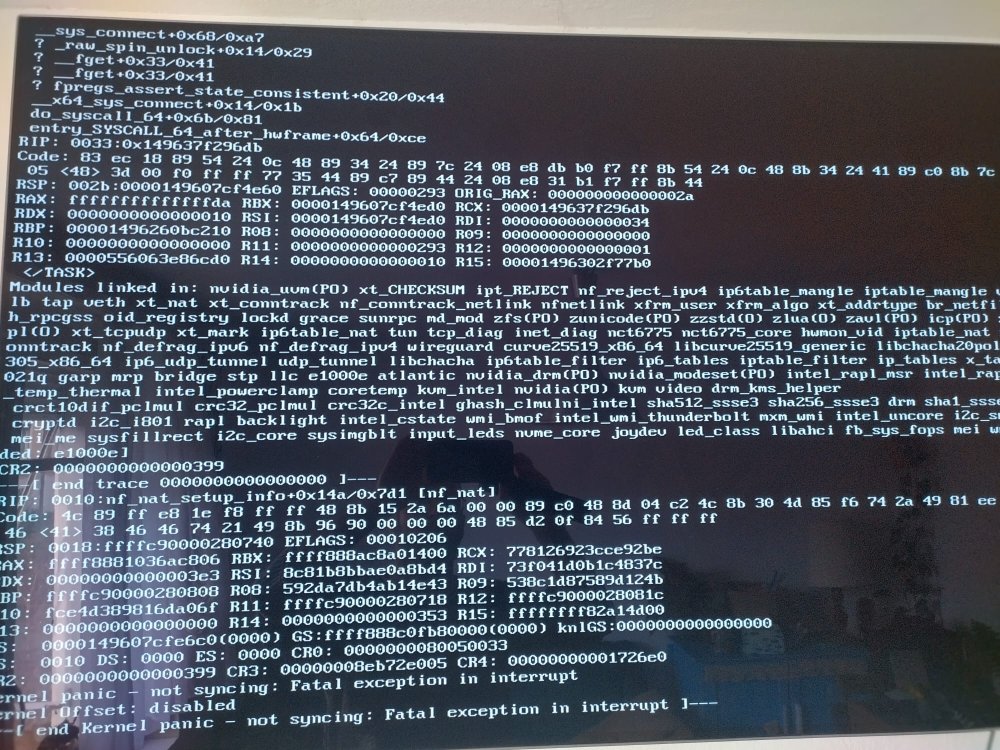
crashed again shortly after. Got this from my monitor, but otherwise the server is unresponsive to any input from my keyboard. I must say, the crashes started after the 6.12.6 upgrade, so now I'll try to upgrade to 6.12.8 and see again. I added the image. The logs again show nothing right after i closed the ssh session this morning...really weird tbh.
-
This is all I've got for now. Seems it crashed in the middle of the night (after I logged out late) Don't know if the error is related to the crash. Don't know why there are so few entries either. Ill connect a monitor to see if i have sth on screen the next time it crashes. To compare it to my syslog. The device in the last crash is But that error comes back frequently. syslog-127.0.0.1.log

