





aglyons
Members
-
Joined
-
Last visited
Everything posted by aglyons
-
I have since found two other cases of this issue popping up. https://forums.unraid.net/topic/190244-712-docker-containers-cant-access-pihole-also-in-docker https://forums.unraid.net/topic/190273-712-docker-no-shim-network/
-
So this is the same situation I am seeing. I also just came across another similar post that is showing the same problem. IMO, this is a new issue since 7.1.x was released. That post does talk about the SHIM network and some scripts that need to run to solve the problem. But I have to question why this is an issue now when it wasn't before. If this is a known issue and there is a known workaround, why wasn't that workaround built into the release?
-
You're running pihole in a container in HOST mode or you created a custom network for PiHole? MACVLAN or IPVLAN?
-
Can you describe your network config? I just posted an issue with containers on a VLAN not being able to communicate with the host. Curious if this is the same problem.
-
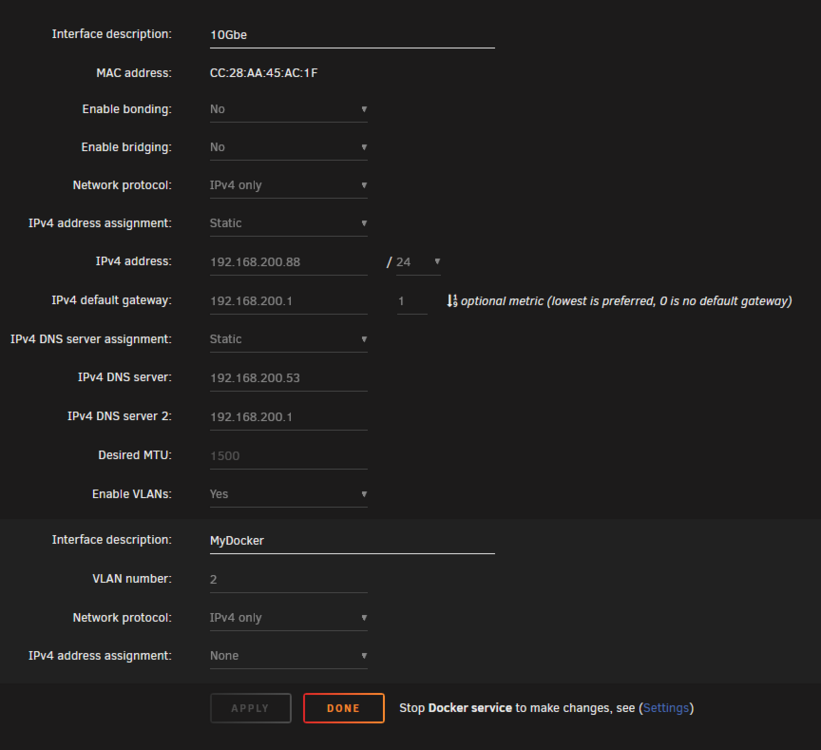
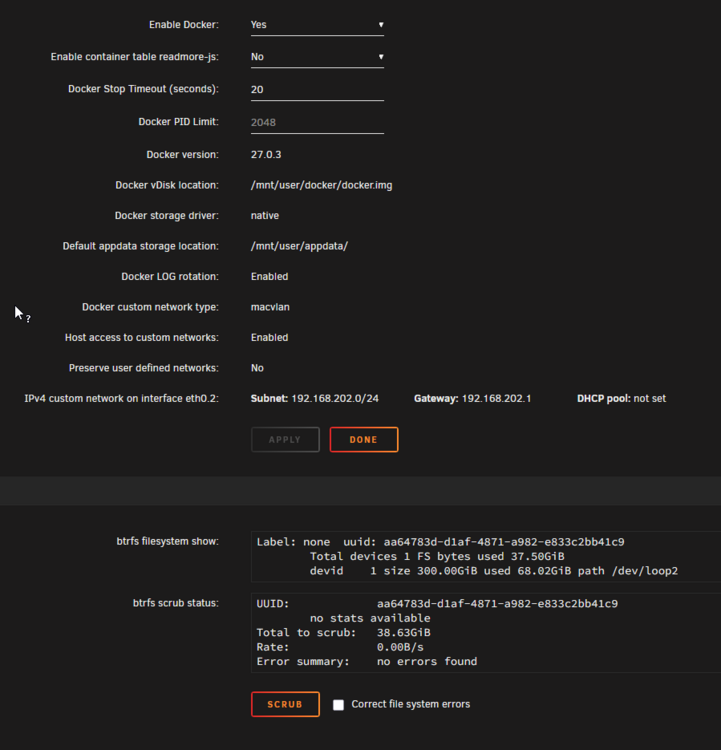
I have a VLAN set via MACVLAN that, under v7.0, worked just fine. After upgrading to 7.1.1 and now 7.1.2, the containers on that VLAN and the host are broken in both directions: Host to Container and Container to Host. I made no other changes to the network config before or after the 7.1.1 or .2 updates. I have 'host access to custom networks' enabled. knoxx-diagnostics-20250517-1748.zip
-
Hey @VladoPortos, just thought I would bring up an oncoming headache. URv7.1 is baking in the oven with RC1 released. v7.1 includes CSS changes as they are working on reworking responsiveness. While I am looking forward to the fixes you are planning, I would hate to see you put a ton of work into FV2 only to have to do it all over again when URv7.1 gets released. While many here might not be too happy about it, with the limited time you have for this, it may be prudent to focus on your changes to be compatible with the 7.1 release instead of 7.0.1, as its lifetime is ticking down.
-
Do you not have the ability to edit the folder on the docker page and then toggle the switch on the containers you want to add to that folder?

-
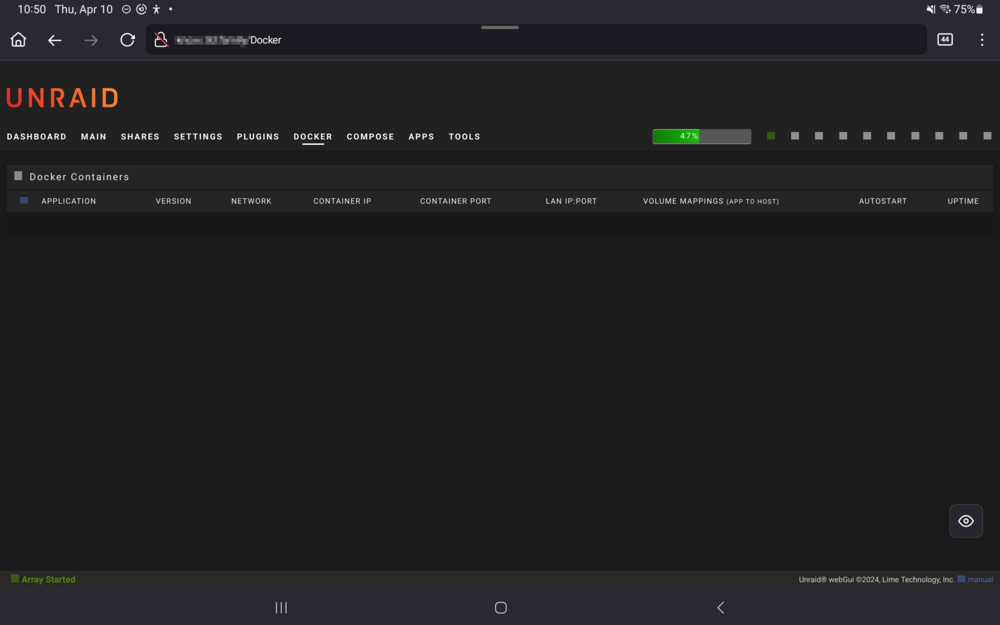
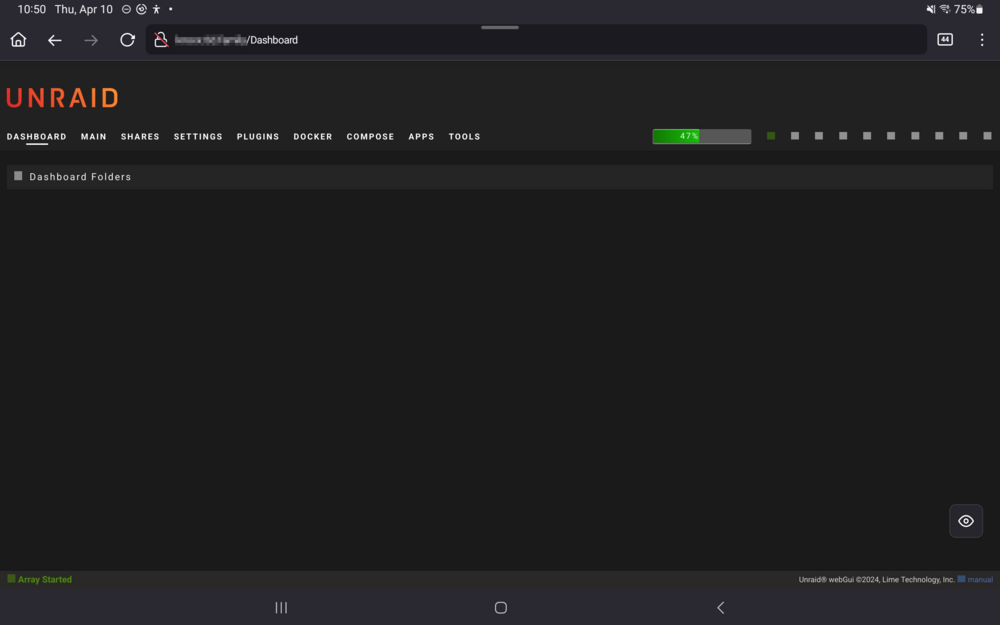
Yes it is, I don't think it's supposed to affect any page other than "/docker". I mentioned at the end of the post that I noticed it added a header "Dashboard Folders" which is not present when pulling up the main page on a PC. That leads me to think the CSS is not specific enough, locking it to only the /docker URL but also the mediaquery has issues with breakpoints.
-
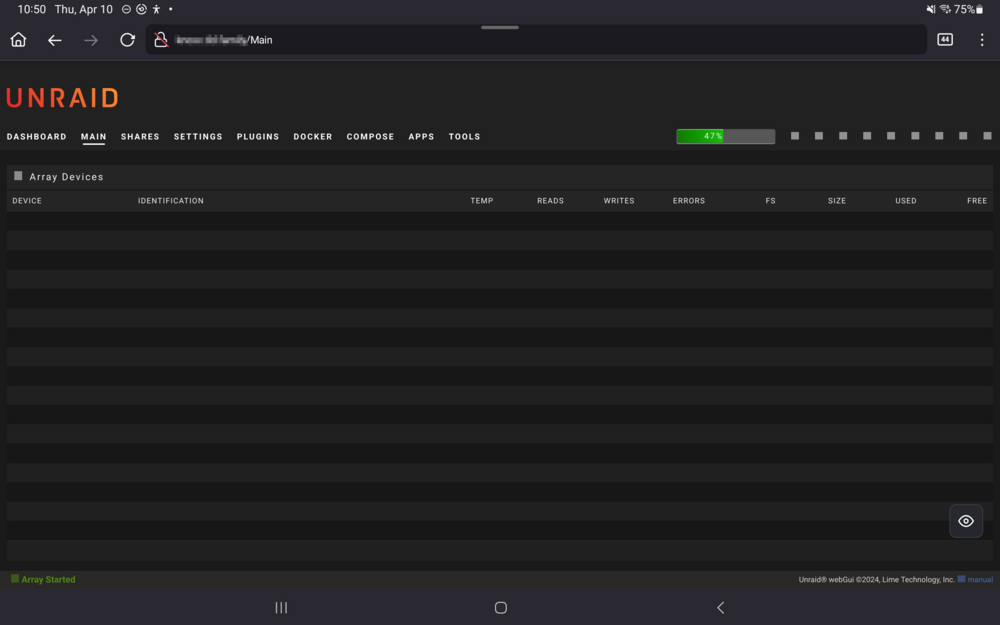
I've discovered that there are other CSS issues with the current release. When opening the UR UI on my Samsung tablet, nothing shows in the page regarding inner content. Desktop PC and mobile are ok; the in-between media query sizes are somehow messing up. *** I just noticed that the main dashboard is showing "Dashboard Folders" for some reason.
-
So I gave up on troubleshooting the default bridge and created a new bridge network parented to eth0. All containers moved to that new bridge are working as expected.
-
If I go by the understanding that enabling the custom network to allow for the bridge to work, and instead of enabling the eth0 custom network, I assign a static IP to the eth0.2 VLAN custom network, that should be the bridge network accessible from x.x.202.x:[port] But that doesn't happen. What has happened is that my Unraid UI is now accessible from both x.x.200.x and x.x.202.x, and still no containers on the default bridge are accessible. (^^ I noticed and corrected that eth0.2 was added to the listening devices list. It is again only accessible from 200.x) All this time, the containers on x.x.202.x and all containers on HOST (x.x.200.x) have been fully accessible. I should add that this is only on the default bridge. I have some compose containers that create their own bridge networks, and both of those work fine. Question to the devs (or those that know): Has the bridge kernel panic issue been resolved fully, or are we still relying on the workaround described in v6.14 release notes?
-
So if I had enabled the custom network on eth0 in the Docker settings, the Unraid UI becomes unavailable. The thing is, I WAS able to access all containers on the bridge up until recently. I'm not sure what changed. I'm sure it wasn't anything I've changed, as I haven't changed anything regarding the network config for about a year now. Currently, with eth0.2 enabled, the Unradi UI is available on the 200.x network and all my Dockers on eth0.2 (202.x) are accessible, as are all containers running in Host mode (200.x). It's only containers on the default bridge that are not accessible to incoming traffic. Outgoing traffic works fine AFAIK. So, as stated, the Unraid UI is accessible with custom network eth0 disabled. I just had a thought that when the system starts up and Docker has not started, it is still listening on eth0. If Docker is not set to start, the Unraid UI is fully accessible. When Docker kicks in, I suspect that eth0 interface gets replaced by br0 but the Unraid system remains set to respond to requests only on eth0, not br0. That switch does not get changed in the Unraid Networking listening interfaces config.
-
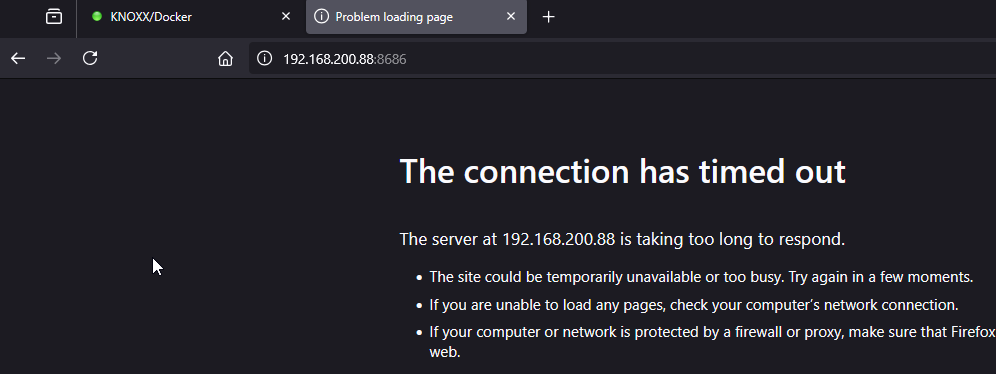
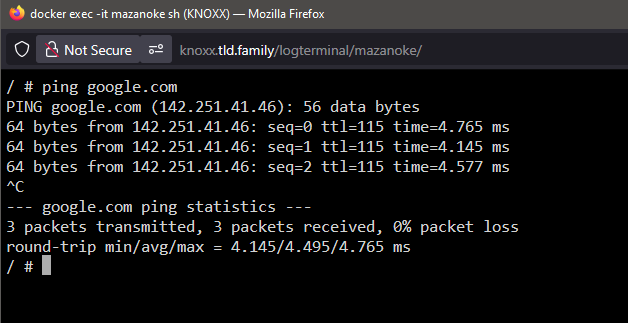
I have a few containers that are local access only, so I put them on the bridge rather than my custom VLAN. I can't be 100% positive, but at some point, none of the containers on the bridge are accessible. They can ping the internet, but I can't bring up any UI pages using the IP:port assigned. I went through my network settings following the config described in the 6.14 release notes (I use MACVLAN for my cutom networks), and on the Docker page, if I enabled the custom network for eth0 as described, I would lose access to the Unraid WebUI once Docker got started. I've restored the config I had so I can get back into the server, but all of the bridge mode containers are still down. knoxx-diagnostics-20250402-1427.zip

-
I think people are confused as to what I am taking about and what I think others have tried to point out. As it is now, each plugin/template has a single thread where everyone replies with every issue. It's a massive headache to find anything and then track the relevant conversation amongst all the other chatter. What I am suggesting is instead of the plug-in/template being a thread, make that a subforum so that separate posts can be made inside. Each post then has it's own topic and it's easier to find things and keep things on topic. This is not creating thousands of subforums.
-
True, most questions are about the app, not the template. But being a public forum, it's not just about the author answering questions about their template. A lot of the community jumps in and helps out. I jsut posted in the Docker Compose plugin thread and as always, I try to go though the posts that were already there to see if my issue had already been discussed. But there are over 40 pages of posts with conversations all merged together in one big mess. In order to find if anyone had already run into the issue and solved it one would have to go through each page, read the start of each post and then try to piece together the thread, which gets broken up with other posts about other things. I don't see why having subforums for each author, which in turn has multiple subforums for each item they manage, is such a problem. I've seen public forums that are way bigger than what was proffered as a reason to not go there. Impossible to enforce is also not true. Limetech sets the rules by which plugins are authored and are accepted into the CA. Why should this be any different? Just because something has always been done a certain way doesn't mean it is the right way or should continue.
-
typo in the post. It is and always was a jpg file. It's saved as a jpg and entered in the icon field as a jpg. The problem remains. EDIT: The icons HAVE to be png? Why is that? The icons were showing up correctly in the appdata backup plugin list, just not the UR docker containers list.
-
Feature Request I just found out that we can add the Compose tab to the main UR menu bar. I thought it odd that while it shows the compose file entries, it doesn't show any compose containers. I would like to be able to keep only template containers on the Dockers tab and have the compose containers listed on the Compose tab. While they are all Docker containers, having the option to keep them separated would be nice to keep things organized.
-
I have had this thought for some time now and was just about to write something along those lines. If you're a plugin or container developer contributing to the community, I think it would be fitting for the developer to be provided with a subforum where they can create a sub-subforum for each plugin/container they author and manage. This would keep all posts in the respecting forums on point. As it stands, an author could have more than one item they manage and trying to follow one specific item amongst a single massive stream of back-and-forth conversations is confusing and exhausting. I have found myself, on many occasions, skipping using the UR forum entirely and searching through Google instead. More often than not, I find answers or solutions NOT on the UR forums but elsewhere, mainly due to the sheer number of unrelated posts and noise one has to weed through here. Regarding the '2688 forum sections' being 'impractical.' That is called organization. Each author looks after their own forum's content. Organized this way, nobody would need to go through all 2688 posts to find what they are specifically looking for, but as it stands, people DO need to weed through 100-200 non-relevant posts to find just the next step when trying to fix their problems. Organizing makes things easier to find, not harder. +1 for cleaning up the forum structure
-
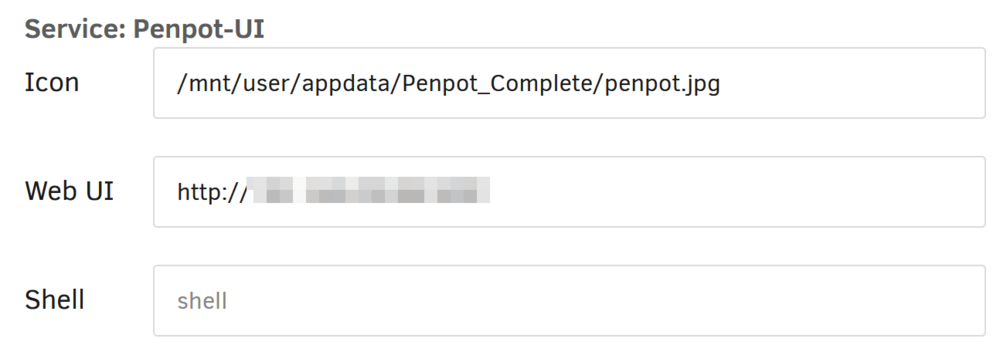
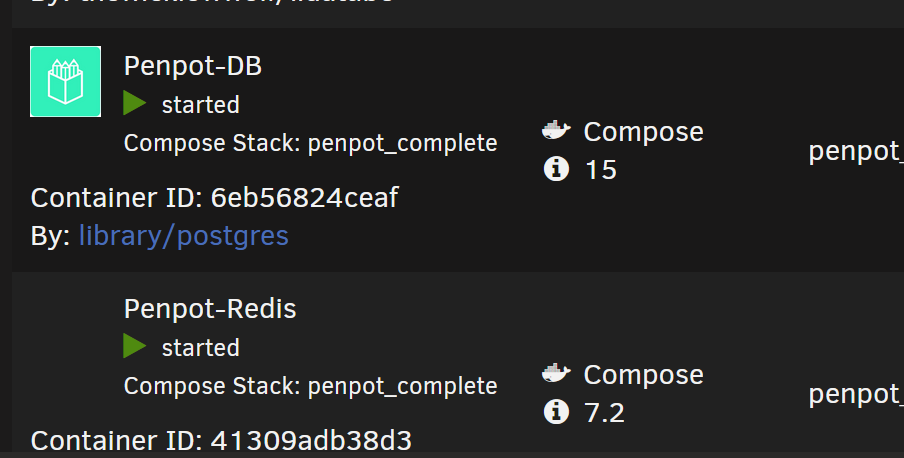
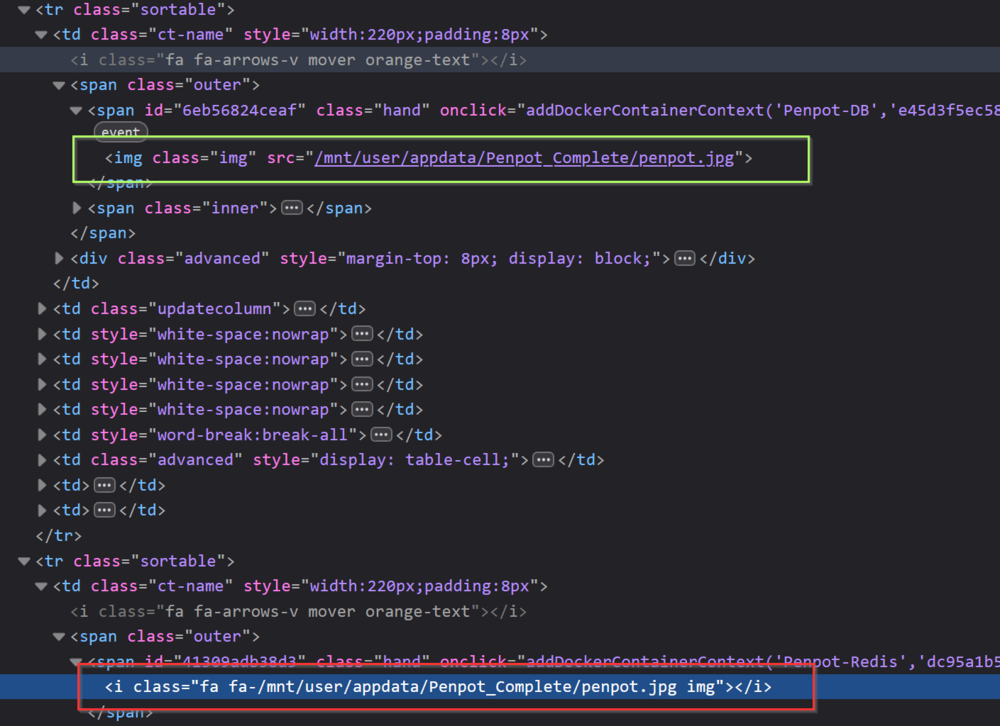
Container icons not showing due to HTML coding issue There appears to be some coding issue somewhere, either in the Compose plugin or Unraid itself when it comes to showing icons defined in the compose plugin UI. I have the icon, in jpg, stored in the appdata folder of the container, and I have set all the defined containers in the compose file set to use the same icon file. No icons show in the UR docker container list. but digging in the code shows that it's trying to. The green highlighted span above shows the corrected code based on the working icons in the UR docker container list. The red highlighted span shows the code generated by either UR or the compose plugin. For some reason, it treats the <img> tag as a <i> tag (used for displaying fonts in italics) and applies a 'fa' class along with trying to apply another class using the icon file path and filename as the descriptor. This problem is not a cache issue but a programmatic problem with how Compose passes the icon data to UR for rendering or how UR processes the data it is passed. PS. On another note, some people put icons on the boot thumb drive, but I would avoid doing so as it adds more content to the thumb drive, requiring further activity on the disk.
-
I see 7.0.1 is out. Alas the kernel is still below 6.7. Still patiently waiting for a kernel update so I can get the APU working. But the wait is getting painful!
-
Is there a way of creating multiple arrays? Here are my thoughts on why I would consider going there. I recently came across a Reddit post about a sysadmin who had a dual drive failure on an array he built. Luckily, it wasn't in production at the time, but it reminded me of a thought I had about arrays and parity disks. Currently, Unraid provides up to two parity drives. This should be sufficient for most people in most situations. But, as the number of data disks in the array increases, the probability of a multi-disk event also increases. A six-disk array with two parity drives will have a lower likelihood of a multi-disk event than a 24-disk array with two parity drives. The ability to create multiple arrays with a smaller number of data drives and parity drives would keep this probability factor down while still providing the overall storage capacity. The shares could still be spread across all of the arrays. Thoughts?
-
I wouldn't worry about it. More wear happens when powering up rather than when keeping it spinning. Besides, I don't think it will take years to resolve this issue.
-
With the release of UR7, the kernel in this release is still below the version that has kernel support for the Ryzen 5 8500G APU. Is there any way to get this working in UR7 in a similar way that Nvidia drivers are installed? Does the kernel HAVE to have the device support in it before installing drivers would even function?
-
Something that didn't come up a an error is the mover tuning plugin. With that installed the mover wouldn't move any files. There was an error message (which I can't recall), I did find a post in here somewhere that concluded it was the tuner plugin causing the problem. Once I uninstalled it the mover started working again.
-
Next question (could ya see that coming lol) OpenZFS is supported in 6.12 How long till work on 7.1 is started and how far out has a .1 release normally taken?




