aglyons
Members
-
Joined
-
Last visited
Everything posted by aglyons
-
Yes and No, I am getting the idea that you want to create some kind of redundancy. The only way to accomplish this, as far as I am aware, is to setup some kind of load balancer that can be configured to redirect traffic when one source is down. I am not aware of how PFSense works, I'm a Unifi guy. But, there may be something built into PFSense that can provide this functionality (https://www.howtoforge.com/how-to-use-pfsense-to-load-balance-your-web-servers). If you are going for redundancy, you then get into the challenges of making sure that box1 and box2 containers/VM's are sync'd in real-time in some way. If they are not then you won't have redundancy. If the two servers don't have the exact same services configured then it won't matter about having a redundant NPM as the services on the server that is down won't respond anyway. Also, in a load balance situation, each NPM is going to have different domain/IP mappings so you can't just duplicate the second NPM with the settings on the first NPM. Getting load balancing running os not a simple feat and requires a lot of planning. Why do you need this kind of set up?
-
You can't forward the same port to two different IP's on your LAN. I'm surprised your router allowed you to even enter this config. Just do all the NPM forwarding on box1 to all the services that are on box2 with the appropriate IP's/ports. So what I read from this is you are double NAT'ed. That's a nightmare. There should be a way you can configure your providers modem/router to operate in bridge mode. That essentially disables the built in router and allows your PFSense to act as the primary (and only) firewall/router. This should simplify managing the system and clear up a lot of port forward/conflict issues.
-
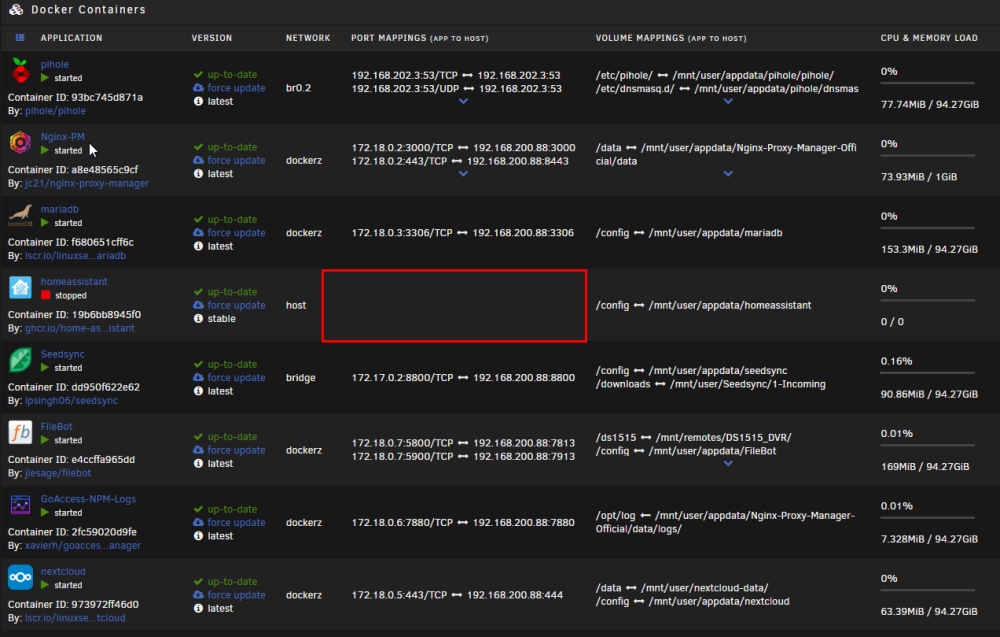
On a side note, and maybe this might help diagnose the cause. I have Homeassistant installed and under the port mapping, it's always been blank. I have tried to run HA on different network configs but it will only respond when set to use 'host'. All the other settings and I get an odd blank URL. The only way I've been able to access the UI is by opening the WebUI from the container menu. PS. I stopped the HA container via SSH when the UI problem kicked up. That's why it's stopped.
-
Managed to get the UI back up again by restarting NGINX and PHP /etc/rc.d/rc.nginx restart /etc/rc.d/rc.nginx reload /etc/rc.d/rc.php-fpm restart /etc/rc.d/rc.php-fpm reload I still don't know why this happened though. Would like to get to the bottom of it.
-
knoxx-diagnostics-20220906-1334.zip
-
here is the network details from the CLI. Is it just me or is there a lot of IPv6 in here? I thought I had all that disabled in the UI. root@KNOXX:~# ip addr show 1: lo: <LOOPBACK,UP,LOWER_UP> mtu 65536 qdisc noqueue state UNKNOWN group default qlen 1000 link/loopback 00:00:00:00:00:00 brd 00:00:00:00:00:00 inet 127.0.0.1/8 scope host lo valid_lft forever preferred_lft forever inet6 ::1/128 scope host valid_lft forever preferred_lft forever 2: tunl0@NONE: <NOARP> mtu 1480 qdisc noop state DOWN group default qlen 1000 link/ipip 0.0.0.0 brd 0.0.0.0 3: gre0@NONE: <NOARP> mtu 1476 qdisc noop state DOWN group default qlen 1000 link/gre 0.0.0.0 brd 0.0.0.0 4: gretap0@NONE: <BROADCAST,MULTICAST> mtu 1462 qdisc noop state DOWN group default qlen 1000 link/ether 00:00:00:00:00:00 brd ff:ff:ff:ff:ff:ff 5: erspan0@NONE: <BROADCAST,MULTICAST> mtu 1450 qdisc noop state DOWN group default qlen 1000 link/ether 00:00:00:00:00:00 brd ff:ff:ff:ff:ff:ff 6: ip_vti0@NONE: <NOARP> mtu 1480 qdisc noop state DOWN group default qlen 1000 link/ipip 0.0.0.0 brd 0.0.0.0 7: sit0@NONE: <NOARP> mtu 1480 qdisc noop state DOWN group default qlen 1000 link/sit 0.0.0.0 brd 0.0.0.0 11: eth1: <BROADCAST,MULTICAST,UP,LOWER_UP> mtu 1500 qdisc mq state UP group default qlen 1000 link/ether 78:2b:cb:47:8f:86 brd ff:ff:ff:ff:ff:ff 12: eth2: <BROADCAST,MULTICAST,UP,LOWER_UP> mtu 1500 qdisc mq state UP group default qlen 1000 link/ether 78:2b:cb:47:8f:87 brd ff:ff:ff:ff:ff:ff 13: eth0: <BROADCAST,MULTICAST,PROMISC,UP,LOWER_UP> mtu 9000 qdisc mq master br0 state UP group default qlen 1000 link/ether 3c:8c:f8:ee:59:84 brd ff:ff:ff:ff:ff:ff 18: br-8efd84f1e081: <BROADCAST,MULTICAST,UP,LOWER_UP> mtu 1500 qdisc noqueue state UP group default link/ether 02:42:d5:9c:d6:00 brd ff:ff:ff:ff:ff:ff inet 172.18.0.1/16 brd 172.18.255.255 scope global br-8efd84f1e081 valid_lft forever preferred_lft forever inet6 fe80::42:d5ff:fe9c:d600/64 scope link valid_lft forever preferred_lft forever 80: eth0.2@eth0: <BROADCAST,MULTICAST,PROMISC,UP,LOWER_UP> mtu 9000 qdisc noqueue master br0.2 state UP group default qlen 1000 link/ether 3c:8c:f8:ee:59:84 brd ff:ff:ff:ff:ff:ff 81: br0: <BROADCAST,MULTICAST,UP,LOWER_UP> mtu 9000 qdisc noqueue state UP group default qlen 1000 link/ether 3c:8c:f8:ee:59:84 brd ff:ff:ff:ff:ff:ff inet 192.168.200.88/24 scope global br0 valid_lft forever preferred_lft forever 82: br0.2: <BROADCAST,MULTICAST,UP,LOWER_UP> mtu 9000 qdisc noqueue state UP group default qlen 1000 link/ether 3c:8c:f8:ee:59:84 brd ff:ff:ff:ff:ff:ff inet 192.168.202.2/24 scope global br0.2 valid_lft forever preferred_lft forever 83: docker0: <BROADCAST,MULTICAST,UP,LOWER_UP> mtu 9000 qdisc noqueue state UP group default link/ether 02:42:5f:04:cb:c3 brd ff:ff:ff:ff:ff:ff inet 172.17.0.1/16 brd 172.17.255.255 scope global docker0 valid_lft forever preferred_lft forever inet6 fe80::42:5fff:fe04:cbc3/64 scope link valid_lft forever preferred_lft forever 129: vethafee979@if128: <BROADCAST,MULTICAST,UP,LOWER_UP> mtu 1500 qdisc noqueue master br-8efd84f1e081 state UP group default link/ether c2:2a:88:7f:90:eb brd ff:ff:ff:ff:ff:ff link-netnsid 1 inet6 fe80::c02a:88ff:fe7f:90eb/64 scope link valid_lft forever preferred_lft forever 131: veth5397ea1@if130: <BROADCAST,MULTICAST,UP,LOWER_UP> mtu 1500 qdisc noqueue master br-8efd84f1e081 state UP group default link/ether de:be:88:6a:51:81 brd ff:ff:ff:ff:ff:ff link-netnsid 2 inet6 fe80::dcbe:88ff:fe6a:5181/64 scope link valid_lft forever preferred_lft forever 133: veth70709e0@if132: <BROADCAST,MULTICAST,UP,LOWER_UP> mtu 9000 qdisc noqueue master docker0 state UP group default link/ether da:1e:bf:55:72:32 brd ff:ff:ff:ff:ff:ff link-netnsid 3 inet6 fe80::d81e:bfff:fe55:7232/64 scope link valid_lft forever preferred_lft forever 135: veth520e30b@if134: <BROADCAST,MULTICAST,UP,LOWER_UP> mtu 1500 qdisc noqueue master br-8efd84f1e081 state UP group default link/ether 26:54:d0:c5:b8:9a brd ff:ff:ff:ff:ff:ff link-netnsid 4 inet6 fe80::2454:d0ff:fec5:b89a/64 scope link valid_lft forever preferred_lft forever 137: vethc7c592a@if136: <BROADCAST,MULTICAST,UP,LOWER_UP> mtu 1500 qdisc noqueue master br-8efd84f1e081 state UP group default link/ether 92:4e:9a:41:87:88 brd ff:ff:ff:ff:ff:ff link-netnsid 5 inet6 fe80::904e:9aff:fe41:8788/64 scope link valid_lft forever preferred_lft forever 142: veth3e9feaf@if141: <BROADCAST,MULTICAST,UP,LOWER_UP> mtu 1500 qdisc noqueue master br-8efd84f1e081 state UP group default link/ether 42:ca:2f:7a:1d:d6 brd ff:ff:ff:ff:ff:ff link-netnsid 8 inet6 fe80::40ca:2fff:fe7a:1dd6/64 scope link valid_lft forever preferred_lft forever
-
Can't pull up the UI of the admin nor any docker containers. I can still ping the IP and the docker PiHole is still responding to requests!?!? I have syslog messages going to my Synology. I saw this in the log at the end. Lot's of network renaming going on here. Not sure if this is contributing to the problem. I've never seen this before. Just to be clear, I did nothing to the server prior to this happening. I was logged into the admin to check things over. Closed out and did some work for a couple hours. Went back to the admin and nothing was responding. 2022-09-06,09:41:30,Info,KNOXX,kern,kernel,veth16a34ee: renamed from eth0 2022-09-06,09:39:14,Info,KNOXX,kern,kernel,eth0: renamed from veth16a34ee 2022-09-06,09:39:10,Info,KNOXX,kern,kernel,veth41e373e: renamed from eth0 2022-09-06,09:37:42,Info,KNOXX,kern,kernel,eth0: renamed from veth9606116 2022-09-06,09:37:35,Info,KNOXX,kern,kernel,veth7d00851: renamed from eth0 2022-09-06,09:37:07,Info,KNOXX,daemon,avahi-daemon,Registering new address record for fe80::40ca:2fff:fe7a:1dd6 on veth3e9feaf.*. 2022-09-06,09:37:07,Info,KNOXX,daemon,avahi-daemon,New relevant interface veth3e9feaf.IPv6 for mDNS. 2022-09-06,09:37:07,Info,KNOXX,daemon,avahi-daemon,Joining mDNS multicast group on interface veth3e9feaf.IPv6 with address fe80::40ca:2fff:fe7a:1dd6. 2022-09-06,09:37:05,Info,KNOXX,kern,kernel,br-8efd84f1e081: port 5(veth3e9feaf) entered forwarding state 2022-09-06,09:37:05,Info,KNOXX,kern,kernel,br-8efd84f1e081: port 5(veth3e9feaf) entered blocking state 2022-09-06,09:37:05,Info,KNOXX,kern,kernel,IPv6: ADDRCONF(NETDEV_CHANGE): veth3e9feaf: link becomes ready 2022-09-06,09:37:05,Info,KNOXX,kern,kernel,eth0: renamed from veth04df8e5 2022-09-06,09:37:04,Info,KNOXX,kern,kernel,device veth3e9feaf entered promiscuous mode 2022-09-06,09:37:04,Info,KNOXX,kern,kernel,br-8efd84f1e081: port 5(veth3e9feaf) entered disabled state 2022-09-06,09:37:04,Info,KNOXX,kern,kernel,br-8efd84f1e081: port 5(veth3e9feaf) entered blocking state 2022-09-06,09:37:01,Info,KNOXX,daemon,avahi-daemon,Withdrawing address record for fe80::88d7:b5ff:fe84:e71b on veth3edcb58. 2022-09-06,09:37:01,Info,KNOXX,kern,kernel,br-8efd84f1e081: port 5(veth3edcb58) entered disabled state 2022-09-06,09:37:01,Info,KNOXX,kern,kernel,device veth3edcb58 left promiscuous mode 2022-09-06,09:37:01,Info,KNOXX,kern,kernel,br-8efd84f1e081: port 5(veth3edcb58) entered disabled state 2022-09-06,09:37:01,Info,KNOXX,daemon,avahi-daemon,Leaving mDNS multicast group on interface veth3edcb58.IPv6 with address fe80::88d7:b5ff:fe84:e71b. 2022-09-06,09:37:01,Info,KNOXX,daemon,avahi-daemon,Interface veth3edcb58.IPv6 no longer relevant for mDNS. 2022-09-06,09:37:01,Info,KNOXX,kern,kernel,vethe59ebd6: renamed from eth0 2022-09-06,09:37:01,Info,KNOXX,kern,kernel,br-8efd84f1e081: port 5(veth3edcb58) entered disabled state
-
I understand what you're talking about, but, I'm curious if the Docker containers will be assigned an IP from the routers DHCP server. They are all exposed to that network. I can't see why the router couldn't look after assignment. Yes, keep the Docker DHCP server off. Then there's no duplicate IPs. I'll have to do some tests myself
-
So let me get this straight. Do Docker networks operate differently than VM networks? I am coming from using an ESXi server where each VM gets its own IP on the same network as the host. My UDM DHCP server sees them and assigns an IP. I then go to that device in the UDM and set it to always get that same IP. It' just simplified things IMO. I can see all the devices and their respective IP in the UDM UI. As well, if I choose to, I can change the IP of that virtual device/container from the UDM UI. If I understand correctly, Docker containers won't get assigned an IP from the UDM at all? I would have to manually assign IP's to containers even though they are on the same network as the host? Or, using DHCP, it would only respond to the Docker networks internal DHCP server?
-
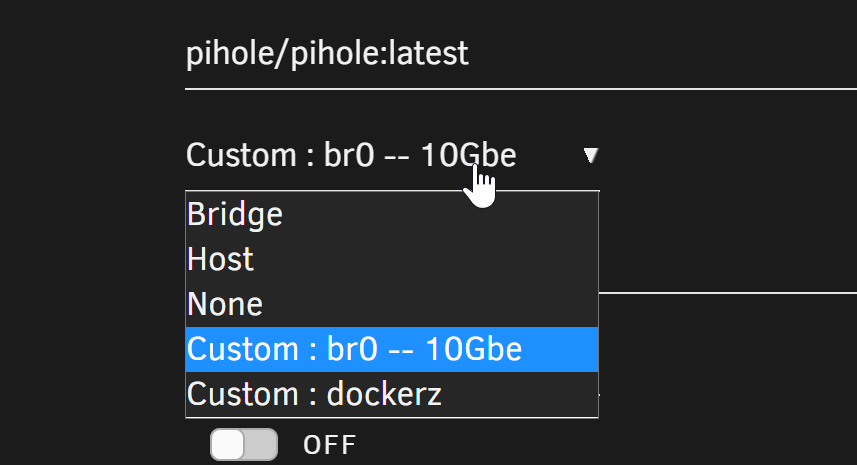
I've posted other threads about issues and have been given some advice which I appreciate. But I still can't seem to figure out a solution. Docker MACVLAN was causing kernel panic crashes so I was advised to switch to IPVLAN, great. I noticed that IPVLAN, how it operates, assigns the containers set static IP address to the host MAC address. While this may be kosher, I have noticed that my router, Unifi UDMProSE, has issues with this approach. It appears that the UDM tracks clients by MAC address. So, the host MAC address in Unifi will have it's IP address flip amongst the various IP's set as static in the container's config. If the host IP ends with 88 and a containers ends with 249 and another at 250. The router will show the host MAC associated with each of those IP's, at random, and only one at a time. If you query the UDM client list for one of the IP's that is not showing, it will not know anything about it. It's still ping-able from other clients, UDM just has no knowledge of it on the LAN. This can cause a problem as the router 'could' assign a used IP via DHCP to a new client on the network at any time causing an IP conflict. Being that IPVLAN is being used, I can't set a DHCP reservation as there is no unique MAC address associated with the container. I switched back to MACVLAN in Docker and went the route of assigning a fixed IP in the UDM for the different containers. I understood that the kernel panic issues were caused by static IP's on the container settings. But then ran into another issue. When you update a container, the MAC address changes. So setting a reserved IP on the DHCP is useless. I have tried going the VLAN route but following all the guides am not getting the same results as expected. I added a VLAN to the network config for docker use. But that VLAN is not shown in the container settings. Just the default br0. So, to wrap things up, we can't used MACVLAN without static IP's or services will break. Set a static IP with MACVLAN and it crashes the box at random. We can't use IPVLAN as it confuses routers and can cause DHCP lease conflicts. Call me frustrated! EDIT: If anyone would be so gracious, I would be more than willing to have a Skype or Zoom call and I can share my screen. That might help speed up both my explanation and a possible resolution to what I am seeing.
-
The thing is, MACVLAN creates 'virtual' MAC addresses. Routers don't have a problem with that as they appear as separate devices. IPVLAN drops the unique MAC addresses and simply assigns the IP to the host MAC. That's the problem. It may well be working just fine. Everything is responding to pings and is operating as expected. One of the containers is a PiHole for the br0 network. If you feel up to giving me some pointers on setting up a VLAN on the UDM for use with the custom network on Docker, I'm all ears.
-
So I had issues with Docker causing kernel panic crashes. I was advised to change from MACVLAN to IPVLAN in the Docker config. It seems to have solved the crashing but it has had another effect on the rest of my network. Specifically, my router. I have a Ubiquiti UDMProSE router. I don't think that should really matter which make or model but with it I can see more details of the network. I have a static IP assigned to the Unraid host network as well as any Docker guest that is also using the host br0. In the admin of my router, it shows the MAC address of the host flipping IP addresses at random from one static IP to another. When one is showing, the other is not known to the router. There are no results when you search for the other static IP. I put a community post up on the UI boards. We'll see if anything comes of that. Maybe I am wrong and all of this is entirely cosmetic.
-
So it appears that this may have caused another issue. I started to notice instability with some containers on br0 networks and now bridge networks as well. One of my containers is trying to connect to an external SFTP server and it's timing out failing to maintain a constant connection. I noticed in my router, Ubiquiti UDMProSE that the MAC address of the server shows the various IP's of the containers flipping from one IP to another. Could this be the result of IPVLAN instead of the MACVLAN? I do have two other NIC's in the server that I could assign one dedicated to the PiHole. I'd have to figure out how to create the custom network in Docker and attach a specific eth to it. Any advice there? UPDATE: So I have confirmed that when Docker is set to IPVLAN, it causes issues, at least with Ubiquiti routers, where outbound connections are timing out and failing. I changed back to MACVLAN and the problems disappeared. Set it to IPVLAN and the problems came back again. I am not experienced enough to troubleshoot further on this but I am willing to try suggestions and to perform testing.
-
So I realized I had to shutdown the Docker service to change this setting. Once down I could change it but then, Docker won't start. There is a line in the console; Aug 30 11:30:53 KNOXX root: '/mnt/user/system/docker/docker.img' is in-use, cannot mount I'm trying a warm boot to see if that clears it up. UPDATE: So the warm boot solved the problem of Docker not starting. I have it set to IPVLAN. I'll watch and see how this runs. Thanks for your assistance!
-
My system, lately, has started to get erratic with it's stability. It crashed hard just this morning and checking the logs showed nothing out of the ordinary. This however was displayed on the monitor I have connected. The biggest problem is I have, aside from losing a ton of data I'd rather not lose, is a PiHole Docker container runs on here. When the system goes down that kills the internet for the whole house (= angry wife & kid). Can anyone offer any advice? SyncMaster SA650 </TASK> Modules linked in: maculan xt_nat xt_tcpudp veth xt_conntrack xt_MASQUERADE nf_c onntrack_netlink nfnetlink xt_addrtype iptable_nat nf_nat nf_conntrack nf_defrag _ipv6 nf_defrag_ipv4 br_netfilter xfs md_mod iptable_filter ip6_tables iptable_ filter ip_tables x_tables atlantic bmx2 intel_powerclamp coretemp crc32c_intel i ntel_cstate ipmi_ssif i2c_core intel_uncore megaraid_sas input_leds led_class ip mi_si umi acpi_power_meter button [last unloaded: atlantic] --[ end trace 9e2cc8776e9cb2ed ]--- RIP: 0010:nf_nat_setup_info+0x146/0x773 [nf_nat] Code: 15 c0 6a 00 00 89 c0 48 8d 04 c2 48 8b 10 48 85 d2 74 07 48 81 ea 98 00 00 00 45 31 c0 48 85 d2 of 84 6b ff ff ff 8a 44 24 4e <38> 42 46 74 19 48 8b 92 98 00 00 00 48 85 d2 0f 84 52 ff ff ff 48 RSP: 0018:ffffc90000274790 EFLAGS: 00010202 RAX: ffff888177ac0206 RBX: ffff888c85f 183c0 RCX: 1cd53ef870e390c7 RDX: 002900002b26ff68 RSI: 5b01b43358f245ef RDI: ffffc90000274768 RBP: ffffc90000274860 RO8: 0000000000000000 R09: b7ff817916811ca9 R10: 8e54dbffc0bc8b40 R11: cca2307651abe750 R12: 0000000000000000 R13: ffffc90000274874 R14: 0000000000000000 R15: ffffc900002747b8 FS: 000014b46c781840(0000) GS: ffff8897dfc00000(0000) kn1GS:0000000000000000 CS: 0010 DS: 0000 ES: 0000 CRO: 0000000080050033 CRZ: 0000557b78fa6298 CR3: 00000007be032000 CR4: 00000000000006e0 Kernel panic not syncing: Fatal exception in interrupt Kernel Offset: disabled ---[ end Kernel panic not syncing: Fatal exception in interrupt ]---
-
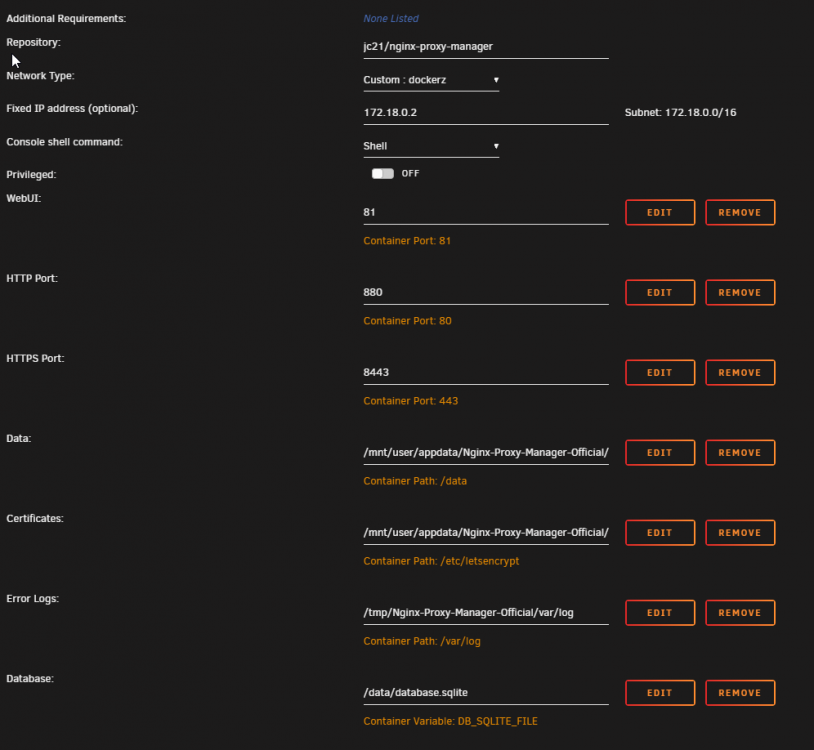
I figured it out. I had assigned an IP on the dockerz network. Another container on the same network was started prior to NPM starting and it was assigned the same IP address. Once I cleared the assigned IP NPM started ok. I made the assumption that defining an IP on a container would reserve the IP from the Docker DHCP. But the Docker network is not like a router. There is no IP reservation. At least defining it in a container is not going to reserve it lol.
-
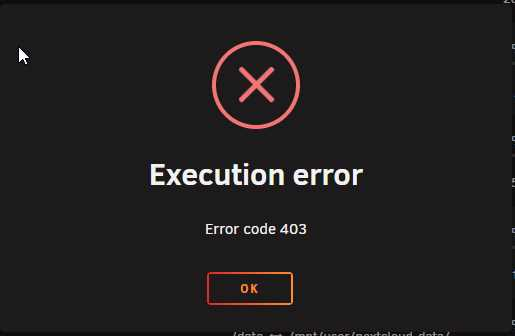
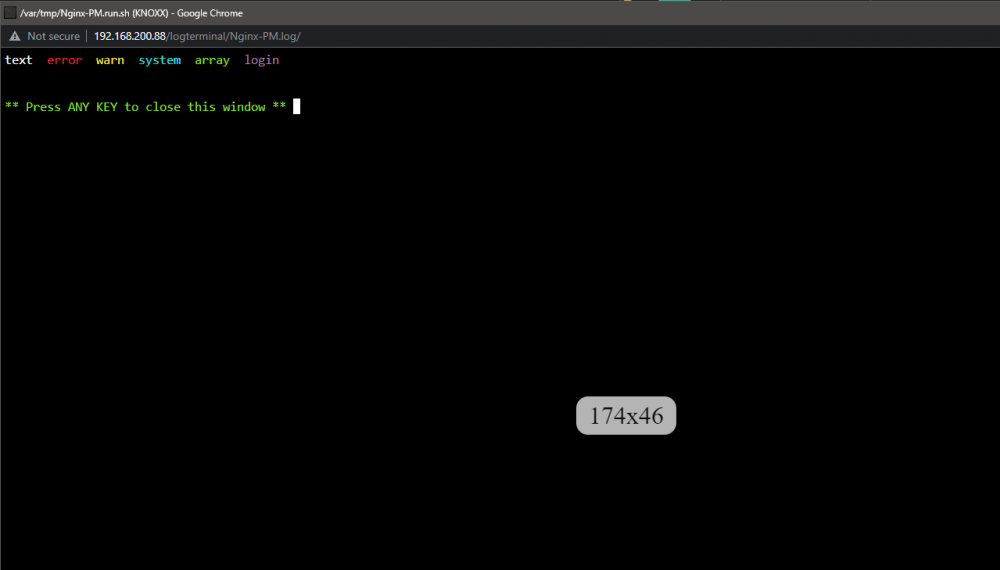
Running into a 403 trying to start the container. There is zero content in the log window. I've done a force update on the container. Still no dice. Any thoughts?
-
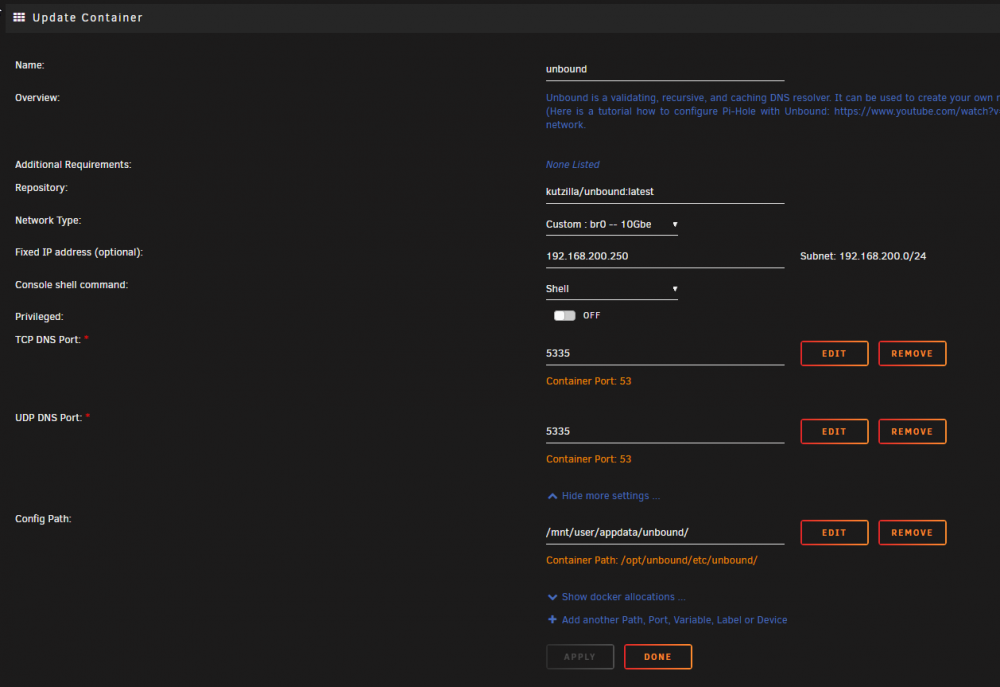
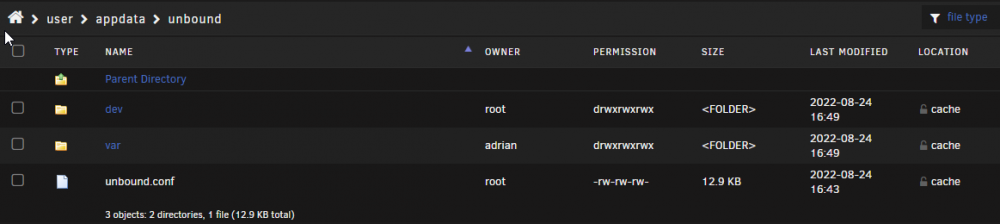
Has anyone figured out the permissions issues with the config folder? I have set permissions to RW-RW-RW and set the owner to 'root' for every folder including the parent and it still cannot access the files. Docker APP Config Permissions and ownership on parent folder Permissions and ownership on folder contents ********************** LOG FILE OUTPUT ********************************** [1661374194] libunbound[22:0] error: udp connect failed: Cannot assign requested address for 2001:500:a8::e port 53 [1661374194] libunbound[22:0] error: udp connect failed: Cannot assign requested address for 2001:500:a8::e port 53 [1661374194] libunbound[22:0] error: udp connect failed: Cannot assign requested address for 2001:500:12::d0d port 53 [1661374194] libunbound[22:0] error: udp connect failed: Cannot assign requested address for 2001:500:2::c port 53 [1661374194] libunbound[22:0] error: udp connect failed: Cannot assign requested address for 2001:500:2d::d port 53 [1661374194] libunbound[22:0] error: udp connect failed: Cannot assign requested address for 2001:500:2d::d port 53 [1661374195] libunbound[22:0] error: udp connect failed: Cannot assign requested address for 2001:500:1::53 port 53 [1661374195] libunbound[22:0] error: udp connect failed: Cannot assign requested address for 2001:503:c27::2:30 port 53 [1661374195] libunbound[22:0] error: udp connect failed: Cannot assign requested address for 2001:500:2d::d port 53 [1661374195] libunbound[22:0] error: udp connect failed: Cannot assign requested address for 2001:500:a8::e port 53 /opt/unbound/etc/unbound/unbound.conf:293: error: cannot open include file '/opt/unbound/etc/unbound/a-records.conf': No such file or directory /opt/unbound/etc/unbound/unbound.conf:294: error: cannot open include file '/opt/unbound/etc/unbound/srv-records.conf': No such file or directory /opt/unbound/etc/unbound/unbound.conf:300: error: cannot open include file '/opt/unbound/etc/unbound/forward-records.conf': No such file or directory read /opt/unbound/etc/unbound/unbound.conf failed: 3 errors in configuration file [1661374195] unbound[1:0] fatal error: Could not read config file: /opt/unbound/etc/unbound/unbound.conf. Maybe try unbound -dd, it stays on the commandline to see more errors, or unbound-checkconf ** Press ANY KEY to close this window **

-
So I did a very non-scientific test and timed a section of files. It transferred 30.9GB of data in 8 minutes. If my math is right, that works out to approx 66MB/s average transfer rate. This is a significant performance hit when considering hardware capabilities IMO. I've read people talk about the purpose of UnRaid and running this kind of server in their operations. Many have described their viewpoint as this is an archive server. Somewhere to put files that are not accessed very often. I didn't come across this sentiment until well after I set all of this up. This may be my downfall as I did not expect this level of performance hit. I deal with a lot of large media files as I work with video content. I need not only large secure storage but also fast. I upgraded my network to support 10GBe connections between my workstation and the UnRaid server. With this performance hit, it seems like it was a waste of $$ as the network is not the bottleneck. I foresee the comments from that last statement. Secure, Fast, Affordable - Pick two out of the three options. I think I'll have to research TruNas and see how I can port everything over.
-
True, just checked the specs on the Ironwolf drives and they are rated at 240MB/s on paper. I guess my frustration is the constant up and down speeds. Especially dropping down so low for so long. I know they are different animals but I don't see this kind of fluctuation from the old Synology box I have which doesn't have any highspeed cache at all.
-
The transfers speeds are bouncing around topping out at 160MB/s but then dropping down to >30MB/s then back up for a short period but then back down. It never goes much higher than 160MB/s which is still way off the 500MB/s potential of a single drive and more realistically, stays in the lower 30MB/s or less speeds for the majority of the activity.
-
@JorgeB - All drives are Seagate Ironwolf, 5x6TB + 3x8TB except parity. Both parity drives are Seagate Exos 12TB and 14TB. @wgstarks - I've had a challenge trying to get rsync on UnRaid to appear as a target on my Synology Hyperbackup APP to no avail. I'm not that much of a CLI guy at present so running rsync at the CLI is not something that I readily know how to do.
-
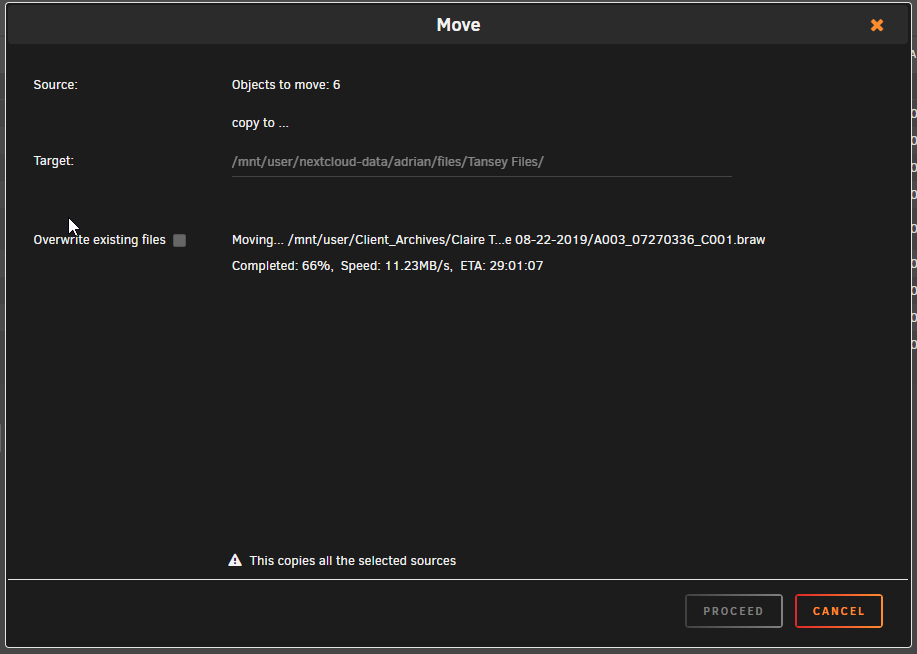
I have had my issues with network performance and now I am seeing overall internal performance that I can't ignore or accept. I am transferring files from one share to another share, internally using the Dynamix File Manager. I have 8 drives that are all SATA3 600Gbps. So why is it that this internal file transfer is running at 11MB per second?? That is 2.2% of the drives potential throughput! I understand that UnRaid does not stripe data across drives. But going from one SATA3 drive to another SATA3 drive, internally should NOT be going this slow. I've seen transfers start at a high speed but then peter out to almost nothing dropping as low as 6MB/s The target nor the source share DO NOT use the cache. I'm starting to feel like UnRaid was not the right option to go with and I should have gone with Trunas instead.
-
Most consumer ISP's do not allow servers to be used on residential connections. Some block 80 and 443 by default. While I know that a hacker could do a port scan and attempt entry, I would prefer to not have standard ports exposed. For both reasons. I am not confident enough in ensuring everything is locked down properly. I have a good firewall but opening ports on servers bypass that security and literally opens your network up. I'm just getting started with UnRaid and homelabs. We gotta start somewhere. PS: If the plugin author is reading this, it would be great if the link to the docs was presented in the UI.
-
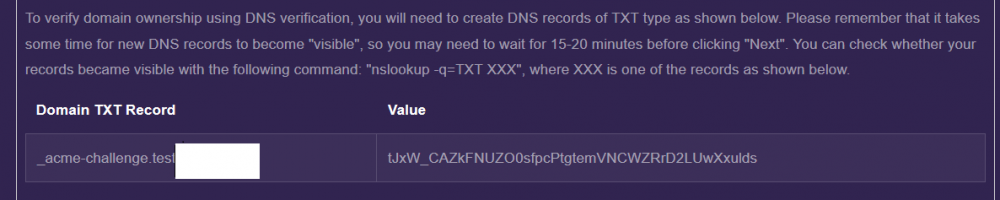
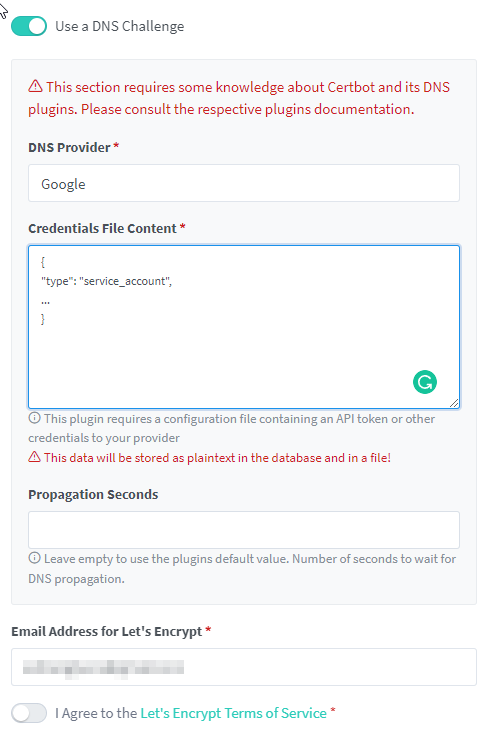
Yes, you should but reading the NPM forum post, I should be putting a TXT value as such; But the UI, when I choose my DNS provider, Google. I am presented with this and I have no idea what to do with it. There is no simple TXT value choice in the dropdown.