





insomnia417
Members
-
Joined
-
Last visited
Everything posted by insomnia417
-
thank u ! it amazing.... just change to english , it works....
-
yes , i means i have saved , but it still show null
-
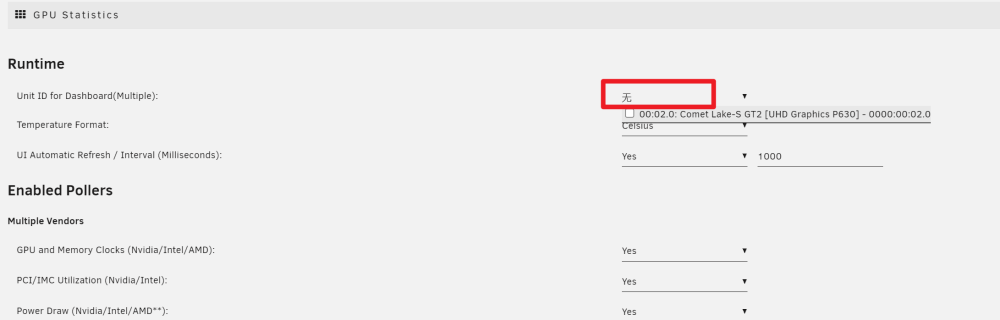
yes , running 6.12rc2 , when i setting and save , it alway reset null ,
-
ALL is changed, but dashboard still not work ,please help ,thank you my CPU is W-1290P (P630 , 9BC6)
-
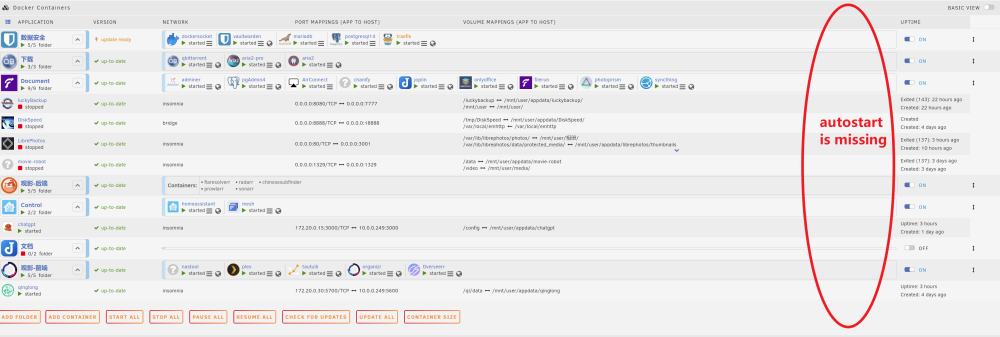
这个界面是在的,最右侧的不见了,
-
6.12 RC2 works , but command 'autostart' is missing
-
i have update RC2 , now it works goood , thanks for reply !
-
6.12 RC1 can not open USB flash disk
-
same error , when i shutdown my windows10 vm (passthrough nvidia) , show me this error :''unraid kernel: pci 0000:00:02.0: Removing from iommu group 2'' and unraid can not find intel gpu anymore!
-
config.php add : <?php umask(000); $config['app']['hidden_folder_names'][] = "appdata"; $config['app']['hidden_folder_names'][] = "appdata-backup"; $config['app']['hidden_folder_names'][] = "isos"; $config['app']['hidden_folder_names'][] = "domains"; $config['app']['hidden_folder_names'][] = "system"; ?php>
-
原来不是我一个人这样 那我就放心了
-
maybe it is used up the VRAM , So is there any other way to keep the VM from crashing after running out of VRAM, or how to add more VRAM (my bios is max 2G VRAM now) or any other way? OR the method of using displaylink to connect the physical display output itself is defective
-
unraid-diagnostics-20230302-1702.zip i use i9 9900ES (qqz5) , unraid 6.11.5 An error will be reported in the log every time the raid is restarted, "unraid kernel: CPU: 5 PID: 4677 Comm: modprobe Tainted: G U W 5.19.17-Unraid #2", This error occurred after 6.10.3 Although gvt-g can be used normally, as long as the windows virtual machine runs for a while, it will make another error, the entire vm option will not be turned on, and windows will also crash (I use the method of connecting the physical display with displaylink)
-
https://williamlam.com/2022/11/updated-findings-for-passthrough-of-intel-nuc-integrated-graphics-igpu.html ESXI supported , unraid still not supported?
-
Finally, I solved my problem. The biggest problem is the network problem! Finally, I tried to use my VPN to directly connect to the official Debian source, so that I could quickly and stably install all dependencies without unknown problems. Because after installing the LXCVNC button, everything was determined by the system default, so I could not change the official source halfway, The following is a Chinese literal translation for Chinese compatriots, because I think there are few countries in the world except China that are closed to the Internet 终于,我解决了我的问题, 最大的问题就是网络问题!我最后尝试使用我的VPN直连debian官方源,才保持快速稳定地安装完所有依赖不出现不知名的问题,因为安装LXCVNC的按钮以后,一切都是由系统默认决定的,所以我没法中途改变官方源, 国人请修改软路由或者V2为全局直连外网!
-
hi, i have go to the step 4, also try 'vnc viewer' with IP:5900 , but always show black screen . I use the Intel-GPU-TOP and gvt-g ,my CPU is 'intel 9900ES' , did I miss any steps?
-
good news ,i have received email from github‘s notice (turbovnc #113 ): This has been implemented in the dev branch and is now available in the 3.1 evolving pre-release builds (https://turbovnc.org/DeveloperInfo/PreReleases). Our implementation should be compatible with that of UltraVNC, TigerVNC, and LibVNCServer. Please test thoroughly. —
-
sorry my english is poor
-
无风扇,H370N solved Gigabyte motherboard support is not very good
-
谢谢楼主,找了整整一天,最后在这里解决了问题,如果不输入userid. 那么默认就会是1000权限,然后我修改umask为0112就解决了 但是还有个问题就是我希望让/user-files/这个文件默认创建就是mobody不知道怎么弄, filerun是个好软件,但是跟nextcloud一样权限问题太让人头大了!!
-
yes , "Chromium-desktop-g3 " 's vnc can support chinese utf-8 , but i dont know which vnc he used , here it is , accetto/ubuntu-vnc-xfce-chromium-g3
-
I saw another program in apps "Chromium-desktop-g3 " enables the clipboard to support UTF-8. Unfortunately, but the system displays garbled code. I don't know how to implement this because I'm still a novice in Linux What a tangled option
-
please support utf-8 , chinese language all block
-
Can this turbovnc support clipboard output in Chinese UTF-8 and how ? just now, i have check the github isus -https://github.com/TurboVNC/turbovnc/issues/113 so , it dosnt support yet ?
-
i have the same probrem with swag


