





squirrellydw
Members
-
Joined
-
Last visited
Everything posted by squirrellydw
-
Everything looks fine to me after 1 preclear, going to run one more to verify. Can you just confirm its OK ================================================================== 1.15 = unRAID server Pre-Clear disk /dev/sdf = cycle 1 of 1, partition start on sector 1 = Disk Pre-Clear-Read completed DONE = Step 1 of 10 - Copying zeros to first 2048k bytes DONE = Step 2 of 10 - Copying zeros to remainder of disk to clear it DONE = Step 3 of 10 - Disk is now cleared from MBR onward. DONE = Step 4 of 10 - Clearing MBR bytes for partition 2,3 & 4 DONE = Step 5 of 10 - Clearing MBR code area DONE = Step 6 of 10 - Setting MBR signature bytes DONE = Step 7 of 10 - Setting partition 1 to precleared state DONE = Step 8 of 10 - Notifying kernel we changed the partitioning DONE = Step 9 of 10 - Creating the /dev/disk/by* entries DONE = Step 10 of 10 - Verifying if the MBR is cleared. DONE = Disk Post-Clear-Read completed DONE Disk Temperature: 32C, Elapsed Time: 42:40:56 ========================================================================1.15 == HGSTHDN724040ALE640 PK1334PCJTM1JS == Disk /dev/sdf has been successfully precleared == with a starting sector of 1 ============================================================================ ** Changed attributes in files: /tmp/smart_start_sdf /tmp/smart_finish_sdf ATTRIBUTE NEW_VAL OLD_VAL FAILURE_THRESHOLD STATUS RAW_VALUE Temperature_Celsius = 187 181 0 ok 32 No SMART attributes are FAILING_NOW 0 sectors were pending re-allocation before the start of the preclear. 0 sectors were pending re-allocation after pre-read in cycle 1 of 1. 0 sectors were pending re-allocation after zero of disk in cycle 1 of 1. 0 sectors are pending re-allocation at the end of the preclear, the number of sectors pending re-allocation did not change. 0 sectors had been re-allocated before the start of the preclear. 0 sectors are re-allocated at the end of the preclear, the number of sectors re-allocated did not change. root@Tower:/usr/local/emhttp#
-
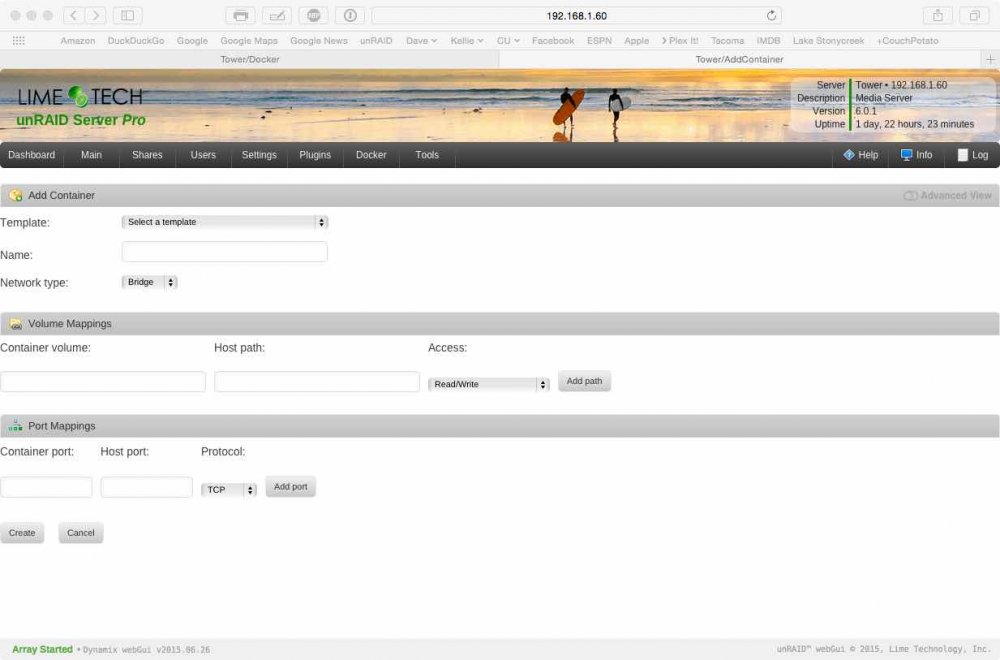
If I don't want to change the port the unpaid uses, what port would you suggest I use? Also if I change the port do I need to change anything on my ATV? And do I need to add anything to here
-
So looking at this I know it passed and looks good to me. My question is the first part. Do i have to worry about any of that? Changed attributes in files: /tmp/smart_start_sdf /tmp/smart_finish_sdf ATTRIBUTE NEW_VAL OLD_VAL FAILURE_THRESHOLD STATUS RAW_VALUE Raw_Read_Error_Rate = 108 117 6 ok 19015016 Spin_Retry_Count = 100 100 97 near_thresh 0 End-to-End_Error = 100 100 99 near_thresh 0 High_Fly_Writes = 83 87 0 ok 17 Airflow_Temperature_Cel = 68 70 45 near_thresh 32 Temperature_Celsius = 32 30 0 ok 32 No SMART attributes are FAILING_NOW 0 sectors were pending re-allocation before the start of the preclear. 0 sectors were pending re-allocation after pre-read in cycle 1 of 2. 0 sectors were pending re-allocation after zero of disk in cycle 1 of 2. 0 sectors were pending re-allocation after post-read in cycle 1 of 2. 0 sectors were pending re-allocation after zero of disk in cycle 2 of 2. 0 sectors are pending re-allocation at the end of the preclear, the number of sectors pending re-allocation did not change. 0 sectors had been re-allocated before the start of the preclear. 0 sectors are re-allocated at the end of the preclear, the number of sectors re-allocated did not change.
-
I like this idea as long as it only reports what important and it's at the beginning of the thread.
-
I figured it was good from the little experience I have with it but anything to make it easier is always better.
-
So I think this drive has no problems from what I can tell correct. Going to replace my parity drive. HGSTHDN724040ALE640 PK1334PBHWBJDX == Disk /dev/sdf has been successfully precleared == with a starting sector of 1 == Ran 3 cycles == == Using :Read block size = 8388608 Bytes == Last Cycle's Pre Read Time : 9:49:40 (113 MB/s) == Last Cycle's Zeroing time : 8:38:59 (128 MB/s) == Last Cycle's Post Read Time : 18:37:02 (59 MB/s) == Last Cycle's Total Time : 27:17:06 == == Total Elapsed Time 91:40:57 == == Disk Start Temperature: 35C == == Current Disk Temperature: 36C, == ============================================================================ ** Changed attributes in files: /tmp/smart_start_sdf /tmp/smart_finish_sdf ATTRIBUTE NEW_VAL OLD_VAL FAILURE_THRESHOLD STATUS RAW_VALUE Temperature_Celsius = 166 171 0 ok 36 No SMART attributes are FAILING_NOW 0 sectors were pending re-allocation before the start of the preclear. 0 sectors were pending re-allocation after pre-read in cycle 1 of 3. 0 sectors were pending re-allocation after zero of disk in cycle 1 of 3. 0 sectors were pending re-allocation after post-read in cycle 1 of 3. 0 sectors were pending re-allocation after zero of disk in cycle 2 of 3. 0 sectors were pending re-allocation after post-read in cycle 2 of 3. 0 sectors were pending re-allocation after zero of disk in cycle 3 of 3. 0 sectors are pending re-allocation at the end of the preclear, the number of sectors pending re-allocation did not change. 0 sectors had been re-allocated before the start of the preclear. 0 sectors are re-allocated at the end of the preclear, the number of sectors re-allocated did not change. ============================================================================ ============================================================================ == == S.M.A.R.T Initial Report for /dev/sdf == Disk: /dev/sdf smartctl 6.2 2013-07-26 r3841 [i686-linux-3.9.11p-unRAID] (local build) Copyright (C) 2002-13, Bruce Allen, Christian Franke, www.smartmontools.org === START OF INFORMATION SECTION === Device Model: HGST HDN724040ALE640 Serial Number: PK1334PBHWBJDX LU WWN Device Id: 5 000cca 23dda88cd Firmware Version: MJAOA5E0 User Capacity: 4,000,787,030,016 bytes [4.00 TB] Sector Sizes: 512 bytes logical, 4096 bytes physical Rotation Rate: 7200 rpm Device is: Not in smartctl database [for details use: -P showall] ATA Version is: ATA8-ACS T13/1699-D revision 4 SATA Version is: SATA 3.0, 6.0 Gb/s (current: 3.0 Gb/s) Local Time is: Thu Aug 14 10:54:42 2014 EDT SMART support is: Available - device has SMART capability. SMART support is: Enabled === START OF READ SMART DATA SECTION === SMART overall-health self-assessment test result: PASSED General SMART Values: Offline data collection status: (0x80) Offline data collection activity was never started. Auto Offline Data Collection: Enabled. Self-test execution status: ( 0) The previous self-test routine completed without error or no self-test has ever been run. Total time to complete Offline data collection: ( 24) seconds. Offline data collection capabilities: (0x5b) SMART execute Offline immediate. Auto Offline data collection on/off support. Suspend Offline collection upon new command. Offline surface scan supported. Self-test supported. No Conveyance Self-test supported. Selective Self-test supported. SMART capabilities: (0x0003) Saves SMART data before entering power-saving mode. Supports SMART auto save timer. Error logging capability: (0x01) Error logging supported. General Purpose Logging supported. Short self-test routine recommended polling time: ( 1) minutes. Extended self-test routine recommended polling time: ( 557) minutes. SCT capabilities: (0x003d) SCT Status supported. SCT Error Recovery Control supported. SCT Feature Control supported. SCT Data Table supported. SMART Attributes Data Structure revision number: 16 Vendor Specific SMART Attributes with Thresholds: ID# ATTRIBUTE_NAME FLAG VALUE WORST THRESH TYPE UPDATED WHEN_FAILED RAW_VALUE 1 Raw_Read_Error_Rate 0x000b 100 100 016 Pre-fail Always - 0 2 Throughput_Performance 0x0005 136 136 054 Pre-fail Offline - 82 3 Spin_Up_Time 0x0007 100 100 024 Pre-fail Always - 0 4 Start_Stop_Count 0x0012 100 100 000 Old_age Always - 4 5 Reallocated_Sector_Ct 0x0033 100 100 005 Pre-fail Always - 0 7 Seek_Error_Rate 0x000b 100 100 067 Pre-fail Always - 0 8 Seek_Time_Performance 0x0005 121 121 020 Pre-fail Offline - 34 9 Power_On_Hours 0x0012 100 100 000 Old_age Always - 18 10 Spin_Retry_Count 0x0013 100 100 060 Pre-fail Always - 0 12 Power_Cycle_Count 0x0032 100 100 000 Old_age Always - 4 192 Power-Off_Retract_Count 0x0032 100 100 000 Old_age Always - 5 193 Load_Cycle_Count 0x0012 100 100 000 Old_age Always - 5 194 Temperature_Celsius 0x0002 171 171 000 Old_age Always - 35 (Min/Max 25/40) 196 Reallocated_Event_Count 0x0032 100 100 000 Old_age Always - 0 197 Current_Pending_Sector 0x0022 100 100 000 Old_age Always - 0 198 Offline_Uncorrectable 0x0008 100 100 000 Old_age Offline - 0 199 UDMA_CRC_Error_Count 0x000a 200 200 000 Old_age Always - 0 SMART Error Log Version: 1 No Errors Logged SMART Self-test log structure revision number 1 No self-tests have been logged. [To run self-tests, use: smartctl -t] SMART Selective self-test log data structure revision number 1 SPAN MIN_LBA MAX_LBA CURRENT_TEST_STATUS 1 0 0 Not_testing 2 0 0 Not_testing 3 0 0 Not_testing 4 0 0 Not_testing 5 0 0 Not_testing Selective self-test flags (0x0): After scanning selected spans, do NOT read-scan remainder of disk. If Selective self-test is pending on power-up, resume after 0 minute delay. == ============================================================================ ============================================================================ == == S.M.A.R.T Final Report for /dev/sdf == Disk: /dev/sdf smartctl 6.2 2013-07-26 r3841 [i686-linux-3.9.11p-unRAID] (local build) Copyright (C) 2002-13, Bruce Allen, Christian Franke, www.smartmontools.org === START OF INFORMATION SECTION === Device Model: HGST HDN724040ALE640 Serial Number: PK1334PBHWBJDX LU WWN Device Id: 5 000cca 23dda88cd Firmware Version: MJAOA5E0 User Capacity: 4,000,787,030,016 bytes [4.00 TB] Sector Sizes: 512 bytes logical, 4096 bytes physical Rotation Rate: 7200 rpm Device is: Not in smartctl database [for details use: -P showall] ATA Version is: ATA8-ACS T13/1699-D revision 4 SATA Version is: SATA 3.0, 6.0 Gb/s (current: 3.0 Gb/s) Local Time is: Mon Aug 18 06:35:38 2014 EDT SMART support is: Available - device has SMART capability. SMART support is: Enabled === START OF READ SMART DATA SECTION === SMART overall-health self-assessment test result: PASSED General SMART Values: Offline data collection status: (0x84) Offline data collection activity was suspended by an interrupting command from host. Auto Offline Data Collection: Enabled. Self-test execution status: ( 0) The previous self-test routine completed without error or no self-test has ever been run. Total time to complete Offline data collection: ( 24) seconds. Offline data collection capabilities: (0x5b) SMART execute Offline immediate. Auto Offline data collection on/off support. Suspend Offline collection upon new command. Offline surface scan supported. Self-test supported. No Conveyance Self-test supported. Selective Self-test supported. SMART capabilities: (0x0003) Saves SMART data before entering power-saving mode. Supports SMART auto save timer. Error logging capability: (0x01) Error logging supported. General Purpose Logging supported. Short self-test routine recommended polling time: ( 1) minutes. Extended self-test routine recommended polling time: ( 557) minutes. SCT capabilities: (0x003d) SCT Status supported. SCT Error Recovery Control supported. SCT Feature Control supported. SCT Data Table supported. SMART Attributes Data Structure revision number: 16 Vendor Specific SMART Attributes with Thresholds: ID# ATTRIBUTE_NAME FLAG VALUE WORST THRESH TYPE UPDATED WHEN_FAILED RAW_VALUE 1 Raw_Read_Error_Rate 0x000b 100 100 016 Pre-fail Always - 0 2 Throughput_Performance 0x0005 136 136 054 Pre-fail Offline - 82 3 Spin_Up_Time 0x0007 100 100 024 Pre-fail Always - 0 4 Start_Stop_Count 0x0012 100 100 000 Old_age Always - 4 5 Reallocated_Sector_Ct 0x0033 100 100 005 Pre-fail Always - 0 7 Seek_Error_Rate 0x000b 100 100 067 Pre-fail Always - 0 8 Seek_Time_Performance 0x0005 121 121 020 Pre-fail Offline - 34 9 Power_On_Hours 0x0012 100 100 000 Old_age Always - 110 10 Spin_Retry_Count 0x0013 100 100 060 Pre-fail Always - 0 12 Power_Cycle_Count 0x0032 100 100 000 Old_age Always - 4 192 Power-Off_Retract_Count 0x0032 100 100 000 Old_age Always - 5 193 Load_Cycle_Count 0x0012 100 100 000 Old_age Always - 5 194 Temperature_Celsius 0x0002 166 166 000 Old_age Always - 36 (Min/Max 25/40) 196 Reallocated_Event_Count 0x0032 100 100 000 Old_age Always - 0 197 Current_Pending_Sector 0x0022 100 100 000 Old_age Always - 0 198 Offline_Uncorrectable 0x0008 100 100 000 Old_age Offline - 0 199 UDMA_CRC_Error_Count 0x000a 200 200 000 Old_age Always - 0 SMART Error Log Version: 1 No Errors Logged SMART Self-test log structure revision number 1 No self-tests have been logged. [To run self-tests, use: smartctl -t] SMART Selective self-test log data structure revision number 1 SPAN MIN_LBA MAX_LBA CURRENT_TEST_STATUS 1 0 0 Not_testing 2 0 0 Not_testing 3 0 0 Not_testing 4 0 0 Not_testing 5 0 0 Not_testing Selective self-test flags (0x0): After scanning selected spans, do NOT read-scan remainder of disk. If Selective self-test is pending on power-up, resume after 0 minute delay. == preclear_rpt_PK1334PBHWBJDX_2014-08-18.txt
-
I got it shutdown and started clearing the drive again. I shut down everything I had running this time so we shall see what happens. Never had this problem before, but I never had PMS running on my server when I did this last time.
-
I have precleared 3TB drives before without a problem but this is the first 4TB drive I'm trying to clear. I have PMS, CP, SB, SAB and NZBDrone running. Should I have stopped those first? How should I power down my server? edit, yes I can't access the webgui, TELNET works fine it looks like. So how can I shutdown my server from telnet? I can than start it back up turn off all the plugins and try again.
-
So what should I do if my server froze over night? I didn't lose power so I don't know whats going on but I can't access it? Here is the link to the syslog, I can access the flash drive. https://www.dropbox.com/s/zn9gllhhmv4ubbu/syslog-20140813-155539.txt
-
One more question, if I want to do this preclear_disk.sh -c 3 -m email@address -M4 /dev/sdX with screen from another computer incase I lose power what would I type? My server is on a backup so I'm not to worry about it losing power but my laptop could. Thanks If it makes a difference I'm using a Mac
-
what is the 4 in -M 4, hours?? SO it would be preclear_disk.sh -c 3 /dev/sdX -m [email protected] -M 4
-
Getting ready to pre clear a drive 3 times and just want to make sure this is correct. Drive is a HGST Deskstar NAS H3IKNAS40003272SN(0S03664) 4TB 7200 RPM 64MB Cache SATA 6.0Gb/s 3.5" High-Performance Hard Drive preclear_disk.sh -c 3 /dev/sdX X being whatever the drive letter is I need to clear Also where do the reports show up again, its been awhile since I have done this. Thanks
-
anyone
-
Just want someone to confirm what I see, everything look good to me. No SMART attributes are FAILING_NOW 0 sectors were pending re-allocation before the start of the preclear. 0 sectors were pending re-allocation after pre-read in cycle 1 of 3. 0 sectors were pending re-allocation after zero of disk in cycle 1 of 3. 0 sectors were pending re-allocation after post-read in cycle 1 of 3. 0 sectors were pending re-allocation after zero of disk in cycle 2 of 3. 0 sectors were pending re-allocation after post-read in cycle 2 of 3. 0 sectors were pending re-allocation after zero of disk in cycle 3 of 3. 0 sectors are pending re-allocation at the end of the preclear, the number of sectors pending re-allocation did not change. 0 sectors had been re-allocated before the start of the preclear. 0 sectors are re-allocated at the end of the preclear, the number of sectors re-allocated did not change. [code/] [code]SMART Attributes Data Structure revision number: 16 Vendor Specific SMART Attributes with Thresholds: ID# ATTRIBUTE_NAME FLAG VALUE WORST THRESH TYPE UPDATED WHEN_FAILED RAW_VALUE 1 Raw_Read_Error_Rate 0x002f 200 200 051 Pre-fail Always - 0 3 Spin_Up_Time 0x0027 100 253 021 Pre-fail Always - 0 4 Start_Stop_Count 0x0032 100 100 000 Old_age Always - 2 5 Reallocated_Sector_Ct 0x0033 200 200 140 Pre-fail Always - 0 7 Seek_Error_Rate 0x002e 100 253 000 Old_age Always - 0 9 Power_On_Hours 0x0032 100 100 000 Old_age Always - 81 10 Spin_Retry_Count 0x0032 100 253 000 Old_age Always - 0 11 Calibration_Retry_Count 0x0032 100 253 000 Old_age Always - 0 12 Power_Cycle_Count 0x0032 100 100 000 Old_age Always - 2 192 Power-Off_Retract_Count 0x0032 200 200 000 Old_age Always - 1 193 Load_Cycle_Count 0x0032 200 200 000 Old_age Always - 9 194 Temperature_Celsius 0x0022 126 118 000 Old_age Always - 24 196 Reallocated_Event_Count 0x0032 200 200 000 Old_age Always - 0 197 Current_Pending_Sector 0x0032 200 200 000 Old_age Always - 0 198 Offline_Uncorrectable 0x0030 100 253 000 Old_age Offline - 0 199 UDMA_CRC_Error_Count 0x0032 200 200 000 Old_age Always - 0 200 Multi_Zone_Error_Rate 0x0008 100 253 000 Old_age Offline - 0 SMART Error Log Version: 1 No Errors Logged SMART Self-test log structure revision number 1 No self-tests have been logged. [To run self-tests, use: smartctl -t] SMART Selective self-test log data structure revision number 1 SPAN MIN_LBA MAX_LBA CURRENT_TEST_STATUS 1 0 0 Not_testing 2 0 0 Not_testing 3 0 0 Not_testing 4 0 0 Not_testing 5 0 0 Not_testing Selective self-test flags (0x0): After scanning selected spans, do NOT read-scan remainder of disk. If Selective self-test is pending on power-up, resume after 0 minute delay. [code/]
-
Thanks, another question. I just realized I'm still using 1.13 and not 1.14, I forgot to update it, is this going to be a problem? How Can I stop the pre clear, I have it doing 3 cycles.
-
any idea how long it takes to pre clear a 3TB WD Red drive? I just started pre clearing one, doing it 3 times
-
So once I upgrade to 1.14 this will work cd /boot, preclear_disk.sh -c 3 /dev/xxx thanks
-
What version of the preclear script are you running? 1.13. how do I update it if it's not the latest? 3TB MBR 4K aligned Thanks for the help
-
running unraid 5.0.3 and getting ready to clear a new drive. Just want to make sure this is correct. I want to clear it 3 times. Drive is a WD Red, do I need to worry about aligning sector 64 or will I be fine with what I have below? cd /boot, preclear_disk.sh -c 3 /dev/xxx thanks
-
Thanks Joe, any chance you could post a report of excatly what I should be look for each time and what they mean?
-
Thanks Joe, I only need to look at this part correct? sectors were pending re-allocation before the start of the preclear. 0 sectors were pending re-allocation after pre-read in cycle 1 of 2. 0 sectors were pending re-allocation after zero of disk in cycle 1 of 2. 0 sectors were pending re-allocation after post-read in cycle 1 of 2. 0 sectors were pending re-allocation after zero of disk in cycle 2 of 2. 0 sectors are pending re-allocation at the end of the preclear, the number of sectors pending re-allocation did not change. 0 sectors had been re-allocated before the start of the preclear. 0 sectors are re-allocated at the end of the preclear, the number of sectors re-allocated did not change.
-
anyone??
-
Can some verify that everything looks good? ** Changed attributes in files: /tmp/smart_start_sdi /tmp/smart_finish_sdi ATTRIBUTE NEW_VAL OLD_VAL FAILURE_THRESHOLD STATUS RAW_VALUE Raw_Read_Error_Rate = 115 118 6 ok 98284504 Spin_Retry_Count = 100 100 97 near_thresh 0 End-to-End_Error = 100 100 99 near_thresh 0 High_Fly_Writes = 96 98 0 ok 4 Airflow_Temperature_Cel = 72 74 45 ok 28 Temperature_Celsius = 28 26 0 ok 28 No SMART attributes are FAILING_NOW 0 sectors were pending re-allocation before the start of the preclear. 0 sectors were pending re-allocation after pre-read in cycle 1 of 2. 0 sectors were pending re-allocation after zero of disk in cycle 1 of 2. 0 sectors were pending re-allocation after post-read in cycle 1 of 2. 0 sectors were pending re-allocation after zero of disk in cycle 2 of 2. 0 sectors are pending re-allocation at the end of the preclear, the number of sectors pending re-allocation did not change. 0 sectors had been re-allocated before the start of the preclear. 0 sectors are re-allocated at the end of the preclear, the number of sectors re-allocated did not change. root@Tower:/boot#
-
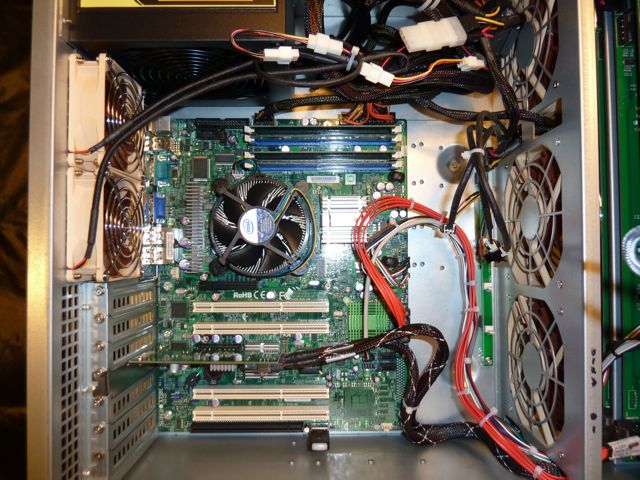
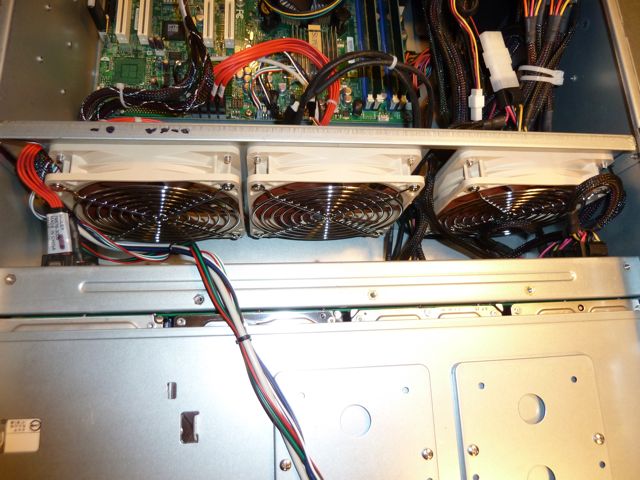
Here a couple pictures of the inside of mine, based on the 20 drive beast.
-
Thanks Joe, I never knew what "failing now" was until you just pointed it out.


