





squirrellydw
Members
-
Joined
-
Last visited
Everything posted by squirrellydw
-
Please let us know when you update it
-
You can add temps and fans to the bottom of the webgui. I see the system and CPU temp now that you mentioned that. Would be nice to have it in the menu bar or a different color. Thanks
-
Would like to gets working with SuperMirco Fans and any way to get the temp in the menu where it says MAIN, SHARES DOCKER etc?
-
-
What is the 81% thing in your menu bar?
-
Thank you, got it running. It only found the CPU Temp but that really all I care about. Would be nice to have others but don't need them. Is there anyway to get it to show up under "Dynamix System Statistics" plugin? Would be great to have everything in one spot
-
Do I copy the "sensors-detect.txt" file to the root of the flash drive or put it in the plugins folder?
-
thanks but just way to confusing for me to figure out.
-
would love to get this working but when I run Sensors nothing shows up. I can see my CPU temp thru IPMI but that it.
-
I say we all donate to Johnodon and give NOTHING to the other guy. The other guy is acting like big baby IMO.
-
FYI, Transmission for Mac was infected with ransom ware http://www.macrumors.com/2016/03/06/mac-ransomware-transmission/
-
Done and if you can do it great if not no big deal. Just would be nice to have guide data
-
For anyone that doesn't know the HDHR Viewer is a plugin for Plex and the HDHomeRun. It allows you to watch Live TV on Plex. I have it setup and working but I would like to get guide data working. Here is the link to the program and install instructions. http://hdhrviewer.zynine.net/hdhrviewerv2-initial-setup/xmltv-zap2xml/ https://forums.plex.tv/discussion/101755/hdhomerun-viewer/p1 If someone can make this into a plugin/docker that will work for guide data $40 is yours
-
Thanks for all the dockers you make, sent you some beer money. If you get a chance maybe you could see if you could make this into a docker http://lime-technology.com/forum/index.php?topic=47200.0
-
Glad I got it when I did.
-
How am i suppose to use your work when I don't know how to make a docker? John did a great job using "your work" so I and others can install it. You should be happy that we are using it.
-
Working great on my server. Thanks John made installing it very easy.
-
So if I already have binhex SAB installed all I need to do is uninstall it and install this and my setting should stay them same correct? Only SAB will be going though the VPN not any of my other programs I have running like Plex, sonar etc correct? I already have PIA so this will work out nicely
-
So what is the difference between this one and the non VPN? Does this support VPN like PIA? If I use SSL why do I need VPN?
-
OK got it downloading now to get it to work with my other program thanks
-
Thanks I will try it in a few hours. I was just looking at the site and I think I know why it didn't download anything. I think I just put my user name in the file and not my email address
-
If that is the case, I would just download the Windows EXE from the website and run it with whatever switches you want. It will generate an XMLTV file. My docker is really designed to work with saarg's TVH. I use a Mac not windows so that won't work I will check this out when I get home, the problem I had earlier was I looked for that file and didn't see it. That's why I was wondering how long it should take to pull that data and make the file. Do I need to put my Data folder somewhere else?
-
I'm not using TVH, I just want to download the xmltv file to use with another program and point it to the file. So I guess this won't work, any other way to download the xmltv file?
-
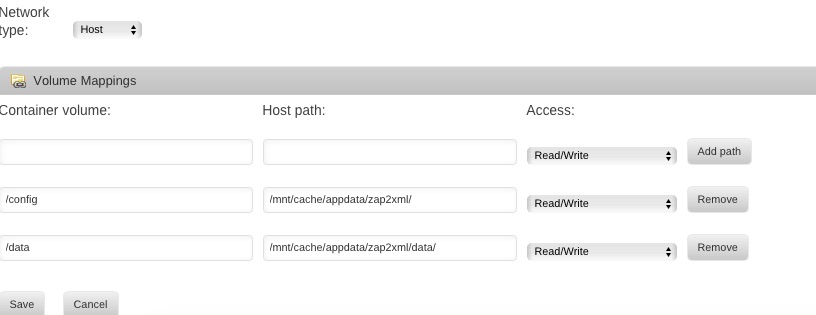
So I setup this up but it doesn't seem to be pulling any data, how long does it take? Attached are my docker settings. Also I changed the conf file with my user data, I removed the *s and added my user name and PW Any idea?
-
maybe just me but since the last update. Plex seems to stop working after awhile. Or maybe its on my end

