





squirrellydw
Members
-
Joined
-
Last visited
Everything posted by squirrellydw
-
so is this a docker or plugin yet, I couldn't find it?
-
so I just add this to SMB not NFS or AFP?
-
thanks but what about all the other DOT files OS X creates?
-
So can I ignore certain files, for example .ds_store files and all the dot Apple files? I have a plugin running that deletes them and today all my shares were read only because your plugin works to well.
-
thats it, leave all the other options as they are? Thanks
-
@Squid can you tell me how I should set this up, what options I should use? Thanks
-
For anyone that is having issues with the Preclear plugin not working like I had. I uninstalled it and reinstalled it and its working now. EDIT.....I rebooted after I uninstalled it, then i reinstalled it and its working now.
-
thanks, that worked great
-
I just ran this and I don't see the files but I still see some Folders with the same name, any idea how I can delete them?
-
So this is what I have, do I need to change any of the other files? #!/bin/bash echo "Searching for (and deleting) .DS_Store Files" echo "This may take a while" find /mnt/user -maxdepth 9999 -noleaf -type f -name ".DS_Store" -exec rm "{}" \; echo "Searching for (and deleting) ._.DS_Store Files" echo "This may take a while" find /mnt/user -maxdepth 9999 -noleaf -type f -name “._.DS_Store" -exec rm "{}" \; echo "Searching for (and deleting) .AppleDB Files" echo "This may take a while" find /mnt/user -maxdepth 9999 -noleaf -type f -name “.AppleDB” -exec rm "{}" \; echo "Searching for (and deleting) .AppleDesktop Files" echo "This may take a while" find /mnt/user -maxdepth 9999 -noleaf -type f -name “.AppleDesktop” -exec rm "{}" \; echo "Searching for (and deleting) .AppleDouble Files" echo "This may take a while" find /mnt/user -maxdepth 9999 -noleaf -type f -name “.AppleDouble” -exec rm "{}" \; echo "Searching for (and deleting) .TemporaryItems Files" echo "This may take a while" find /mnt/user -maxdepth 9999 -noleaf -type f -name “.TemporaryItems” -exec rm "{}" \;
-
anyone have any ideas for me. I don't understand why preclear isn't working or why I can't click on anything
-
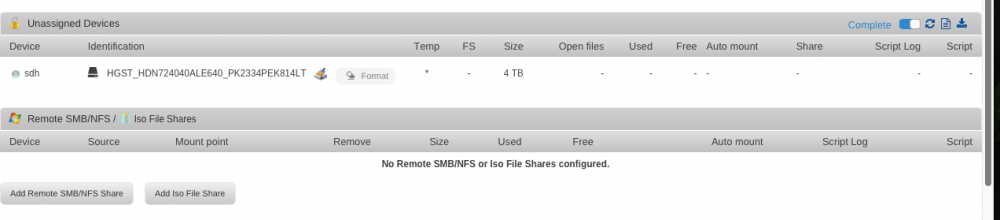
I posted this under the preclear thread but I think this might be a better spot. Here are my logs. I can see the drive under Unassigned Devices but Preclear isn't doing anything it just say Please wait... retrieving information What am I doing wrong? I can't click on anything sdh, or the drive serial number. Do I need to turn on Destructive Mode?, I just read that. I would like to get this new drive cleared to replace one that is giving me issues. Even if I just go to Tools, Settings and click on preclear I still get Please wait... retrieving information tower-diagnostics-20170309-1942.zip tower-syslog-20170313-0845.zip
-
So should it look like this #!/bin/bash echo "Searching for (and deleting) .DS_Store Files" echo "This may take a awhile" find /mnt/user -maxdepth 9999 -noleaf -type f -name ".DS_Store" -exec rm "{}" \; #!/bin/bash echo "Searching for (and deleting) .AppleDB" echo "This may take a awhile" find /mnt/user -maxdepth 9999 -noleaf -type f -name ".AppleDB" -exec rm "{}" \;
-
The plugin isn't working, just says " Please wait... retrieving information!" I have a HGST 4TB NAS drive
-
So I just looked at a script and if I want to add my own all I really need to do is replace whats in bold correct? and the same with the other two files #!/bin/bash echo "Searching for (and deleting) .DS_Store Files" echo "This may take a awhile" find /mnt/user -maxdepth 9999 -noleaf -type f -name ".DS_Store" -exec rm "{}" \; Is there away to add all these to one script? _.DS_Store .AppleDB .AppleDesktop .AppleDouble .TemporaryItems thanks
-
I think I will install this tonight when I get home. How can I add these so they all run at once. I want to be able to delete ALL the .files that Apple puts on the shares. These are the ones I can think of right now. If someone could write this for me I would really appreciate it. I then might be able to look at the file a figure out how to add new ones myself. Thanks ._.DS_Store .AppleDB .AppleDesktop .AppleDouble .TemporaryItems
-
perms:Folder perms != rwxrwxrwx: [rwxrwsrwx]: /mnt/disk6/TV Shows/./.TemporaryItems/folders.501 I just deleted that file Thanks
-
so I tried a test and I got this There are some permission issues with the folders/files you want to move 0 file(s)/folder(s) with an owner other than 'nobody' 0 file(s)/folder(s) with a group other than 'users' 1 folder(s) with a permission other than 'drwxrwxrwx' 0 files(s) with a permission other than '-rw-rw-rw-' or '-r--r--r--' any idea? Should I change something in the settings like "Run as User" should be what?
-
I think I have the same issue. How do I convert to XFS, do I need an extra drive or can I convert what I have without losing data? Mar 9 20:13:38 Tower root: rsync: rsync_xal_set: lsetxattr(""/mnt/user0/."","user.org.netatalk.Metadata") failed: Operation not supported (95)Mar 9 20:13:38 Tower root: rsync: rsync_xal_set: lsetxattr(""/mnt/user0/."","user.org.netatalk.has-Extended-Attributes") failed: Operation not supported (95)Mar 9 20:14:08 Tower root: rsync error: some files/attrs were not transferred (see previous errors) (code 23) at main.c(1178) [sender=3.1.2]
-
Just want to say thank you again. jrdnic helped me get LetsEncrpt setup and did a great job. No way I could have done it by myself. Thanks man.
-
thanks sent a PM back
-
So would anyone like to help me setup Lets Encrypt? I just can't figure it out. We could use Team Viewer. Thinking Thursday sometime if that would work for anyone. I live in the USA on the east coast. Just let me know ahead of time what information you might need so I can have it all ready to go. Feel free to PM if you want. Thanks
-
Ok, so how do I setup a reverse proxy? Will that mess with anything else I have like Sab, Sonarr, etc?
-
How can i set this up so my friends can request moves from outside my network?
-
So if I would want to switch from BinHex Dockers to yours what would I need to do? I currently use Plex, Sonarr and SABNZB from Binhex. I don't have any issues with them, yours just seem to update quicker and offer more. Also what is the difference between yours and his? Thanks


