squirrellydw
Members
-
Joined
-
Last visited
Everything posted by squirrellydw
-
Ok I got it setup and working with iTunes but I don't understand how to use the remote app or set that up cancel that, figured it out
-
ok, then how do I know when it's done scanning my music? Sorry for the dumb questions
-
ok so I guess I will ask a stupid question. How do I use this if I can't see anything?
-
so I got this loaded but how do I get to the web interface?
-
does this support apples Airplay?
-
going to install this tonight or tomorrow. My question is how long does it take to start playing music from a computer or iPhone? For example, I open up my Mac laptop and launch iTunes does iTunes take forever to load the music or is it quick?
-
I got the docker setup and working fine but how do I run this script from my Mac so I can get the 3 files I need to get my Lutron Caseta lights working? https://home-assistant.io/components/lutron_caseta/
-
ever figure this out, I have a couple movies doing the same thing
-
Should I have anything under "Transcoder temporary directory"? The reason I ask is I have a few MKV files won't play through Plex web or on my friends device remotely? The file plays fine on my AppleTV and through VLC on my computer but it won't play on his AppleTV or through Plex web. I have plenty of free space on the drive. The issue seems to be the files are all on disk 7. Disk 7 is fine, I ran a smart report.
-
I like the UN but hate the font for RAID. Make RAID more like UN
-
I have nerd pack and mcelog installed, I just don't know where it is? Where do I find the mcelog?
-
I have this error, I have mcelroy installed but not sure how to get to it. Your server has detected hardware errors. You should install mcelog via the NerdPack plugin, post your diagnostics and ask for assistance on the unRaid forums. The output of mcelog (if installed) has been logged
-
I think you helped me before. If you could help me out again that would be great. I can't do anything right now since i'm at work till probably 11 PM eastern time tonight and I have plans tomorrow night. My main issue is I'm trying to get the unofficial Plex App store installed and it's not working. So I thought I would try and reinstall it. Maybe we can find a time that works and you could look at it.
-
Thanks but if I don't do that would my users to need to set everything up again or would I just need to add them. I'm afraid something might be corrupt and not letting me add channels
-
I currently use Binhex docker but I would like to switch to yours. If I do this I would need to set everything up in Plex again, shares, user, etc correct?
-
I just noticed something weird. Why do all my other dockers have a port assigned to them but Plex doesn't? Plex works fine but wondering why it doesn't show a port being used like my other dockers? I'm also wondering if this is why I can't get the Plex Unsupported App store working
-
Any chance making this into a docker https://www.reddit.com/r/LazyMan/wiki/linux
-
Is this a problem or should I ignore it. I thought I read that I can ignore it but not sure. Template URL for docker application LetsEncryptis missing. Template URL for docker application ombi is missing. Template URL for docker application plexpy is missing. Template URL for docker application radarr is missing.
-
I just got a message "Your server has detected hardware errors. You should install mcelog via the NerdPack plugin, post your diagnostics and ask for assistance on the unRaid forums. The output of mcelog (if installed) has been logged" I installed "mcelog" but where is the LOG at? Is it in the basic unraid log
-
thanks, I was looking for an official unraid docker but I guess this will work for now.
-
OK where is the docker? If I go to Apps in unraid nothing shows up
-
I guess no one wants to make one, bummer
-
thanks that worked
-
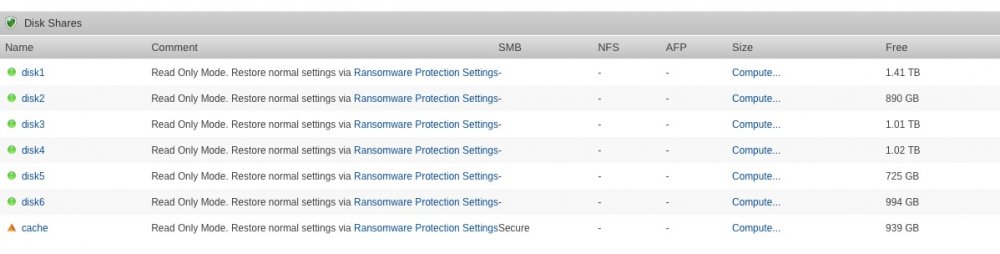
@Squid Thanks update and reboot fixed it. Cache drive still says Read Only Mode.
-
So everything seems to be running fine now that I added this "veto files = /._*/.DS_Store/" but I have two questions. should all the squidbait shares be public or is it better to have them as Secure? My Disk shares say Read Only Mode, is that correct? If not how do I fix it? Thanks