





Shady420
Members
-
Joined
-
Last visited
-
wow a fix this needs ro be the fix for this cuz i have been dealing with this for over 5 years and finlly a fix thank you so much give this person a start
-
this don't work glade it didn't say there Was a fix at least how has this been going on for over 10 years and not yet a fix for it when you have to reinstall windows every 7 to 100 days just to get access to the server sicking
-
come here cu it says there is a fix when in fact no fix been doing this for over 10 years still no fix for it wow
-
this doesn't work i came here cuz it said there was a fix but like always been happening for 10 years plus and still no fix wow
-
good day I have been using unraid for 3 or so years and this is the first time i have rain into this im running unraid latest 40 gig ram 27 tb hard drive Xeon ,WD hard drives 1 gig internet speed not sure what else to put but i cannot install the updated community apps and now have no access to my CA section and it says to install and when I do this is what I get back plugin: installing: community.applications.plg Executing hook script: pre_plugin_checks plugin: downloading: community.applications.plg ... done Executing hook script: pre_plugin_checks Cleaning Up Old Versions Fixing pinned apps Setting up cron for background notifications plugin: downloading: community.applications-2024.11.29-x86_64-1.txz ... plugin: community.applications-2024.11.29-x86_64-1.txz download failure: Generic error Executing hook script: post_plugin_checks any help would be great
-
has something happened to this docker? the download part works but when you want to edit them into or with another video there is no video this just started happening been using metube for 2 years now worked fine up to about 3 months ago so its not good unless you just want to watch it then its fine but if you want to use it in a video don't work you have to download the video then watch and screen rec it im mean i can just screen rec it from YouTube right from the get go no need to metube but if you have any info on what is going on thanks
-
My friend its hard-to-find good help these days when you ask something people are so quick at makes sure they know what mother board and bios and all the way down to what kind of batt for your CMOS but don't care what you have when they slap a google search up don't blame them as people like them will just say there doing their job. The best thing I have found is it look for help on google and or youtube is the best places to get help for unraid space invaders on YouTube is good outdated but still good info my friend hope you found help take care
-
Manual install method | Unraid Docs
-
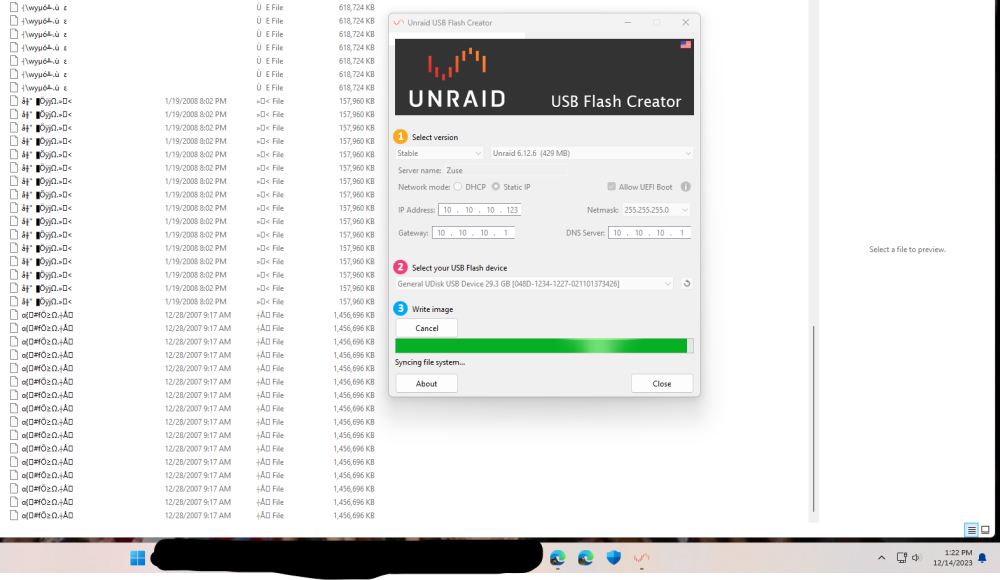
I have dell r510, dell r410, dell r720xd I'm trying to make a use for a server in my windows computer. and all I get is a bunch of weird files and I have done it on my Asus commuter and my 2 HP AIO and the same outcome every time I try to make a USB any help please.
-
Hi there just wondered if you have got this fixed. As I have been using METUBE for months and have had no problem with it was working great till about 4 days ago sometimes it won't download ad most of the time the video downloads and I can't play it says code H264 or 5 but it worked up topo a few days ago so just wondered if you had got this fixed thanks.
