SavellM
Members
-
Joined
-
Last visited
Everything posted by SavellM
-
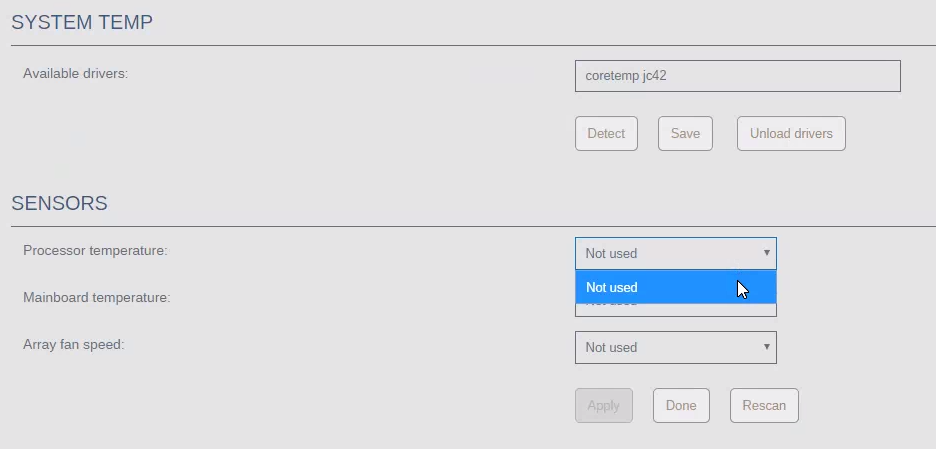
Yup, check this. They all populated correctly the first time. And I selected CPU, Mobo, and clicked apply, then poof they vanished and now nothing.
-
There is no sensors.conf That folder only has: drivers.conf dynamix.system.temp.txz But this is drivers.conf coretemp jc42 I did uninstall the plugin and tried to re-install it. Same deal no sensors.
-
@bonienl Can you help with my issue above with Temps?
-
Can anyone help with this? I want to make sure my CPU cooling is adequate when doing 4k transcodes from Plex.
-
Anyone have ideas for this?
-
Hey guys, so just installed system temp, along with nerdtools for perl. Followed the wiki, and it detected my sensor, and cpu/mobo and everything. Selected cpu, and mobo, and then clicked Apply and poof, now no sensors are gone, and I cant select anything, and I also dont see the temp being displayed. Here are the logs: Sep 30 20:25:14 Odin emhttpd: req (4): cmd=/plugins/NerdPack/scripts/packagemanager&arg1=--download&csrf_token=**************** Sep 30 20:25:14 Odin emhttpd: cmd: /usr/local/emhttp/plugins/NerdPack/scripts/packagemanager --download Sep 30 20:25:14 Odin nerdpack: Processing Packages... Sep 30 20:25:14 Odin nerdpack: Installing perl-5.24.0 package... Sep 30 20:25:17 Odin nerdpack: tmux-2.5 used by plugin: preclear.disk Sep 30 20:25:17 Odin nerdpack: utempter-1.1.6 used by plugin: preclear.disk Sep 30 20:25:18 Odin nerdpack: Cleaning up packages... Sep 30 20:25:18 Odin nerdpack: All packages processed... Sep 30 20:27:10 Odin emhttpd: req (5): cmd=/plugins/dynamix.plugin.manager/scripts/plugin&arg1=install&arg2=https://raw.githubusercontent.com/bergware/dynamix/master/unRAIDv6/dynamix.system.temp.plg&csrf_token=**************** Sep 30 20:27:10 Odin emhttpd: cmd: /usr/local/emhttp/plugins/dynamix.plugin.manager/scripts/plugin install https://raw.githubusercontent.com/bergware/dynamix/master/unRAIDv6/dynamix.system.temp.plg Sep 30 20:27:10 Odin root: plugin: running: anonymous Sep 30 20:27:10 Odin root: plugin: creating: /boot/config/plugins/dynamix.system.temp/dynamix.system.temp.txz - downloading from URL https://raw.githubusercontent.com/bergware/dynamix/master/archive/dynamix.system.temp.txz Sep 30 20:27:10 Odin root: plugin: checking: /boot/config/plugins/dynamix.system.temp/dynamix.system.temp.txz - MD5 Sep 30 20:27:10 Odin root: plugin: running: /boot/config/plugins/dynamix.system.temp/dynamix.system.temp.txz Sep 30 20:27:10 Odin root: plugin: creating: /usr/sbin/sensors-detect - downloading from URL https://raw.githubusercontent.com/bergware/dynamix/master/archive/sensors-detect Sep 30 20:27:11 Odin root: plugin: setting: /usr/sbin/sensors-detect - mode to 0755 Sep 30 20:27:11 Odin root: plugin: running: anonymous Sep 30 20:28:04 Odin kernel: i2c /dev entries driver Sep 30 20:28:14 Odin kernel: i2c /dev entries driver Sep 30 20:31:21 Odin kernel: i2c /dev entries driver Sep 30 20:31:21 Odin kernel: i2c /dev entries driver Sep 30 20:35:37 Odin emhttpd: req (6): csrf_token=****************&title=System+Log&cmd=%2FwebGui%2Fscripts%2Ftail_log&arg1=syslog Sep 30 20:35:37 Odin emhttpd: cmd: /usr/local/emhttp/plugins/dynamix/scripts/tail_log syslog Diagnostics attached too. odin-diagnostics-20170930-2037.zip
-
Ye thats my thoughts too
-
@jbrodriguez quick question, if I only have 1 user account (root) would running this as nobody have any issues? After its run, do I just need to run the permissions checker and I should be ok?
-
Does it attempt to play, with maybe the spinning thing? I've had it be randomly slow (discussed issues a few pages back) it seems mostly better, but still some episodes take a good 10/15 seconds to actually start.
-
This is one of them
-
I gotta ask... Whats in the weekly updates? Seems like every Friday night (yes I know thats the schedule) there is an update for every docker container. But what actually changes?
-
When Plex starts, I get this in the logs: # NOTE: Your system does not have udev installed. Without udev # # you won't be able to use DVBLogic's TVButler for DVR # # or for LiveTV # # # # Please install udev and reinstall Plex Media Server to # # to enable TV Butler support in Plex Media Server. # # # # To install udev run: sudo apt-get install udev # I saw an earlier post that this would only be needed if I was using this tuner. Which tuner is that? If I use an HDHomeRun would I need to worry about this? Should I install udev just for clarity's sake? Also I get this: *** WARNING: Detected another IPv6 mDNS stack running on this host. This makes mDNS unreliable and is thus not recommended. *** Do I need to worry about this too?
-
32GB DDR4 ECC... (2x16gb) Will upgrade to 64GB in the future.
-
Nothing customised, just what Plex had scraped itself. I didnt remove my current shares, I just edited them added in the 2 new paths and deleted the old path. (renamed from movies, to movies1, movies2, movies3)
-
Thanks guys, Changed it to drives, tested and media played immediately even with transcoding...
-
Good point I haven't tested my music since moving to unRAID... I'll try the work around, but was just thinking that in the future when I have like 5+ drives its gonna be a ballache.
-
Ok but then if lets say Movies are split between 3 drives, I have to add 3 mount points? As in /mnt/ I see, disk1,2,3 and cache, user, and user0. So if I edit Movies, I select disk1 how can I ref disks 2 and 3 on the same share? Or I'll need to have movies1 to disk1, movies2 to disk2 and so on. Seems like my library is going to end up with a whack ton of share, which kinda sucks a lot. Is there no other thing we can think of to see why it takes so long? Surely I'm not the only one that is affected by this, otherwise there would be lots of people moaning right? Or do people not know any different?
-
Would I need to change all the mappings for things like Sonarr, Radarr, HP, NZBget and so on?
-
Thanks guys, Is there an easy way to change to /mnt/? Or do I need to stop ALL plugins and adjust them all to use the same share?
-
Ye Plex works fine. But starting a new movie or something takes a good 10seconds or more. My Synology was instantaneous. I do have Dynamix Cache Dirs installed already. Maybe it is not setup correctly, is there a guide to it? (I'm new to unRAID)
-
Can anyone else help?
-
General attached. Plex Media Server.log
-
I did check. It was super clean so didn't bother adding it. I can see no errors anywhere. Apart from it just being slow. Still works though
-
Ye there are lots in: /mnt/user/appdata/plex/Library/Application Support/Plex Media Server/Logs But which would you like? I grabed a Transcoder log hopefully this will be the one? Plex Transcoder Statistics.log
-
Now that you all finished your fight, can anyone help me? I timed it this morning and it was actually over 10 seconds to start playing.