





Healzangels
Members
-
Joined
-
Last visited
Everything posted by Healzangels
-
Past few days I've suddenly seen my docker image filling up and found the culprit to also be plex. I have /transcode mapped to /tmp and also a PlexRamScratch ram disk setup. Sounds similar to what you're seeing. If I find the root cause will update here as well.
-
Seeing this as well on one of my containers using the memory constraints. Is there a new better way to do this?
-
Kept looking through thread and saw this so gave it a whirl. Seems to have fixed my problem as well. I can now save the settings changes! Going to continue testing but seems promising!
-
Shucks unlucky I guess! I've tried with Chrome, Firefox, Safari as well as in incognito mode with no extensions running but still CSRF. Tried the new beta and same thing. I'll attempt a few other options and see if they have any success. Thanks for the info.
-
If there is any additional information I can provide as well; let me know! Would love to try and get working to backup my appdata in this method once again. Cheers!
-
Did a bit more digging and did find "/Settings/AB.Main: missing csrf_token" in my logs. Found this mentioned as well on 12 page of this thread but didn't see what the fix might be. Thanks in advanced!
-
Greetings! Apologies if I missed this in another post. I recently upgraded to 6.12.6 and finding the old App Backup deprecated installed your awesome new one. Going to setup found it pretty straight forward however when I click save after configuring I am redirected back to http://IP/Settings/AB.Main but just a solid white page. Refreshing or navigating away and back shows the settings not having saved. I've tried this in multiple different browsers with no luck. Also tried uninstalling/reinstalling plugin as well as restarting unraid entirely. Thanks for any assistance in getting this setup. -Cheers
-
👍 perfect, thanks!
-
Hmm would it only appear if I'm already on 6.12? I'm currently still on 6.11.5 and was thinking of setting up folderview prior to the upgrade but doing the same search comes back No Matching Applications Found. Showing version 2023.07.03 in the lower left corner. Thanks for the info!
-
Apologizes for the silly question but for installation; this should be done from Plugins -> Install Plugin -> Adding URL? Didn't see it in CA so figure that's the case? Thanks!
-
Yup, lesson learned! Did you end up changing to a Nmve or something similar for your transcoding? Curious the pros and cons you've found if so. Well maybe besides the obvious on I've found myself with hah!
-
Were you able to find a fix for this? Thanks
-
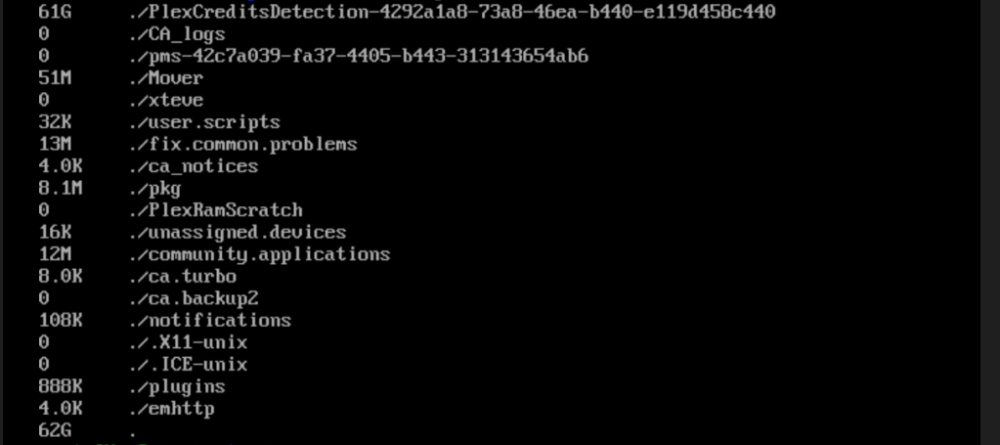
Issue occurred again this morning but was able to still access via ssh and find the culprit. Turns out it looks like a known bug currently with Plex Credit Detection. https://forums.plex.tv/t/plex-crashing-server-out-of-inodes-on-tmp/833431 will disable until a fix is in place. Hope this helps if anyone else has had this happen as well.
-
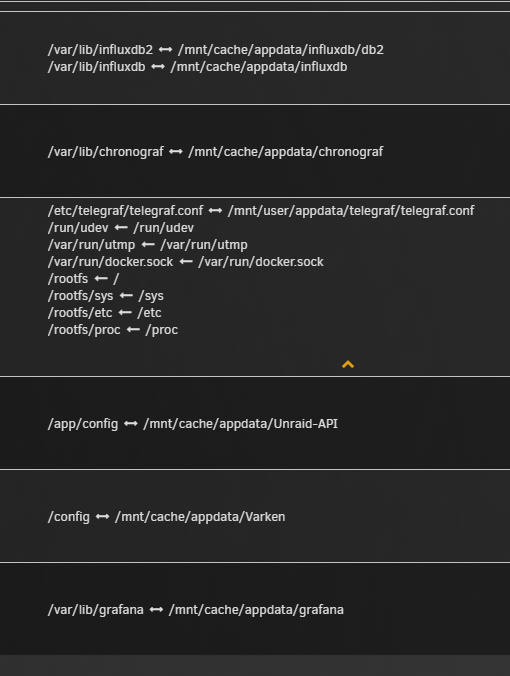
Thinking it may be due to GUS (Grafana unRaid Stack) I setup this weekend? I've taken a look at my mappings and see telegraf is set to use map /rootfs to ram locations. Double checked instructions I had been following and these seem correct so may be not the issue? Maybe a more seasoned person can explain/confirm those mappings as well.
-
Also output of du -xh --max-depth=1 / 0 /opt 884K /.cache 21M /tmp 1.2G /usr 23M /sbin 0 /mnt 30M /lib64 8.2M /lib 0 /home 15M /etc 12M /bin 12M /var 8.0K /root 1.3G /
-
Greetings! Woke up to the follow this morning: Warning: session_write_close(): write failed: No space left on device (28) in /usr/local/emhttp/plugins/dynamix/include/.login.php on line 218 Warning: session_write_close(): Failed to write session data (files). Please verify that the current setting of session.save_path is correct (/var/lib/php) in /usr/local/emhttp/plugins/dynamix/include/.login.php on line 218 Warning: Cannot modify header information - headers already sent by (output started at /usr/local/emhttp/plugins/dynamix/include/.login.php:218) in /usr/local/emhttp/plugins/dynamix/include/.login.php on line 222 After doing some searching/reading of forum posts looks like I have something writing to RAM which shouldn't be/something misconfigured. I've since restarted and am back in so not sure if the results of the df -h command will show anything of value but these are my current results: Filesystem Size Used Avail Use% Mounted on rootfs 63G 1.3G 62G 3% / tmpfs 32M 7.0M 26M 22% /run /dev/sda1 120G 886M 119G 1% /boot overlay 63G 1.3G 62G 3% /lib/firmware overlay 63G 1.3G 62G 3% /lib/modules devtmpfs 8.0M 0 8.0M 0% /dev tmpfs 63G 0 63G 0% /dev/shm cgroup_root 8.0M 0 8.0M 0% /sys/fs/cgroup tmpfs 128M 800K 128M 1% /var/log tmpfs 1.0M 0 1.0M 0% /mnt/disks tmpfs 1.0M 0 1.0M 0% /mnt/remotes tmpfs 1.0M 0 1.0M 0% /mnt/addons tmpfs 1.0M 0 1.0M 0% /mnt/rootshare tmpfs 64G 303M 64G 1% /tmp/PlexRamScratch /dev/md1 21T 20T 588G 98% /mnt/disk1 /dev/md2 21T 20T 640G 97% /mnt/disk2 /dev/md3 21T 20T 631G 97% /mnt/disk3 /dev/md4 19T 18T 736G 97% /mnt/disk4 /dev/md5 19T 17T 1.3T 94% /mnt/disk5 /dev/md6 15T 15T 540G 97% /mnt/disk6 /dev/md7 7.3T 7.0T 345G 96% /mnt/disk7 /dev/md8 7.3T 7.1T 236G 97% /mnt/disk8 /dev/md9 7.3T 7.0T 335G 96% /mnt/disk9 /dev/md10 7.3T 6.9T 430G 95% /mnt/disk10 /dev/md11 7.3T 7.1T 265G 97% /mnt/disk11 /dev/md12 7.3T 6.9T 421G 95% /mnt/disk12 /dev/md13 7.3T 7.2T 146G 99% /mnt/disk13 /dev/md14 21T 19T 1.3T 94% /mnt/disk14 /dev/nvme1n1p1 3.7T 611G 3.1T 17% /mnt/cache /dev/nvme0n1p1 1.9T 1.2T 657G 65% /mnt/plex /dev/nvme2n1p1 1.9T 3.8M 1.9T 1% /mnt/windows shfs 182T 175T 7.7T 96% /mnt/user0 shfs 182T 175T 7.7T 96% /mnt/user /dev/loop2 125G 66G 58G 54% /var/lib/docker /dev/loop3 1.0G 4.3M 905M 1% /etc/libvirt //192.168.0.10/Multimedia 50T 49T 1.4T 98% /mnt/remotes/192.168.0.10_Multimedia Appreciate any assistance in getting to the bottom of this and if I can provide any additional logs/screen shots let me know! Thanks!
-
Greetings! Came across an issue with my binhex-privoxyvpn setup this morning. Everything had been working without issue for a while/set it and forget it so not sure when the issue started occurring. The issue seems to be when attempting to access the WebUI of my service I have routed through binhex-privoxyvpn I receive an "ERR_CONNECTION_TIMED_OUT" I can confirm based on the container logs that traffic is properly being routed through the vpn container/receiving the vpn IP address but can't seem to gain access to the WebUI. Changing the network interface to bridge/custom docker network I am once again able to access the WebUI so the container seems to be working properly. Also I've found setting setting 'VPN_ENABLED' to no also provides working tests to the services webui so maybe the issue is with my Wireguard file? I've updated it will a newly acquire setup config from Mulvad. Weirder still as I've continue to troubleshoot; came across this reddit post, which mentioned having a very similar issue and someone fixing by trying with OpenVPN instead of Wireguard. Gave that a shot and surprisingly had the same result was able to access WebUI if I'm using OpenVPN instead of Wireguard. Cheers docker run -d --name='privoxyvpn' --net='dockernetwork' --privileged=true -e TZ="America/New_York" -e HOST_OS="Unraid" -e HOST_HOSTNAME="MyServer" -e HOST_CONTAINERNAME="privoxyvpn" -e 'VPN_ENABLED'='yes' -e 'VPN_PROV'='custom' -e 'VPN_CLIENT'='wireguard' -e 'VPN_OPTIONS'='' -e 'LAN_NETWORK'='10.0.1.0/24,172.18.0.0/24' -e 'NAME_SERVERS'='84.200.69.80,37.235.1.174,1.1.1.1,37.235.1.177,84.200.70.40,1.0.0.1' -e 'SOCKS_USER'='admin' -e 'SOCKS_PASS'='socks' -e 'ENABLE_SOCKS'='no' -e 'ENABLE_PRIVOXY'='yes' -e 'VPN_INPUT_PORTS'='5047' -e 'VPN_OUTPUT_PORTS'='5047' -e 'DEBUG'='false' -e 'UMASK'='000' -e 'PUID'='99' -e 'PGID'='100' -l net.unraid.docker.managed=dockerman -l net.unraid.docker.webui='http://config.privoxy.org/' -l net.unraid.docker.icon='https://raw.githubusercontent.com/binhex/docker-templates/master/binhex/images/privoxy-icon.png' -p '8118:8118/tcp' -p '9118:9118/tcp' -p '5047:5047/tcp' -v '/mnt/user/appdata/privoxyvpn':'/config':'rw' --sysctl="net.ipv4.conf.all.src_valid_mark=1" 'binhex/arch-privoxyvpn' 36e042bf62fdc40b575e3d2b88c7c61daca6e5dd903e60db90530d9ea3a901f4 Container Log -A OUTPUT -o eth0 -p tcp -m tcp --sport 5047 -j ACCEPT -A OUTPUT -o eth0 -p udp -m udp --sport 5047 -j ACCEPT -A OUTPUT -s 172.18.0.0/16 -d 10.0.1.0/24 -o eth0 -p tcp -m tcp --sport 8118 -j ACCEPT -A OUTPUT -s 172.18.0.0/16 -d 10.0.1.0/24 -o eth0 -p tcp -m tcp --dport 5047 -j ACCEPT -A OUTPUT -s 172.18.0.0/16 -d 172.18.0.0/24 -o eth0 -p tcp -m tcp --sport 8118 -j ACCEPT -A OUTPUT -s 172.18.0.0/16 -d 172.18.0.0/24 -o eth0 -p tcp -m tcp --dport 5047 -j ACCEPT -A OUTPUT -p icmp -m icmp --icmp-type 8 -j ACCEPT -A OUTPUT -o lo -j ACCEPT -A OUTPUT -o wg0 -j ACCEPT -A OUTPUT -s 172.18.0.0/16 -d 172.18.0.0/16 -j ACCEPT -A OUTPUT -d removedfromlog/32 -o eth0 -j ACCEPT -A OUTPUT -o eth0 -p tcp -m tcp --sport 5047 -j ACCEPT -A OUTPUT -o eth0 -p udp -m udp --sport 5047 -j ACCEPT -A OUTPUT -s 172.18.0.0/16 -d 10.0.1.0/24 -o eth0 -p tcp -m tcp --sport 8118 -j ACCEPT -A OUTPUT -s 172.18.0.0/16 -d 10.0.1.0/24 -o eth0 -p tcp -m tcp --dport 5047 -j ACCEPT -A OUTPUT -s 172.18.0.0/16 -d 172.18.0.0/24 -o eth0 -p tcp -m tcp --sport 8118 -j ACCEPT -A OUTPUT -s 172.18.0.0/16 -d 172.18.0.0/24 -o eth0 -p tcp -m tcp --dport 5047 -j ACCEPT -A OUTPUT -p icmp -m icmp --icmp-type 8 -j ACCEPT -A OUTPUT -o lo -j ACCEPT -A OUTPUT -o wg0 -j ACCEPT 2023-07-02 14:35:12,949 DEBG 'start-script' stdout output: -------------------- 2023-07-02 14:35:12,950 DEBG 'start-script' stdout output: [info] Attempting to bring WireGuard interface 'up'... 2023-07-02 14:35:12,954 DEBG 'start-script' stderr output: Warning: `/config/wireguard/wg0.conf' is world accessible 2023-07-02 14:35:12,958 DEBG 'start-script' stderr output: [#] ip link add wg0 type wireguard 2023-07-02 14:35:12,959 DEBG 'start-script' stderr output: [#] wg setconf wg0 /dev/fd/63 2023-07-02 14:35:12,959 DEBG 'start-script' stderr output: [#] ip -4 address add 10.67.63.4/32 dev wg0 2023-07-02 14:35:12,962 DEBG 'start-script' stderr output: [#] ip link set mtu 1420 up dev wg0 2023-07-02 14:35:12,964 DEBG 'start-script' stderr output: [#] resolvconf -a wg0 -m 0 -x 2023-07-02 14:35:12,973 DEBG 'start-script' stderr output: [#] wg set wg0 fwmark 51820 2023-07-02 14:35:12,974 DEBG 'start-script' stderr output: [#] ip -4 route add 0.0.0.0/0 dev wg0 table 51820 2023-07-02 14:35:12,974 DEBG 'start-script' stderr output: [#] ip -4 rule add not fwmark 51820 table 51820 2023-07-02 14:35:12,975 DEBG 'start-script' stderr output: [#] ip -4 rule add table main suppress_prefixlength 0 2023-07-02 14:35:12,977 DEBG 'start-script' stderr output: [#] sysctl -q net.ipv4.conf.all.src_valid_mark=1 2023-07-02 14:35:12,978 DEBG 'start-script' stderr output: [#] iptables-restore -n 2023-07-02 14:35:12,979 DEBG 'start-script' stderr output: [#] '/root/wireguardup.sh' 2023-07-02 14:35:14,035 DEBG 'start-script' stdout output: [info] Application does not require external IP address, skipping external IP address detection 2023-07-02 14:35:14,037 DEBG 'start-script' stdout output: [info] Application does not require port forwarding or VPN provider is != pia, skipping incoming port assignment 2023-07-02 14:35:14,039 DEBG 'start-script' stdout output: [info] WireGuard interface 'up' 2023-07-02 14:35:14,068 DEBG 'watchdog-script' stdout output: [info] Privoxy not running 2023-07-02 14:35:14,069 DEBG 'watchdog-script' stdout output: [info] Attempting to start Privoxy... 2023-07-02 14:35:15,072 DEBG 'watchdog-script' stdout output: [info] Privoxy process started 2023-07-02 14:35:15,073 DEBG 'watchdog-script' stdout output: [info] Waiting for Privoxy process to start listening on port 8118... 2023-07-02 14:35:15,084 DEBG 'watchdog-script' stdout output: [info] Privoxy process listening on port 8118
-
Seem to be running into this issue? I enable the feature, needed to restart my system after confirming working and now back up and running and can't ping my containers. Anyone able to find a method of preventing this sans restarting the Docker service? Thanks!
-
Hey lqid10t did you ever find a solution to Npm S6-SYNC hang. My instance is doing the exact same thing and going crazy trying to figure out why. Thanks!


