





Healzangels
Members
-
Joined
-
Last visited
Everything posted by Healzangels
-
Greetings! Was curios if this plugin was also compatible/would work with 7.0/7.0.1 Looking for a new way to add PowerShell without Nerdtools. Thanks!
-
Are you running through a reverse proxy? If so make sure you’ve got websocket support enabled/setup properly.
-
This might be a silly question but is it possible to have multiple Ignore file and folder listed text paths. For example If I have File list path: /mnt/user/system/plexcache/plexcache_mover_files_to_exclude.txt is there a way to add an additional path/.txt file for it to check through/ say File list path: /mnt/user/system/plexcache/plexcache_mover_files_to_exclude.txt, /other/path/to/file/ignore.txt Or some other formatting to achieve this? Thanks!
-
@Alextrical curious if you had been able to make it any further along. I ended up putting this on the back burner as wasn't able to quite able to bring it a cross the finish line. Cheers!
-
Having the same issue with the same model UPS. Was curious which settings you were using for your Driver and Driver port. Cheers!
-
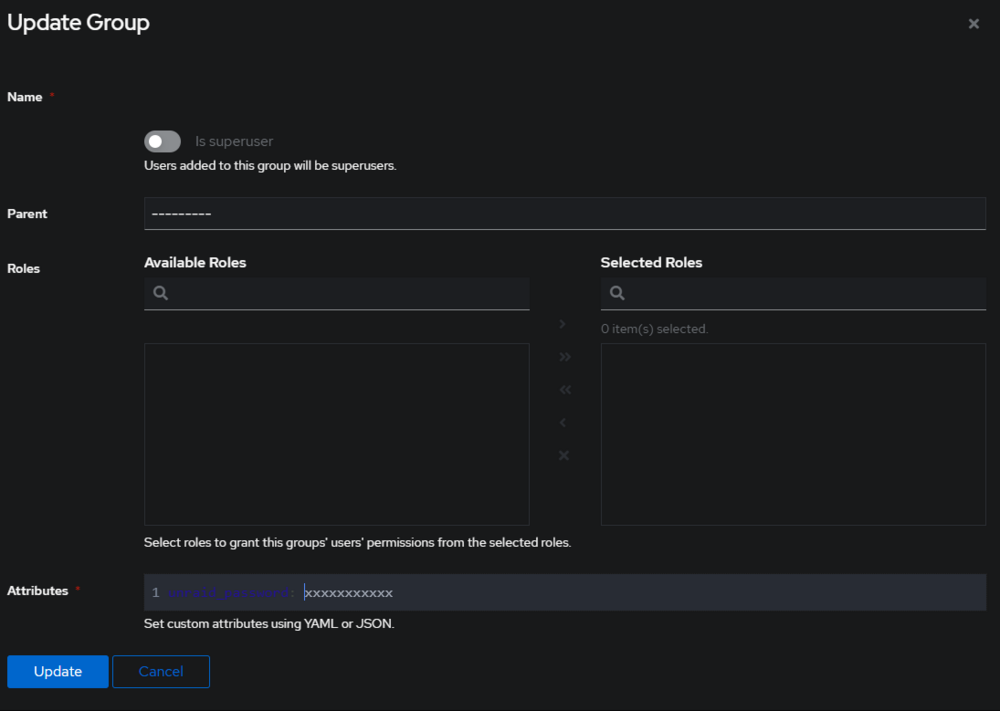
A gotcha indeed! Thanks for the info/better understanding. Also thanks for the updated code, appreciate it. Was able to test today but unfortunately still not a success. New code in place and updated variables. Interestingly nothing in the Authentik logs like I was seeing before when I had the () or internal_host = "http://10.0.1.xx". Just looks like a successful login attempt from the logs side. On the webpage side, I see my normal Authentik log -> login with my account that I have assigned to the group containing my unraid_password attribute -> greeted by the normal unraid login page. Wish I could provide more information but if there are some other logs I could be checking or within Chrome console happy to provide any info. Again thanks for the assistance troubleshooting/doing this, and no worries if we hit a full roadblock! - Cheers
-
Hey thanks so much for the follow up and extra information! Also apologies I mid testing so made some mistakes when writing yesterdays post which lead to some inaccuracies to what I was seeing/communicated here. D'oh sorry! The error I had been seeing yesterday was actually the follow (not the cookie is missing, I realized this was the end of the expression not the error message) Traceback (most recent call last): File "Unraid_Authentik", line 74, in <module> File "Unraid_Authentik", line 36, in handler File "/ak-root/venv/lib/python3.12/site-packages/requests/sessions.py", line 637, in post return self.request("POST", url, data=data, json=json, **kwargs) ^^^^^^^^^^^^^^^^^^^^^^^^^^^^^^^^^^^^^^^^^^^^^^^^^^^^^^^^^ File "/ak-root/venv/lib/python3.12/site-packages/requests/sessions.py", line 589, in request resp = self.send(prep, **send_kwargs) ^^^^^^^^^^^^^^^^^^^^^^^^^^^^^^ File "/ak-root/venv/lib/python3.12/site-packages/requests/sessions.py", line 703, in send r = adapter.send(request, **kwargs) ^^^^^^^^^^^^^^^^^^^^^^^^^^^^^^^ File "/ak-root/venv/lib/python3.12/site-packages/requests/adapters.py", line 622, in send raise ConnectionError(e, request=request) requests.exceptions.ConnectionError: HTTPConnectionPool(host='http', port=80): Max retries exceeded with url: /10.0.1.xx/login (Caused by NameResolutionError("<urllib3.connection.HTTPConnection object at 0x1526279ea510>: Failed to resolve 'http' ([Errno -2] Name or service not known)")) Expression After testing more today I found that this was caused as during one point of my testing I had set internal_host = "http://10.0.1.xx" Rather then just the IP address. I've since removed the "http://" (internal) and "https://" (external) from my entries. With those changes logging into authentik in front of my Unraid address I actually see nothing in the logs regarding my Scope Mapping (which seems like a good thing!) however I am still stopped by my unraid login screen. I then tested with removing the "200" from the list of good status. With that change I would see a "Property Mapping exception" in my Authentik logs containing the following Exception. Exception Traceback (most recent call last): File "Unraid_Authentik", line 74, in <module> File "Unraid_Authentik", line 46, in handler builtins.TypeError: argument of type 'int' is not iterable Thanks again for the assistance in troubleshooting! Feels very close when I leave the 200 in place however with no entries in the logs but still hitting the unraid login not sure what to test next. - Cheers!
-
Hey @dangle thanks for putting this together! Was able to follow the instructions fairly well but seem to be hitting an issue somewhere. Created a new group with the attribute unraid_password: xxxxxxx being the password used for the root account, assigned this to my normal Authentik account I use. I've created a Property Mapping -> Scope Mapping following instructions. I've updated internal_host internal_host = "10.0.1.xx" and my external external_host = "https://server.xxxxxx.com" I had an existing Provider setup so I added the additional scopes I created above. It already had the same external_host Existing application, as well as already assigned to Outpost. I had existing setup for forward authentication setup in my npm so changes there. In the logs I do see the following. # Something went wrong if the login succeeded but the cookie is missing ak_logger.error("cannot get unraid token") return {} So think I'm close but missing some part of the equation. Thanks for any and all assistance might be able to provide to get over the final hurdle. - Cheers!
-
Awesome thanks very much! Gave that a shot and ran into a slight error/error message but found which included running ssh-keyscan -H TARGET_HOST >> ~/.ssh/known_hosts So ran that with the TARGET_HOST set to my remote_host from the command you had above and everything seems to be working now. I see the key listed under my root user if I navigate to the Users section in the GUI. I think that does it then? Thanks again.
-
Awesome, great to hear as well! I'll adjust and report back next time I reboot my system (should be this weekend as have some maintenance planned!) Thanks a lot.
-
Greetings! Reading through this thread I think I've confused myself some what. I understand 6.9 changed how the symlinks behave making some older steps unneeded. Trying to figure out what are the correct steps to take now if I am trying to use passwordless SSH between two unraid servers. If anyone could provide a suggested post to follow or provide steps that would be super as I'm hesitant to mess an original config up or something similar. Thanks!
-
Shucks, well thanks for the update! If I get it setup and working will report back.
-
Hey was wondering if you were able to solve this, seeing a similar error on myself when trying to use the iptables-allports. -Cheers!
-
Really enjoying the script! Thanks for sharing with the community. I was curious would there be any harm in setting the set the run to "At Startup of Array" to allow for it to be running after a system reboot? Or would this not work since it needs to be running in the background? Ideally would love to not have to remember to go in and start the script after restarting the system. Thanks - Cheers!
-
Greetings wondering if you found a solution to the error:0 in libc-2.37.so. My system seems to become very unresponsive and am seeing these in my logs. Cheers!
-
Looks like this didn't gain traction but also curious if anyone has an answer. - Cheers!
-
Greetings! Was wondering if anyone had been able to get the email notifications from fail2ban working. I've got Cloudflare blocking working however can't seem to figure out how to get the sendmail.conf working properly with the setup.
-
Thanks so much! I double checked yesterday again for possible conflicts with extensions/browser but to no avail. Tested with new release and "fix" is working great so thanks again! -Cheers!
-
Greetings once again! I've found each update I need to re-add this line to be able to have my appdata backup function as intended/not have issues saving. <input type="hidden" name="csrf_token" value="<?=_var($var,'csrf_token')?>"> I know in the minority as this issue doesn't seem to happen to everyone but wondering if that was a change that could be baked in to not need to make the change when the plugin is updated. Cheers!
-
Makes sense, thanks for the additional insight.
-
Fantastic, exactly what I was asking. Thanks for sharing! Curious how often you found the script necessary to run? Every 12 hours via User-Scripts say? Thanks again.
-
Wondering if you could re-share script seems to have been removed - Cheers!
-
Hey was curious if SMB ended up being the culprit. I've disabled my Share SMB settings but have it on for SMB Shares to other local NAS I have so reluctant to turn it off esp this problem seems to have only started past few weeks. Thanks!
-
Hey seem to be having this same issue! Was wondering if you had found a fix. I am reluctant to stop SMB as I use that for mounting network shares to me NAS/additional media content. Thanks!
-
Greetings! Having an issue with my unraid system the past few days and can't seem to nail down what the culprit is. The symptom seems to be over time my systems memory usage will continue to creep up until the system becomes unstable and eventually will lock up. I am running on unraid 6.12.6 I 've also found while seeing the memory usage climb if I am to shut down the docker service while the usage drops it certainly does not appear to be what is consuming the most. Also it seems whatever I am seeing using the memory is not being caused by docker in this case? However restarting the system, starting the array but leaving the docker service off the /usr/local/bin/shfs does not seem to appear. Below is what I am currently seeing running htop after turning off the docker service. That /usr/local/bin/shfs will continue to climb. I have seen many posts in regards to /usr/loca/bin/shfs consuming a lot of CPU what had a hard time finding those referring to memory usage. If I could figure out what exactly was causing this that would be great! No major changes have occurred on the system outside of regular docker container updates. Which in turn might be a *major* change but I am having a hard time pinpointing which container it might be. Appreciate any assistance anyone can provide in getting to the bottom of this!



