





ArveVM
Members
-
Joined
-
Last visited
Everything posted by ArveVM
-
checked some logs and google a bit - and came upon this thread with somehow similar issue: It mentioned issues with HDDtemp (which I have installed), so I'll try deactivate it and see if disk keep quiet as intended posting here just to hint to the solution and keep a link to the thread somewhere I can find it
-
unfortunately not able to do that at the moment,, all 3,5'' slots are hot-swap bays in my chassis,, will have to make some kind of adjustment to get fixtures for other spin-drives below the hot-swap bays,,, By the way,, the parity 10tb red and the two data-drives in the array are also on the same drive-bay-row (same "bay-controller" and cable to HBA) - so it is rather strange behaviour for one drive compared to others ?
-
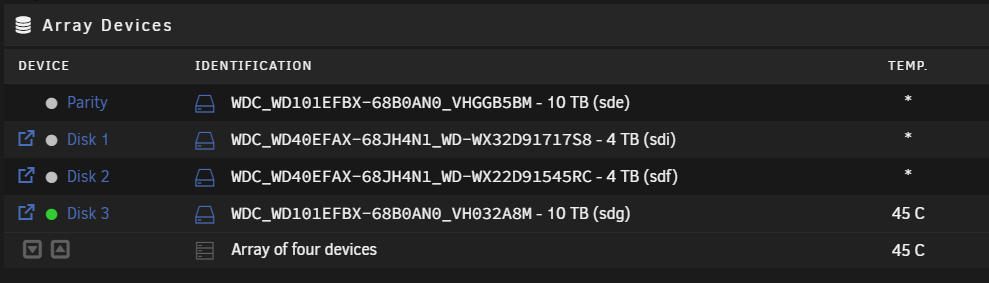
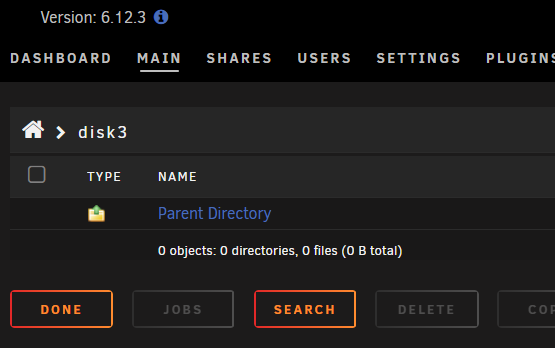
I've got an array of three disks with a parity Disk 3 was last added, 10tb same as parity. it is still not used (was something spilled over, but I corrected in share-settings and cleaned with unBalance) and it is refusing to spin down and stay down Settings / disk settings / Default spin down delay: 15 min Disk3 / settings / Spin down delay: 15 min (was set to default but have now tested with 15min) Drive seems empty,, even trying to press "spin down" in main-tab is effective for a little while,, the drive keeps spinning up a minute or so later,,, Was planning on using it for "non essential data" - so really inconvenient that it keeps spinning attaching diagnostics for further investigations PS: server is currently running pre-clear on another drive at the moment,,, unraid1-diagnostics-20230804-2001.zip
-
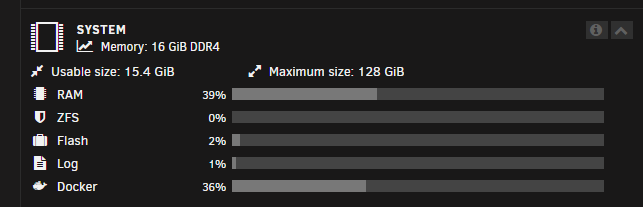
So updated the Fix-common-problems-plugin to latest and did a scan, and it came up with this jem so I guess that running a handfull of dockers creates extreme peaks in addition to the normal <40% ram utilization? I was planning on looking for some good black-friday-offers on additional RAM,, but I guess I have a mis-configuration somewhere that is causing theese crashes - and I'd like to know what I've done wrong and not just put on bandaids with MORE POWER adding a fresh diagnostics in case it shows more valuable info for you experts unraid1-diagnostics-20230728-2015.zip

-
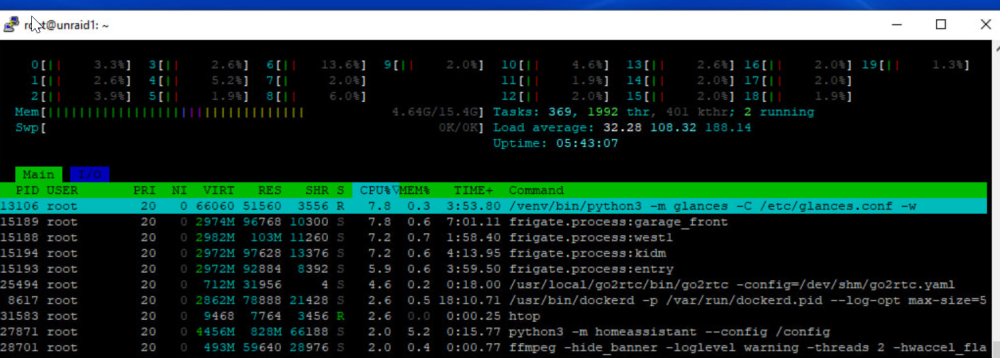
got the GUI back to beeing responsive a bit,, and got to download diagnostics: unraid1-diagnostics-20230728-1830.zip also got an advice (and guidance) to log on to terminal via PuTTY and got this view from htop he indicated that the load was high,, but not what could have caused it,, After a while the server was again responsive,, so what could it have been ? (diagnostics attached)
-
might be worth mentioning that I've added a 10tb data-drive, a additional 1tb nvme and an m2-coral-tpu the last week,, TPU worked fine with the driver-plugin and showing just fine in Frigate The data-disk was OK for preclear,, but had a bit issues getting it into the array (solved in separate thread,, massieve thanks to @itimpi new nvme and one unassigned device added as pools,,, - where the unassigned was previously shared so was a bit of cleaup on shares/config -but that seemd to work fine - so don't think that is relevant - but what do I now
-
Have been expanding server and had some issues - but seemed OK and then upgraded from 6.12.2 to 6.12.3 and got a fawlty shutdown and need for parity-check. Before check is completed,, the entire server freezes. It responds to ping, but not awailable any UI ! no dockers resond to their web-services/Apps (HA, homepage Unsure if it is flash-issue, or it might be network-related? (Flash is connected to USB2-port,, device was SanDisk Ultra Fit 32 GB USB 3.1 and is now SanDisk Ultra USB 3.0 - 32 GB) In UnifiDreamMachinePro (router), Unraid is showing up with new mac-adresses all the time now,,, it is connected via 2,5gbe nic on mobo (Gigabyte Z690 ddr4), and have been a bit strange before 6.12, but stranger after,, at 6.11 (and old 1gbe nic- mobo) I had it defined as fixed IP,, but on the new it is changing mac's quite frequently,,, First time it hung completely I removed the flash and "fixed it" in my computer and it was fine,,, - for a day Then it happened again, and I bought a new flash and copied config and restarted this afternoon - and now it is failed again,,, Is there some way to do investigation to network-issues first? And is there any way I've set some logging that is not compatible with the flash-drive?? Would apriciate some guidance


-
first issue solved by de-attaching and re-attaching cables,, Second issue fixed by assigning drive to a dedicated pool for Frigate,,
-
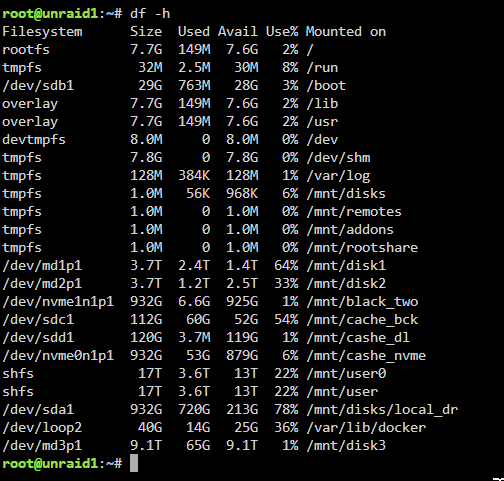
That made the trick,, Shut-down, re-attached cables, even moved the disk new to second row (mostly for improved airflow), startup and format is completed on first try ! - thanks a lot for the assistance and guidance ! Now I see a second issue,, my old crappy spin-drive for Frigate-recording is having a hickup again. it seems to be mounted,, but there are no indication of size (last time I checked there was about 12gb of snapshot/video on it) I've previously seen issues where the dropping of of the usb-attached Local_dr messes with the (sdi)-references,, so I've found them in console using then I've unmounted and was able to mount again,,, But now it seems like it is not mounted and just not available to mount? unraid1-diagnostics-20230727-0000.zip



-
It's connected through the LSI-HBA. The HBA has two cables to two four-bay hotswap in the 4408-case,,, and the new drive is the first one on the upper bay,, - but it has run just fine for two days for the pre-clear?? Anyway,, will shut down and try re-attach the cables,, - will report back when done Thanks for the assistance so far
-
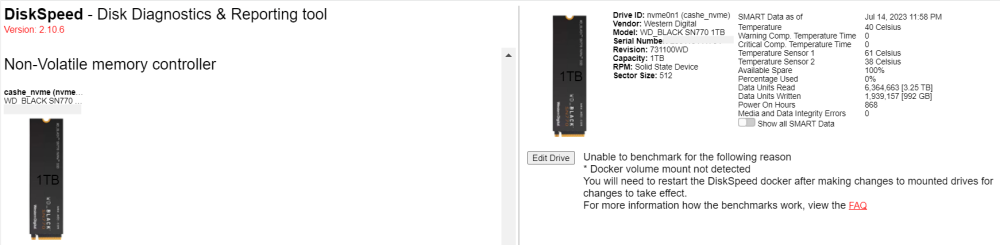
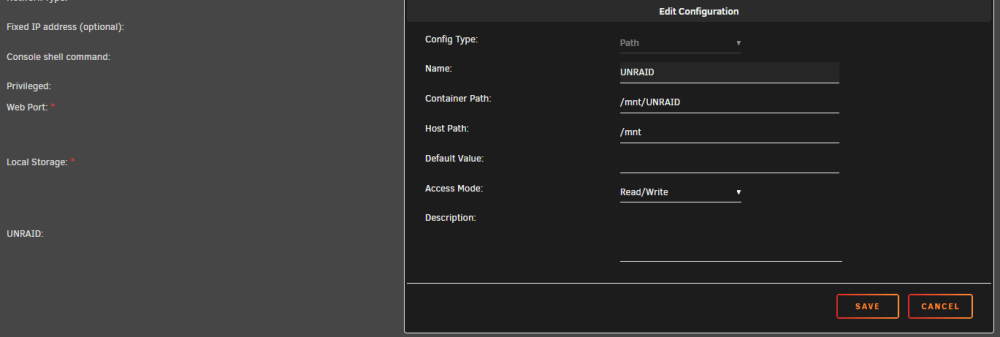
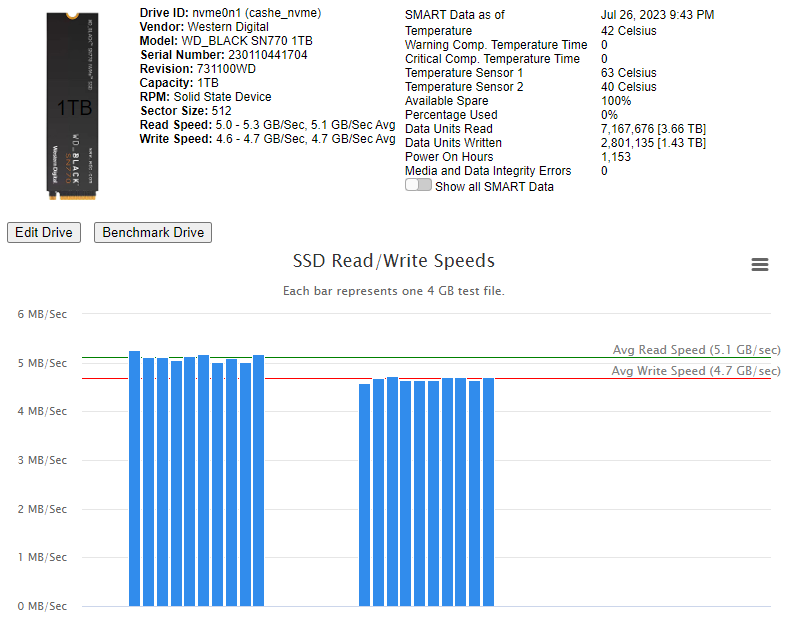
soooo,, just putting my self out there - noob as I am Thanks for the exellent app,,, when I actually figured out how to match the FAQ-instructions,, everyting works fine and for other noobs that find the exellent FAQ a bit hard on the first try,, this is how I set the path allocation : then it is possible to "benchmar drive" for ssd's both my mobo-attached sata and my nvme's come up just fine;) Sample from my appdata-drive;
-
just tried once more,, was a bit longer standing with "formating" - but got back to the "unmountable" unraid1-diagnostics-20230726-2018.zip
-
I did not follow this to the letter,, https://docs.unraid.net/unraid-os/manual/storage-management#data-disks given that I added the drive and did a preclear first,, but should it not be OK to do 1 - 5 - 6 - 8 - 9 - 10 ? I am able to click format, and the disk shows for a few seconds as "Formating" then it is back to the status of "unmontable,,,, " after a few seconds,,


-
Bought new drive, WD red plus 10tb. Added to server, pre-cleared with unassigned devices. Stop array, (tried to at least) restart server, new disk added to array. Tick the box to format unmountable disk - click format,, status showing Formating device(s) for a few seconds, and then the Array is back to showing a disk that is not formated PS: Was not able to stop array when going to shut down to install new nvme,, can the pause of parity-check after restart be the issue? Know I did not have to restart,,, but wanting to ad an extra nvme and a m2-coral and adjust some fan-settings in bios,, so wanted to get that done when i had the oportunity Awaiting some qualified advice before starting parity-check,, in case there is somehting else I should rather do before that,,, unraid1-diagnostics-20230726-1847.zip

-
Did you get a response or a solution to this? Having the same problem,, have not tried the temp-plugin, but I'm using glances+hddtemp to show HD-temps in HA - could that be an issue? Two pwm-fans directly to new motherboard; Gibabyte Z690
-
new build and just got word of DiskSpeed,,, - great tool, so thanks a lot Good readings on HBA and mobo-attached SSD's, but the nvme on the gigabyte z690 gamingX is not giving me any diskspeed ;( The drive is cashe-drive, xfs, used for docker/appdata please advice next step - have seen other in this post getting good data from their nvme - so guess there is an obvious config I'm missing? - or something I should check/post for further investigation?
-
Hi first of all - huge thanks for the plugin - much apriciated! running unRaid 6.11.5, DFM 2023.06.01 a bit of a noob,, so have just learnt to watch out for permissions,, and using DFM makes it that much easier My issue: used DFM to create: - new share bck_staging and it got permissions nobody-drwxrwxrwx - subfolder staging got same permissions - and then the following sub-folders got theese permissions: (one folder with nobody as owner and two with root as owner ) so it is super easy for me to change the permissions in DFM, but is this a bug or a feature? If it's a feature and supposed to be like this - can you please give me some pointers to why? - with my current knowledge I'd like to change owner to nobody on all files/folder in this share,,, but i have to ask to get better knowledge

-
It's a LSI 9211-8i / WD RED / WD RED PLUS combo unfortunately the drives are outside the SFF, and only cables from the LSI 9211-8i is long enough,,, so guess swithcing from one port to the other on the LSI would not really be a test? (also mobo is low on sata-connections and had to use them for the two cashe-SSD-disks (which did not like the LSI) I don't think I will invest more time on this,, as clearly the psu is lower capacity than recommended - it is not a solution for the future - so will leave the disks spinning until I get a more suitable PSU (and even more disks ) many thanks for the assistance
-
thanks, did disable spindown and have been stable since:) Did also check with some psu-calculation tools,, and it seems I've been streching the capcaity of the PSU to the limit (ups still reporting usage of around 100watt, while calc-tools show 230w to 380w (different tools) - so I guess that is the root-cause - and your solution is a good workarond So next step is to get new case/psu to be able to add rest of my drives,, Can I please ask how/where you find the info on disk/controller-issues when spinup/spindown? - or guidance to some doc's/tutorials on reading the actual diagnostics (I'm a noob,, but like to get to know the basics,,so apriciate any pointers to increas knowledge,,)
-
Yes - same with me: the save&restart is just saving and stopping container, not starting it,, - slightly anoying then it is just to get the 4K stream for Reolink to work ,, but that's a challenge for another forum:) Thanks -
-
more info on current power-consumption: Using NUT's, and it is reporting UPS power usage of around 100watt - but the UPS also power a Unify DreamMachine Pro + poe-inject/8lite (poe for 2 cameras and 2ap's and a flex-swithc) and the usual ISP equipment,, so the 255W 'capacity' seems theoretically good for me,, but am I missing some issues on peaks or something - or will the diagnostics show other issue ??
-
Hi relatively fresh unRaid user - so be gentle with me:) have used for vm/docker mgmt for a short year,, just starting to add drives to my array and experiencing failures. Did some forum-browsing the last time it happened, and concluded it might have been loose cabling because it was short time after adding parity and second drive to array. Rebuild to same disk according to user-guide, and it has been working fine for about two weeks- then the same issue occurs (but this time on the new disk) Background: Have an Dell OptiPlex 9020 Small Form Factor with disks in external enclosure,, and wondering if it might be power-issues or cabling? The drives that have reported failure are new WD red's (the others are old crap)-drives Setup: using original PSU; 255 W according to https://www.dell.com/support/manuals/no-no/optiplex-9020-desktop/opt9020sffom-v2/specifications?guid=guid-0805b167-15c7-4302-a0b4-aabdc5e358a3&lang=en-us Have an LSI 9211-8i 6G SAS HBA with 4 3,5'' disks attached (parity, two array-disks and one unassigned for frigate) in addition a usb-attached unassigned (for local disaster recovery) and two SSD's attached to motherboard unraid1-diagnostics-20230505-0904.zip
-
Hi I've tried to install the go2rtc docker from @crzynik (his is the version that separate from Frigate docker) The web-interface work,, and can add a temporary stream in web-interface,, but are not able to get the go2rtc.yaml- file to work (or load at all??). Hence I'm not able to increase log-level to further investigate either My suspcicon is on the setting for config/container-path or possibly the naming of the config-file?? Anyone got this working and can chare some screenshots of their settings - please ?
-
yeh,,, ,shamefull to admit it - but it was actually time-settings that was wrong. the "use NTP" setting from previous server was set to NO. When put to YES, the old setting with an local NTP and three global was activated,, restart, and there you go: so closing this with lack of time-settings/NTP as solution,, in case others get into same issue. - have actually moved from one test-unraid to another and the time-settings did follow,, so unsure why/what happened here,,, - perhaps it was the new LSI 9211-8i and bios-issues with that that rocked the boat??? anyway, now it seems to work -

-
yepp, tried it - but no internet connection still (it got IP correct the first time also) PS: solution in other post - so no further support required, thanks for your assistance





