





M8trix
Members
-
Joined
-
Last visited
Everything posted by M8trix
-
Connect plugin does not work with Unraid 7.2.2. The UI has changed and I can't find the login.
-
I believe there is a latest tag right now. According to the Mealie setup on the website, it is listed.
-
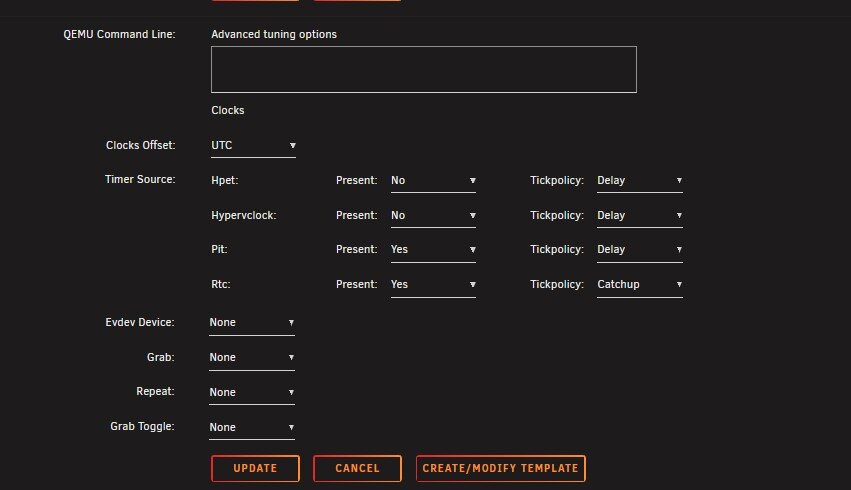
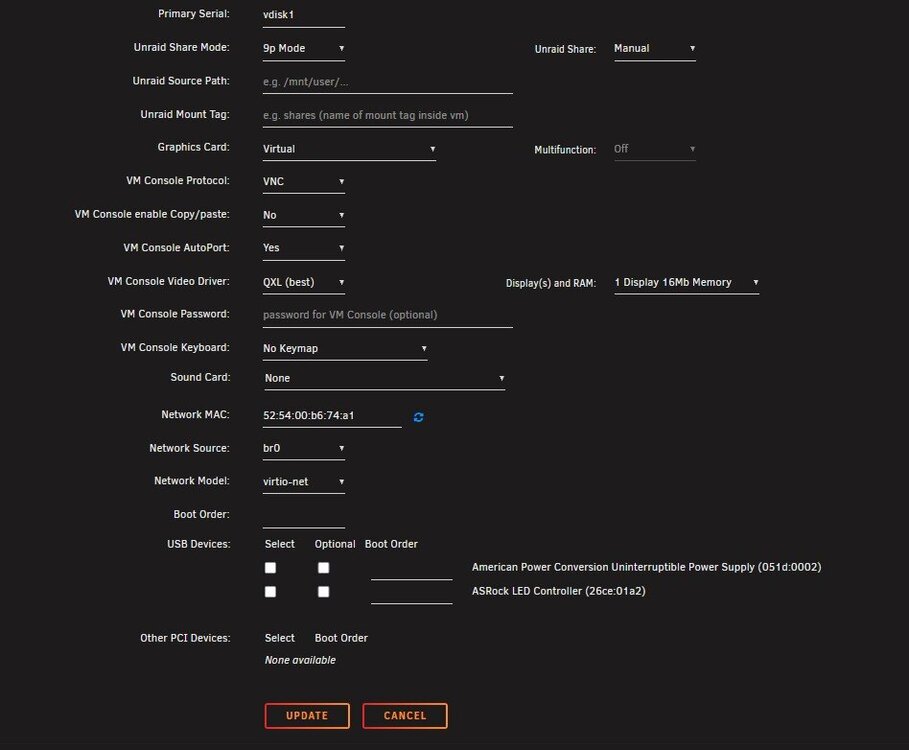
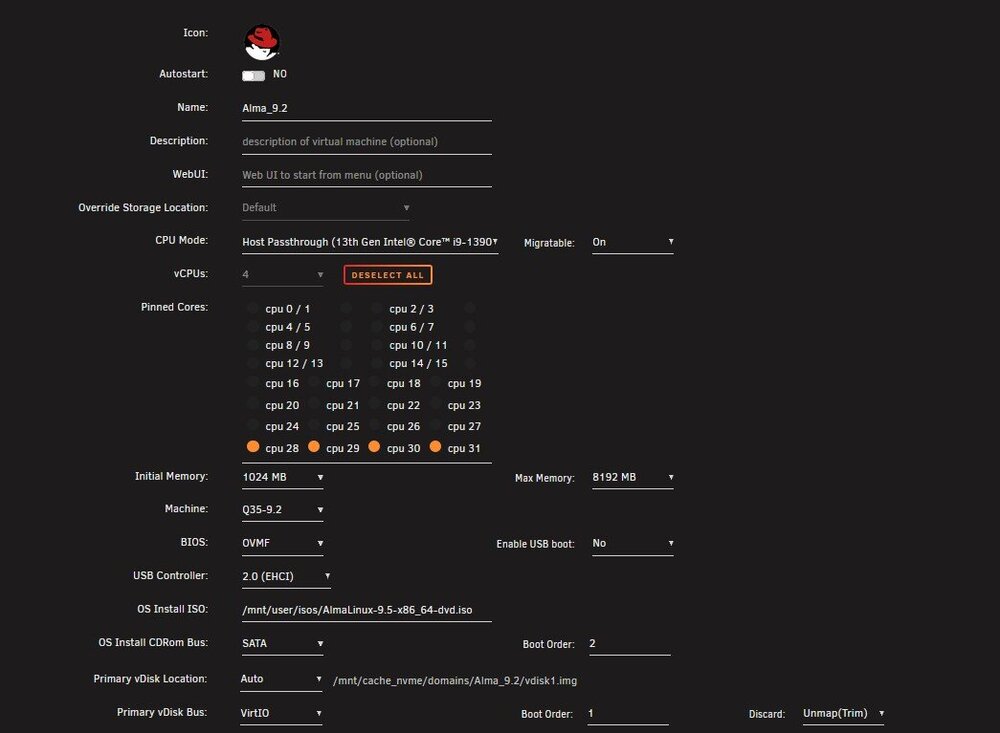
I used the default RedHat Template for Alma and Fedora. I used the Ubuntu default template for Mint and Ubuntu. The install with all 4 distro's fails and I am unable to get command line access. I used the ISO for each of these VMs from the individual distro website. zion-diagnostics-20250517-1042.zip
-
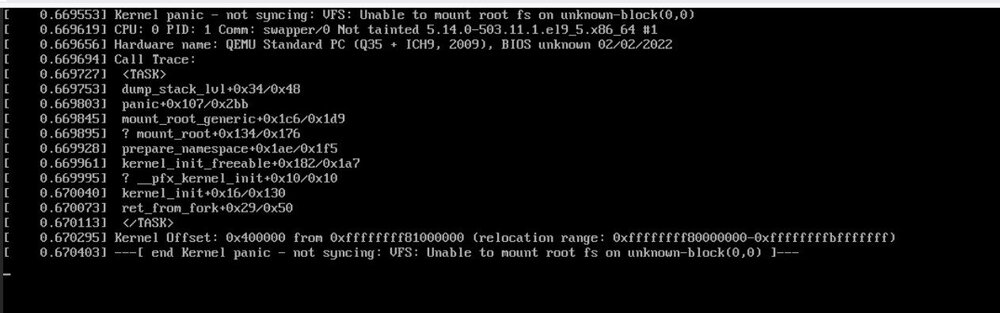
I am running 7.1.2. I have tried to install Alma 9.2, Fedora Kenoite 42, Mint 22 and Ubuntu 24.04 in a VM. I keep getting "Requires Guest agent installed" and fails. I have not tried to install a VM in 7.1 until today but my Home Assistant VM that was there before I upgraded works just fine. The screen shot is an example of what is shown in the VNC console for Alma. Attached is also the XML. I appreciate any assistance. XML.txt
-
I have put almost all of my dockers on a custom network. They have been successfully communicating in the past. However I recently had to move Plex to a dedicated IP due to new disabling UPnP on my new firwall (UDM SE). I am now having issues with all the Arrs, Kometa, and Overseer communicating with Plex. unRAID and Plex are on the same VLAN and I have turned off all the firewall blocks. I can open up the Plex server from my laptop on the same VLAN. I have done a docker network ls and the network is still listed is still listed.
-
Thank you, I found the docker. It was flarsolver.
-
My router started to notify me that my unraid server was blocked from communicating with this website, it has marked it as spam. Any thoughts on this?
-
App data backup keeps failing nightly. There is an error in the log from last night about Tdarr that is below. Log is attached. Version: 2023.10.16 Your debug log ID: 095b94b8-e954-4034-a431-cbd156bd7d78 Log.txt
-
I have a preinstalled Home Assistant VM that I can no longer connect to. I noticed on the bootup that Kernal Time Sync does not complete. I then tried to install a PopOS VM with the Ubuntu Settings. I am getting Kernal Panic - not Syncing: No working Init found on the PopOS install. Other VM's will not complete the install.
-
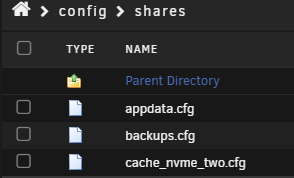
This is in the config shares folder? cache_nvme_two.cfg is there. Do I just delete it?
-
This was the name I used. I have a cache_nvme_one and a cache_nvme already. I will see if I can figure out the config files.
-
Long ago I removed a cache pool (Example name: cache_nvme_two) and I recently installed a new nvme and tried to use the old name on a new drive but unraid will not let me. When naming the new pool, the error I get is "invaild name." Is is possible to use the old name? Thank you for your assistance.
-
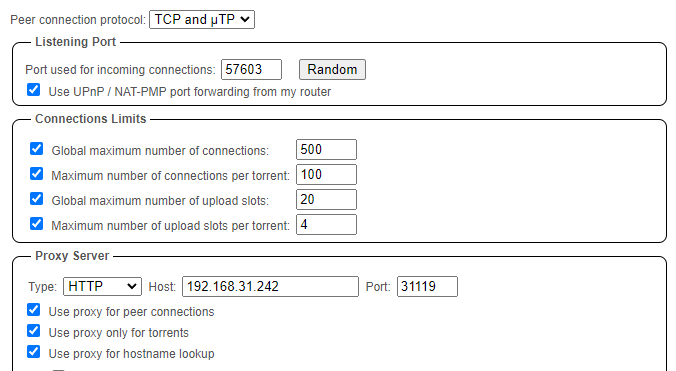
I am trying to setup qbit container to route through the privoxyvpn container with pia and port forarding. I am having an issue wih the port forwarding working. I may not completely understand what is required. I have setup qbit in the UI to use the privoxyvpn container as a Proxy Server, the screen shot is below. My 2 container's are setup in accordance with the below settings as well. I keep getting 0 B/s Up Speed. I have varified in the logs that I am connecting to the CA Toronto server with a port forward assigned. What am I doing wrong? Thank you for your assistance. binhex-privoxyvpn docker run -d --name='binhex-privoxyvpn' --net='dockernet' --privileged=true -e TZ="America/New_York" -e HOST_OS="Unraid" -e HOST_HOSTNAME="Zion" -e HOST_CONTAINERNAME="binhex-privoxyvpn" -e 'VPN_ENABLED'='yes' -e 'VPN_USER'='pXXXXXX' -e 'VPN_PASS'='XXXXXXXXX' -e 'VPN_PROV'='pia' -e 'VPN_CLIENT'='openvpn' -e 'VPN_OPTIONS'='' -e 'LAN_NETWORK'='192.168.31.0/24' -e 'NAME_SERVERS'='84.200.69.80,37.235.1.174,1.1.1.1,37.235.1.177,84.200.70.40,1.0.0.1' -e 'SOCKS_USER'='XXXXX' -e 'SOCKS_PASS'='XXXXXX' -e 'ENABLE_SOCKS'='no' -e 'ENABLE_PRIVOXY'='yes' -e 'VPN_INPUT_PORTS'='31118' -e 'VPN_OUTPUT_PORTS'='31119' -e 'DEBUG'='false' -e 'UMASK'='000' -e 'PUID'='99' -e 'PGID'='100' -e 'STRICT_PORT_FORWARD'='yes' -l net.unraid.docker.managed=dockerman -l net.unraid.docker.webui='http://config.privoxy.org/' -l net.unraid.docker.icon='https://raw.githubusercontent.com/binhex/docker-templates/master/binhex/images/privoxy-icon.png' -p '8118:8118/tcp' -p '9118:9118/tcp' -v '/mnt/cache_nvme/appdata/binhex-privoxyvpn':'/config':'rw' --sysctl="net.ipv4.conf.all.src_valid_mark=1" 'binhex/arch-privoxyvpn' qbittorrent docker run -d --name='qbittorrent' --net='dockernet' -e TZ="America/New_York" -e HOST_OS="Unraid" -e HOST_HOSTNAME="Zion" -e HOST_CONTAINERNAME="qbittorrent" -e 'WEBUI_PORT'='8080' -e 'PUID'='99' -e 'PGID'='100' -e 'UMASK'='022' -l net.unraid.docker.managed=dockerman -l net.unraid.docker.webui='http://[IP]:[PORT:8080]' -l net.unraid.docker.icon='https://raw.githubusercontent.com/linuxserver/docker-templates/master/linuxserver.io/img/qbittorrent-logo.png' -p '8080:8080/tcp' -p '6881:6881/tcp' -p '6881:6881/udp' -v '/mnt/user/media/torrent/':'/1_downloads':'rw' -v '/mnt/cache_nvme/appdata/qbittorrent':'/config':'rw' 'lscr.io/linuxserver/qbittorrent'
-
I am having an issue on GluetunVPN with Port Forwarding being recognized on Qbit. I am using PIA with the Toronto Servers (From my understanding PIA’s Canada Servers do forward). I have confirmed that I am able to connect to the internet through the VPN. My unraid setup is below. The 8080 tcp is for Qbit to route through the Docker. Qbit’s port in the UI is 52000. What am I doing wrong? Any assistance is appreciated. docker run -d --name='GluetunVPN' --net='dockernet' -e TZ="America/New_York" -e HOST_OS="Unraid" -e HOST_HOSTNAME="Zion" -e HOST_CONTAINERNAME="GluetunVPN" -e 'TZ'='America/New_York' -e 'VPN_SERVICE_PROVIDER'='private internet access' -e 'VPN_TYPE'='openvpn' -e 'VPN_INTERFACE'='tun0' -e 'VPN_ENDPOINT_PORT'='' -e 'VPN_ENDPOINT_IP'='' -e 'OPENVPN_PROTOCOL'='udp' -e 'OPENVPN_USER'=XXXXXX -e 'OPENVPN_PASSWORD'=XXXXXXX -e 'OPENVPN_VERSION'='2.5' -e 'OPENVPN_VERBOSITY'='1' -e 'OPENVPN_FLAGS'='' -e 'OPENVPN_CIPHERS'='' -e 'OPENVPN_AUTH'='' -e 'OPENVPN_PROCESS_USER'='no' -e 'OPENVPN_IPV6'='off' -e 'OPENVPN_CUSTOM_CONFIG'='' -e 'WIREGUARD_IMPLEMENTATION'='auto' -e 'WIREGUARD_PRIVATE_KEY'='' -e 'WIREGUARD_PRESHARED_KEY'='' -e 'WIREGUARD_PUBLIC_KEY'='' -e 'WIREGUARD_ADDRESSES'='' -e 'SERVER_REGIONS'='CA Toronto' -e 'SERVER_COUNTRIES'='' -e 'SERVER_CITIES'='' -e 'SERVER_NAMES'='' -e 'SERVER_HOSTNAMES'='' -e 'FIREWALL'='on' -e 'FIREWALL_VPN_INPUT_PORTS'='52000' -e 'FIREWALL_INPUT_PORTS'='' -e 'FIREWALL_OUTBOUND_SUBNETS'='' -e 'FIREWALL_DEBUG'='off' -e 'LOG_LEVEL'='info' -e 'DOT'='on' -e 'DOT_PROVIDERS'='quad9' -e 'DOT_PRIVATE_ADDRESS'='127.0.0.1/8,10.0.0.0/8,172.16.0.0/12,192.168.0.0/16,169.254.0.0/16,::1/128,fc00::/7,fe80::/10,::ffff:7f00:1/104,::ffff:a00:0/104,::ffff:a9fe:0/112,::ffff:ac10:0/108,::ffff:c0a8:0/112' -e 'DOT_VERBOSITY'='1' -e 'DOT_VERBOSITY_DETAILS'='0' -e 'DOT_VALIDATION_LOGLEVEL'='0' -e 'DOT_CACHING'='on' -e 'DOT_IPV6'='off' -e 'BLOCK_MALICIOUS'='on' -e 'BLOCK_SURVEILLANCE'='on' -e 'BLOCK_ADS'='off' -e 'UNBLOCK'='' -e 'DNS_UPDATE_PERIOD'='24h' -e 'DNS_ADDRESS'='' -e 'DNS_KEEP_NAMESERVER'='on' -e 'HTTPPROXY'='on' -e 'HTTPPROXY_LOG'='off' -e 'HTTPPROXY_USER'='' -e 'HTTPPROXY_PASSWORD'='' -e 'HTTPPROXY_STEALTH'='off' -e 'SHADOWSOCKS'='on' -e 'SHADOWSOCKS_LOG'='off' -e ':8388'='8388' -e 'SHADOWSOCKS_PASSWORD'='' -e 'SHADOWSOCKS_CIPHER'='chacha20-ietf-poly1305' -e 'HEALTH_SERVER_ADDRESS'='127.0.0.1:9999' -e 'HEALTH_TARGET_ADDRESS'='github.com:443' -e 'HEALTH_VPN_DURATION_INITIAL'='6s' -e 'HEALTH_VPN_DURATION_ADDITION'='5s' -e 'UPDATER_PERIOD'='0' -e 'PUBLICIP_FILE'='/gluetun/ip' -e 'PUBLICIP_PERIOD'='12h' -e 'VERSION_INFORMATION'='on' -e 'HTTP_CONTROL_SERVER_LOG'='on' -e 'PUID'='1000' -e 'PGID'='1000' -l net.unraid.docker.managed=dockerman -l net.unraid.docker.webui='http://[IP]:[PORT:8000]' -l net.unraid.docker.icon='https://raw.githubusercontent.com/qdm12/gluetun/master/doc/logo_256.png' -p '8888:8888/tcp' -p '8080:8080/tcp' -p '8000:8000/tcp' -v '/mnt/cache_nvme/appdata/gluetun/':'/gluetun':'rw' --cap-add=NET_ADMIN --restart always 'qmcgaw/gluetun'
-
The Database location within the container is wrong in the Unraid Template
-
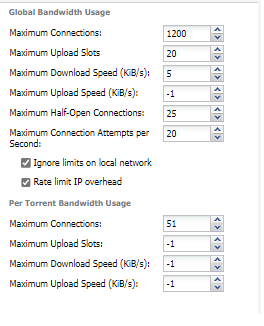
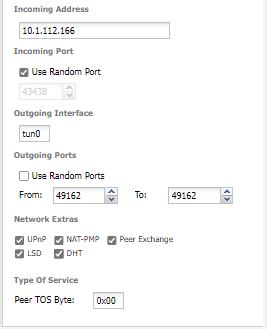
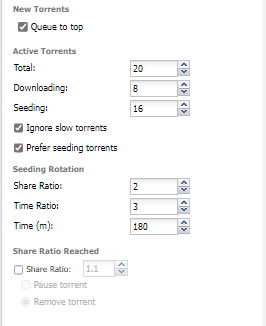
I have an issue with seeding. I have over 2000 torrents waiting to reach a seed ratio but still no seeds. I have slowed my download speed to 5 KiB to help fix my ratio. I have tried with no VPN and there was no change. Anyone help troubleshoot please? My Deluge settings are below. Docker setup is here: https://pastebin.com/z09GhN3s. Logs are here: https://pastebin.com/ra6zSmr0 *Edited for Logs and Docker Setup. **Additional info: I have tried to change Incoming port in UI and logs show it not changing. In support of assigning a port, I have port forwarded in the router and assigned the port in docker. However with random port being assigned every docker config change changing docker port is not possible through UI.
-
Thank you. I misunderstood what those were for.
-
@binhex. Thank you for the response. The defaults are for PIA, I use NordVPN, Any recommendations?
-
Help please. As of today, delugevpn no longer works. UI will not load. If I turn off the VPN, the UI loads just fine. I even tried Binhex/Qbitvpn and get same symptoms. Were the IP tables just changed? I have had this setup for 2 months with no issues but today it has issues. I have completely rebuilt the docker from scratch and tried new VPN severs in both the US and Canada with no luck. If it is an IP Tables thing, where can I find the list of IPs for NORDVPN that are on the list? Supervisord.log attached. Any thoughts could help. supervisord.log



