





mathomas3
Members
-
Joined
-
Last visited
Everything posted by mathomas3
-
Recently I was adding some new drives to my system and 1 was bad... never registered with unraid that it was there and because of this the system reported that I was missing another disk in the array... after I replaced the missing disk (disk 1 or 2) the missing disk was found... no rhyme or reason as to how this happened... but it did... I have a recent support thread for this... to include logs, thankfully... I would be happy to replicate this should need be... but I dont think its safe to continue to assume that everything is fine should my disk 1/2 fail and then suddenly have two red balled diskes due to this error... Happy to help and assist with this bug... and to be clear... I never found the shadow failed disk... I mearly replaced the failed disk 1/2 and the other drive was found after the replacement... Fair to assume that should disk 1/2 fail... this shadow disk will also be red balled...
-
restarting the system proved to fix the issue... but that was wierd... really wierd
-
How does a 8tb drive magically turn into a 14tb drive!?!

-
That's odd... This window it shows that I have only the one 18tb hdd but when I hit the drop down window to swap hdds... I have 2 18tb drives listed there... So I should have 2 unassigned 18tb drives... not the one... hmmm
-
it's a 24 bay enclosure... either it works or it doesnt
-
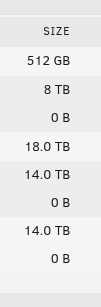
This is a bit of a strange one for me... I idenified(one incorrectly) 3 8tb disks that were extra and I wanted to replace them with 18tb ones instead. I stopped the array and after I pulled them, I checked the Main page to confirm that I pulled the right ones. Problem is that I was showing that I was missing 2 data disks from the array, one of them being a 14tb drive, which I didnt pull. Ok... I found that one that I pulled and put that back in but yet I was still missing 2 data disks. Ok... So I went ahead and installed the two new 18tb disks and checked the page once again, Amazingly one of the missing disks was found but only 1 18tb disk is listed on the main page... where did that 18tb disk go???!??? My array only holds 24 disks but 25 is listed??? huh?!? Maybe one of the new disks is bad but why would I have so many disks showing as installed... Yikes! tower-diagnostics-20250605-1240.zip
-
finally got things back to normal... Ran the permission fixer and actually let it run... go figure
-
oh and to note... I used unbalanced to move the files over. There were no noticeable errors
-
Hello all, For a while now I have been running my dockers on my array due to issues with an earlier Disk Pool... I just got done making a new Disk Pool and I moved the dockers over... everything moved and seemed like it was fine but I noticed some odd issues with them. I restarted them and I got the following error... NzbDrone.Common.Exceptions.SonarrStartupException: Sonarr failed to start: AppFolder /config is not writable I will assume this is effecting more then just the one docker but yea... Disk Pools and me dont seem to play nice tower-diagnostics-20250509-1404.zip
-
The reason these dockers/VMs are on the array was because I was having strange issues with dockers updating and or running... after I migrated things over to the array, things went back to normal. I need to clean up the cache drives(one is missing) and fully get the docker files in one place... So strangely SABNZB would start strong on a download for 10 seconds and then it would tapper off into nothing, sitting like that for tens of mins. I have been giving it the benefit of the doubt given some activity of the array, but zero progress... that's a little rich... I just got done setting up NZBGet and thus far I have had none of the issues that I had with SAB. For now I will leave SAB in a powered off state for the time being, perhaps down the road I will give it another go.
-
I was able to update the system via the normal means after doing a reboot... so now im on 7.0.1 So far so good... time will tell... though I did come into a strange issue... sabnzb's web interface becomes unresponsive after around 5 mins after restarting the docker... dont know if it's doing anything in the background after it does that(ill find out in the morning) but having this issue isnt nice... I did update the docker after restarting and that didnt do anything to help... Anyone else having this issue? tower-diagnostics-20250504-2150.zip
-
Thinking you're correct. Trying to download Diags now, but after waiting 5 mins for it(never waited this long before) The usb must be on it's last legs The screenshot is after 5 mins

-
Correct me if Im wrong... but this isnt TOO old... If a manual update is required... it's going to be a while till I do... I would have to tear apart my entire server because the USB is internally mounted in it

-
Now that I am thinking about this a little more, about a month ago I did see that there was an update for my system and yet unraid said that I was on the current version... hmmm
-
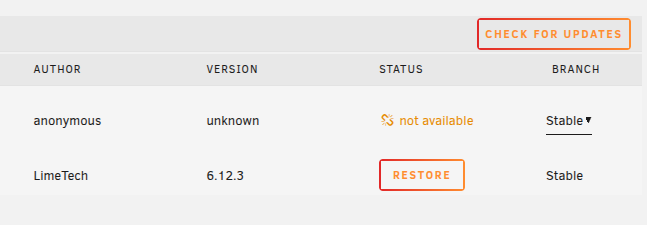
Hello, Today I restarted the server due to the UI not showing any of the HDDs in the array even though everything else was running. For some odd reason I also checked to see if there was an update of the system and what you see below is what I got. When clicking on the 'check for updates' button, I get a blank white box with no text and besides the title of the box, the only other thing there is the button 'done' Thoughts?
-
Found this site... google reviews are also solid... 170 for renewed drives https://www.goharddrive.com/Major-Brand-18TB-7200RPM-SAS-6Gb-s-3-5-HDD-p/g01-1884-cr.htm
-
Do you have a lead on a decent 18tb drive? from the normal places I order from they are priced around 200+... found 2 sites that have referbished ones at 170(goharddrive.com)
-
Google maps doesnt have good ratings for them... the two bad reviews are from people that have left 1 and 2 reviews total... not something you can hold alot of weight to... but... hhmmm
-
Hello all, Came across this and it seems like a too good(to be true?) deal for a 18tb NEW SAS drive. Thought? https://www.aa2zsupply.com/product-p/51739.htm?gad_source=4&gad_campaignid=22473069787&gbraid=0AAAAADBU5WwVtzRhxNuwezRD8QrKCaUtR&gclid=Cj0KCQjwzrzABhD8ARIsANlSWNOmhfcgXI_kv-BcVt3x7D_a7CE4d7VM0NFhvoUpykrqEZ9Sqi4WeBwaAhWTEALw_wcB At that price it might be worth it to try... I will try and reach out to the in the morning to validate that they are a real company and the price is good. Mat
-
It pains me reading your English.... Yikes...
-
As you wish... Im just saying what happened to me and what my fix was. It's worth trying out IMO... to help narrow down what's going on... Best of luck
-
changing the format shouldnt make a difference... just move your docker files to the array and see how it goes... IMO should 'fix' your problems...
-
Your blaming the OS when you should be blaming your hardware and or your lack of planning... You want to try out truenas... be my guest... Your electric company will thank you!
-
to note... I had two SSD's in the disk pool... I had issues within some of the dockers, odd issues, but mostly when trying to update them, even had a docker become 'orphaned' due to this... After I moved everything over to the array, things started working normally... Hope that helps
-
Not wanting to hijack this thread... but are your dockers hosted on a btrfs disk pool??? I had something like what your describing happen to me while I had my dockers hosted on this disk pool... It wasnt till I moved all of my dockers back to the array did things start working properly... little known bug??? Dont know... but something to consider

