





mathomas3
Members
-
Joined
-
Last visited
Everything posted by mathomas3
-
I wouldnt do anything atm... your have 2 failed drives ATM and should anything go wrong... you are going to lose data... I would suggest stopping dockers and limit the disk activity others will be better to advise you... but you can try to rebuild a drive that is still currently connected... but checking SMART reports are needed... please provide those
-
unless you can get one of those 'failed' disks to function for a parity rebuild... you might be out of luck
-
Lets not forget to mention that those are some high temps to be running these HHDs at. I would suggest addressing that soon. More heat means that you will have a higher failure rate
-
What your describing is exactly what is happening to me. Till this is addressed, I am avoiding Disk Pools
-
When it comes to the dockers... disable the auto start for the dockers... Enable docker... and one by one turn a single docker on, wait and test it out, should everything look fine, repeat it's also not a good idea to do this while a parity check is running due to high disk IO
-
Maybe I am being a stick in the mud, but if the only thing that is causing the server to hang is a btrfs DP, why would anyone use it? Yes reading data from it is quick, but writing data to it is slow and not to mention the hangups/docker issues. When mover was writing data to the DP, it would only write about 25-50 gigs of data... In my 30 years in IT, I have never seen anything like this It's unacceptable
-
So it's normal for the system to hang for 2h while mover is running... and when ever a docker wants to write data to a DP? If that's the case I would rather have everything running off of the array because these issues dont exist there Though that wouldnt explain why I am unable to update around 50% of the dockers while they are hosted on the DP. Since moving them off of it, I have been able to update them. There is something wrong with a btrfs DP... Dont know what's going on but... I dont think it would be normal nor acceptable for a CPU to spike/hang a system while writing to a DP
-
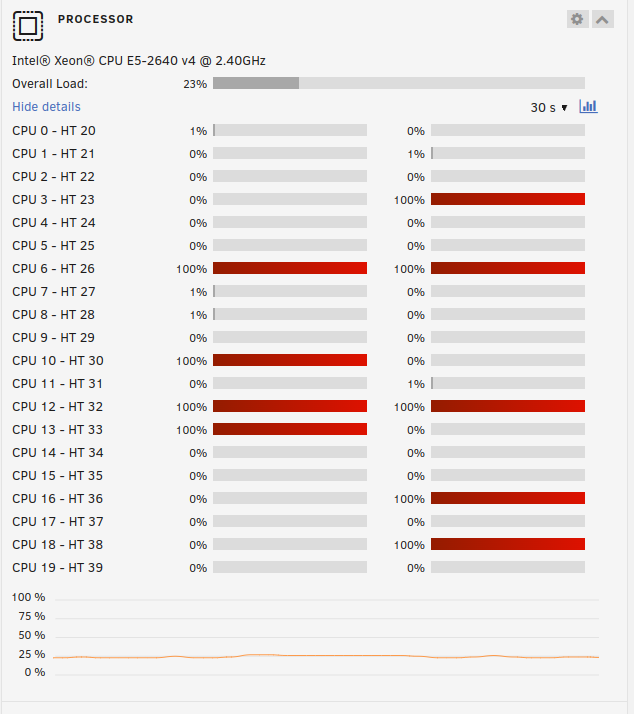
I feel as if you have ignored my concerns on this thread... I have posted about this CPU issue a number of times in a number of different topics... Here I am trying to figure out as to why the services DP is causing CPU spikes... I even removed this DP and recreated it... but when mover was writing data to the DP, the cpu again spiked for over an hour... until there is a hint/suggestion as to why this is happening... I will be avoiding a DP in the furture
-
Could this be a bug of sorts?
-
Just for grins I recreated the Services DP and invoked mover to move things back
-
Yes I would like to have everything on the Services disk pool The problem is that I have been receiving errors when trying to update dockers due to a number of errors... cant stop docker, docker with the same name already exists which often times orphaned the docker. I have some dockers that I havent been able to update due to this. After moving everything off of the Services DP, I have been able to update everything. I would also randomly get system hang ups which would cause everything to hang for around 5 min and would happen 5-15 times a day. I highly suspect that these errors was due to the services DP. I think it was you who mentioned a problem with how I upgraded my DP would cause problems later. Ill Cleanup those files now. Thanks
-
I made a little progress... I after updating a few dockers and noticed that new files were being written to the 'Services' disk pool I changed the share setup from Services>Array to Cache>Array This cleared out around 500mb and what is left is 20mb of data... I might be willing to let this go... there is a DB file that I would like to save Anyway Logs are attached to include the Mover logs tower-diagnostics-20240109-0829.zip
-
Will do that tonight
-
Hello, Sorry for the long delay but after reading a number of different comments about dockers being at fault, I decided to play around with them to try and narrow down which one might be at fault. I never did find one to be the cause. As time went on, I began to suspect that my BTRFS share to be at fault. Seemingly any time there were heavy IO to/from that share the CPU would spike. I also had errors when trying to update different dockers, errorring out when it failed to remove the docker and couldnt install due to a docker having the same name already being there. After this the docker would be orphaned and requiring a reinstall. So last night I moved as much as I can with mover to the array after disabling docker and VMs. I have 500mb of files that refuse to move. Any input as to completely move them over would be welcome. My thoughts are to move everything off and completely rebuild this disk pool. I recall a comment years ago that, due to how I upgraded this pool that I would have problems rebuilding? I disk if I had a failure... After moving things around I have been able to update a number of dockers that previously were failing and I havent seen CPU spikes(too early to judge perhaps). Anyways, I look forward to your wise input tower-diagnostics-20240109-0723.zip
-
any input would be very welcome... my system is getting worse by the hour... I just updated the system and rebooted... now the system is nearly unresponsive even at the physical console... logging into it took 5 mins and every command that I give it take another five eeks!
-
I shut down the server and did a memory test and everything came back good... oddly on boot I was missing a disk... I replaced it and it's building again
-
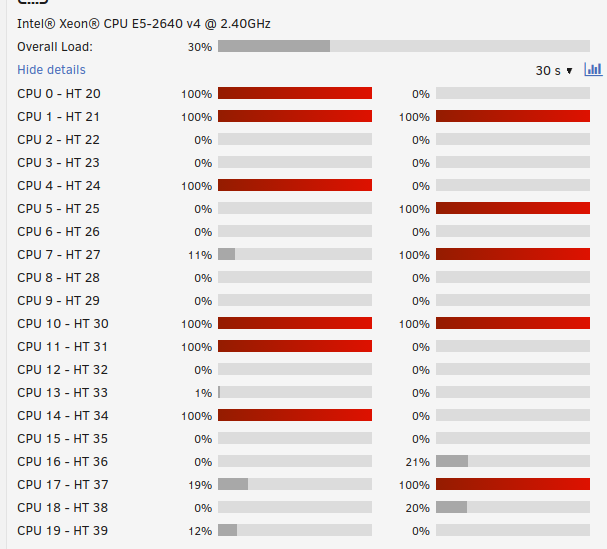
Hello all... I have been having an issue with my system for a while now... The system randomly hangs at various times but I suspect that it has something to do with btrfs disk pool... Recently I deployed a VM to this share thinking that the issue might have something to do with my dockers and I was going to move them to a VM but in doing so I increased the IO on the disks, causing the issue to happen more often I have tried shutting down all of the dockers(limiting IO to the btrfs disks) and I did observe the issue persist Is this normal? Im running all of this on 2x 20core cpus... I know they dont have the fastest clock speed but it should be more then enough to handle what little load I have on this system... Any suggestions are very welcome... Dec 18 20:20:37 Tower kernel: traps: lsof[26886] general protection fault ip:147908d89c6e sp:242fdb11bfcc0dd5 error:0 in libc-2.37.so[147908d71000+169000] tower-diagnostics-20231219-0822.zip

-
oh... and yes I did try CPU pinning which doesnt seem to do anything
-
Hello all, I am looking to migrate some of my unraid hosted Dockers to a VM in hopes to contain the CPU spikes that I have been getting. Mind you I have never setup docker outside of unraid but till just recently, I tried to install mealie but it was confusing... Really the whole docket eco system is something I am unfamiliar with. Are there any guide you all would recommend that I follow? Is there a way for me to run the dockers from where they are currently? Thank you for your time/input Matt
-
Try this first and if you have another drive go down, I would look into the PSU being the issue. @itimpi Good question... I was going straight to the PSU, I hadnt thought to ask that
-
I would disagree. I have stacks of then new 3,5,6TB green/red/black drives that failed regularly... Since using SAS(retired data center) drives, my failure rate dropped by a lot and maybe that's the thing. SAS drives are intended for data centers and thus the build quality is better? Anyway you put it, it's just my observations... Back to OP. Are you using a SATA controller card given the number of drives that you are using?
-
I havent looked at diags but if you are using SATA drives, that could be the problem... I did run them when I first started but after having a good number of those drives failing I moved on to using SAS... My typical sata drive failures happened every two months running 8 drives at the time Since moving over to SAS I might have one drive fail a year using renewed 8tb drives and that's running 20 drives Something to consider
-
This isnt the first time that I have had this happen... I would agree with you... but if it was a disk problem... Why would the CPU spike on a post read operation?
-
I will note that during the high cpu windows, nearly everything froze while that was going on... dockers were unresponsive and it was just weird...
-
Hello all, Like the title says I was trying to figure out what was using nearly 50% of my 40 CPU cores, maxing out half of them for 10 mins at a time and then 3 mins of calm before the cycle starts again. I thought it was my dockers so I powered off the ones I thought would be causing this and there was no change. I powered off all of the dockers and still the issue persisted. I checked TOP and the highest CPU processes were DD and CMP... thus I stopped the post read process and everything returned to normal... Is this something that others have encountered?

