





spants
Community Developer
-
Joined
-
Last visited
Everything posted by spants
-
Give it some time, they should appear after 1hr of use
-
The way it works is that you set your dns on machines (or via your router) to pint to your unraid box, this processes the requests and if they pass it will resolve by the dns entries in the template (which you can change). Do you only have one interface? (I do)
-
This bit is strange!... are your running two of them?. I would delete/rename the appdirectory for pihole and try again.. Is this related? Its the template on a new setup: https://puu.sh/s3sfM/a728584fb0.png Could be!. silly me. Only needs one port 53.... I have updated the template... edit... mine had the same but ran ok. attached is my config.
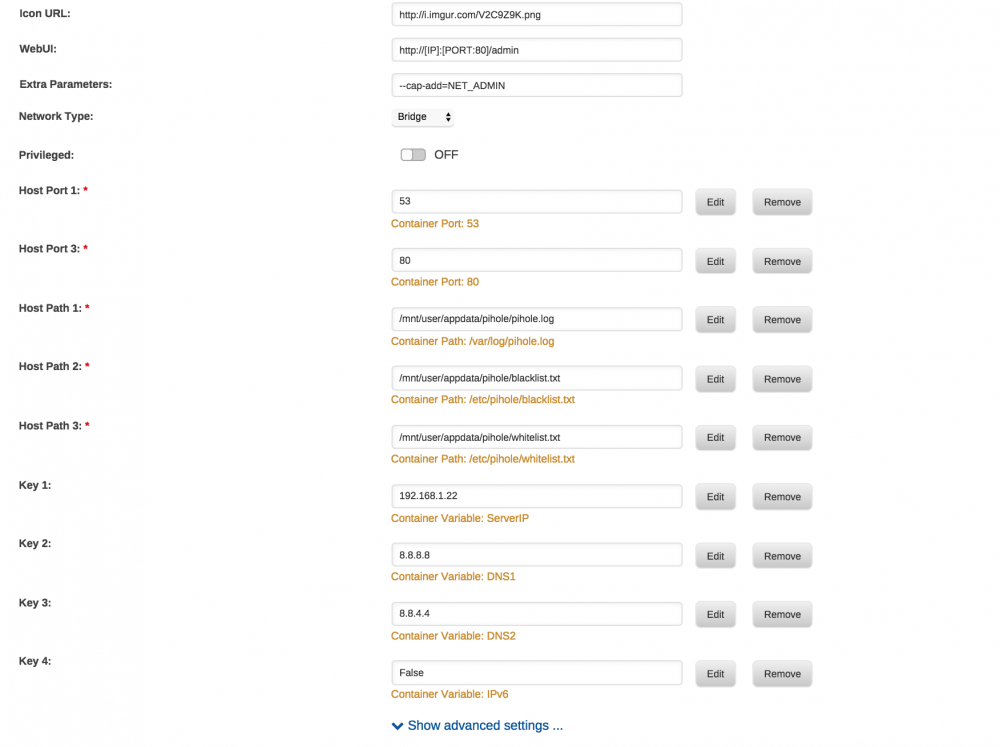
-
This bit is strange!... are your running two of them?. I would delete/rename the appdirectory for pihole and try again..
-
Sorry about all the confusion Make sure that you use PIHOLE and not UNRAID-HOLE from now on. Pihole was in beta and I have now removed the beta flag.
-
Any chance you could post a sanitized version of your reverse proxy conf file? Curious to see how you are assigning both stuff on 82 and on 1962. I have been trying to also figure out how to do the letsencrypt with the linuxserver Apache docker. I use the older reverse proxy docker still. And I simultaneously use the Apache Docker as well. I want to consolidate. I posted my issue w/ letencrypt on the Apache docker thread https://lime-technology.com/forum/index.php?topic=43858.msg500727#msg500727 Many thanks!! H. Sorry for delay - I wasnt getting notifications. The Apache docker is different to the nginx-letsencrypt one Apache mappings for docker are 443/tcp 192.168.1.22:444 80/tcp 192.168.1.22:82 Nginx-letsencrypt 443/tcp 192.168.1.22:443 80/tcp 192.168.1.22:1962 proxy.conf client_max_body_size 5000m; client_body_buffer_size 128k; #Timeout if the real server is dead proxy_next_upstream error timeout invalid_header http_500 http_502 http_503; # Advanced Proxy Config send_timeout 5m; proxy_read_timeout 240; proxy_send_timeout 240; proxy_connect_timeout 240; # Basic Proxy Config proxy_set_header Host $host:$server_port; proxy_set_header X-Real-IP $remote_addr; proxy_set_header X-Forwarded-For $proxy_add_x_forwarded_for; proxy_set_header X-Forwarded-Proto https; proxy_redirect http:// $scheme://; proxy_http_version 1.1; proxy_set_header Connection ""; proxy_cache_bypass $cookie_session; proxy_no_cache $cookie_session; proxy_buffers 32 4k; site-confs server { listen 80; listen 443 ssl default_server; if ($scheme = http) { return 301 https://xxxxx.duckdns.org$request_uri; } root /config/www; index index.html index.htm index.php; server_name xxxxx.duckdns.org; ssl_certificate /config/keys/fullchain.pem; ssl_certificate_key /config/keys/privkey.pem; ssl_dhparam /config/nginx/dhparams.pem; ssl_ciphers 'snip'; ssl_prefer_server_ciphers on; ssl_session_cache shared:SSL:10m; client_max_body_size 5000M; ### Add HTTP Strict Transport Security ### add_header Strict-Transport-Security "max-age=63072000; includeSubdomains" always; add_header Front-End-Https on; location / { try_files $uri $uri/ /index.html /index.php?$args =404; } # amazon echo-node red location /echo { proxy_pass http://192.168.1.22:1880/echo; } location /nextcloud { include /config/nginx/proxy.conf; proxy_pass https://192.168.1.22:442/nextcloud; } } so the port changes are done via the docker mapping.
-
Strange, working fine on mine. Is it cached in your browser?
-
Yes - please use the official docker version and install nodes through the Palette menu option. I can update my version if needed for some strange reason! Note: If you want to pass through a device from the host to the official docker, you may need to change the user that runs node red to root. For example, to use a usb-serial adaptor, I had to use for the Extra Parameters : --device=/dev/ttyACM0 --user=root Tony
-
To use that app you would either need to install a Node.js container and install it in there or build a wrapper for the gui part of node red... Might be worth pinging the author and see if he has seen Node Red?
-
unfortunately that is a straight Node.js app. It will need a wrapper to pull it into NodeRed
-
Abolutely - serach for "node red sonos" - there are a few nodes out there
-
New Node Red v0.15 is out :- http://nodered.org/blog/2016/10/11/version-0-15-released The NodeRed-officialdocker template will pull 0.15 (force if not showing update available). As this includes the function to add nodes to the palette, my version my become redundant :-). Please check your flows and see if you can add any dependancies using the officialdocker version that I created a template for and let me know! (note that in appdata directory for my version, I use "flow" in the file names. The official docker uses "flows" ..... rename the files... Use a test copy not your live copy for the migration testing. )
-
i do the same. pihole uses port 80 unraid on 81 apache (spotweb and stuff) on 82 letsencrypt and proxy on 1962
-
note that on the new template that I have changed the name from pihole-for-unraid to just pihole for the docker name. It now uses the base docker that I modified so my template is just a template for this (I dont need to build a docker anymore)
-
Nice changes!.... I will update the template so that other people can use them. I have been trying the "pixelsrv-tls" and ab-solution adblock running on my router for a while which also works well!.
-
not AFAIK. I was chatting with Dave CJ and Nick O'Leary at Thingmonk in London (we work for the same company....)
-
Some nice Node Red enhancements (maybe!) .... Hopefully I wont have to build mine anymore..
-
Just updated my custom NodeRed docker to v0.14.6 and added the template for the official NodeRed 0.14.6 docker image...... At the end of September - there will be some great announcements for NodeRed..... stay tuned!
-
I have noticed that blacklists and whitelists are not saved, maybe a permission problem.. .. editing the files works...
-
I guess that other dockers are running ok? That's strange as it just installs and runs ok for me. Not sure how to debug without logs. What version of UNRAID are you using? Tony
-
I think so. As it is easy to setup, why not give it a go and let me know what you prefer. For disclosure- I don't use them as I have ad blocking on my router = http://www.snbforums.com/threads/beta-ab-solution-1-08-beta2-is-out.34021/
-
Hi - thanks for trying it out. Please can you use this topic: http://lime-technology.com/forum/index.php?topic=50453.msg486072#msg486072 You will need to get the log from the docker itself = the notepad icon on the line of the docker (I think your log is from the main unraid log?)
-
what does the log say?
-
A quick way to install node-red-dashboard ..... 1. Stop the container 2. Delete node-red-contrib-ui from appdata/nodered/node-modules directory (your data directory) 3. Start Node Red 4. Use Admin tab to add node-red-dashboard This installs the latest v2 dashboard (Make sure you follow the steps above) Tony
-
I dont think it is out yet on npm (or as an official release)... As soon as it is, it will be on here!
