





JoergH
Members
-
Joined
-
Last visited
Everything posted by JoergH
-
I have the same problem. Never had any issues with this until I updated...
-
Thank you, again! I closed the tab, reopened Nextcloud, logged in and here they were again. Exactely, I did do an update, just today.
-
Thank you for the explanation, @Geck0! I will do so. EDIT: Just checked, that the settings are all active, so this is just not recognized by Nextcloud, it seems. Hopefully my final problem with this now: After doing the asked occ maintenance my Users disappeared from the list. I can see 7 Users in the group overview on the left side but they don't show with names etc. on the right... How can I recover them?
-
Another question: I managed to delete some of the warnings inside Nextcloud but where to I find the apache config to correct these: I set the first one inside the ssl.conf to "nosniff" but that didn't make a difference....
-
Thanks! I found it now. The error log was from nextcloud but the setting I had to correct was in /mnt/user/appdata/swag/nginx/proxy-confs/nextcloud.subdomain.conf The upstream app definition included the port..probably it took it from the nextcloud config Everything works again as before. Thank you for your help!
-
I found out something now. In nginx error.log it shows that he adds the port twice... 2024/09/20 20:15:29 [error] 872#872: *61 invalid port in upstream "192.168.178.66:444:444", client: 2.138.145.170, server: nextcloud.*, request: > How can I correct this?
-
I did not change the trusted proxy. It was swag before. I tried the dedicated IP but it won't help. Took out the ":444" Nextcloud.log is 81 MB...do you still want it? error.log is empty.
-
If I would know...I used the new config files instead of the ones I used before. I checked if I can see any differences. Once I couldn't find any, I overwrote the old config file. I used to have these two lines active before and it worked but the updates obviously changed that... Maybe it is some nginx configuration issue? Unfortunately I do not really understand how all this works in detail and am staggering in the mist a little... I overwrote the nginx config and autehlia config as far as I remember....
-
Thank you! That helped so far, that I can access the browser login page now locally again.... I still can't access it from somewhere else...
-
Thank you! Yes, it is. I can't access it from anywhere and my clients can't access the files neither. Could you please specify which log you mean? There are so many: Nextcloud.log (81 MB), nginx/error.log, nginx/access.log, ssl, etc. Here is my php.config <?php $CONFIG = array ( 'memcache.local' => '\\OC\\Memcache\\APCu', 'datadirectory' => '/data', 'instanceid' => 'ocigxr2ap7z6', 'passwordsalt' => 'MrjMPWDDediMvzjHzDv78RxfbUd/rj', 'secret' => 'xxxxxxxxxxxxxxxxxxxxxxxxxxxxxxxxxxxxxxxxxx', 'trusted_domains' => array ( 0 => '192.168.178.66:444', 1 => 'nextcloud.xxx.info', ), 'trusted_proxies' => array ( 0 => 'swag', ), 'default_phone_region' => 'DE', 'dbtype' => 'mysql', 'version' => '29.0.7.1', 'overwrite.cli.url' => 'https://nextcloud.xxx.info/', 'overwritehost' => 'nextcloud.xxx.info', 'overwriteprotocol' => 'https', 'dbname' => 'nextcloud', 'dbhost' => '192.168.178.66:3306', 'dbport' => '', 'dbtableprefix' => 'oc_', 'mysql.utf8mb4' => true, 'dbuser' => 'nextcloud', 'dbpassword' => 'xxxxx', 'installed' => true, 'loglevel' => 0, 'maintenance' => false, 'filelocking.enabled' => 'true', 'memcache.locking' => '\\OC\\Memcache\\APCu', 'mail_from_address' => 'xxx', 'mail_smtpmode' => 'smtp', 'mail_sendmailmode' => 'smtp', 'mail_domain' => 'xxx.de', 'mail_smtphost' => 'mail.xxx.de', 'mail_smtpport' => '587', 'mail_smtpauth' => 1, 'mail_smtpname' => 'xxx', 'mail_smtppassword' => 'xxxxx', 'upgrade.disable-web' => true, ); and my protocoll starting Nextcloud Nextcloud protocol.txt
-
Hi, I got some errors indicated when I checked inside Nextcloud like my trusted proxy setup would not be correct. It worked all the time but something seems to have changed with one of the updates recently. I tried to fix it and saw that a couple of config files seemed to be outdated and checked and saved the new ones. I didn't find any differences, though. I get no errors after starting the dockers (mysql, nextcloud and swag) but when I try to access the webpage, it shows "500 internal Server error". How can I find out what's wrong and how to fix it? I checked my config files but can't find anything wrong...
-
Hi, I use a nextcloud docker container with Mariadb and get a message that I ran out of storage memory (35 GB limit) I checked in Nextcloud/User Settings and it says "unlimited". Where can I increase this 35GB limit? Thanks for your help!
-
Habe den Indizes Fehler und wenn ich das Commando docker exec --user 99 nextcloud php occ db:add-missing-indices im Umraid Terminal ausführe, erhalte ich ein Could not open input file: occ Was mache ich falsch?
-
Hi, I run the nzbhydra2 docker on my unraid system. I added binsearch, tried to search anything via Sonarr but get the message in the logfile that binsearch is only setup for searching internal searches. Where can I change it to use binsearch for all type of searches?
-
Great. 😞 I deleted all now and set it up from scratch...didn't increase my trust in that system though... Thanks for the help!
-
sh-5.1# ls -l total 1189992 -rw-rw-rw- 1 nobody users 7 Apr 16 19:53 backupfolder -rw-rw-rw- 1 nobody users 52428800 Apr 19 10:22 backup_server.db -rw-rw-rw- 1 nobody users 32768 Apr 19 21:10 backup_server.db-shm -rw-rw-rw- 1 nobody users 20983192 Apr 19 21:10 backup_server.db-wal -rwxrwx--- 1 nobody users 209715200 Apr 17 21:43 backup_server_files.db -rwxrwx--- 1 nobody users 1146880 Apr 19 20:05 backup_server_files.db-shm -rwxrwx--- 1 nobody users 642625272 Apr 19 20:05 backup_server_files.db-wal -rw-r--r-- 1 nobody users 52428800 Apr 18 14:50 backup_server_link_journal.db -rw-r--r-- 1 nobody users 32768 Apr 19 20:00 backup_server_link_journal.db-shm -rw-r--r-- 1 nobody users 10543112 Apr 19 19:59 backup_server_link_journal.db-wal -rw-r--r-- 1 nobody users 52428800 Apr 18 20:58 backup_server_links.db -rw-r--r-- 1 nobody users 294912 Apr 19 19:59 backup_server_links.db-shm -rw-r--r-- 1 nobody users 146008712 Apr 19 19:59 backup_server_links.db-wal -rw-r--r-- 1 nobody users 94208 Apr 19 10:22 backup_server_settings.db -rw-r--r-- 1 nobody users 32768 Apr 19 18:42 backup_server_settings.db-shm -rw-r--r-- 1 nobody users 655112 Apr 19 15:05 backup_server_settings.db-wal -rwx------ 1 nobody users 2277102 Apr 18 20:58 clientlist_b_17.ub -rwx------ 1 nobody users 3227964 Apr 18 21:24 clientlist_b_18.ub -rwxrwx--- 1 nobody users 14967631 Apr 19 20:04 clientlist_b_20.ub drwxrwxrwx 1 nobody users 22 Apr 16 19:53 config -rwxrwx--- 1 nobody users 162 Apr 19 18:42 dataplan_db.txt drwxrwx--- 1 nobody users 130 Apr 16 19:53 fileindex drwxrwxrwx 1 nobody users 24 Apr 16 19:53 log -rw-rw-rw- 1 nobody users 83 Apr 16 19:53 server_ident_ecdsa409k1.priv -rw-rw-rw- 1 nobody users 128 Apr 16 19:53 server_ident_ecdsa409k1.pub -rw-rw-rw- 1 nobody users 23 Apr 16 19:53 server_ident.key -rw-rw-rw- 1 nobody users 335 Apr 16 19:53 server_ident.priv -rw-rw-rw- 1 nobody users 442 Apr 16 19:53 server_ident.pub -rw-rw-rw- 1 nobody users 20 Apr 16 19:53 server_token.key -rwxrwx--- 1 nobody users 52 Apr 19 18:42 server_version_info.properties drwxrwxrwx 1 nobody users 6 Apr 16 19:53 sqlite drwxrwxrwx 1 nobody users 560 Apr 19 20:05 tmp -rwxrwx--- 1 nobody users 35525547 Apr 16 19:53 UrBackupUpdate.exe -rwxrwx--- 1 nobody users 25448161 Apr 16 19:53 UrBackupUpdateLinux.sh -rwxrwx--- 1 nobody users 102 Apr 16 19:53 UrBackupUpdateLinux.sig2 -rwxrwx--- 1 nobody users 40 Apr 16 19:53 UrBackupUpdate.sig -rwxrwx--- 1 nobody users 102 Apr 16 19:53 UrBackupUpdate.sig2 -rw-rw-rw- 1 nobody users 3 Apr 16 19:53 version_linux.txt -rw-rw-rw- 1 nobody users 3 Apr 16 19:53 version.txt sh-5.1#
-
Thanks. Indeed I found the files there but it doesn't run...? sh-5.1# cd /var/urbackup sh-5.1# ls backupfolder backup_server_links.db dataplan_db.txt sqlite backup_server.db backup_server_links.db-shm fileindex tmp backup_server.db-shm backup_server_links.db-wal log UrBackupUpdate.exe backup_server.db-wal backup_server_settings.db server_ident_ecdsa409k1.priv UrBackupUpdateLinux.sh backup_server_files.db backup_server_settings.db-shm server_ident_ecdsa409k1.pub UrBackupUpdateLinux.sig2 backup_server_files.db-shm backup_server_settings.db-wal server_ident.key UrBackupUpdate.sig backup_server_files.db-wal clientlist_b_17.ub server_ident.priv UrBackupUpdate.sig2 backup_server_link_journal.db clientlist_b_18.ub server_ident.pub version_linux.txt backup_server_link_journal.db-shm clientlist_b_20.ub server_token.key version.txt backup_server_link_journal.db-wal config server_version_info.properties sh-5.1# urbackupsrv remove-unknown 2023-04-19 20:55:29: Going to remove all unknown files and directories in the urbackup storage directory. Waiting 20 seconds... 2023-04-19 20:55:49: Shutting down all database instances... 2023-04-19 20:55:49: Opening urbackup server database... 2023-04-19 20:55:49: WARNING: SQLite: cannot open file at line 39363 of [3bfa9cc97d] errorcode: 14 2023-04-19 20:55:49: WARNING: SQLite: os_unix.c:39363: (13) open(/var/urbackup/backup_server_files.db) - errorcode: 14 2023-04-19 20:55:49: Could not open db [urbackup/backup_server_files.db] 2023-04-19 20:55:49: ERROR: Database "urbackup/backup_server_files.db" couldn't be opened 2023-04-19 20:55:49: ERROR: Couldn't open backup server database. Exiting. Expecting database at "/var/urbackup/backup_server_files.db"
-
Hi, I run urbackup for a while now but since I changed the IDs of some of my clients and reinstalled urbackup after wiping out appdata by changing the Share from Cache to prefer and back etc. my Disk ran full in no time now. So I guess there must be lots of "unknown" client residual files I would lite to delete. When I tried to do that in the docker console I got this: sh-5.1# urbackupsrv remove-unknown 2023-04-19 17:16:58: Going to remove all unknown files and directories in the urbackup storage directory. Waiting 20 seconds... 2023-04-19 17:17:18: Shutting down all database instances... 2023-04-19 17:17:18: Opening urbackup server database... 2023-04-19 17:17:18: WARNING: SQLite: cannot open file at line 39363 of [3bfa9cc97d] errorcode: 14 2023-04-19 17:17:18: WARNING: SQLite: os_unix.c:39363: (13) open(/var/urbackup/backup_server_files.db) - errorcode: 14 2023-04-19 17:17:18: Could not open db [urbackup/backup_server_files.db] 2023-04-19 17:17:18: ERROR: Database "urbackup/backup_server_files.db" couldn't be opened 2023-04-19 17:17:18: ERROR: Couldn't open backup server database. Exiting. Expecting database at "/var/urbackup/backup_server_files.db" When I look at media/urbackup/ I find the following files: sh-5.1# ls media/urbackup backup_server.db backup_server_link_journal.db backup_server_settings.db clientlist_b_6.ub server_ident.priv backup_server.db-wal backup_server_link_journal.db-wal backup_server_settings.db-wal server_ident_ecdsa409k1.priv server_ident.pub backup_server_files.db backup_server_links.db clientlist_b_17.ub server_ident_ecdsa409k1.pub backup_server_files.db-wal backup_server_links.db-wal clientlist_b_18.ub server_ident.key So I just don't understand why is he incapable to open the database? Googl'ing the SQlite errorcode, I found an article about the problem https://www.pantz.org/software/sqlite/unabletoopendbsqliteerror.html but then I don't see the mentioned file here...?? The second file he can't open (backup_server_files.db) exists here but it says he is expecting it in /var/urbackup/ , which is completely empty?
-
You can install the clients from the website on your devices, like PCs, tablets, etc. and then do an autmated backup on your server. It is not for backing up your server itself as far as I understood.
-
Er legt die Backups normalerweise lokal ab und dann kopiert er sie über die verschiedenen Wege weiter, z.B. FTP oder in die Dropbox etc. Das Weiterkopieren in die Dropbox macht er aber nicht, da angeblich die Schreibrechte fehlen würden, was aber (siehe Screenshot) nicht stimmt. Es muss also vermutlich mit dem Docker zusammenhängen. Ich frage mich nur, ob man das heilen kann?
-
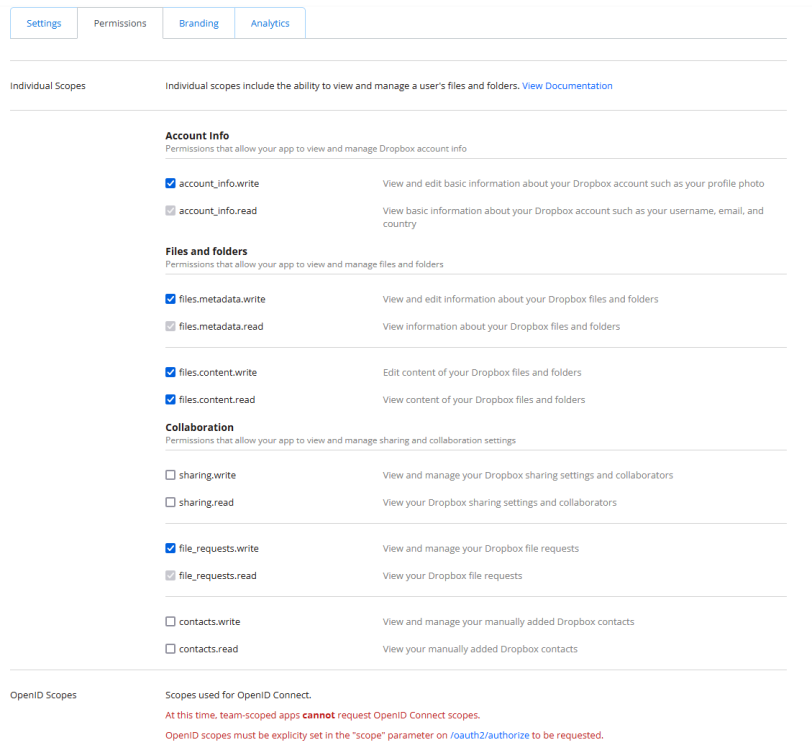
Danke für den Tipp!! Das hat geholfen. Jetzt kommt beim Versuch mit Backitup ein Backup in die Dropbox zu machen die Meldung ich hätte der App keine Schreibberechtigung erteilt, was aber nicht stimmt. Die Sicherung selbst führt er durch aber beim Kopieren hapert's dann. [ERROR] [dropbox] - upload Dropbox: {"code":400,"text":"Error in call to API function \"files/upload\": Your app is not permitted to access this endpoint because it does not have the required scope 'files.content.write'. The owner of the app can enable the scope for the app using the Permissions tab on the App Console."} Weiss da einer weiter? Versuche ich Backups aus der Dropbox wieder einzuspielen kommt: "Dropbox: Error on Dropbox list" Ich schliesse daraus, dass er überhaupt nicht auf die Dropbox lesend oder schreibend zugreifen kann...? Warum?
-
Schade, dass mir keiner helfen kann...
-
Das ist mir bewusst. Ich brauche aber kein Backup vom Backup meiner Platten. Da reicht mir eine Absicherung gegen Plattenausfall. Alles hat halt seine Grenzen.
-
Ich würde gerne das NAS System auf den Windows PC sichern, da er ja sowieso verbunden ist. Wenn das NAS also aus welchen Gründen auch abschmieren würde, dass ich es mit wenig Aufwand wieder in den alten Zustand bekomme. Also dafür erforderliche sollte er sichern. Meine Daten an sich soll er nicht komplett sichern, dafür habe ich ja eine Paritätsplatte, falls was passiert. Sicher könnte ich auch eine weitere Platte extern anschließen, aber wozu? Da ich den PC quasi täglich dran habe, bräuchte ich ja nicht noch einen weiteren Verbraucher einbinden. Inkrementell wäre natürlich gut, damit man vielleicht mal drei Versionen hat, aber nicht zwingend.
-
Hi! Erstmal vielen Dank für den klasse Docker! Ich möchte mit meinem Smarthome vom PI auf das NAS umziehen und wollte deshalb mein Backup einspielen. Das Backup habe ich auf meinem NAS gespeichert. Wenn ich die gleichen Einstellungen wie auf dem PI verwende, bekomme ich aber leider keine Backups angezeigt, da er einen Zugriffsfehler auswirft, die Liste bleibt leer: Error: Command failed: sudo mount -t cifs -o username=nas_user,password=****,noserverino,rw,uid=iobroker,gid=iobroker,file_mode=0777,dir_mode=0777 //192.168.178.66/Backup/RaspberryHome /opt/iobroker/backups Unable to apply new capability set. Wie kann ich diesen "capability set" erstellen lassen, so dass ich zugreifen kann?

