





Soulplayer
Members
-
Joined
-
Last visited
Everything posted by Soulplayer
-
I’m currently not on the beta. Did it work previously? Perhaps it’s a Plex issue more then unraid?
-
This did not start autofan when rebooting the server. Does anyone have a better solution I can use? My PMW controller is 4 FIXED: I changed to using a userscript: #!/bin/bash /usr/local/emhttp/plugins/dynamix.system.autofan/scripts/rc.autofan start At first start array only
-
Hello, I have a problem with transcoding on plex not using my iGPU bun only when I enable HDR tone mapping. I see the following in the logs: But then I see it’s using the CPU for transcoding. Again using it on non-hdr content it works and plex uses the UHD Graphics 770 to transcode. Intel-GPU-TOP is installed and I am assuming that I use the right docker settings since non-hdr content transcode without a hitch. Does anyone have an idea where the problem lies? Thank you, Soul
-
Feature request for Fan Auto Control: Please implement a setting to always autostart. My PMW controller is number 4 in the list, and Fan Auto Control did not start on reboot. Apparently, this is because it only tests the first pmw? Link
-
I did reboot the server. I did not know the changes would be lost. I changed the file and everything is in order.
-
I'm seeing the same issue. I changed the age_mover according to https://github.com/hugenbd/ca.mover.tuning/commit/276266b17e231199a258d3cf0ac5f8d786ed30bb.
-
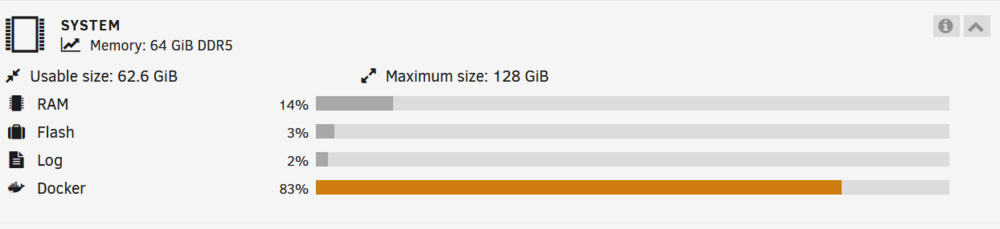
Hello, I moved my server to a new motherboard/cpu/memory and so on. There were soms small problems but the big weird one is the memory usage from docker. I cannot find the culprit so I came here for help. Can someone point me in a direction? I first thougt it was plex or tdarr but when the containers are down the usage stayed the same. When I start docker I immediatly see the usage to go 9TB... homelabserver-diagnostics-20240616-0924.zip
-
I'm getting a few of these the last week, but I cannot see what is causing them. I had to reboot my server a couple of times but not when the latest one occurred, so I'm not sure if this has something to do with it. May 11 04:40:08 HomeLabServer root: Fix Common Problems: Error: Machine Check Events detected on your server May 11 04:40:08 HomeLabServer root: mcelog: ERROR: AMD Processor family 25: mcelog does not support this processor. Please use the edac_mce_amd module instead. May 11 04:40:08 HomeLabServer root: CPU is unsupported I do not experience any freezes or lag or any issue with the server. Everything is running smooth... I attached my diagnostics. homelabserver-diagnostics-20240511-0750.zip
-
using a different controller fixed the issue. Weird but I'm happy
-
Could you share your settings? Mine doesn't work: switch: - platform: wake_on_lan mac: 52:xx:00:xx:2c:xx broadcast_address: 10.0.1.xx broadcast_port: 9 host: 10.0.1.xxx name: 2023-xxxx-gaming
-
Strange indeed... I have to find one that fits a X1. I have 2 X16 but those have GPU's inside of them and then 2x X1.
-
I'll try that. Is one as this a possible candidate? Link I am also wondering if transcoding in memory could cause this? I use my memory for plex encoding.
-
Hello, so after a month of waiting today the BTRFS scrub yielded again 5 errors. I have already changed the cables and changed the asmedia controller with a new one and ran memtest for 24 hours without errors. The weird thing for me is that it is always 5 errors (I reset the disk stats everytime and it is a different file). This time it is a file that was downloaded 29 march. It happens only to the disks connected to the asmedia controller. Any pointers? The data corrupted is easily replaced but it is driving me nuts… it has to do something with the controller or all the disk would be effected…?
-
Okay if there are no memory errors I will buy a new controller. Do you prefer a brand? Otherwise I’ll buy the one listed below: IO Crest
-
Thank you for your answer. I recently upgraded all ram and the errors kept coming back. So I’m thinking it is the controller. I will run a memtest tomorrow night to be sure. Do you have a recommendation for a sata controller (4sata ports x1)?
-
Hello, I’ve been seeing some BTRFS errors for a while now. Last week I changed all my cables but today I was alerted of another one. Is there something else that could be the cause here? I attached my diagnostic file. Really looking forward for some tips here… I read around the forum but I cannot see any reason why my system should be giving these errors (except bitrot?). I do use SATA controller: ASMedia Technology Inc. ASM1064 Serial ATA Controller but this should work according to the recommended sata controller guide I found on this forum. Thanks in advance! Mar 3 23:13:46 HomeLabServer kernel: BTRFS warning (device md1p1): checksum error at logical 1204729884672 on dev /dev/md1p1, physical 1204738273280, root 5, inode 1610, offset 1571762176, length 4096, links 1 (path: data/media/movies/films-kinderen/[WEBDL-1080p][8bit][h264][AAC 2.0]-NLKIDS.mkv) Mar 3 23:13:46 HomeLabServer kernel: BTRFS error (device md1p1): bdev /dev/md1p1 errs: wr 0, rd 0, flush 0, corrupt 1, gen 0 Mar 3 23:13:46 HomeLabServer kernel: BTRFS warning (device md1p1): checksum error at logical 1204729888768 on dev /dev/md1p1, physical 1204738277376, root 5, inode 1610, offset 1571766272, length 4096, links 1 (path: data/media/movies/films-kinderen/WEBDL-1080p][8bit][h264][AAC 2.0]-NLKIDS.mkv) Mar 3 23:13:46 HomeLabServer kernel: BTRFS error (device md1p1): bdev /dev/md1p1 errs: wr 0, rd 0, flush 0, corrupt 2, gen 0 Mar 3 23:13:46 HomeLabServer kernel: BTRFS warning (device md1p1): checksum error at logical 1204729892864 on dev /dev/md1p1, physical 1204738281472, root 5, inode 1610, offset 1571770368, length 4096, links 1 (path: data/media/movies/films-kinderen/[WEBDL-1080p][8bit][h264][AAC 2.0]-NLKIDS.mkv) Mar 3 23:13:46 HomeLabServer kernel: BTRFS error (device md1p1): bdev /dev/md1p1 errs: wr 0, rd 0, flush 0, corrupt 3, gen 0 Mar 3 23:13:46 HomeLabServer kernel: BTRFS warning (device md1p1): checksum error at logical 1204729896960 on dev /dev/md1p1, physical 1204738285568, root 5, inode 1610, offset 1571774464, length 4096, links 1 (path: data/media/movies/films-kinderen/[WEBDL-1080p][8bit][h264][AAC 2.0]-NLKIDS.mkv) Mar 3 23:13:46 HomeLabServer kernel: BTRFS error (device md1p1): bdev /dev/md1p1 errs: wr 0, rd 0, flush 0, corrupt 4, gen 0 Mar 3 23:13:46 HomeLabServer kernel: BTRFS warning (device md1p1): checksum error at logical 1204729901056 on dev /dev/md1p1, physical 1204738289664, root 5, inode 1610, offset 1571778560, length 4096, links 1 (path: data/media/movies/films-kinderen/[WEBDL-1080p][8bit][h264][AAC 2.0]-NLKIDS.mkv) Mar 3 23:13:46 HomeLabServer kernel: BTRFS error (device md1p1): bdev /dev/md1p1 errs: wr 0, rd 0, flush 0, corrupt 5, gen 0 homelabserver-diagnostics-20240309-0934.zip
-
Following this post I'm posting my diagnostics in the hope this is not a grave error. Fix Common Problems gave me an error about Machine Check Events Thank you, Soul homelabserver-diagnostics-20240110-0513.zip
-
I’m using this template, but it seems to not be configured properly? It creates the file but with a different user. I had to add user_id: as a variable and then set it to 99. Now it shows as the right owner. I think the variables already defined don't match what is needed according to this. File permission and directory permission do not seem to work also... Am I alone in this? Thank you!
-
still seeing this issue :(. If I reboot the server it works until it does not anymore. homelabserver-diagnostics-20230706-1925.zip
-
Hello, I have a weird issue. Sometimes my VM does not boot anymore. I get the following error: If I restart my unaid machine the VM boots as if nothing is wrong. After a while I get the error again and I need to reboot my unraid server. Any idea what could be the cause and how to fix this? <?xml version='1.0' encoding='UTF-8'?> <domain type='kvm' id='2'> <name>windows-desktop</name> <uuid>cf0c6e95-8c08-4d1d-a7ea-d8bbc14d6297</uuid> <metadata> <vmtemplate xmlns="unraid" name="Windows 11" icon="windows11.png" os="windowstpm"/> </metadata> <memory unit='KiB'>33030144</memory> <currentMemory unit='KiB'>33030144</currentMemory> <memoryBacking> <nosharepages/> </memoryBacking> <vcpu placement='static'>16</vcpu> <cputune> <vcpupin vcpu='0' cpuset='4'/> <vcpupin vcpu='1' cpuset='16'/> <vcpupin vcpu='2' cpuset='5'/> <vcpupin vcpu='3' cpuset='17'/> <vcpupin vcpu='4' cpuset='6'/> <vcpupin vcpu='5' cpuset='18'/> <vcpupin vcpu='6' cpuset='7'/> <vcpupin vcpu='7' cpuset='19'/> <vcpupin vcpu='8' cpuset='8'/> <vcpupin vcpu='9' cpuset='20'/> <vcpupin vcpu='10' cpuset='9'/> <vcpupin vcpu='11' cpuset='21'/> <vcpupin vcpu='12' cpuset='10'/> <vcpupin vcpu='13' cpuset='22'/> <vcpupin vcpu='14' cpuset='11'/> <vcpupin vcpu='15' cpuset='23'/> </cputune> <resource> <partition>/machine</partition> </resource> <os> <type arch='x86_64' machine='pc-i440fx-7.1'>hvm</type> <loader readonly='yes' type='pflash'>/usr/share/qemu/ovmf-x64/OVMF_CODE-pure-efi-tpm.fd</loader> <nvram>/etc/libvirt/qemu/nvram/cf0c6e95-8c08-4d1d-a7ea-d8bbc14d6297_VARS-pure-efi-tpm.fd</nvram> <smbios mode='host'/> </os> <features> <acpi/> <apic/> <hyperv mode='custom'> <relaxed state='on'/> <vapic state='on'/> <spinlocks state='on' retries='8191'/> <vendor_id state='on' value='none'/> </hyperv> <ioapic driver='kvm'/> </features> <cpu mode='host-passthrough' check='none' migratable='on'> <topology sockets='1' dies='1' cores='8' threads='2'/> <cache mode='passthrough'/> <feature policy='require' name='topoext'/> </cpu> <clock offset='localtime'> <timer name='hypervclock' present='yes'/> <timer name='hpet' present='no'/> </clock> <on_poweroff>destroy</on_poweroff> <on_reboot>restart</on_reboot> <on_crash>restart</on_crash> <devices> <emulator>/usr/local/sbin/qemu</emulator> <disk type='file' device='cdrom'> <driver name='qemu' type='raw'/> <source file='/mnt/user/isos/virtio-win-0.1.225-2.iso' index='1'/> <backingStore/> <target dev='hdb' bus='sata'/> <readonly/> <alias name='sata0-0-1'/> <address type='drive' controller='0' bus='0' target='0' unit='1'/> </disk> <controller type='usb' index='0' model='qemu-xhci' ports='15'> <alias name='usb'/> <address type='pci' domain='0x0000' bus='0x00' slot='0x07' function='0x0'/> </controller> <controller type='sata' index='0'> <alias name='sata0'/> <address type='pci' domain='0x0000' bus='0x00' slot='0x03' function='0x0'/> </controller> <controller type='virtio-serial' index='0'> <alias name='virtio-serial0'/> <address type='pci' domain='0x0000' bus='0x00' slot='0x04' function='0x0'/> </controller> <controller type='pci' index='0' model='pci-root'> <alias name='pci.0'/> </controller> <interface type='bridge'> <mac address='52:54:00:b2:2c:f4'/> <source bridge='br0'/> <target dev='vnet1'/> <model type='virtio'/> <alias name='net0'/> <address type='pci' domain='0x0000' bus='0x00' slot='0x02' function='0x0'/> </interface> <serial type='pty'> <source path='/dev/pts/1'/> <target type='isa-serial' port='0'> <model name='isa-serial'/> </target> <alias name='serial0'/> </serial> <console type='pty' tty='/dev/pts/1'> <source path='/dev/pts/1'/> <target type='serial' port='0'/> <alias name='serial0'/> </console> <channel type='unix'> <source mode='bind' path='/var/lib/libvirt/qemu/channel/target/domain-2-windows-desktop/org.qemu.guest_agent.0'/> <target type='virtio' name='org.qemu.guest_agent.0' state='connected'/> <alias name='channel0'/> <address type='virtio-serial' controller='0' bus='0' port='1'/> </channel> <input type='mouse' bus='ps2'> <alias name='input0'/> </input> <input type='keyboard' bus='ps2'> <alias name='input1'/> </input> <tpm model='tpm-tis'> <backend type='emulator' version='2.0' persistent_state='yes'/> <alias name='tpm0'/> </tpm> <audio id='1' type='none'/> <hostdev mode='subsystem' type='pci' managed='yes'> <driver name='vfio'/> <source> <address domain='0x0000' bus='0x24' slot='0x00' function='0x0'/> </source> <alias name='hostdev0'/> <address type='pci' domain='0x0000' bus='0x00' slot='0x05' function='0x0'/> </hostdev> <hostdev mode='subsystem' type='pci' managed='yes'> <driver name='vfio'/> <source> <address domain='0x0000' bus='0x24' slot='0x00' function='0x1'/> </source> <alias name='hostdev1'/> <address type='pci' domain='0x0000' bus='0x00' slot='0x06' function='0x0'/> </hostdev> <hostdev mode='subsystem' type='pci' managed='yes'> <driver name='vfio'/> <source> <address domain='0x0000' bus='0x01' slot='0x00' function='0x0'/> </source> <boot order='1'/> <alias name='hostdev2'/> <address type='pci' domain='0x0000' bus='0x00' slot='0x08' function='0x0'/> </hostdev> <hostdev mode='subsystem' type='pci' managed='yes'> <driver name='vfio'/> <source> <address domain='0x0000' bus='0x28' slot='0x00' function='0x0'/> </source> <alias name='hostdev3'/> <address type='pci' domain='0x0000' bus='0x00' slot='0x09' function='0x0'/> </hostdev> <hostdev mode='subsystem' type='pci' managed='yes'> <driver name='vfio'/> <source> <address domain='0x0000' bus='0x2a' slot='0x00' function='0x1'/> </source> <alias name='hostdev4'/> <address type='pci' domain='0x0000' bus='0x00' slot='0x0a' function='0x0'/> </hostdev> <hostdev mode='subsystem' type='pci' managed='yes'> <driver name='vfio'/> <source> <address domain='0x0000' bus='0x2f' slot='0x00' function='0x3'/> </source> <alias name='hostdev5'/> <address type='pci' domain='0x0000' bus='0x00' slot='0x0b' function='0x0'/> </hostdev> <memballoon model='none'/> </devices> <seclabel type='dynamic' model='dac' relabel='yes'> <label>+0:+100</label> <imagelabel>+0:+100</imagelabel> </seclabel> </domain>
-
It's back up again
-
Has this feature been added yet?
-
Is it down again? I'm seeing the same issue since today
-
I'm having the same problem. It does not work anymore when updating to the latest version of Unraid :(
-
Hello, I am running a windows 11 WM. It works great BUT it takes a really long time to start booting. Could it have something to do with the memory that's being demanded? This is about the half of the machines' memory (there is enough to spare). Any idea's? Thank you! <?xml version='1.0' encoding='UTF-8'?> <domain type='kvm' id='29'> <name>windows-desktop</name> <uuid>cf0c6e95-8c08-4d1d-a7ea-d8bbc14d6297</uuid> <metadata> <vmtemplate xmlns="unraid" name="Windows 11" icon="windows11.png" os="windowstpm"/> </metadata> <memory unit='KiB'>33030144</memory> <currentMemory unit='KiB'>33030144</currentMemory> <memoryBacking> <nosharepages/> </memoryBacking> <vcpu placement='static'>16</vcpu> <cputune> <vcpupin vcpu='0' cpuset='4'/> <vcpupin vcpu='1' cpuset='16'/> <vcpupin vcpu='2' cpuset='5'/> <vcpupin vcpu='3' cpuset='17'/> <vcpupin vcpu='4' cpuset='6'/> <vcpupin vcpu='5' cpuset='18'/> <vcpupin vcpu='6' cpuset='7'/> <vcpupin vcpu='7' cpuset='19'/> <vcpupin vcpu='8' cpuset='8'/> <vcpupin vcpu='9' cpuset='20'/> <vcpupin vcpu='10' cpuset='9'/> <vcpupin vcpu='11' cpuset='21'/> <vcpupin vcpu='12' cpuset='10'/> <vcpupin vcpu='13' cpuset='22'/> <vcpupin vcpu='14' cpuset='11'/> <vcpupin vcpu='15' cpuset='23'/> </cputune> <resource> <partition>/machine</partition> </resource> <os> <type arch='x86_64' machine='pc-i440fx-7.1'>hvm</type> <loader readonly='yes' type='pflash'>/usr/share/qemu/ovmf-x64/OVMF_CODE-pure-efi-tpm.fd</loader> <nvram>/etc/libvirt/qemu/nvram/cf0c6e95-8c08-4d1d-a7ea-d8bbc14d6297_VARS-pure-efi-tpm.fd</nvram> </os> <features> <acpi/> <apic/> <hyperv mode='custom'> <relaxed state='on'/> <vapic state='on'/> <spinlocks state='on' retries='8191'/> <vendor_id state='on' value='none'/> </hyperv> </features> <cpu mode='host-passthrough' check='none' migratable='on'> <topology sockets='1' dies='1' cores='8' threads='2'/> <cache mode='passthrough'/> <feature policy='require' name='topoext'/> </cpu> <clock offset='localtime'> <timer name='hypervclock' present='yes'/> <timer name='hpet' present='no'/> </clock> <on_poweroff>destroy</on_poweroff> <on_reboot>restart</on_reboot> <on_crash>restart</on_crash> <devices> <emulator>/usr/local/sbin/qemu</emulator> <disk type='file' device='cdrom'> <driver name='qemu' type='raw'/> <source file='/mnt/user/isos/virtio-win-0.1.225-2.iso' index='1'/> <backingStore/> <target dev='hdb' bus='sata'/> <readonly/> <alias name='sata0-0-1'/> <address type='drive' controller='0' bus='0' target='0' unit='1'/> </disk> <controller type='pci' index='0' model='pci-root'> <alias name='pci.0'/> </controller> <controller type='sata' index='0'> <alias name='sata0'/> <address type='pci' domain='0x0000' bus='0x00' slot='0x03' function='0x0'/> </controller> <controller type='virtio-serial' index='0'> <alias name='virtio-serial0'/> <address type='pci' domain='0x0000' bus='0x00' slot='0x04' function='0x0'/> </controller> <controller type='usb' index='0' model='ich9-ehci1'> <alias name='usb'/> <address type='pci' domain='0x0000' bus='0x00' slot='0x07' function='0x7'/> </controller> <controller type='usb' index='0' model='ich9-uhci1'> <alias name='usb'/> <master startport='0'/> <address type='pci' domain='0x0000' bus='0x00' slot='0x07' function='0x0' multifunction='on'/> </controller> <controller type='usb' index='0' model='ich9-uhci2'> <alias name='usb'/> <master startport='2'/> <address type='pci' domain='0x0000' bus='0x00' slot='0x07' function='0x1'/> </controller> <controller type='usb' index='0' model='ich9-uhci3'> <alias name='usb'/> <master startport='4'/> <address type='pci' domain='0x0000' bus='0x00' slot='0x07' function='0x2'/> </controller> <interface type='bridge'> <mac address='52:54:00:b2:2c:f4'/> <source bridge='br0'/> <target dev='vnet28'/> <model type='virtio-net'/> <alias name='net0'/> <address type='pci' domain='0x0000' bus='0x00' slot='0x02' function='0x0'/> </interface> <serial type='pty'> <source path='/dev/pts/1'/> <target type='isa-serial' port='0'> <model name='isa-serial'/> </target> <alias name='serial0'/> </serial> <console type='pty' tty='/dev/pts/1'> <source path='/dev/pts/1'/> <target type='serial' port='0'/> <alias name='serial0'/> </console> <channel type='unix'> <source mode='bind' path='/var/lib/libvirt/qemu/channel/target/domain-29-windows-desktop/org.qemu.guest_agent.0'/> <target type='virtio' name='org.qemu.guest_agent.0' state='connected'/> <alias name='channel0'/> <address type='virtio-serial' controller='0' bus='0' port='1'/> </channel> <input type='mouse' bus='ps2'> <alias name='input0'/> </input> <input type='keyboard' bus='ps2'> <alias name='input1'/> </input> <tpm model='tpm-tis'> <backend type='emulator' version='2.0' persistent_state='yes'/> <alias name='tpm0'/> </tpm> <audio id='1' type='none'/> <hostdev mode='subsystem' type='pci' managed='yes'> <driver name='vfio'/> <source> <address domain='0x0000' bus='0x24' slot='0x00' function='0x0'/> </source> <alias name='hostdev0'/> <address type='pci' domain='0x0000' bus='0x00' slot='0x05' function='0x0'/> </hostdev> <hostdev mode='subsystem' type='pci' managed='yes'> <driver name='vfio'/> <source> <address domain='0x0000' bus='0x24' slot='0x00' function='0x1'/> </source> <alias name='hostdev1'/> <address type='pci' domain='0x0000' bus='0x00' slot='0x06' function='0x0'/> </hostdev> <hostdev mode='subsystem' type='pci' managed='yes'> <driver name='vfio'/> <source> <address domain='0x0000' bus='0x01' slot='0x00' function='0x0'/> </source> <boot order='1'/> <alias name='hostdev2'/> <address type='pci' domain='0x0000' bus='0x00' slot='0x08' function='0x0'/> </hostdev> <hostdev mode='subsystem' type='pci' managed='yes'> <driver name='vfio'/> <source> <address domain='0x0000' bus='0x28' slot='0x00' function='0x0'/> </source> <alias name='hostdev3'/> <address type='pci' domain='0x0000' bus='0x00' slot='0x09' function='0x0'/> </hostdev> <hostdev mode='subsystem' type='pci' managed='yes'> <driver name='vfio'/> <source> <address domain='0x0000' bus='0x2a' slot='0x00' function='0x1'/> </source> <alias name='hostdev4'/> <address type='pci' domain='0x0000' bus='0x00' slot='0x0a' function='0x0'/> </hostdev> <hostdev mode='subsystem' type='pci' managed='yes'> <driver name='vfio'/> <source> <address domain='0x0000' bus='0x2f' slot='0x00' function='0x3'/> </source> <alias name='hostdev5'/> <address type='pci' domain='0x0000' bus='0x00' slot='0x0b' function='0x0'/> </hostdev> <memballoon model='none'/> </devices> <seclabel type='dynamic' model='dac' relabel='yes'> <label>+0:+100</label> <imagelabel>+0:+100</imagelabel> </seclabel> </domain>


