tmodev
Members
-
Joined
-
Last visited
Everything posted by tmodev
-
So i just noticed its probably not a sabnzb issue, but an unraid issue related to the 7.2.0 update... not a single path that is passed through to any container is currently writeable inside the container... thanks for looking into it and trying to help out
-
So i forced 99:100 on my path and even re-nuked the permissions to 777 but still get the same issues with the newest container
-
So if i got this right ill create 2 path variables: - /mnt/user0/data/usenet/incomplete-> /mnt/incomplete - /mnt/user0/data/usenet/complete -> /mnt/downloads That might resolve my issue right? UPDATE: it did not. do i need to change ownership on the host?
-
yes i set it up according to the trash guides.... which was working for months tho.. ill try checking the ownership of that path
-
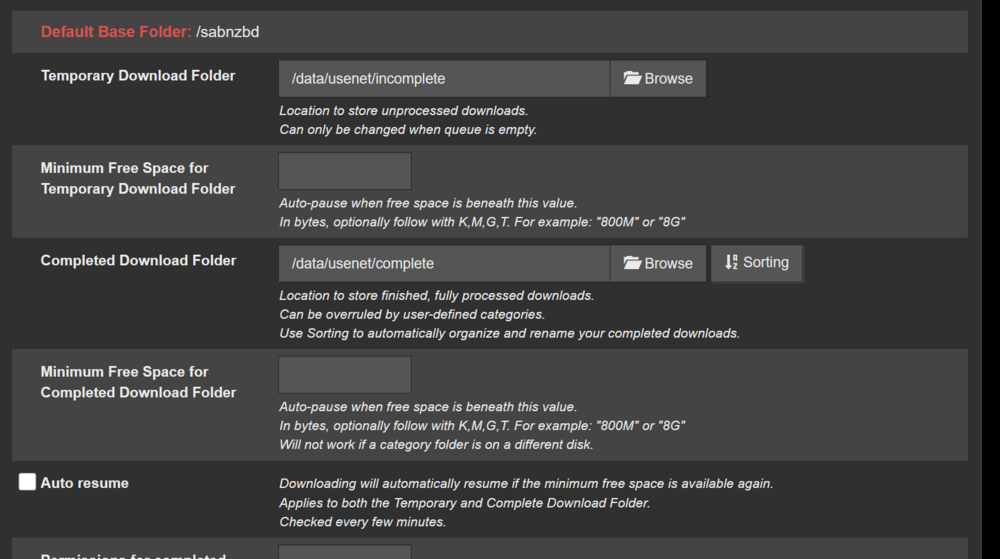
Hello and Grias di @ich777 , First of all thank you for your great work. I love your containers. However since upgrading to the latest 7.2.0 (and updating the containers) i ran into some weird problems with SABNZB... For some reason the container can no longer write to the dirs i have configured... before that it was working for months without issues... I even tried to nuke the permissions on that path (chmod 777) but i still cannot create files/dirs in that container... If i do that in Unraid it works without an issue... any idea what could be the culprit? When i start the container i get following error: 2025-11-01 18:13:15,901::INFO::[__init__:466] SSL version = OpenSSL 3.5.1 1 Jul 2025 2025-11-01 18:13:15,917::INFO::[notifier:166] Sending notification: Warning - /data/usenet/incomplete is not writable at all. This blocks downloads. To prevent all helpful warnings, disable Special setting 'helpful_warnings'. (type=warning, job_cat=None) 2025-11-01 18:13:15,917::WARNING::[misc:96] /data/usenet/incomplete is not writable at all. This blocks downloads. To prevent all helpful warnings, disable Special setting 'helpful_warnings'. 2025-11-01 18:13:15,927::WARNING::[misc:96] /data/usenet/complete is not writable at all. This blocks downloads.
-
@Josh.5 thank you for the awesome container Is it possible to directly connect it to a monitor and use the GPU rather than inhome streaming?
-
Suddenly i can nolonger search for apps in the CA store... No VPN used.. CA-Logging-20250112-0006.zip

-
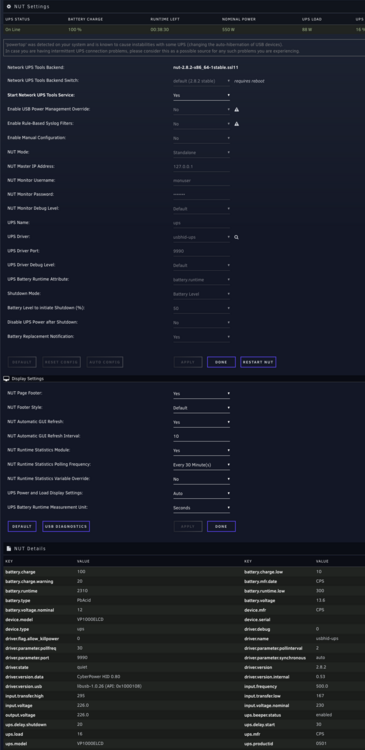
Hello guys, Does anyone of you run NetworkUPS Tools with the PeaNUT Homepage integration? I had it working in the past when i was trying out an ACP UPS. However, with my Cyberpower UPS (way lower idle draw from the UPS itself) I cannot get this widget to work. Any ideas what i might have configured wrong? https://gethomepage.dev/latest/widgets/services/peanut/ - tmoUPS: icon: https://cdn-icons-png.flaticon.com/512/2138/2138730.png description: tmo UPS siteMonitor: http://192.168.178.200:9990 statusStyle: "dot" widget: type: peanut url: http://192.168.178.200:9990 key: ups fields: ["battery_charge", "ups_load", "ups_status"]

-
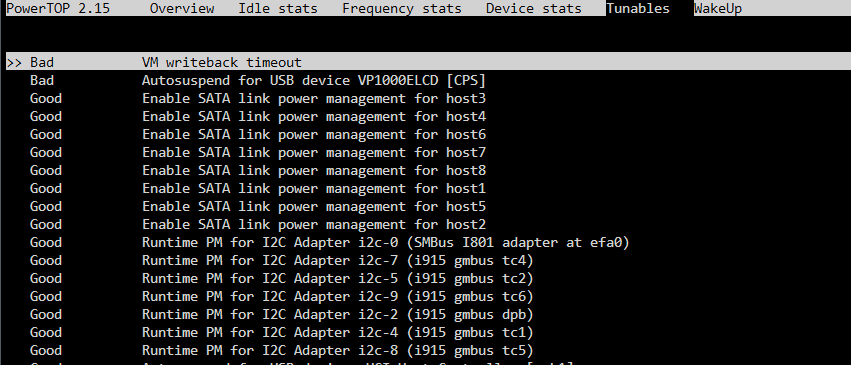
Thanks. Ill try to get a replacement and try again Update: I tried now additonal cables and got the same result. In the syslog i always see that it was found but then disconnected? b 26 12:49:55 tmosrv kernel: usb 1-9: new low-speed USB device number 21 using xhci_hcd Feb 26 12:49:55 tmosrv kernel: hid-generic 0003:0764:0501.03E7: hiddev96,hidraw0: USB HID v1.10 Device [CPS VP1000ELCD] on usb-0000:00:14.0-9/input0 Feb 26 12:50:03 tmosrv kernel: usb 1-9: USB disconnect, device number 21 Feb 26 12:50:03 tmosrv flash_backup: adding task: /usr/local/emhttp/plugins/dynamix.my.servers/scripts/UpdateFlashBackup update Feb 26 12:50:06 tmosrv kernel: usb 1-9: new low-speed USB device number 22 using xhci_hcd Feb 26 12:50:06 tmosrv kernel: hid-generic 0003:0764:0501.03E8: hiddev96,hidraw0: USB HID v1.10 Device [CPS VP1000ELCD] on usb-0000:00:14.0-9/input0 Feb 26 12:50:14 tmosrv kernel: usb 1-9: USB disconnect, device number 22 Feb 26 12:50:17 tmosrv kernel: usb 1-9: new low-speed USB device number 23 using xhci_hcd Feb 26 12:50:17 tmosrv kernel: hid-generic 0003:0764:0501.03E9: hiddev96,hidraw0: USB HID v1.10 Device [CPS VP1000ELCD] on usb-0000:00:14.0-9/input0 Feb 26 12:50:23 tmosrv emhttpd: cmd: /usr/local/emhttp/plugins/nut/scripts/nutscan Feb 26 12:50:25 tmosrv kernel: usb 1-9: USB disconnect, device number 23 Feb 26 12:50:28 tmosrv kernel: usb 1-9: new low-speed USB device number 24 using xhci_hcd Feb 26 12:50:28 tmosrv kernel: hid-generic 0003:0764:0501.03EA: hiddev96,hidraw0: USB HID v1.10 Device [CPS VP1000ELCD] on usb-0000:00:14.0-9/input0 Feb 26 12:50:36 tmosrv kernel: usb 1-9: USB disconnect, device number 24 Feb 26 12:50:39 tmosrv ool www[31791]: /usr/local/emhttp/plugins/nut/scripts/start Feb 26 12:50:39 tmosrv kernel: usb 1-9: new low-speed USB device number 25 using xhci_hcd Feb 26 12:50:40 tmosrv kernel: hid-generic 0003:0764:0501.03EB: hiddev96,hidraw0: USB HID v1.10 Device [CPS VP1000ELCD] on usb-0000:00:14.0-9/input0 Feb 26 12:50:40 tmosrv root: Writing NUT configuration... Feb 26 12:50:41 tmosrv root: Updating permissions for NUT... Feb 26 12:50:41 tmosrv root: Checking if the NUT Runtime Statistics Module should be enabled... Feb 26 12:50:41 tmosrv root: Disabling the NUT Runtime Statistics Module... Feb 26 12:50:42 tmosrv root: Network UPS Tools - Generic HID driver 0.52 (2.8.1) Feb 26 12:50:42 tmosrv root: USB communication driver (libusb 1.0) 0.46 Feb 26 12:50:42 tmosrv root: libusb1: Could not open any HID devices: insufficient permissions on everything Feb 26 12:50:42 tmosrv root: No matching HID UPS found Feb 26 12:50:42 tmosrv root: Driver failed to start (exit status=1) Feb 26 12:50:42 tmosrv root: Network UPS Tools - UPS driver controller 2.8.1 Feb 26 12:50:47 tmosrv kernel: usb 1-9: USB disconnect, device number 25 Feb 26 12:50:50 tmosrv kernel: usb 1-9: new low-speed USB device number 26 using xhci_hcd Feb 26 12:50:51 tmosrv kernel: hid-generic 0003:0764:0501.03EC: hiddev96,hidraw0: USB HID v1.10 Device [CPS VP1000ELCD] on usb-0000:00:14.0-9/input0 Feb 26 12:50:58 tmosrv kernel: usb 1-9: USB disconnect, device number 26 Feb 26 12:51:01 tmosrv kernel: usb 1-9: new low-speed USB device number 27 using xhci_hcd Feb 26 12:51:02 tmosrv kernel: hid-generic 0003:0764:0501.03ED: hiddev96,hidraw0: USB HID v1.10 Device [CPS VP1000ELCD] on usb-0000:00:14.0-9/input0 Feb 26 12:51:04 tmosrv flash_backup: adding task: /usr/local/emhttp/plugins/dynamix.my.servers/scripts/UpdateFlashBackup update Feb 26 12:51:09 tmosrv kernel: usb 1-9: USB disconnect, device number 27 Feb 26 12:51:12 tmosrv kernel: usb 1-9: new low-speed USB device number 28 using xhci_hcd Feb 26 12:51:13 tmosrv kernel: hid-generic 0003:0764:0501.03EE: hiddev96,hidraw0: USB HID v1.10 Device [CPS VP1000ELCD] on usb-0000:00:14.0-9/input0 Feb 26 12:51:20 tmosrv kernel: usb 1-9: USB disconnect, device number 28 Feb 26 12:51:23 tmosrv kernel: usb 1-9: new low-speed USB device number 29 using xhci_hcd Feb 26 12:51:24 tmosrv kernel: hid-generic 0003:0764:0501.03EF: hiddev96,hidraw0: USB HID v1.10 Device [CPS VP1000ELCD] on usb-0000:00:14.0-9/input0 Feb 26 12:51:31 tmosrv kernel: usb 1-9: USB disconnect, device number 29 Feb 26 12:51:34 tmosrv kernel: usb 1-9: new low-speed USB device number 30 using xhci_hcd Any ideas? is this caused by a bad cable? Update: Idk what changed but it resolved itself. I can now see the ups. We will see how long it lasts Thanks for your help Update 2: I guess i found the culprit my powertop might disconnect the ups
-
Yes i did Reset the config each time. nut-debug-20240226120152.zip
-
i tried now various usb ports but i had no luck. I dont have another USB Cable. Is there anything else i could try? When i run nut-scanner i get this... root@tmosrv:/etc/nut# nut-scanner Cannot load XML library (libneon.so) : file not found. XML search disabled. Cannot load IPMI library (libfreeipmi.so) : file not found. IPMI search disabled. Scanning USB bus. No start IP, skipping SNMP No start IP, skipping NUT bus (old connect method) Scanning NUT bus (avahi method). [nutdev1] driver = "usbhid-ups" port = "auto" vendorid = "0764" productid = "0501" product = "VP1000ELCD" serial = "" vendor = "CPS" bus = "001" device = "070" busport = "002" ###NOTMATCHED-YET###bcdDevice = "0002" # WARNING: <empty> "serial" reported in some devices: nutdev1 What is the ahavi method?
-
Hello, I am trying to use a CyberPower UPS. Initially it was working, and the UPS was detected. However, recently it starting crashing for whatever reason. If i run Auto Config, the UPS is detected. However the driver fails to start with the following error messages Feb 26 09:50:25 tmosrv root: Network UPS Tools - Generic HID driver 0.52 (2.8.1) Feb 26 09:50:25 tmosrv root: USB communication driver (libusb 1.0) 0.46 Feb 26 09:50:25 tmosrv root: libusb1: Could not open any HID devices: insufficient permissions on everything Feb 26 09:50:25 tmosrv root: No matching HID UPS found Feb 26 09:50:25 tmosrv root: Driver failed to start (exit status=1) Feb 26 09:50:25 tmosrv root: Network UPS Tools - UPS driver controller 2.8.1 Feb 26 09:50:26 tmosrv root: Writing NUT configuration... Feb 26 09:50:27 tmosrv kernel: usb 1-4: new low-speed USB device number 30 using xhci_hcd Feb 26 09:50:27 tmosrv kernel: hid-generic 0003:0764:0501.001A: hiddev96,hidraw0: USB HID v1.10 Device [CPS VP1000ELCD] on usb-0000:00:14.0-4/input0 Feb 26 09:50:35 tmosrv kernel: usb 1-4: USB disconnect, device number 30 Feb 26 09:50:38 tmosrv kernel: usb 1-4: new low-speed USB device number 31 using xhci_hcd Feb 26 09:50:38 tmosrv kernel: hid-generic 0003:0764:0501.001B: hiddev96,hidraw0: USB HID v1.10 Device [CPS VP1000ELCD] on usb-0000:00:14.0-4/input0 Feb 26 09:50:43 tmosrv root: Updating permissions for NUT... Feb 26 09:50:43 tmosrv root: Checking if the NUT Runtime Statistics Module should be enabled... Feb 26 09:50:43 tmosrv root: Disabling the NUT Runtime Statistics Module... Feb 26 09:50:44 tmosrv root: Stopping the NUT services... Feb 26 09:50:46 tmosrv kernel: usb 1-4: USB disconnect, device number 31 Feb 26 09:50:46 tmosrv root: Network UPS Tools - UPS driver controller 2.8.1 Feb 26 09:50:49 tmosrv kernel: usb 1-4: new low-speed USB device number 32 using xhci_hcd Feb 26 09:50:49 tmosrv kernel: hid-generic 0003:0764:0501.001C: hiddev96,hidraw0: USB HID v1.10 Device [CPS VP1000ELCD] on usb-0000:00:14.0-4/input0 Feb 26 09:50:57 tmosrv kernel: usb 1-4: USB disconnect, device number 32 Feb 26 09:50:59 tmosrv flash_backup: adding task: /usr/local/emhttp/plugins/dynamix.my.servers/scripts/UpdateFlashBackup update Feb 26 09:51:00 tmosrv kernel: usb 1-4: new low-speed USB device number 33 using xhci_hcd Feb 26 09:51:00 tmosrv kernel: hid-generic 0003:0764:0501.001D: hiddev96,hidraw0: USB HID v1.10 Device [CPS VP1000ELCD] on usb-0000:00:14.0-4/input0 Feb 26 09:51:08 tmosrv kernel: usb 1-4: USB disconnect, device number 33 Feb 26 09:51:11 tmosrv kernel: usb 1-4: new low-speed USB device number 34 using xhci_hcd Feb 26 09:51:11 tmosrv kernel: hid-generic 0003:0764:0501.001E: hiddev96,hidraw0: USB HID v1.10 Device [CPS VP1000ELCD] on usb-0000:00:14.0-4/input0 Feb 26 09:51:19 tmosrv kernel: usb 1-4: USB disconnect, device number 34 Feb 26 09:51:22 tmosrv kernel: usb 1-4: new low-speed USB device number 35 using xhci_hcd Feb 26 09:51:22 tmosrv kernel: hid-generic 0003:0764:0501.001F: hiddev96,hidraw0: USB HID v1.10 Device [CPS VP1000ELCD] on usb-0000:00:14.0-4/input0 I tried reinstalling, rebooting, an older version (2.8 of the nut driver) but nothing seem to work. Any ideas what issue it could be? EDIT: Running nut-scanner -U gives me root@tmosrv:~# nut-scanner -U Cannot load XML library (libneon.so) : file not found. XML search disabled. Cannot load IPMI library (libfreeipmi.so) : file not found. IPMI search disabled. Scanning USB bus. [nutdev1] driver = "usbhid-ups" port = "auto" vendorid = "0764" productid = "0501" product = "VP1000ELCD" serial = "" vendor = "CPS" bus = "001" device = "063" busport = "004" ###NOTMATCHED-YET###bcdDevice = "0002" # WARNING: <empty> "serial" reported in some devices: nutdev1
-
@genesisdoeswhatnintendont Thanks for your tipps. I finally managed to reach c8 on my Asrock Z790 Pro RS/D4 after months of trying. I had to uninstall the Realtek driver plugin to go deeper than c3 after the update. Update: I actually reach C10 now. Amazing.
-
I guess so as well. However, im idling at 65w with 8 hdds and 3 nvmes and 20+ container running which is still good i suppose. and yet id love to know how deep i could go. my proxmox build idles between 20 and 25 watt (5 ssds + 4 hdds) and reaches c8. Just for science id love to know how big the impact is. Ill try your suggestions regarding the RGB LED controller and report back. Maybe it helps somehow EDIT: just checked with lsusb. It looks like i dont have a RGB Controller (or its deactivated already).
-
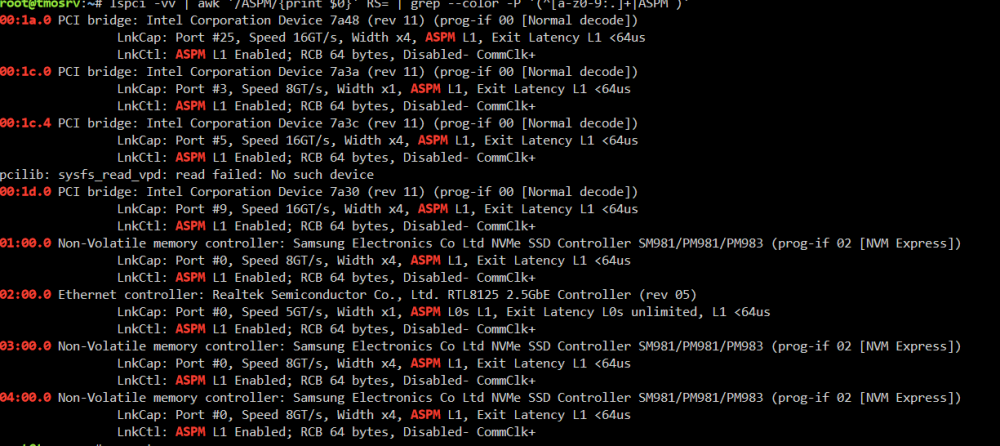
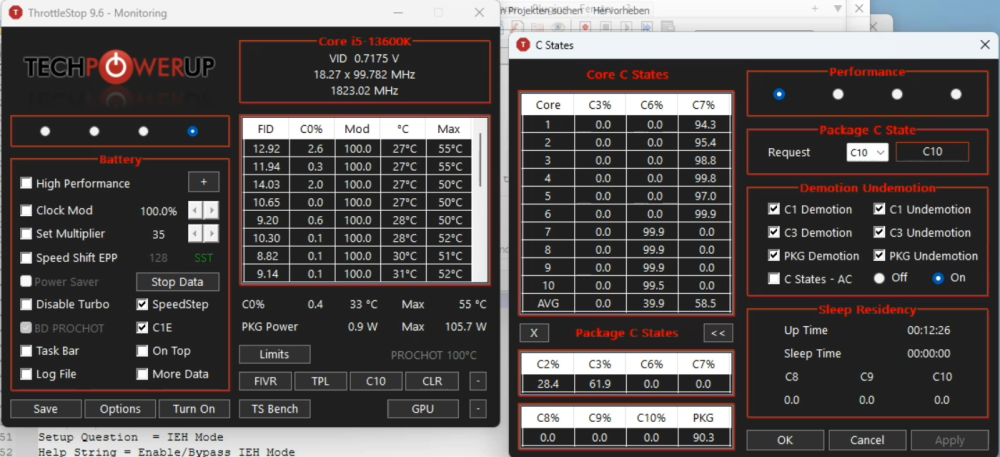
I am also trying to apply @genesisdoeswhatnintendont guide to the asrock z790 pro rs d4. I disabled it and my USBs are still working. I think its some sort of RGB LED Controller maybe? In my case i still cant reach deeper C-States than C3 eventhough I enabled ASPM for all my devices. Enabled C-States. Deactivated every unnecessery device and yet i am only able to reach c3. "Native ASPM" is disabled. Any suggestions what else i could try to tune? Also does anybody know why i get an error when running lspci -vv | awk '/ASPM/{print $0}' RS= | grep --color -P '(^[a-z0-9:.]+|ASPM )' could this be the culprit? EDIT: I am also using a PiKVM which is plugged in via HDMI. Storage: 3x 1Tb Samsung 970 Evo Plus (can do c10) 8x 16Tb Toshiba MG08 (can do c8 atleast) Throttlestop on Windows:
-
Solved by using NFS Shares 🤦♂️
-
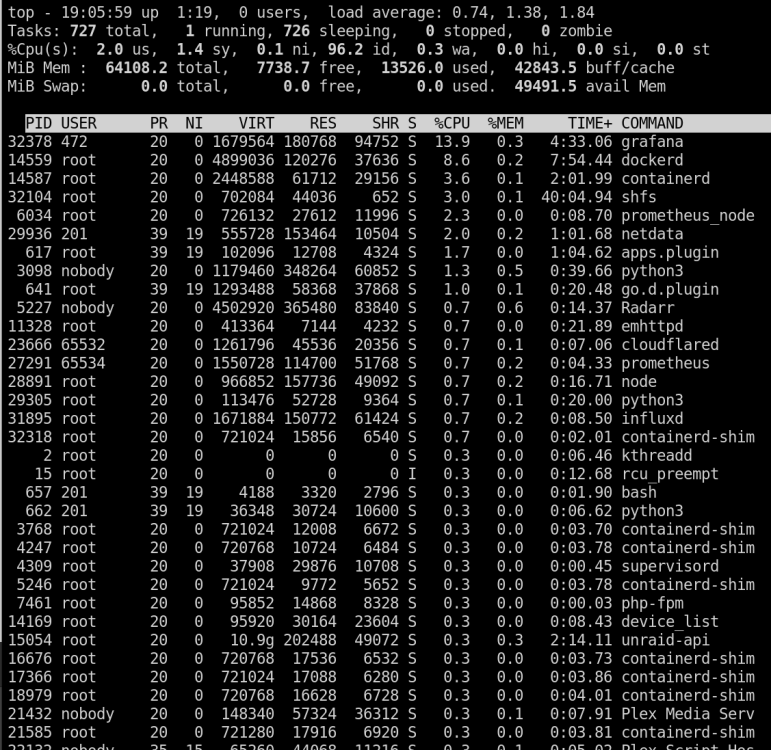
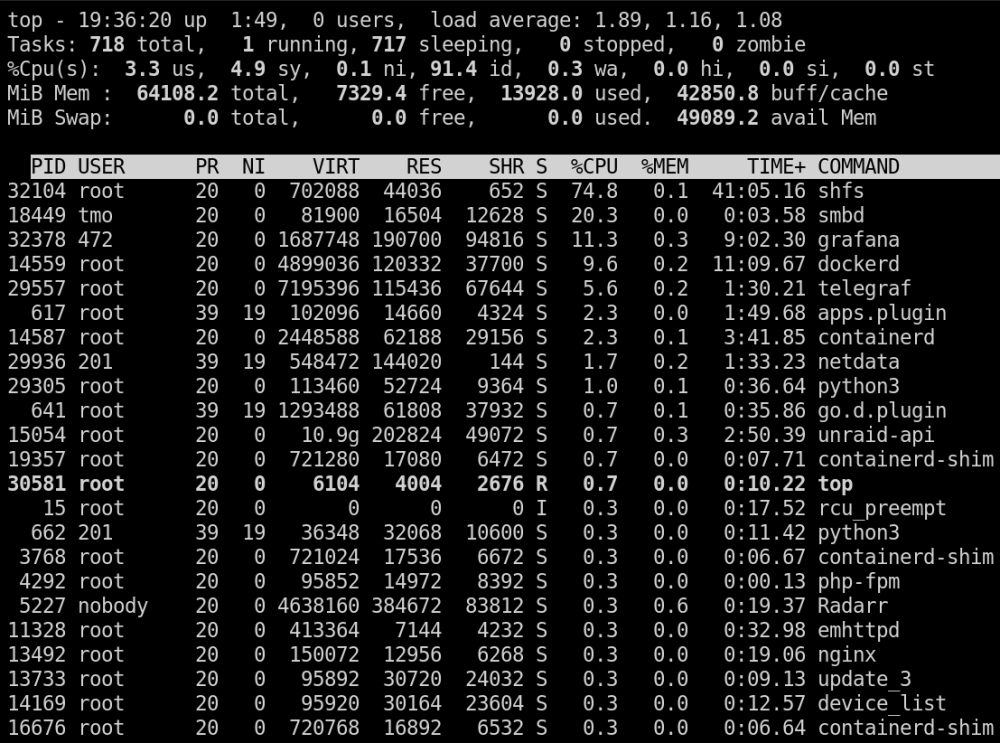
Hello People, I have two unraid servers at home, one for doing plex and cloud storage and one for backups. If I mount shares, which i want to backup, on the backup server, it creates a process on the plex server that causes high cpu load, which generates 10 watt more on idle. This happens even if the disks are spun down on the plex server and nothing actively accessing the mounted shares (no docker no vms no background scripts). The process dissapears as soon as i stop the array on the backup server (remotes are unmounted). Also, there is no IO wait going on. Plex Server - Backup Server array offline Plex Server - Backup Server array online Any ideas how I can solve this issue? UPDATE: on my backup server i also see an 24 20:25:32 tmoBackUP unassigned.devices: Unmounting Remote SMB/NFS Share '//TMOSRV/pictures'... Jan 24 20:25:32 tmoBackUP unassigned.devices: Unmount cmd: /sbin/umount -t cifs '/mnt/remotes/TMOSRV_pictures' 2>&1 Jan 24 20:25:35 tmoBackUP unassigned.devices: Unmount of '//TMOSRV/pictures' failed: 'umount: /mnt/remotes/TMOSRV_pictures: target is busy. ' Jan 24 20:25:50 tmoBackUP kernel: CIFS: VFS: \\TMOSRV\pictures Close unmatched open for MID:333484 Jan 24 20:26:22 tmoBackUP kernel: CIFS: VFS: \\TMOSRV\pictures Close unmatched open for MID:340252 Jan 24 20:26:53 tmoBackUP kernel: CIFS: VFS: \\TMOSRV\pictures Close unmatched open for MID:345316 Jan 24 20:27:24 tmoBackUP kernel: CIFS: VFS: \\TMOSRV\pictures Close unmatched open for MID:349894 Jan 24 20:27:55 tmoBackUP kernel: CIFS: VFS: \\TMOSRV\pictures Close unmatched open for MID:354671 Jan 24 20:28:26 tmoBackUP kernel: CIFS: VFS: \\TMOSRV\pictures Close unmatched open for MID:359516 Jan 24 20:28:57 tmoBackUP kernel: CIFS: VFS: \\TMOSRV\pictures Close unmatched open for MID:363684 Jan 24 20:29:28 tmoBackUP kernel: CIFS: VFS: \\TMOSRV\pictures Close unmatched open for MID:368522 Jan 24 20:29:59 tmoBackUP kernel: CIFS: VFS: \\TMOSRV\pictures Close unmatched open for MID:372965 Jan 24 20:30:30 tmoBackUP kernel: CIFS: VFS: \\TMOSRV\pictures Close unmatched open for MID:377236 in my logs. also i cant unmount \\tmosrv\pictures with the unassigned devices plugin