





shire
Members
-
Joined
-
Last visited
Everything posted by shire
-
Permission set to 777 in the folder worked...
-
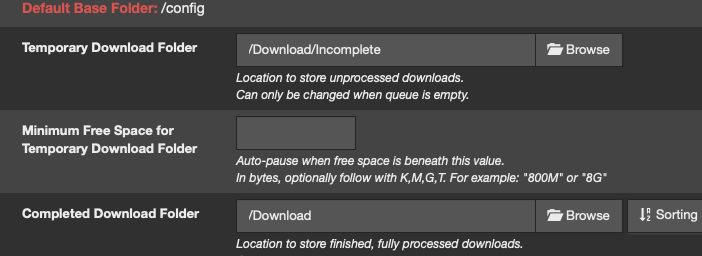
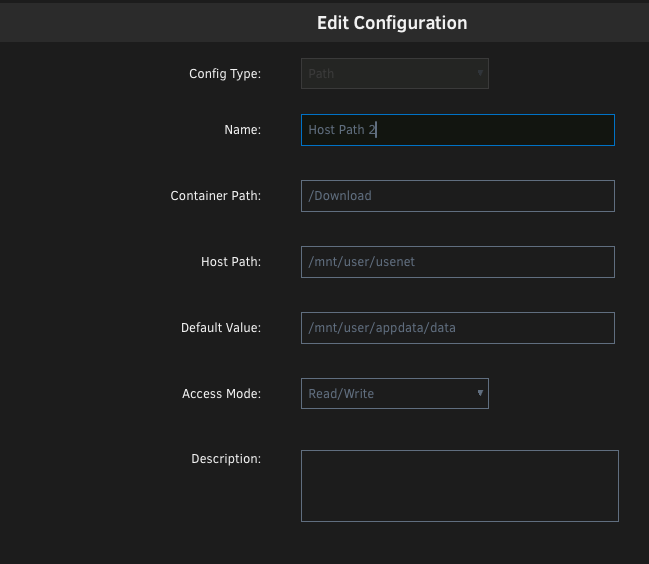
Is there a way to set the download path to a sub-directory on a share? In the settings of the container: Usenet is the name of the share. The file will be unpacked in the first level of the share in a directory. 'Incomplete' will be used (folder) for the temp files. Great would be: \USENET\DATA \USETNET\DATA\INCOMPLETE and not... \USENET \USENET\INCOMPLETE USENET being the name of the share and not a folder...
-
Like the plugin and it works fine. Just a small note: Could you offer the 24hour format for hour like the settings in the Scheduler section?
-
It works now. Thanks again.
-
Ah...you might be right. I changed the mainboard (RMA). Maybe I haven't switched it on after I changed it. I will check....thanks.
-
Installed is embyserver (not the beta one). dri is added in the settings with /dev/dri.
-
I have a 12th Gen Intel® Core™ i5-12500 @ 3000 MHz on a Supermicro X13SAE-F. Today I started emby and used the transcoding feature. I noticed high CPU use. intel_gpu_top -L shows: root@Tower:~# intel_gpu_top -L card0 1a03:2000 pci:vendor=1A03,device=2000,card=0 It seems that it is not longer working. Is it correct that it will not longer work on the current kernel?
-
It seems, that this is just not possible.
-
Hello together, Location 1: 192.168.1.99 (Server) Location 2: 192.168.10.99 (Mac) on location 1 I have set up my Unraid server. It is connected via VPN to my 2nd location. Is there a way to setup the routing under 'Settings - Networks Settings - Routing table' in a way that files will not be routed over location 2 when I copy files from one share on the server to another one (when the shares are mounted via SMB on the Mac). Bye.
-
Ich habe das dann letztlich mit dem unraid filemanager erledigt. Ich hatte vermutet, dass man das Problem irgendwie mit dem Netzwerk-Routing Einstellungen lösen kann. Scheint wohl nicht der Fall zu sein oder?
-
Hallo zusammen, ich habe zwei Fritzboxen, die ich über das Internet mit VPN verbunden habe. An einem Router hängt der Server, am anderen Ende mein Mac. Ich kann so sogar meine Shares direkt via SMB am Mac mounten. Wenn ich nun versuche, ein File von einem Share auf einen anderen zu kopieren (über SMB), geschieht das über den Mac und nicht direkt auf dem Server. Natürlich ist das dann recht langsam. Kann man Unraid abgewöhnen, das File über die entfernte Netzwerkverbindung zu kopieren? Bye.
-
Hello, is there a way to use sFTP without a separate program (as docker) like sFTPGO? Unraid itself offers FTP, but doesn't seem to support sFTP. Bye.
-
Mit emby funktioniert das recht gut. Es kann, wie gewünscht, das Video-Material auch direkt während der Übertragung komprimieren. Ich habe in der Vergangenheit immer darauf verzichtet DLNA-System zu verwenden. Wenn das Material nicht in einem bestimmten Format vorliegt, funktionieren die oft nicht. Da sind SMB/NFS-Shares einfach deutlich unkomplizierter zu handhaben. Für das Bandbreiten-Problem gibt es nun scheinbar leider keine andere Möglichkeit dies direkt bei der Verwendung eines SMB/NFS-Shares zu lösen. Da ich das eh nicht so oft verwenden möchte, reicht das so.
-
Hallo zusammen, ich habe einen unRAID-Server daheim laufen (Standort 1). Dieser ist an eine Fritz!Box angeschlossen. Diese verbindet sich auf Anfrage via VPN mit einer anderen (entfernten) Fritz!Box - Standort 2. Damit bin ich in der Lage zwei unterschiedliche Netzwerke miteinander zu verbinden und ich kann direkt auf die SMB-Shares auf dem unRAID-Server (Standort 1) von Standort 2 zugreifen. Das Streamen von Video-Material funktioniert recht gut, so lange das File eine angemessene Bitrate hat. Ich habe nun nach verschiedenen Möglichkeiten gesucht, wie ich beim Streamen die Bandbreite des Video-Materials reduzieren kann, damit es zu keinen Unterbrechungen kommt. Meine Informationen bisher: - Direktes Komprimieren des Video-Streams beim Zugriff über einen SMB-Share scheint nicht möglich zu sein - Kleinere Varianten des Video-Materials anlegen, um die Übertragung ohne Buffern zu gewährleisten (den Weg werde ich nicht gehen) - Verwendung eines DLNA-Servers. Dieser bedient den Client und kann den Stream variabel auf eine bestimmte Bitrate anpassen (emby z.B) Welche Möglichkeiten (die mir ggf. unbekannt sind) habe ich, um das Problem zu lösen? Bye.
-
Here is the report... WDC_WD40EFZX-68AWUN0_WD-WX42D91ND945-20240801-1120.txt
-
Between the error segments it writes now: Jul 31 18:33:57 Tower kernel: sd 2:0:3:0: [sde] tag#139 UNKNOWN(0x2003) Result: hostbyte=0x00 driverbyte=DRIVER_OK cmd_age=0s Jul 31 18:33:57 Tower kernel: sd 2:0:3:0: [sde] tag#139 Sense Key : 0x3 [current] Jul 31 18:33:57 Tower kernel: sd 2:0:3:0: [sde] tag#139 ASC=0x11 ASCQ=0x0 Jul 31 18:33:57 Tower kernel: sd 2:0:3:0: [sde] tag#139 CDB: opcode=0x88 88 00 00 00 00 00 87 92 f7 c0 00 00 02 40 00 00
-
Hello together, a few months ago, I had constant problems with my server. That system was over 10 years old, and so I decided to set up a new machine. The new server is completely new. I used basically nothing from the old machine. During the first parity check, the system fixed a lot of sectors. This shows up in the log file: Jul 30 19:34:21 Tower kernel: md: recovery thread: Q corrected, sector=3249428320 During the second parity check, I got a lot of read errors again: Jul 31 16:57:54 Tower kernel: md: disk12 read error, sector=1167649920 Any ideas how to solve this? Might be the drive? Bye.
-
Danke. Ich werde das mal durchrechnen...oder besser nicht. Billig wird das nicht.:-/
-
Das Gehäuse ist von LianLi. Mit den genannten Case (4x) passen 20 Platten rein (normale SATA-Platten). Das Ziel sollten daher 18 Platten + 2 Parity + 1 Cache Platte sein. Die bisherige SATA Cache-Platte würde ich allerdings gerne durch eine M.2 NVME ersetzen. Die Karte ist folgende: https://www.amazon.de/SFF8087-Controller-SFF-8087-Chip-Adapter-Erweiterung/dp/B0CRVR1PQL/?_encoding=UTF8&pd_rd_w=izZI5&content-id=amzn1.sym.09dd31c9-ca41-478c-8924-c3af80a010cf%3Aamzn1.symc.acc592a4-4352-4855-9385-357337847763&pf_rd_p=09dd31c9-ca41-478c-8924-c3af80a010cf&pf_rd_r=1JE0ZB3D9ADBP9SB160J&pd_rd_wg=NoxQZ&pd_rd_r=79665070-0231-4b73-9ca8-8bbf9325010d&ref_=pd_hp_d_btf_ci_mcx_mr_hp_d Nach deinem Post würde sich diese dann erübrigen, da es sich um eine 8 Port-Karte handelt. Das Mainboard hat folgende PCIe-Steckplätze: 1 PCIe 3.0 x4, 1 PCIe 3.0 x1, 2 PCIex16 slots are running at NA/16, or 8/8 Insofern würden also zwei dieser Karten reinpassen. https://www.amazon.de/MZHOU-SATA-Controller-Erweiterungskarte-SATA-Kabeln-Integrierter-Adapterkonverter-ASM1166-6SATA/dp/B097RBLM9G/?_encoding=UTF8&pd_rd_w=izZI5&content-id=amzn1.sym.09dd31c9-ca41-478c-8924-c3af80a010cf%3Aamzn1.symc.acc592a4-4352-4855-9385-357337847763&pf_rd_p=09dd31c9-ca41-478c-8924-c3af80a010cf&pf_rd_r=1JE0ZB3D9ADBP9SB160J&pd_rd_wg=NoxQZ&pd_rd_r=79665070-0231-4b73-9ca8-8bbf9325010d&ref_=pd_hp_d_btf_ci_mcx_mr_hp_d Die Frage wäre also, ob diese Karte auch in den PCIex passen (bzw. ob das Sinn macht)? Da bin ich nicht geung in der Materie. Würde ich nur zwei Karten verbauen, wären das mit den Onboard SATA-Ports also 6+6+8=20 Anschlüße. Wenn die Cache-Platte eine M.2 wäre, würde es also passen. Aus der Erfahrung heraus, hätte ich allerdings gerne ein paar freie SATA-Ports, da die in der Vergangheit oftmals als erstes nicht funktionierten. Also doch wieder LSI ... z.B. zwei 9300-8i.
-
Hallo zusammen, mein Server ist in die Jahre gekommen und es wird langsam Zeit, das System zu upgraden. 1. Mainboard ASRock B75 Pro3-M -> Ersatz: Supermicro X11SCA-F 1151 Pin Single Workstation: Ich möchte vor allem Stabilität. Das ASrock ist mittlerweile das zweite Bord, da sich das erste vor drei Jahren verabschiedet hat. Das Supermicro hat IPMI. Damit kann ich mir einen Monitor und das Keyboard am Server sparen. Außerdem unterstützt es EEC. Dazu hätte ich eine Frage. Ich bin immer davon ausgegangen, dass das nur die Xeon können. Scheinbar ist das nicht korrekt. 2. CPU Intel® Core™ i3-8300T Für Low-Power würde ich diesen wählen. Laut Intel unterstützt er ECC. Korrekt oder übersehe ich etwas? 3. Controller. Im Moment verwende ich zwei LSI SAS 9207-8i. Nach einigen Tests scheint einer Probleme zu bereiten. Ich frage mich, ob es überhaupt noch Sinn macht LSI (oder vergleichbar) zu kaufen und nicht eher das hier zu verwenden (gibt es auf Amazon). -> Ersatz: PCIe auf SFF8087 Mini SATA 3.0 8-Port Controller PCIE3.0 auf SFF 8087 SFF-8087 SATA ASM1166 Chip-Adapter Erweiterung USB C Pcie Mini SATA3.0 Karte 6 Gbit/s Gibt es irgendwelche Probleme mit diesen Karten bzw. Nachteile, warum man trotzdem eher LSI verwenden sollte? 4. Festplatten Case. Derzeit verwende ich Noname-Cases welches es möglich machen 5 3,5" auf dem Platz von 3 5,25" unterzubringen. Die Gehäuse sind nun schon fast 12 Jahre alt und auf mindestens einem Slot scheint das Backplane Verbindungsprobleme mit der HD zu haben, so dass die Platte dort immer auf Fehler läuft. -> Ersatz: SilverStone SST-FS305-E 3x 5,25 Zoll Hot-Swap für 5x 3,5 Zoll HDD Die Lüfter würde ich allerdings ersetzen durch Noctua NF-A8 PWM. Falls sonst noch jemand Anmerkungen hat, höre ich diese gerne.
-
Thanks!! It is rebuilding now. I guess the cable is dead or the port on my SATA add-on card.
-
Okay. That is a lot of text. I can't go any further form the present screen with 'Start will bring the array online'. So I should start maintenance mode and do a parity check/rebuilt? (optional) Tick the box to start in Maintenance mode. If you start the array in Maintenance mode you will need to press the Syncbutton to trigger the rebuild. The advantage of doing this in Maintenance mode is that nothing else can write to the array while the rebuild is running which maximises speed. The disadvantage is that you cannot use the array in the meantime and until you return to normal mode cannot see what the contents of the disk being rebuilt will look like. Drive18 shows indeed as disabled / emulated data...
-
Changed the cable and moved the port from the add-on card to the mainboard. I started the array and it still says "Start will bring the array online" and nothing of rebuild.
-
Drive 18 is the new replacment drive.
-

