shire
Members
-
Joined
-
Last visited
Everything posted by shire
-
Hm...how can I use it with a Mac? Oh... GitHubGitHub - TheCase/IPMIView.app: MacOS App wrapper for Supe...MacOS App wrapper for Supermicro's IPMIView/iKVM java app - TheCase/IPMIView.app will try.
-
This week I tried to reboot the server and in the process I checked the boot process in the IPMI remote console. The system only showed the unRAID boot selection and nothing else. No Supermicro splash screen or the typical loading information of unRAID. That also means, I can't use IPMI to use the unRAID console directly. I did a reset of the BIOS/BMC, but nothing changed. I also haven't changed the settings in the BIOS the last few month. IGFX is activated for the iGPU but not really more. Somebody on Reddit guessed that the graphical output might be redirected to the iGPU. I can get into the BIOS and I can see the output, but nothing else except the unRAID boot selection. FW MB: 5.1 FW BMC: 01.04.15 Question: Has somebody discovered something like this and know how to solve this?
-
So I installed the 'Intel GPU TOP' plugin and thereafter the 'intel Graphics SR-IOV' driver. That worked fine so far. I also added the following to /modprobe.d/i915.conf: options i915 force_probe=!4690 After checking: lspci -nn | grep VGA 00:02.0 VGA compatible controller [0300]: Intel Corporation Alder Lake-S GT1 [UHD Graphics 770] [8086:4690] (rev 0c) 09:00.0 VGA compatible controller [0300]: ASPEED Technology, Inc. ASPEED Graphics Family [1a03:2000] (rev 52) The result in the 'system driver section' after reboot is: The driver is disabled (blacklisted). I haven't really installed other plugins which have something to do with the graphical interface besides 'GPU stats'. How can I avoid this?

-
Also the devices are removed....

-
Hm...After the reboot it adds always the blacklist i915: options i915 force_probe=!4690blacklist i915 I did: Remove blacklist i915 from entry in the mod probe file. Do a rebuild in the GUI and reboot...

-
Also... Is it necessary to bind those two devices? I only use Emby docker and want the iGPU to transcode.
-
Also... Is it necessary to bind those two devices? I only use Emby docker and want the iGPU to transcode.
-
Okay... Di I have to modify i915 and Xe or only i915? Is the modification of i915 necessary to have this work?
-
root@Tower:~# lspci -nn | grep VGA 00:02.0 VGA compatible controller [0300]: Intel Corporation Alder Lake-S GT1 [UHD Graphics 770] [8086:4690] (rev 0c) 09:00.0 VGA compatible controller [0300]: ASPEED Technology, Inc. ASPEED Graphics Family [1a03:2000] (rev 52) root@Tower:~#
-
After reboot: The two IOMMU groups from the SysDev site are gone.

-
It is disabled....

-
So...for Emby this would not be of any use I guess?
-
No luck. I see the PID for the render/3d in intel-gpu-top only a few seconds when I start the video. Then the transcoding switches to software (the CPU is running at 90%). I also activated SR-IOV support in the BIOS. No change... Emby error : 00:21:24.148 [hevc_qsv @ 0x1283080] Error during QSV decoding.: unknown error (-21) 00:21:24.148 Error while decoding stream #0:0: Unknown error occurred Anything I should check?

-
After installing the plugin the number of VFs is set to 2 (available 7). Should I increase the number? What would that do?

-
Thank you very much. Intel-GPU-Top was installed before. The i915 driver package was missing. Playback seems to run fine now.
-
Any idea where the issue is: (SOLVED)
-
Hello together, happens during streaming video with emby server to emby for android. Is this an unraid issue or emby issue? I'm using a Supermicro X13 SAE-F with the latest firmware installed. Bye.
-
Thanks. Worked with both issues.
-
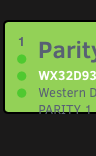
Custom text is written outside the box in the dashboard.
-
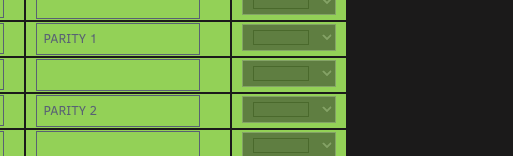
Custom Color can't be changed. How can I access it? I want another color for my two parity drives.
-
- Option to jump directly to /user...when opening the file manager. - Move copy/files: When I choose the target entry (folder) it would be helpful to jump directly to the folder in the share by entering the first letter.
-
It was the Bitwarden Plugin. I deleted the cache for the plugin in Safari and the error is gone. I think there is not much anyone can do about this. I just leave it here for anybody who has the same issue...
-
So far I understand, there are only community generated dark mode templates available for JD. For example: https://github.com/Vinylwalk3r/JDownloader-2-Dark-Theme What template will be loaded when setting this to '1'? I like it and I would also use it with my other local installation...

-
Seems to be an issues with Safari. Works great in Chrome.
-
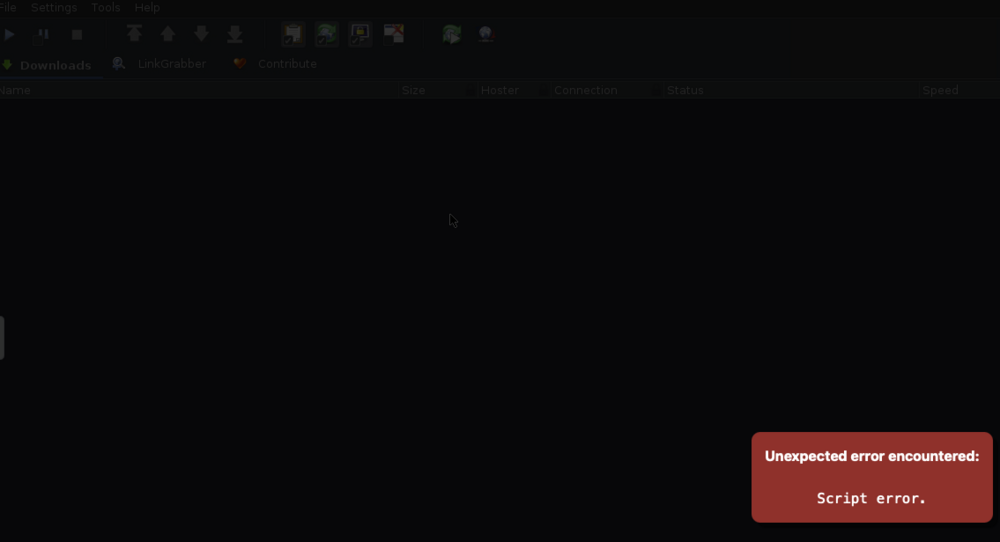
I installed the Docker for JD and it worked fine so far. Today I started the docker again and received this message. Any ideas what could caused this? The log file: Feb 26 19:52:04 Tower kernel: docker0: port 1(vethebe0b35) entered disabled state Feb 26 19:52:04 Tower kernel: veth04293dc: renamed from eth0 Feb 26 19:52:04 Tower kernel: docker0: port 1(vethebe0b35) entered disabled state Feb 26 19:52:04 Tower kernel: vethebe0b35 (unregistering): left allmulticast mode Feb 26 19:52:04 Tower kernel: vethebe0b35 (unregistering): left promiscuous mode Feb 26 19:52:04 Tower kernel: docker0: port 1(vethebe0b35) entered disabled state Feb 26 19:52:04 Tower kernel: docker0: port 1(veth4c035e9) entered blocking state Feb 26 19:52:04 Tower kernel: docker0: port 1(veth4c035e9) entered disabled state Feb 26 19:52:04 Tower kernel: veth4c035e9: entered allmulticast mode Feb 26 19:52:04 Tower kernel: veth4c035e9: entered promiscuous mode Feb 26 19:52:04 Tower kernel: docker0: port 1(veth4c035e9) entered blocking state Feb 26 19:52:04 Tower kernel: docker0: port 1(veth4c035e9) entered forwarding state Feb 26 19:52:05 Tower kernel: eth0: renamed from vetha33ecee