jch
Members
-
Joined
-
Last visited
Everything posted by jch
-
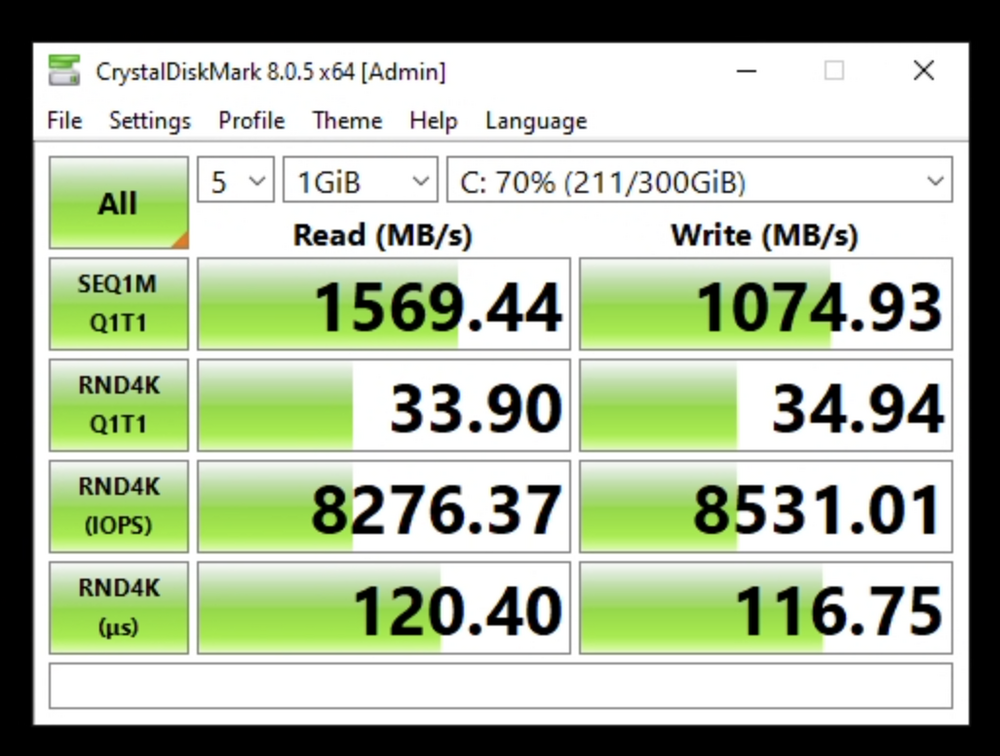
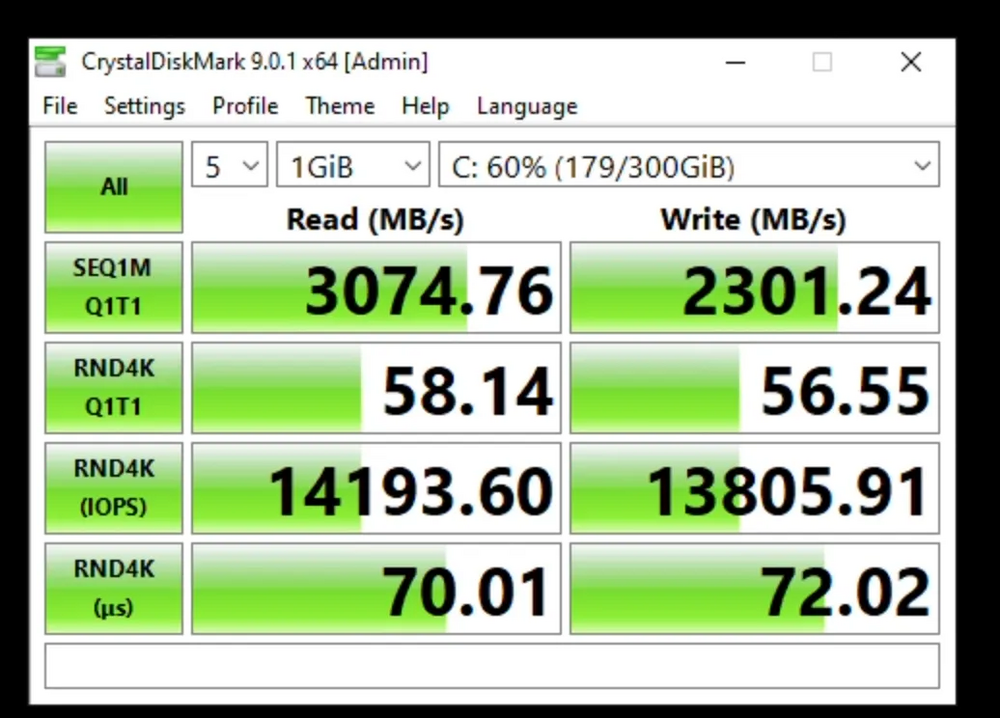
I've been experimenting with LVM-backed VM storage as a middle ground between file-based images and direct device passthrough. I wanted better performance than img files but didn't want to sacrifice snapshots or lose an entire NVMe device to a single VM. The I/O performance improvement over regular img files is pretty substantial - my Windows VM feels much more responsive now. The interesting thing is that while it looks like more layers: VM → qemu → LVM → loop device → file → filesystem → storage It actually performs better than direct file access because you get proper block device I/O with better caching and alignment. Setup process: Create storage file: truncate -s 100G vdisk-lvm.img Mount via loop device: losetup /dev/loop4 vdisk-lvm.img Initialize LVM: pvcreate /dev/loop4 && vgcreate vm-storage /dev/loop4 Create logical volume: lvcreate -L 90G -n windows vm-storage Update VM XML to point to /dev/vm-storage/windows instead of the img file The bonus is you get LVM snapshots, which are really handy for things like Windows updates where you want an easy rollback option. I set up some User Scripts to handle the loop device mounting automatically when the array starts/stops. Benchmarks (all using NVME + Real World test, the disk image sits on a Samsung 990 Pro NVMe drive, encrypted XFS format): Using raw image file, "typical" setup: <disk type='file' device='disk'> <driver name='qemu' type='raw' cache='none' io='native' discard='unmap' iothread='1'/> <source file='/mnt/primary/domains/Windows/vdisk1.img'/> Using LVM mounted <disk type='block' device='disk'> <driver name='qemu' type='raw' cache='none' io='native' discard='unmap' iothread='1'/> <source dev='/dev/vm-storage/windows' index='1'/> My question is: why isn't this approach discussed more often in VM guides or forums? Is there some downside I'm not seeing, or is it just the perceived complexity that keeps people using raw/qcow2 files? The performance improvement seems worth the slightly more involved setup. It's not native NVME speeds, but you retain snapshot flexibility.
-
While I appreciate all the functionality that this plugin provides, I wanted a very simple way of pausing any parity checks if mover was running. I noted that the `monitor` command for this plugin seems to... take a while to complete. Probably because it's doing a lot of checks? It also seems to touch a lot of files and I was looking for some simple functionality. To this end, I wrote a small script that others might find useful. I have this script run every few minutes using the CA User Scripts plugin. It only uses built-in system commands. #!/usr/bin/php #arrayStarted=true <?php // https://claude.ai/chat/41bf3384-61ac-44ab-8341-0898d78d1223 // Define constants $PIDFILE = "/var/run/mover.pid"; $LOCKFILE = "/var/run/parity-mover-monitor.lock"; $mdcmd = '/usr/local/sbin/mdcmd'; $parity_control = '/usr/local/emhttp/webGui/scripts/parity_control'; $logName = "parity-monitor"; // Function to get mdstat values function mdstat($key) { return exec("grep -Pom1 '^$key=\K.+' /proc/mdstat"); } // Log function using system logger function logMessage($string) { global $logName; $cmd = 'logger -t "' . $logName . '" "' . $string . '"'; shell_exec($cmd); } // Check if parity check is active $isParityActive = (mdstat('mdResyncPos') > 0 && substr(mdstat('mdResyncAction'), 0, 7) == 'check P'); $isParityRunning = ($isParityActive && mdstat('mdResync') > 0); $isParityPaused = ($isParityActive && mdstat('mdResync') == 0); $moverRunning = file_exists($PIDFILE); $lockExists = file_exists($LOCKFILE); // Main logic if ($moverRunning) { // If mover is running and parity is running, pause parity if ($isParityRunning) { logMessage("Mover running and parity check active - pausing parity check"); exec("$parity_control pause"); // Create lock file to indicate that this script paused the parity check file_put_contents($LOCKFILE, date('Y-m-d H:i:s')); logMessage("Created lock file to track parity pause"); } } else { // If mover is not running and parity is paused, check if we should resume if ($isParityPaused && $lockExists) { logMessage("Mover not running, parity check paused, and lock file exists - resuming parity check"); exec("$parity_control resume"); // Remove the lock file after resuming unlink($LOCKFILE); logMessage("Removed lock file after resuming parity"); } } // Cleanup: Only remove the lock file if we're back to a normal state // (mover not running AND parity check not paused) AND the lock file exists if (!$moverRunning && !$isParityPaused && $lockExists) { unlink($LOCKFILE); logMessage("Cleanup: Removed lock file because normal operation has resumed"); }
-
The package folders.
-
3rd time's the charm.
-
-
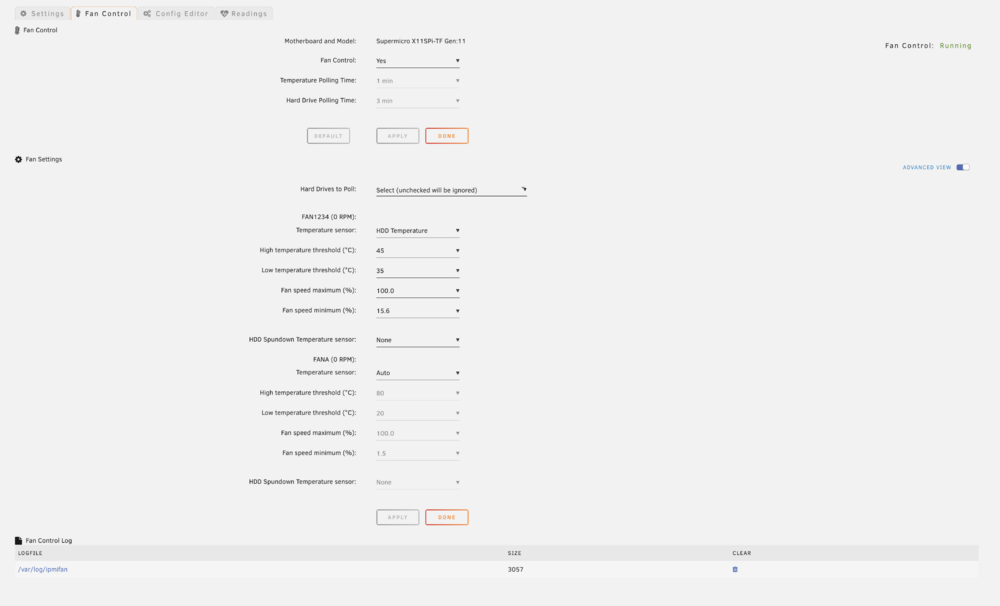
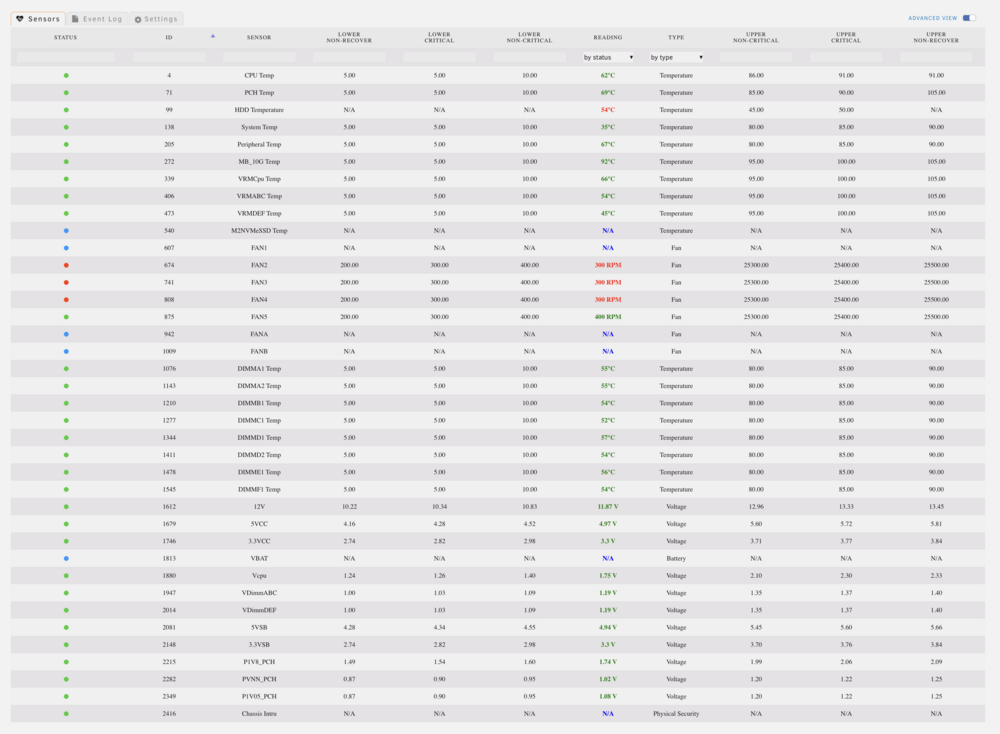
A @SimonF I have the exact same issue. Using an Supermicro X11SPi-TF , Version 1.02 motherboard. Here's my fan settings page (let me know if I can post any other diagnostics to help locate the issue):
-
There's some indication that for very high memory systems (i.e i have 256GB of memory), it would be better to set dirty_bytes / dirty_background_bytes instead (https://www.suse.com/support/kb/doc/?id=000017857). Since the % numbers are limited to integers, 1% / 2% still causes quite some freezing when the mover is running (my rough model is reads are queued behind 2.56GB of cache, so transferring at ~100MB / s means operations freeze for ~30s while mover is running). Could we add those two flags as an alternative way of setting dirty?
-
@EDACerton I think one of my "At Startup of Array" scripts was crashing out or misconfigured. It calls a custom `rc.service` script and inside that script i call `. /etc/rc.d/rc.library.source` but i was only including that because i copied other files in `rc.d`. i looked at that script and it looks like there's a lot of stuff in there so i opted to refactor my startup script to remove references to `rc.library.source`. haven't had an issue since i excluded it from my "At Startup of Array" scripts. the original script is here: https://gist.github.com/jasperchan/2016270e2b4f6dfab9ca409a68b4ae8e
-
thanks, that was helpful guidance. looks like the tailscale service wasn't started. i cleaned out some of my "on array start" scripts and now it's installing properly so it's clearly something to do with one of my scripts interfering with the tailscale install sequence. nothing to do on your end, thanks for your continued maintenance on this plugin!
-
The main dashboard and settings page is still not loading for me using the Preview version. This is from a clean install where I deleted any Tailscale references from the /boot/config directory and rebooted. Tower-tailscale-diag-20241020-175615.zip
-
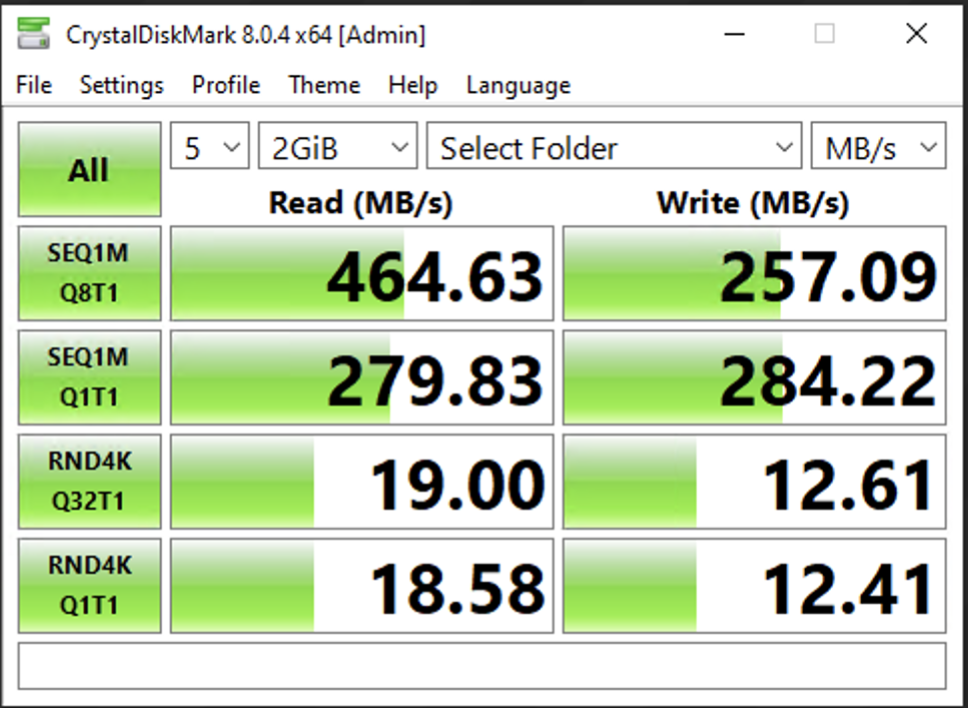
The folder I've mounted is directly on the cache pool (i.e. by-passing FUSE via exclusive access or referencing /mnt/cache/<folder>/) and is on a pair of Samsung 870 EVO 2TB SSD's in an encrypted mirrored BTRFS configuration. My CrystalDiskMark results from the guest VM (this is with other concurrent writes going on -- was too lazy to do a real dedicated test) are below. It's fast enough for me and like @Shadowplay highlighted the stability is phenomenal now, I don't see any of the issues I previously had with virtiofsd.
-
They are all documented here: https://gitlab.com/virtio-fs/virtiofsd EDIT: Oops I misread your question. No I haven't found anything that clearly outlines the "best" setup. The document I linked has some guidelines (i.e. they were very very adamant that `--announce-submounts` is extremely important if you're passing through a mount). Given it's an open-source project, probably worth reaching out to the maintainers especially if they will become default arguments in unraid. So, I think this is a personal choice but what I've found is that if you enable caching then you have to be very careful about modifying the files in the host while the guest is running (at least when I was doing extensive testing a year ago). I have a project that I am running that concurrently accesses the files that the VM has access to but if your VM files aren't touched by any other process on the host than it's probably safe to re-enable cache. I believe `auto` in the rust virtiofsd implementation does some checking for changes but with older versions I found that I was seeing very strange file corruption, especially if mover moves the file. I disabled it because I couldn't get to the bottom of it and everything seems "fast enough" without it (I get near native writes anyway onto the nvme drive that I shared). If you want to re-enable cache, I'd suggest going with "auto" (the default for rust virtiofsd) and then do testing where you make sure there isn't any file corruption under the following circumstances: - actively write to a file on the guest, try to move file file on the host (to simulate mover) - open the file on guest (to hit the cache), then modify the file on host, then make sure those changes propagate to the guest - open the file on guest (to hit the cache), then rename the file on host and make sure those changes propagate to the guest There might be more test cases but those were the ones causing issues with older versions. Also thanks for expanding my steps to be more detailed :).
-
The arguments for the Rust version of virtiofsd diverges from the original version that Unraid has bundled so certain XML changes are not properly passed (i.e. cache). For absolute stability, I found the Rust version to be superior since it has various options for handling submounts and much better handling for host files changing via cache=never. For others looking for this functionality, what I did was using the latest version of the Rust virtiofsd (compiled version available at https://gitlab.com/virtio-fs/virtiofsd/-/releases) stored at /root/.virtiofsd/virtiofsd (though you can put it anywhere, just modify the script), and then combined it with this script (stored at /root/.virtiofsd/virtiofsd.sh) that passes the --fd parameter properly: #!/bin/bash # process -o option but ignore it because unraid generates the command for us VALID_ARGS=$(getopt -o o -l fd: -- "$@")i if [[ $? -ne 0 ]]; then exit 1; fi eval set -- "$VALID_ARGS" while [ : ]; do case "$1" in --fd ) FD="$2" shift 2 ;; -o ) shift 1 ;; -- ) shift; break ;; * ) shift; ;; esac done # https://gitlab.com/virtio-fs/virtiofsd /root/.virtio/virtiofsd \ --fd="$FD" \ --shared-dir="/mnt/<YOUR SHARE DIR HERE>" \ --xattr \ --cache="never" \ --sandbox="chroot" \ --inode-file-handles="mandatory" \ --announce-submounts The relevant excerpt from your XML config is (noting that this setup ignores most parameters and instead you should make argument changes directly in `virtiofsd.sh` above; through testing you do need to keep the `<target ... />` argument as that's the handle the windows driver will be looking for): <filesystem type='mount' accessmode='passthrough'> <driver type='virtiofs' queue='1024'/> <binary path='/root/.virtio/virtiofsd.sh' xattr='on'> ... </binary> ... <target dir='YOUR HANDLE HERE'/> <alias name='fs0'/> ... </filesystem> These changes resulted in effectively native file transfer speeds between VM and host (~200MB/s) and I've noted it seems to no longer have any memory issues or weird file locking issues. 100GB+ transfers between the VM and host systems daily (large and small files) so I feel good about the current setup (I also followed the instructions on upgrading to the latest v248 drivers in windows). Using this setup allows me to create a synthetic directory in the host that only contains the folders I want to pass through to the VM and consolidates them under a single drive in the VM. The --announce-submounts argument was critical in doing this in a stable way.
-
Is there a way to add additional stats to the footer of the WebGUI? The IPMI support plugin allows adding some fan/temp stats, but I'd like to add things like overall load, network traffic, etc.

-
Since libvirt.img contains all of the VM configs, is this ever updated (or does it need changing across unRAID versions)? I ask specifically because it looks like the qemu startup script file contains some vfio binding logic. I noticed with this recent upgrade to 6.12.4 that my changes to that script were retained. Aside, if anybody seeing this has an unmodified /etc/libvirt/hooks/qemu script, could you attach it here? I made changes to mine without backing it up, and I don't want to reset it because then I'd have to re-setup my VMs.
-
The desired behavior I'm looking for is to be able to isolate (as much as possible) host processes from a VM's cores dynamically. I'm aware of the `isolcpu` boot setting, but that's too rigid really doesn't play nicely with Docker containers. I've come across https://github.com/spheenik/vfio-isolate/tree/master which looks promising, but unfortunately doesn't quite seem to work. My understanding of cgroup is quite weak. However, I've done some testing and it seems like `taskset -pc <CPUSET> <PID>` accomplishes what I'm looking for (i.e. it will schedule running tasks onto specific cores). I can fairly easily write a script that loops through all running processes and applies the correct cpuset isolation BUT I'm not familiar with how to ensure that _new_ processes are scheduled only on a specific cpuset for the duration of the VM's lifetime. It seems like cgroup is the right direction though, but the directory structure in unRAID's /sys/fs/cgroup/... doesn't seem to match what vfio-isolate is working for. Does anybody know how to ensure that new processes are assigned to specific CPU cores by changing the "default" setup in /sys/fs/cgroup?
-
If anybody finds this topic like I did, I hope they find this useful. I added this at the top of my `/etc/libvirt/hooks/qemu` file (just under the `<?php` tag: // https://github.com/PassthroughPOST/VFIO-Tools $vfio_args = join(" ", array_map("escapeshellarg", array_slice($argv, 1))); shell_exec("/etc/libvirt/hooks/vfio_tools.sh {$vfio_args}"); Then I put the attached `vfio_tools.sh` in the same directory and `chmod +x vfio_tools.sh`. I modified the original script slightly so that you see the hook executions in the syslog. Then I created the `qemu.d` directory and followed the steps from https://github.com/PassthroughPOST/VFIO-Tools/tree/master to install various hooks. The directory structure is `/etc/libvirt/hooks/qem.d/<VM_NAME>/<HOOK_NAME>/<STATE_NAME>/<SCRIPTS>`. All the events can be found here: https://libvirt.org/hooks.html. I believe you need to make the script file executable as well. You probably need to repeat these steps every time you do an upgrade because unRAID controls the `qemu` script. vfio_tools.sh
-
For others who find this thread, using the Mover Tuning plugin, I setup the following script: Replace the run after command with the vm.dirty_ratio you normally use (probably 20). sysctl -w vm.dirty_ratio=20 I noticed significant improvements in concurrent file usage while Mover is running with these changes.

-
Is the `in_use` command invoked by the `/usr/local/bin/move` binary itself? I don't see any calls to the `in_use` command in the `/usr/local/sbin/mover` file.
-
Is there a way to configure the "Move All from Cache-Yes shares when disk is above a certain percentage" / "Move All from Cache-yes shares pool percentage" settings to move only enough files to get the disk below a certain percentage? The practical use-case is that if the cache is being used for hot-file access, you want to keep as many files as possible in the cache. Ideally you can evict files from the cache drive based on last access or creation time (in addition to the filter settings). EDIT: I found the comment about using the "keep files under a certain age", but that requires some fairly precise tuning and the workload on the cache disk is fairly variable. It looks like a candidate location to filter the file list would be here https://github.com/hugenbd/ca.mover.tuning/blob/master/source/ca.mover.tuning/usr/local/emhttp/plugins/ca.mover.tuning/age_mover#L753 (to sort the file list by age and then take files until you get to the threshold). I don't have a dev environment setup for doing this otherwise I'd help out :).
-
Okay, digging into it a bit more, it actually seems like maybe it's a different problem. The issue seems to be that if Mover starts moving files from a directory, the whole directory is locked or something and prevents writes. Is that expected behavior?
-
It would be helpful to understand how Mover determines whether a file is safe to move. What I'm observing is for fairly large move operations, it seems like some files that are actively written to by a VM with a mapped SMB share (via virtio adapter) is being moved, causing the host VM to report an error when writing to the file. When I do a simple test of a single open file, Mover seems to correctly skip over the open file. Via a terminal: root@Tower:~# smbstatus -L Locked files: Pid User(ID) DenyMode Access R/W Oplock SharePath Name Time -------------------------------------------------------------------------------------------------- 343 1000 DENY_NONE 0x12019f RDWR LEASE(RWH) /mnt/primary/system/shares/pdb Incoming/video.mp4.part Wed Jun 21 12:11:39 2023 343 1000 DENY_NONE 0x100081 RDONLY NONE /mnt/primary/system/shares/pdb . Wed Jun 21 12:16:57 2023 And from the syslog when I trigger Mover: Jun 21 12:34:53 Tower move: mover: started Jun 21 12:34:53 Tower move: skip: /mnt/cache/Archive/Tower/20230428/video.mp4.part Jun 21 12:34:53 Tower move: mover: finished However, if there are a lot of files that need to be moved, then I'm seeing those open files being moved. Anecdotally, it seems to happen if the file is opened after Mover is initiated (but it's hard to confirm). Could it be that Mover is checking the file permissions when the operation starts, but if the permissions change during the run then this causes the behavior I'm seeing? I've attached my smb.conf to see if that has anything to do with it. I'll admit I have a slightly convoluted share scheme where I have symlink'd `/mnt/cache/Archive/Tower/20230428/` to `/mnt/primary/system/shares/pdb/Incoming` and I create a custom share for the `/mnt/primary/system/shares/pdb` directory (this is to combine several shared folders into one and so I only need a single mapped drive inside of the VM). smb.conf
-
And to clarify the purpose of this feature -- if I was already using /usr/<pool name>/... as my path, then this should effectively behave exactly the same as that right (from a performance perspective)?
-
Nevermind, I'm dumb. Yeah I was missing the global share settings enable.
-
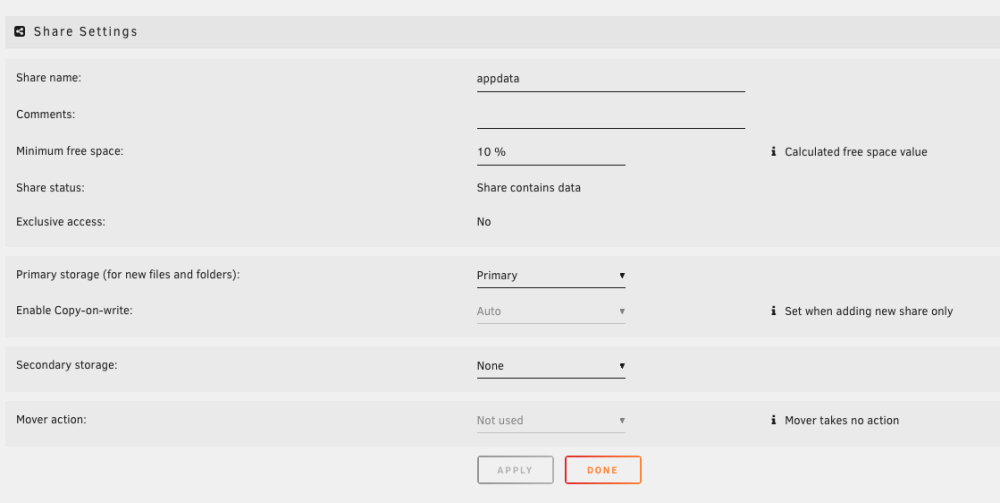
My share settings are pretty straightforward, with Primary storage set to a BTRFS RAID 1 pool (which I've named Primary). All the files have been moved to the pool: Yet Exclusive Access = No even after an Array restart. Am I missing something?