





deliverer
Members
-
Joined
-
Last visited
Everything posted by deliverer
-
actually I think it's related to exporting over NFS based on some additional reading. Ugh, how big of impact is this to a full ZFS implementation?
-
it's happened again, but don't know why this time. When I run the command above, I only see 2 directories listed but they are the same files. Any additional thoughts on what to try? Does enabling NFS security settings cause exclusive mode to turn off? root@MEDIA01:/mnt/user/appdata# ls -d /mnt/*/appdata /mnt/user/appdata/ /mnt/zfs_mirror/appdata/
-
@MoooNhow did this go, as I need to do it as well? I wish there was something like logs that could indicate it’s necessary before doing this change. Makes me extremely nervous.
-
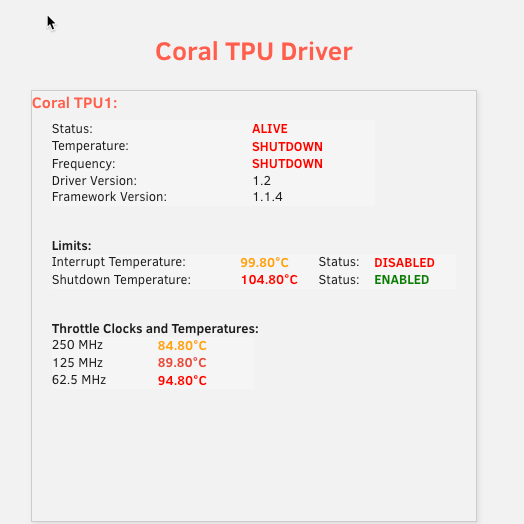
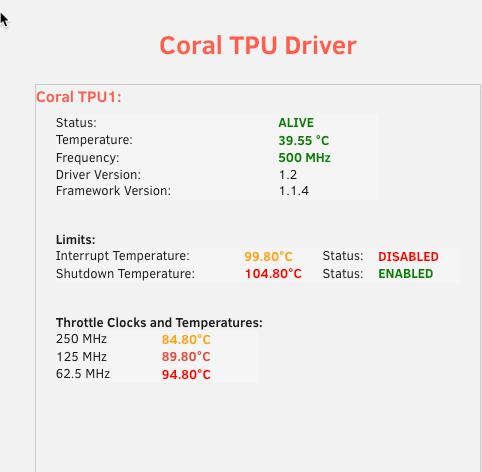
Frigate crashed today and I think it's due to my coral TPU overheating? Any ideas here? It's been working fine for over a week now. This is the PCI version. I rebooted and it came back, but don't know what might have caused it. I have attached 2 screenshots before and after the reboot. detectors: coral: type: edgetpu device: pci:0
-
I'm trying to setup a docker for DHCP and DNS services leveraging Technitium. The docker has it's own dedicated ip and I've followed these instructions for resolving potential macvlan problems. Via tcpdump I see the dhcp request come into the br0 interface, but it's not making it to my docker to issue a DHCP request. My docker is running on br0 with it's own dedicated ip. Is there something I need to do to Unraid and disable dnsmasq or something? Please let me know how to potentially resolve as I've been banging away at this for 2 days now without success. Thank you! I using Unraid 6.12.11
-
I've been trying for 2 days to get Technitium DNS/DHCP to work on a docker with Unraid without any success. I've followed the steps above for the macvlan fixes, but I see the DHCP request come in the bond0 interface, but it never makes it the my docker with it's dedicated IP. What else can I check/do to make sure the both DNS and DHCP get forwarded correctly to my docker? Any thoughts?
-
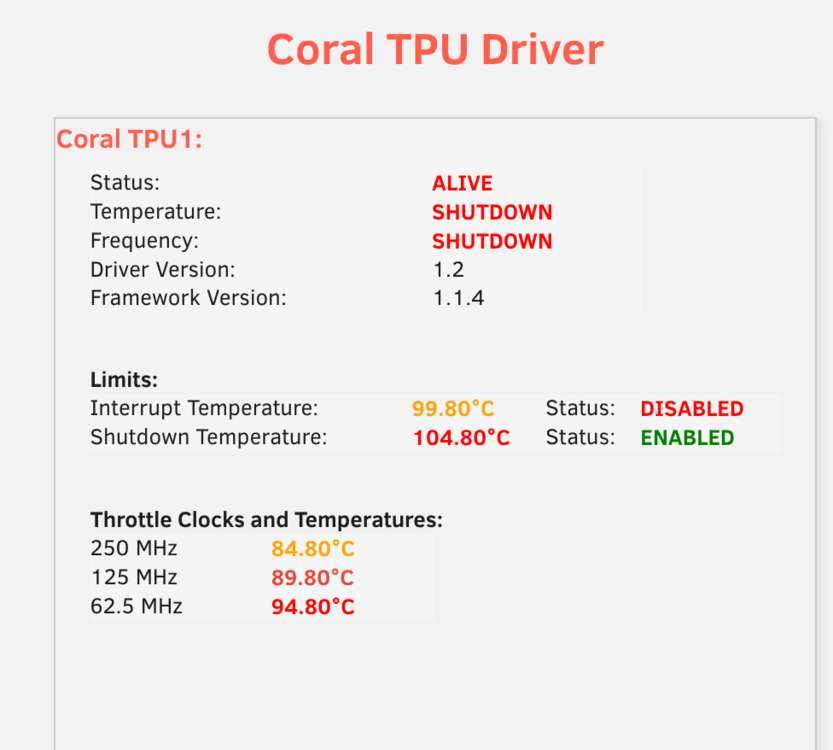
I haven't even started using coral yet with Frigate, but I noticed this when I looked under settings. Any thoughts? Frigate isn't even started? Temps were fine the other day and I haven't changed anything. I also see this in Unraid logs Aug 9 08:09:41 MEDIA01 kernel: apex 0000:03:00.0: Apex performance not throttled due to temperature Aug 9 08:09:46 MEDIA01 kernel: apex 0000:03:00.0: Apex performance not throttled due to temperature Aug 9 08:09:51 MEDIA01 kernel: apex 0000:03:00.0: Apex performance not throttled due to temperature Aug 9 What could be causing temperate shutdowns?
-
I have Watchtower successfully updating my dockers within Unraid. However, when I go to the docker page on Unraid, the status there shows there is an update available, even though it does not need to be updated. Is there a way to fix that or do I just live with it since it's being handled by WatchTower? I'm running version 6.12.6
-
I have two ZFS pools on my server. One is a ZFS mirror where all my app data(dockers/VM's) is stored and I have another ZFS2 for data. The ZFS mirror is constantly writing data every 5 seconds and my understanding this is normal for ZFS. My question is there some tuning or something else like a SLOG I could set up that would improve the constant writing to disk without impacting data integrity? Currently, my server sits in the living room and it's quite noisy when the disk is written to every 5 seconds. Some ideas * install a SLOG SSD * adjust sync from standard to none * adjust zfs_txg_timeout
-
root@MEDIA01:/boot/config/modprobe.d# ls -d /mnt/*/appdata /mnt/user/appdata/ /mnt/zfs_media/appdata/ /mnt/zfs_mirror/appdata/ there it is. sorry I know this is basic linux stuff but sometimes I struggle even though I've been playing with linux for years. /mnt/zfs_media/appdata/ <---That is the culprit
-
The share where exclusive mode is not working is "appdata". No secondary storage is set I did a search and don't see any other folders with that name; just the one. Driving me crazy as I can't figure it out. root@MEDIA01:/mnt# find / -name appdata* /usr/local/emhttp/plugins/appdata.backup /usr/share/bash-completion/completions/appdata-validate find: ‘/sys/kernel/slab’: Input/output error find: ‘/proc/25721’: No such file or directory /mnt/user/appdata find: failed to read
-
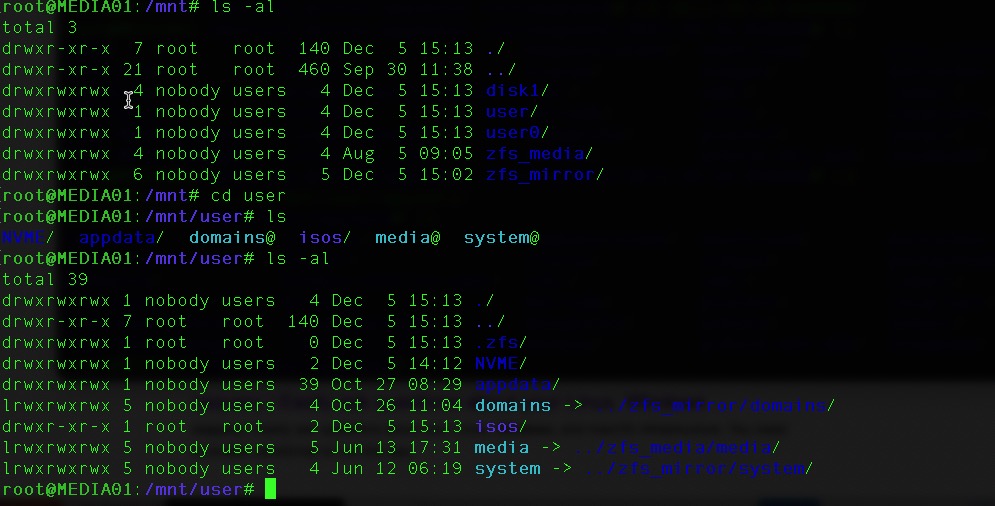
Could also be the fact /mnt/user is being used? Here is a screen shot how /mnt/user points to /mnt/zfs_mirror/...
-
Let me ask this question. I turned snapshots on. Say my mount is the following. /mnt/zfs_mirror/appdata/AppA if the snapshot is stored here, would this break exclusive mode? /mnt/zfs_mirror/appdata/.zfs/snapshot/023-10-16-050000/AppA
-
what should I look for in the diag download?
-
I'll go the diag route. been running without completion since you posted to run that compute.
-
Been computing for a while now and says please wait. Any other ideas on how to get the info?
-
@itimpithings have been going good with my configuration, but all of a sudden one of my shares is no longer in exclusive mode. How would I find the directory? that is causing the issue? From above, there can't be a directory with the same name correct?
-
What is the best/easiest way to add addons like the facial recognition option from the App Store? Really would like this addon, but not quite sure how to get it installed. Do I need to build a complete new docker from the ground up? https://apps.nextcloud.com/apps/facerecognition
-
This is probably a dumb question, but is there a way to set up automatic ZFS snapshots based on time? Say I want to take a snapshot every 4 hours, is this possible? Is there also a way to maintain how many snapshots are kept? Lastly, what does "Recursively create snapshots of all descendent datasets" mean when I manually perform a snapshot? I don't quite understand if I should select this or not? Based on my google research, it's more if you want to do the entire pool? Since the UI only allows the dataset to be selected for a snapshot, does it matter if I select this option or not?
-
Good point, forgot I even had the plugin installed. Thanks.
-
This is probably a dumb question, but is there a way to set up automatic ZFS snapshots based on time? Say I want to take a snapshot every 4 hours, is this possible? Is there also a way to maintain how many snapshots are kept? Lastly, what does "Recursively create snapshots of all descendent datasets" mean when I manually perform a snapshot? I don't quite understand if I should select this or not? Based on my google research, it's more if you want to do the entire pool? Since the UI only allows the dataset to be selected for a snapshot, does it matter if I select this option or not?
-
It was just weird that it wasn't doing that initially when I set up my dockers and good to know it doesn't matter as either share is the same as far as performances goes. Thank you for the reply
-
I updated to Unraid 6.12.1 and noticed something odd about docker paths. Previously mapping a path inside a docker I would click something like the following. /mnt/user/appdata/application1 Now it's doing the following, even when I select the above path /mnt/zfs_mirror/appdata/application1 Technically both are the same path, but I didn't know if I need to go back and fix all my dockers to use this new behavior. I'm new to Unraid and this behavior just started with the latest version. I'm using ZFS on all my shares with exclusive access. Is there a reason this would work better selecting the new pathing on all my existing dockers? It seems to be switching automatically to the pool name even when I select the previous path within the docker mappings? Hopefully this makes sense and if it doesn't, I can create some screen shots to assist.
-
Understood. I should be good to go as it shows enabled on the shares now after I changed the global setting. Appreciate the help!
-
Found it, thank you. What do you mean @itimpi? I thought there were a lot of performance benefits with ZFS based on the release notes if you are only using ZFS as the primary storage with no secondary storage?


