only-university6482
Members
-
Joined
-
Last visited
Everything posted by only-university6482
-
Hi all, Just updated the codeprojectai container today and it is not working with my gtx970 gpu anymore - haven't figured it out yet. Been working fine for 2 years. Rebooted etc. Nothing. Changed back to CodeProject.AI_ServerGPU container app and this works fine. Something in the new image that is not compatible with older gtx gpu's perhaps? Please let me know if anyone runs CodeProject.AI_Server with a gtx 900 series to see if it detects it. Mine defaults to CPU and can't seem to change it. It always picks up the gpu automatically. Many thanks
-
I was thinking about a backup to another physical location like my shed also but I have the opposite problem. Gets too hot from Nov-May. Probably 50-60c inside easily on a hot sunny day. One of those American plastic type ones. (I'm in the southern hemisphere) Right next to the shed I have lan and power for the pool so would have been a good place apart from the extreme heat. Super dry inside also.
-
Fixed - granted r/w to groups and other on the pbs appdata folders. Not sure why that was altered. All running as normal now. Thanks
-
thanks # ls -al /etc/proxmox-backup/ total 36 drwx------ 1 backup backup 185 Oct 27 16:03 . drwxr-xr-x 1 root root 1902 Sep 27 14:39 .. -rw-r--r-- 1 99 users 0 Sep 3 00:18 .initialized -rw-r----- 1 99 users 24 Sep 27 14:36 acl.cfg -rw------- 1 99 users 3243 Sep 3 00:18 authkey.key -rw-r----- 1 99 users 800 Sep 3 00:18 authkey.pub -rw-r----- 1 99 users 1675 Sep 3 00:18 csrf.key -rw-r----- 1 99 users 232 Sep 27 16:30 datastore.cfg -rw-r----- 1 99 users 3243 Sep 3 00:18 proxy.key -rw-r----- 1 99 users 2094 Sep 3 00:18 proxy.pem -rw------- 1 99 users 148 Sep 20 13:35 shadow.json -rw-r----- 1 99 users 114 Sep 20 13:35 user.cfg
-
permissions on what? Been running fine for 6 months. Nothing changed.
-
Last day or 2 my backup server just stopped working. authkey errors in the logs. No idea yet how to fix this. Can anyone point me in the right direction? Thanks thread 'main' panicked at 'called `Result::unwrap()` on an `Err` value: unable to read "/etc/proxmox-backup/authkey.pub" - Permission denied (os error 13)', src/auth_helpers.rs:162:63 note: run with `RUST_BACKTRACE=1` environment variable to display a backtrace PROXY: Starting... thread 'main' panicked at 'called `Result::unwrap()` on an `Err` value: unable to read "/etc/proxmox-backup/authkey.pub" - Permission denied (os error 13)', src/auth_helpers.rs:162:63 note: run with `RUST_BACKTRACE=1` environment variable to display a backtrace PROXY: Starting... thread 'main' panicked at 'called `Result::unwrap()` on an `Err` value: unable to read "/etc/proxmox-backup/authkey.pub" - Permission denied (os error 13)', src/auth_helpers.rs:162:63 note: run with `RUST_BACKTRACE=1` environment variable to display a backtrace PROXY: Starting... thread 'main' panicked at 'called `Result::unwrap()` on an `Err` value: unable to read "/etc/proxmox-backup/authkey.pub" - Permission denied (os error 13)', src/auth_helpers.rs:162:63 note: run with `RUST_BACKTRACE=1` environment variable to display a backtrace PROXY: Starting... thread 'main' panicked at 'called `Result::unwrap()` on an `Err` value: unable to read "/etc/proxmox-backup/authkey.pub" - Permission denied (os error 13)', src/auth_helpers.rs:162:63 note: run with `RUST_BACKTRACE=1` environment variable to display a backtrace
-
Hi, I´m a bit stuck with this app proxmox backup server. Cannot access the gui and getting loads of errors. Can anyone help? Related with the authkey. Thanks thread 'main' panicked at 'called `Result::unwrap()` on an `Err` value: unable to read "/etc/proxmox-backup/authkey.pub" - Permission denied (os error 13)', src/auth_helpers.rs:162:63 note: run with `RUST_BACKTRACE=1` environment variable to display a backtrace PROXY: Starting... thread 'main' panicked at 'called `Result::unwrap()` on an `Err` value: unable to read "/etc/proxmox-backup/authkey.pub" - Permission denied (os error 13)', src/auth_helpers.rs:162:63 note: run with `RUST_BACKTRACE=1` environment variable to display a backtrace PROXY: Starting... thread 'main' panicked at 'called `Result::unwrap()` on an `Err` value: unable to read "/etc/proxmox-backup/authkey.pub" - Permission denied (os error 13)', src/auth_helpers.rs:162:63 note: run with `RUST_BACKTRACE=1` environment variable to display a backtrace PROXY: Starting... thread 'main' panicked at 'called `Result::unwrap()` on an `Err` value: unable to read "/etc/proxmox-backup/authkey.pub" - Permission denied (os error 13)', src/auth_helpers.rs:162:63 note: run with `RUST_BACKTRACE=1` environment variable to display a backtrace PROXY: Starting... thread 'main' panicked at 'called `Result::unwrap()` on an `Err` value: unable to read "/etc/proxmox-backup/authkey.pub" - Permission denied (os error 13)', src/auth_helpers.rs:162:63 note: run with `RUST_BACKTRACE=1` environment variable to display a backtrace
-
An entire week now, touch wood, all stable. Disabled: cpu pinning Removed: tweaks and tips, frigate (with usb passthrough for tpu coral), blueiris camera recording 24/7 to hard drive pool. (blueiris now records to a hdd attached to the usb on my asus router) I will attempt to re-add frigate and the coral usb next week to see if that trips to unraid server to crash
-
3 days up and running now without issues. I do have the cctv camera recording streams turned off (5 cameras recording 24/7) and also frigate with the coral usb device disconnected. Possibly one of these causing the crashes?
-
No errors found with the memory. 🙁 Maybe I'll try resitting the cpu Could be one of the plugins or usb attached disks either..
-
ok thanks - will do that I'll move my blueiris/codeproject over to another pc in the meantime. Moved frigate with coral tpu to another pc just now.
-
Mine just crashed 10 mins ago again! I'm at a loss, will do a memory test I had syslog server enable and just looked at the file - nothing in there. Crashed just before the 11:05 timestamp Oct 20 10:28:56 tower500 proxmox-backup-proxy[57]: starting rrd data sync Oct 20 10:28:57 tower500 proxmox-backup-proxy[57]: rrd journal successfully committed (18 files in 0.050 seconds) Oct 20 11:05:31 tower500 proxmox-backup-api[9]: service is ready Oct 20 11:05:31 tower500 proxmox-backup-proxy[10]: service is ready
-
Crashed again just now.. nothing in syslog server Oct 20 09:58:56 tower500 proxmox-backup-proxy[57]: write rrd data back to disk Oct 20 09:58:56 tower500 proxmox-backup-proxy[57]: starting rrd data sync Oct 20 09:58:56 tower500 proxmox-backup-proxy[57]: rrd journal successfully committed (18 files in 0.051 seconds) Oct 20 10:28:56 tower500 proxmox-backup-proxy[57]: write rrd data back to disk Oct 20 10:28:56 tower500 proxmox-backup-proxy[57]: starting rrd data sync Oct 20 10:28:57 tower500 proxmox-backup-proxy[57]: rrd journal successfully committed (18 files in 0.050 seconds) Crashed just at 11:03am: Oct 20 11:05:31 tower500 proxmox-backup-api[9]: service is ready Oct 20 11:05:31 tower500 proxmox-backup-proxy[10]: service is ready Oct 20 11:05:31 tower500 proxmox-backup-proxy[10]: applied rrd journal (3007 entries in 0.039 seconds) Oct 20 11:05:31 tower500 proxmox-backup-proxy[10]: write rrd data back to disk Oct 20 11:05:31 tower500 proxmox-backup-proxy[10]: starting rrd data sync Oct 20 11:05:31 tower500 proxmox-backup-proxy[10]: rrd journal successfully committed (18 files in 0.043 seconds) This doesn't tell me anything unfortunately. Am I looking in the wrong place?
-
Did you get to the bottom of the kernel panic error? Having the same on mine so turned on syslog yesterday. I see it passed the memtest so an issue somewhere else? Thanks
-
I have Unraid on an amd cpu. Followed the guidelines for the idle and global state settings etc in bios. AMD Ryzen 5 3400G with Radeon Vega Graphics @ 3700 MHz ASRock B550M Pro4 American Megatrends International, LLC., Version P2.90 Memory: 32 GiB DDR4 Just activated syslog server as it crashed a week ago, 3 days ago and twice today. Last screenshot I capture on the monitor was this: kernel panic - not syncing kernel offset: disabled end kernel panic - not syncing... I do have several docker containers - like frigate with tpu, codeproject with gpu (from blueiris). Seems to occur more often when frigate is processing lots of data.. Lets see what the syslog says on the next crash.
-
exactly the same behaviour here. Did you solve this? I created a new share on an hdd I use for backups and put the path in like you do but no backups go into this folder. Looks like they still default to the docker.img!! ) as the size shows this. Frustrating.
-
Shame this is not official and not updated from the developer. I have a license and pay the annual maintenance fee for BI. Would be great to run it on docker instead of a dedicated windows vm!
-
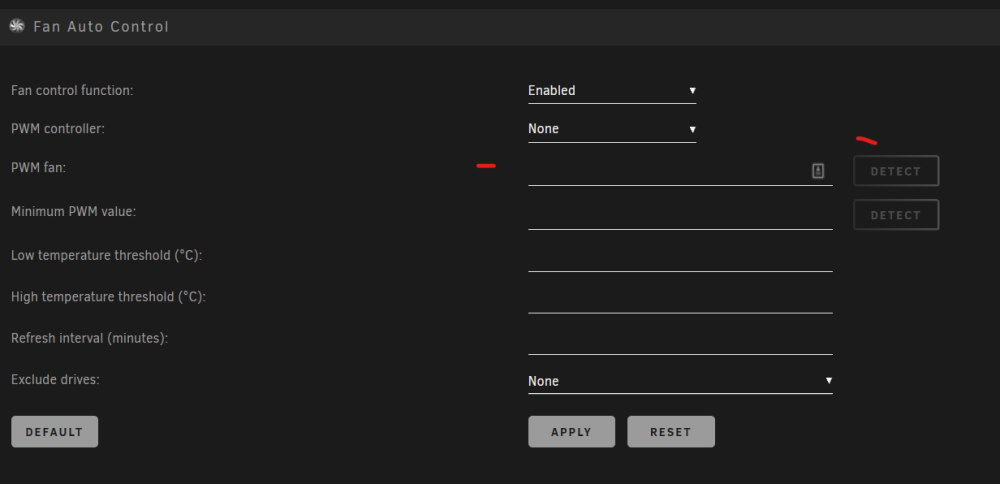
same here - got my temp sensors working after sensors-detect but nothing in the fan app. Detect is greyed out. root@Tower500:~# sensors-detect # sensors-detect version 3.6.0 # Board: ASRock B550M Pro4 # Kernel: 6.1.49-Unraid x86_64 # Processor: AMD Ryzen 5 3400G with Radeon Vega Graphics (23/24/1).. .....
-
Thanks. I'll back to you soon. Card currently removed from system now as I do not believe it was being utilized, just consuming energy. My frigate hardware acceleration was using the integrated graphics on the cpu (3200g) I think. Works well and probably more efficient. Tried the HW on the nvidia and temp rose by 23c!! Turned that off!
-
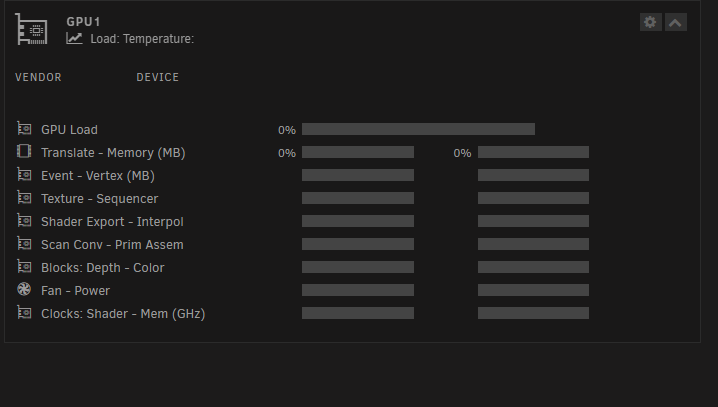
Thanks! root@Tower500:~# radeontop -d - -l 1 -b 04 Dumping to -, line limit 1. 1693870316.741081: bus 04, gpu 0.00%, ee 0.00%, vgt 0.00%, ta 0.00%, sx 0.00%, sh 0.00%, spi 0.00%, sc 0.00%, pa 0.00%, db 0.00%, cb 0.00%, uvd 0.00%, vce0 0.00%, vram 0.29% 5.92mb, gtt 0.21% 4.20mb, mclk inf% 0.150ghz, sclk 47.62% 0.300ghz
-
Vs: 6.12.4 root@Tower500:~# lspci -Dmm | grep VGA 0000:01:00.0 "VGA compatible controller" "NVIDIA Corporation" "GM204 [GeForce GTX 970]" -ra1 -p00 "ASUSTeK Computer Inc." "GM204 [GeForce GTX 970]" 0000:04:00.0 "VGA compatible controller" "Advanced Micro Devices, Inc. [AMD/ATI]" "Cape Verde GL [FirePro W4100]" -p00 "Dell" "Cape Verde GL [FirePro W4100]" 0000:0a:00.0 "VGA compatible controller" "Advanced Micro Devices, Inc. [AMD/ATI]" "Picasso/Raven 2 [Radeon Vega Series / Radeon Vega Mobile Series]" -rc8 -p00 "Advanced Micro Devices, Inc. [AMD/ATI]" "Picasso" Many thanks!
-
Dumping to -, line limit 1. 1693858369.175237: bus 0a, gpu 0.00%, ee 0.00%, vgt 0.00%, ta 0.00%, sx 0.00%, sh 0.00%, spi 0.00%, sc 0.00%, pa 0.00%, db 0.00%, cb 0.00%, vram 20.03% 405.44mb, gtt 0.76% 113.99mb, mclk 97.14% 1.166ghz, sclk 14.29% 0.200ghz
-
I have a amd firepro 4100 installed Unfortunately its not showing any metrics. the raeon top app is installed. Possibly not compatible with this model?