





only-university6482
Members
-
Joined
-
Last visited
Everything posted by only-university6482
-
same issue here but with a gtx970 Tried different drivers but get the following ----------------Downloading Nvidia Driver Package v575.64.05----------------- ---------This could take some time, please don't close this window!------------ ---------------Can't download Nvidia Driver Package v575.64.05---------------- So I'm assuming the new version of unraid just will not play ball with an old gtx gpu??
-
Holy moly that's hot!! Mine rarely gets to 55c. Idles at 48c Did you have the boost mode on the tpu? What's your camera/config set up like? Overworking with too many operations per second?
-
well if it's linux you need to create an agent, the command is listed when you set up a client on the gui. Windows is easy as you just run the executable for the agent. I'll try it out on a test vm first. Still can't solve the issue with VM Back up app though. Maybe it's the beta 3.0
-
How do you do this for a proxmox VM? I am wary of running the suggested command in the proxmox shell. It's just used as a qdevice for quorum in a cluster
-
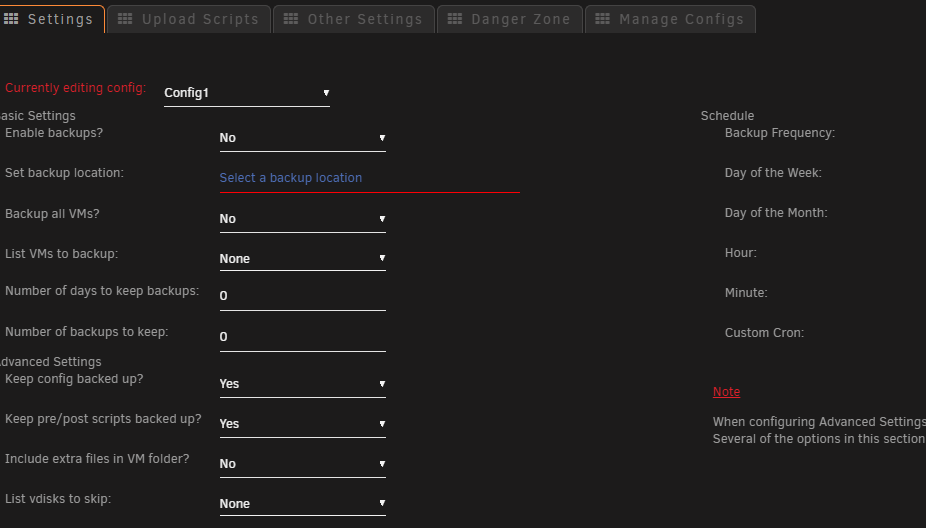
I'm on V7 beta 3 Unraid and this app appears to have stopped working in my case anyway. I reset everything to default, chose all VM's, backup location correct and when I hit backup NOW nothing happens. Tried adding a schedule and wait, Still nothing. Anyone having issues recently? Thanks. I'll try uninstalling and reinstalling the plugin later Still no luck. Everytime I click enable and specify my path for the destination, the click apply. Nothing saves. I go back in and it's all reset to defaults.
-
I'm struggling with backups now with .chunks errors and nothing will backup to my pbs datastore. Been using it for 2 years. I had recently changed my cache from btrfs to zfs and restored all of my apps. But this looks like a permission issue on the datastore on the array (not changed) Error: update atime failed for chunk/file "/datastore/.chunks/688e/688ee26ec68c1c1d4fd7e13d18cecc4731abc96bd4949142828c3dc9b6b032d0" - EPERM: Operation not permitted INFO: cleanup temporary 'vzdump' snapshot I have the following permissions set: root@Tower:/mnt/user/ProxmoxDataStore# ls -la total 2116 drwxrwxrwx 1 nobody users 96 Oct 2 00:00 ./ drwxrwxrwx 1 nobody users 115 Oct 4 13:48 ../ drwxrwxrwx 1 nobody users 1069056 Apr 2 2024 .chunks/ -rw-rw-rw- 1 nobody users 331 Oct 2 00:00 .gc-status -rw-rw-rw- 1 nobody users 0 Apr 2 2024 .lock drwxrwxrwx 1 nobody users 4096 Sep 29 13:07 ct/ drwxrwxrwx 1 nobody users 205 Oct 4 13:15 vm/ Ended up creating a new datastore on another drive of the array. I do have past backups in standard format on another drive luckily
-
Nope not here - Integrates with homassistant without issues
-
Quick question. I have removed my gpu as I do not needit anymore. Removed the gpus all and device object from the container config. All working fine. I have an amd 3400g. Will it use the integrated graphics of this cpu automatically or do I need to add an extra parameter? error-gpu There was an error getting usage stats. This does not mean hardware acceleration is not working. Either your GPU does not support this or Frigate does not have proper access to get statistics. This is expected for the Home Assistant addon. UPDATE: Fixed. Added variable radeonsi amd-vaapi GPU %Memory % 2.50%19.27%
-
Can something assist in helping me set up a 2nd instance of codeproject please? I have tried to add the 2nd instance with different ports/name/appdata name etc. All unique values. But still the data and modules folders are empty on codeproject_ai-2 using 32168 for udp/tcp etc. Even checked in portainer and tried to recreate from there with all 2nd instance unique values. Says up and running but seems to be using the 1st port 32168 and not opening in 32170 for example. Anyone had luck in setting up a 2nd instance? Thanks
-
One observation, not sure if it's just me, is that the cpu processor metrics seems to spike and fall more often with these powersave settings. Is this normal?
-
HI , old thread i know but did your 9207 work on the 3.0 x 1 slot?
-
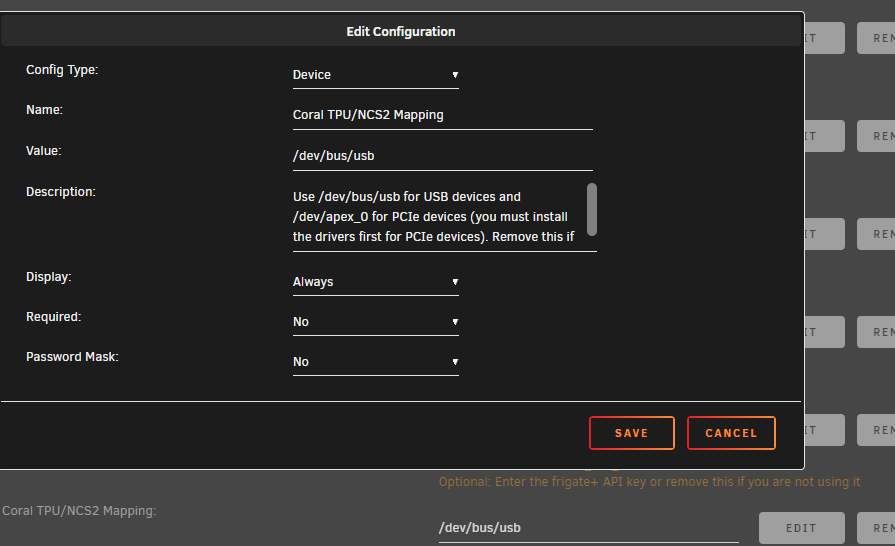
First thing I don't see in your unraid config is the /dev/bus/usb. Extra params also: --gpus=all --shm-size=256mb --mount type=tmpfs,target=/tmp/cache,tmpfs-size=100000000 --restart unless-stopped Try these 2 changes first. Make sure your CPAI is not sharing the usb also. frigate: detectors: #coral: # type: edgetpu # device: usb coral1: type: edgetpu device: pci:0 mqtt: host: user: password: logger: # Optional: default log level (default: shown below) default: debug #info go2rtc: streams: gate_sub: - rtsp://user:[email protected]:554/Channel/102 frontyard_sub: - rtsp://user:[email protected]:554/Channel/102 rear_sub: - rtsp://user:[email protected]:554/Channel/102 front_sub: - rtsp://user:[email protected]:554/Channel/102 backyard_sub: - rtsp://user:[email protected]:554/Channel/ drive_sub: - rtsp://user:[email protected]:554/Channel/102 webrtc: candidates: - 192.168.1.244:8555 cameras: gate: enabled: true ffmpeg: hwaccel_args: preset-vaapi inputs: - path: rtsp://127.0.0.1:8554/gate_sub?video=copy input_args: preset-rtsp-restream roles: - detect - record - rtmp
-
I even had luck with the coral tpu m2 wifi card. Slotted it in, changed config in frigate to pcie:0 and up working straight away. Not sure what else to suggest. Must be a passthrough issue in the iommu groups or something like that. Can you see the device in settings> System Devices? Under the groups?
-
yes was suspecting that also. Luckily with the dedicated windows pc these issues don't happen.
-
Great concept when it works. Unfortunately had too many issues with ntfs usb devices plugged in. Bit buggy - often says needs reboot or errors when trying to mount again manually even with automount on. Ended up spinning up a small lenovo tff thinkcentre with windows 10 compact and adding all my ntfs external drives to this and using filesync to back up stuff from my unraid to my WD drives. Solid now.
-
This worked thanks but still no mesh option on this one. Regarding the mesh I have the standard codeproject/ai-server running with its mesh function. Ran up several other CPAI nodes (a few on lxc proxmox debian and alpine containers and one windows installation on a VM. The unraid mesh does not communicate with any - added them to hostnames - they are visible but cannot ping them. UDP port enabled also. The lxc containers read the windows cpai but not the other way around. Would really like to get the mesh working on the unraid cpai container app. What other security/firewall settings do I need to change to get them to communicate with each other? Thanks
-
Does anyone know how to get an 'unassigned device' remote and shared mounted disk to show up in the gui of this app? Thanks
-
Just got this: cameras: gate: enabled: true ffmpeg: hwaccel_args: preset-vaapi inputs: - path: rtsp://127.0.0.1:8554/gate_sub?video=copy input_args: preset-rtsp-restream roles: - detect - record - rtmp detect: width: 704 height: 480 fps: 5 objects: track: - person ....
-
Portainer is not needed as it's just a nice gui to access the containers. Just handy as it's user friendly. This is all I have in my config. I do not have any ffmpeg configs before go2rtc. At the camera level all I have in regards to ffmpeg is: ffmpeg: hwaccel_args: preset-vaapi anything else I added to this broke it
-
Have you installed portainer app? I'd advise doing that so you can easily view all the paths, env variables and settings easily. Much easier to make updates. Add device in the unraid frigate app settings as /dev/bus/usb (in portainer you can make sure this is mapped) and extra parameters: --gpus=all --shm-size=256mb --mount type=tmpfs,target=/tmp/cache,tmpfs-size=100000000 --restart unless-stopped config.yaml: detectors: coral: type: edgetpu device: usb Not sure if I did much else to get the tpu usb going tbh.
-
Works great with the coral USB But I'm trying to get tailscale client working in the docker container. Can install it using the linux command but running 'tailscope up' does nothing, Says it fails to connnect. Now my other frigate lxc container on proxmox ran fine with tailscale. No extra config was required. Any ideas how I can get tailscale working in this container? Thanks
-
Brilliant. Got it working. Yes just choosing SATA for the img worked. Leaving the windows drivers iso as IDE. Migrated 2 across, 1 linux VM for homeassistant and another for windows with blueiris. Good to have a backup. Not sure if I'm going to stick with these VM's on unraid or proxmox yet. Still good to be able to spin them up if I don't have proxmox. Thanks!
-
I am still trying to fix the boot blue screen error on this methods also
-
Wow so many issues posted in general support your issues gets pushed down to the bottom very quickly. So many issues with 6.12.8? I'm on 6.12.6 after a rollback and everything working well again. 6.12.8 caused issues with my gpu driver - could not connect. No idea why yet. Unless I find someone else with the same issue think I'll be sticking with this version for now.
-
Hi all, I had planned to upgrade to 6.12.6 to 6.12.8. Upgraded all my plugins and apps beforehand. Nvidia drivers for my gtx970 all set to latest. After upgrading the app CodeProject.AI_ServerGPU and CodeProject.AI would not connect to the gpu. Error: unraid srver rc.docker: CodeProject.AI_ServerGPU: Error response from daemon: could not select device driver "" with capabilities: [[gpu]] Downgraded back to 9.12.6 and all working again. Not much in the logs apart from that - 'could not select device driver' GPU shows up in hardware ok as present on system. Could anyone share any light on this please? Many thanks

