Everything posted by UnraidSecretaryOffice
-
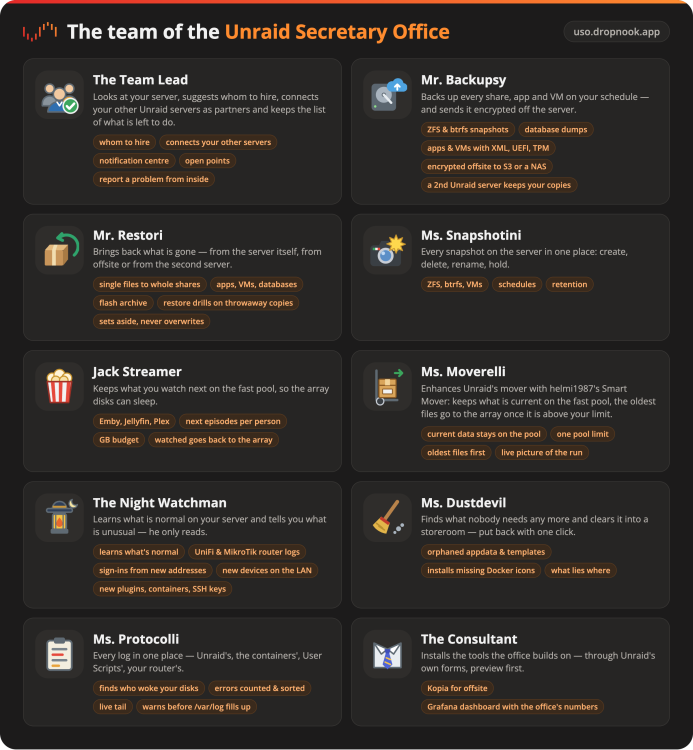
Hi everyone, The Unraid Secretary Office (USO) brings a whole team into Unraid's web UI. Each member of staff looks after one part of your Unraid server. Pictures: https://uso.dropnook.app Install Unraid 7.3.2 or a newer 7.x; snapshots need ZFS or btrfs. Jack Streamer needs Python 3 (e.g. "Python 3 for UNRAID" from Apps) — the rest of the team doesn't, and the Team Lead tells you if it's missing. Run this in Unraid's terminal — or paste just the URL under Plugins → Install Plugin: plugin install https://github.com/dropnook/UnraidSecretaryOffice/releases/latest/download/unraid-secretary-office.plgThen open Office in the menu bar (Sekretariat on a German Unraid — you can rename it). Not in Community Applications yet — the listing is pending. Until then, install it with the URL above; updates come through Unraid's plugin manager either way. Support Questions, problems and wishes: right here in this thread, as a GitHub issue, or straight from the office without a GitHub account (⋯ → Report a problem or a wish…). Thanks The tools behind Jack Streamer and Ms. Moverelli — MediaCache, folder consolidation and Smart Mover — are by helmi1987, and Ms. Protocolli's syslog rules come from Enhanced Log by dlandon and EDACerton. Thank you!
-
Gerne und ich hoffe, dass es jetzt auch stabil bleibt. Du könntest eine Antwort als Lösung markieren. Dann sehen andere in der Forum-Übersicht, dass es hier keine Hilfe mehr braucht. Und falls jemand mal dasselbe Problem hat, kommt er zügig zum richtigen Bereich.
-
Als gute und einigermassen preiswerte Hardware würde ich dir eine Google-TV Box empfehlen. Diese bekommt man i.d.R. wesentlich günstiger als Apple-TV Boxen, brauchen aber u.U. auch mehr Zeit zum Einrichten und Härten wenn man das will (Werbung etc...). Zum Beispiel eine Xiaomi Mi TV Box S (3rd Gen). Als Client-App Moonfin und ggf. zusammen mit dem Moonbase Plugin am Jellifin-Server.
-
Die 30.000 und 60.000 sind nur die Länge des Fehlerprotokolls und alle Einträge sind vom selben Typ, “Invalid Field in Command”, also abgelehnte Verwaltungsbefehle (Abfragen nach etwas, das die Firmware nicht kennt), keine Lese- oder Schreibfehler. Kann man ignorieren. Dein Scrub heute Vormittag ohne Fehler auf beiden Geräten, und seit dem 17. Oktober kein einziger relevanter Fehler im Log. Sieht also gut aus würde ich behaupten. Zwei Dinge am Rande: die beiden nvme1 und nvme0 melden viele Power Cycles und viele Unsafe Shutdowns bei relativ wenig Betriebsstunden. Unraid startet man nicht so häufig, das stammt wohl aus einem früheren Leben der SSDs (gebraucht gekauft, oder vorher in einem Notebook?). Und falls die Aussetzer vom Anfang wiederkommen: Beide NVMes laufen bei dir mit ASPM L1 (PCIe-Stromsparen). Das wäre dann mein erster Verdächtiger, testweise pcie_aspm=off in der Syslinux-Konfiguration. Solange das nicht wieder passiert kannst es aber so lassen. Und Settings → Syslog Server → "Mirror syslog to boot drive" kannst du wieder auf No stellen. Und das Problem scheint vorerst gelöst denke ich.
-
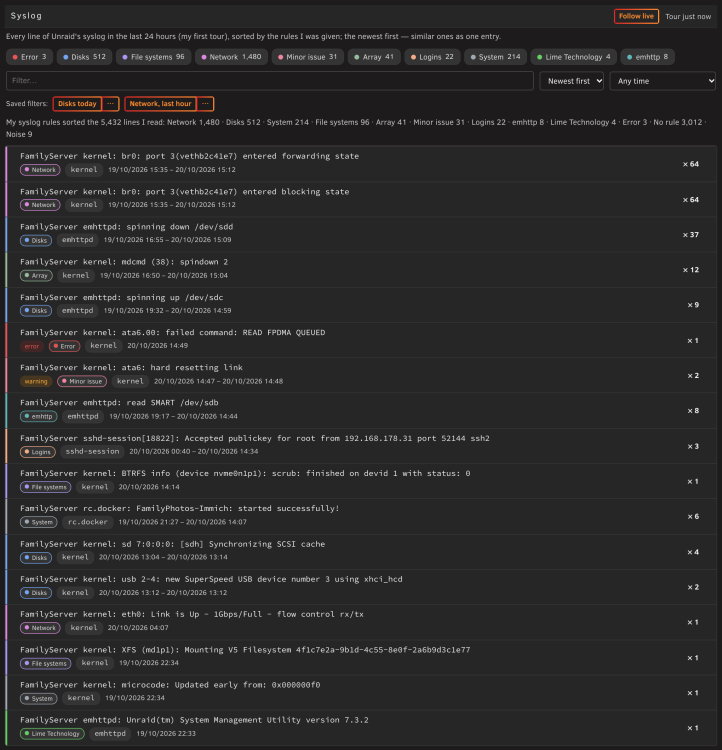
As promised, a short report back: the rule set is in. Ms. Protocolli sorts Unraid’s syslog with Enhanced Log’s rules, shipped unchanged, with Dan Landon’s copyright and the GPL notice kept in the file and the credit to both of you in the README. Her Syslog tile shows the counts per kind (disks, network, file systems, logins, system, errors …), a label shows one kind alone, and you can add your own rules and hide words on top. Thanks again for the years of work in that file. As of today the Unraid Secretary Office isn’t in Community Applications yet (the listing is in review). Until then it installs like any plugin: Plugins → Install Plugin, paste https://github.com/dropnook/UnraidSecretaryOffice/releases/latest/download/unraid-secretary-office.plg — updates then come through Unraid’s plugin manager as usual.
-
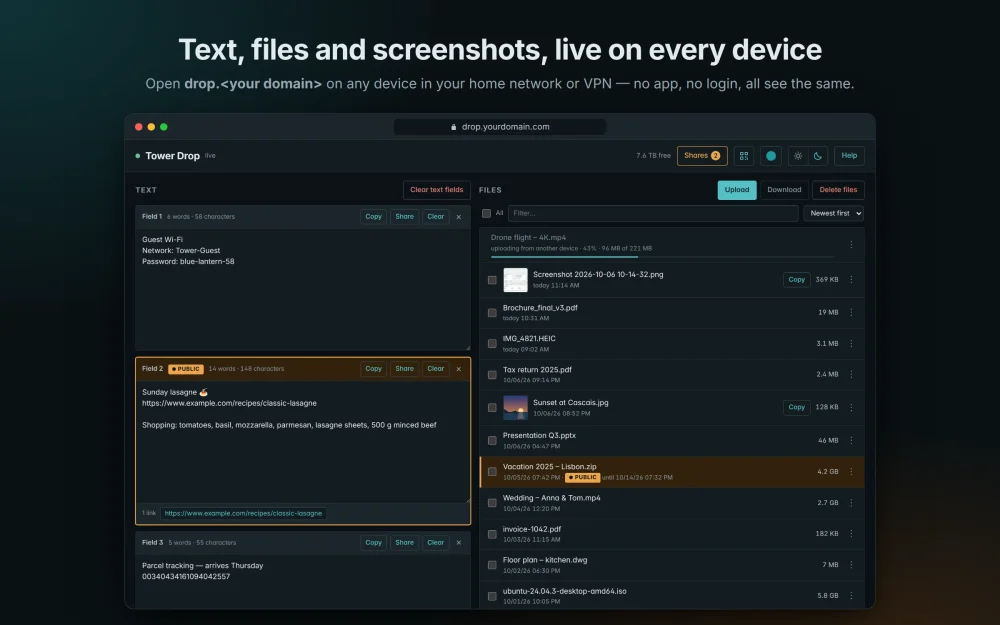
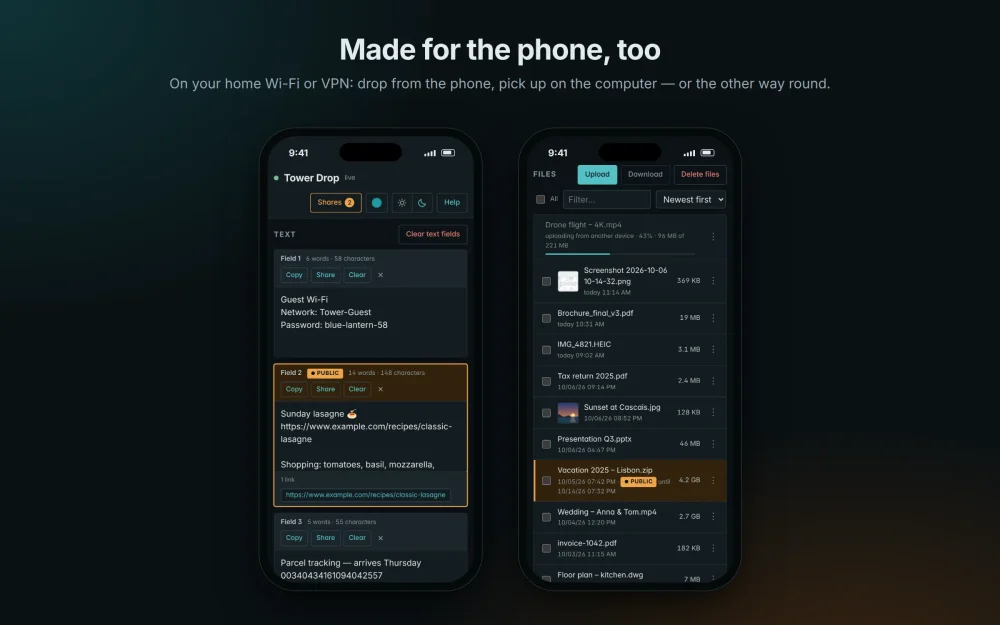
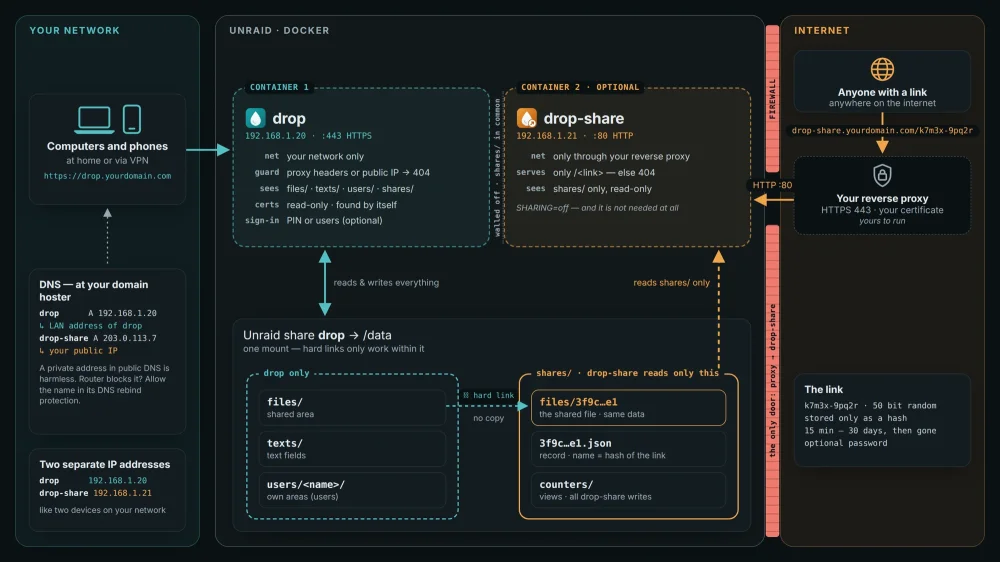
Hi everyone, Drop is instant sharing for your home network — like AirDrop, but for every device. Get a text or a file from your phone to your PC, from Windows to a Mac, from Android to an iPhone: open one web page, drop it in, and it is on every other device at once. No app, no login, no cloud — everything stays on your Unraid server. Made for your own LAN at home. On your devices it is simply Drop — the page calls itself “<server name> Drop”, after your server. Everything at a glance, with pictures: https://dropnook.dropnook.app/ — gallery: https://dropnook.dropnook.app/gallery/ What it does Text fields that survive reloads and lost connections; uploads of any size, resumable, with progress visible to everyone. Screenshots straight from the clipboard with Ctrl+V; pictures with preview, large view and Copy into the clipboard of another computer. Live room: video or voice for up to 10 people in your network — one click to join, no ringing. Picture and sound go straight from device to device; nothing leaves your network. Needs HTTPS and is meant for your private LAN only. Share to the internet: a single file or text through a link that expires by itself (15 minutes to 30 days), optionally with a password. Served by a second, locked-down container — Drop itself is never reachable from the internet. This is optional: it needs the Compose stack with its two separate containers. Optional users: up to five, each with a PIN, an area of their own next to the shared one, and their own colour. Two ways to run it — same image, pick what you need Community Applications — LAN only. Apps → search Dropnook → Install. One container (drop), reachable in your network only, sharing to the internet switched off. Give it its own address (Custom: br0 with a fixed IP) and open http://<that address>/, or use Bridge with the template’s port 8088. Create the share drop first (Shares → Add Share). For HTTPS — and so for the live room — enter a certificate (e.g. from Cert Warden) under Show more settings. Compose stack — with sharing to the internet. Two separate containers, drop and drop-share, each with its own LAN address, set up with the Compose Manager Plus plugin: Docker → Compose → Add New Stack → paste compose.yaml and the .env from the repo, fill in two free addresses, Compose Up. Your reverse proxy points at drop-share only; Drop finds your existing certificate (Nginx Proxy Manager’s folder is preset) and runs HTTPS in your network, too. Step by step: https://github.com/dropnook/dropnook.app#installation What Drop deliberately does not do: no folders (zip them), no recycle bin, no uploads from outside, no live room from outside your network. Updates: the image ghcr.io/dropnook/dropnook:2 follows every 2.x release; after an update every open Drop page reloads itself. Support: questions, problems and wishes here in this thread or as a GitHub issue: https://github.com/dropnook/dropnook.app/issues. German speakers: there is a German thread too. I have used Unraid for years — Drop is the tool I always missed for my own home network. Maybe it helps some of you, too. Cheers, Benj
-
Bleibt eigentlich nur noch das Elektrische... Netzteil oder Board. Netzteil tauschen wäre der nächste logische Schritt; wenn es damit weiter einfriert, bleibt das Board.
-
Thanks! Done.
-
Da stimme ich dir voll zu, deine Prototypen Bilder sind cool und helfen definitiv ja. Ich vermute dass Unraid 8 auch mehr in diese Richtung gehen wird. Und Unraid 7.4 bringt auch bereits Mover-Verbesserungen mit. Ich selber nutze für mehr Funktionen und Ansichten mein eigenes USO-Plugin das zeigt z.B. beim moven auch schöne Grafiken, den Speed und die Zeitprognose. Parity-Sync zeigt das aktuelle Unraid aber auch schon an im Tab Main unten, da fehlt mir eigentlich nichts.... Allgemein hat Unraid in letzter Zeit mega Fortschritte gemacht und solche Community Anfragen / Ideen wie von dir werden nicht selten aufgenommen.
-
Mover: files and folders whose name ends in a space are never moved (and a same-named neighbour can be moved instead) Seen on 7.4.0-rc.1, and the same move binary behaves this way on 7.3.3. The Mover seems to strip trailing whitespace from every path it reads on stdin. A file or folder whose name ends in a space (or tab) is then looked up without it, fails with «No such file or directory», and stays where it is. The mover still exits 0. With «Mover logging» disabled (the default) nothing is logged about it, so a share looks fully moved while some files are still on the pool. It gets worse when a file 'twin' sits next to 'twin ' asking for 'twin ' moves 'twin' instead. It only bites real trailing spaces (byte 0x20) in the name on the server. Names written by apps on the server have them: Nextcloud (synced from a Mac), containers, the terminal, NFS clients. In my case it was folders like '06 June ' inside a Nextcloud data share. A name with a trailing space made in the macOS Finder over SMB is not affected, because Samba stores the trailing space as U+F028, so such a folder moves fine.
-
Ganz genau :-) Danke dir und viel Spass beim weiteren Entwickeln. Ich werde hier weiter mitlesen.
-
Cool - Tools von Leuten gebaut die Erfahrung haben und wissen was es braucht. Ich habe jedoch schon lange kein Windows mehr und möchte es mir auch nicht mehr antun 😝 Die einfache Einrichtung und Nutzung eines zentralen Monitoring finde ich super, nur befürchte ich auch, dass die Fülle an User-Wünschen dann auch den Umfang sprengen könnte? Bei mir im Einsatz sind natürlich diverse Unraid Server, Ubiquiti Unifi und die typischen Home-Apps wie Nextcloud, Immich, Plex/Emby/Jellifin, Kopia (beste Backuplösung die ich kenne), Nginx Proxy Manager, Apache/Webseiten und versitygw als eigenen S3-Server. Im Kollegenumfeld von mir ist z.B. Mikrotik (Netzwerk) vertreten. Wichtig wäre sicher auch zu verstehen und zu sehen ob SSL Zertifikate bald ablaufen oder obsolet geworden sind, wobei ersteres Nginx eigentlich selber automatisieren kann. Von daher ja, Apps überwachen und alles was mit dem Netzwerk zu tun hat.
-
Hallo Meik Mega cooles Projekt! Darf ich fragen warum du es als Windows-Anwendung gebaut hast, anstatt als Docker? Und ob Ubiquiti Unifi vielleicht noch geplant ist neben OPNsense. 😃 Viele Grüsse Benj
-
Thank you!
-
Thanks for keeping it alive this long. The part of Enhanced Log that is hard to replace isn’t the pages, it’s syslog_match.conf. That is probably years of forum experience in one file. I maintain the Unraid Secretary Office (https://github.com/dropnook/UnraidSecretaryOffice, GPL-3.0-or-later). Its log desk, Ms. Protocolli, already reads the syslog, dmesg, Docker, libvirt, Samba, User Scripts, every container’s log and counts and groups errors and warnings. But what she doesn’t have is exactly your curated per-line classification and the highlighting. I’d like to take the rule set into her, keep it maintained there (with the credit to EDACerton and dlandon in the README, same as I do for helmi1987’s MediaCache ans SmartMover tools) and add maybe custom rules on top. If that’s fine with you ❔ , I’ll report back here when it’s in. That keeps the rules alive for people who install the Unraid Secretary Office Plugin; whether someone also wants to fork the standalone plugin for the CA listing is a separate question, and I won’t promise that.
-
Two things from your diagnostics first: parity is the 32 TB with serial …K1S1KNN6 (sdo) and it sits on an Intel port; disk1 is the other 32 TB (…K1S1L37P, sds), and that one is on the Marvell card. So moving disk1 off the card is right, parity doesn’t need to move? On skipping the rebuild: the “write error” at 06:07 was Unraid’s own read-error correction (it reconstructed the four sectors from parity and tried to write them back, that write failed, hence the disable), so it doesn’t look like anything of yours was written to the emulated disk11 before the array stopped at 06:21; the physical disk is very likely identical to what parity emulates. Even so, I’d rebuild rather than New Config: a rebuild rewrites one 18 TB disk from parity, so you don’t have to trust that the physical disk11 matches what parity emulates; New Config takes the disk as it is and then needs a full parity sync over all 17 disks, which takes longer. If disk11’s SMART is clean after the reboot, rebuild it onto itself: Stop, set disk11 to “no device”, Start, Stop, assign it again, Start. Replace the card first, so the rebuild doesn’t run through it. Hopefully you still have a backup just in case—there are a lot of disks....🤔
-
Hast du es mittlerweile selber geschafft oder brauchst du noch Hilfe?
-
Passt so. “Power Supply Idle Control” musst du nicht weiter suchen: Sie verhindert nur den tiefen Leerlaufzustand, der manche Netzteile stört, und den hast du mit “Global C-state Control = Deaktiviert” bereits abgeschaltet. CLDO VDDP/VDDG auf Auto lassen, da gibt es nichts einzustellen. Jetzt ein, zwei Tage so laufen lassen: bleibt er stabil, war es das; friert er wieder ein, kommt das Netzteil dran oder weiter suchen....
-
Your syslog shows disk11 (the WD 18 TB on sdr) stopped answering at 20:18 last night, about 27 minutes into the clear of the new disk: timeouts, “failed to IDENTIFY”, then the kernel disabled the device. No CRC errors, the drive simply vanished from the bus, so SMART couldn’t be read either. The red X only came at 06:07 when the array next touched it. Disk11 sits on the Marvell 88SE9215 card together with the new disk that was being cleared and disk1; Marvell cards are known to drop disks under load, so my guess is the card, not the drive. JorgeB will no doubt confirm or correct that and give you the exact steps; in the meantime: reboot, check disk11’s SMART, and don’t run the clear and a rebuild through that card at the same time.
-
Danke, das hilft weiter. Dass er auch ohne Docker beim rsync einfriert, nimmt Docker und Netzwerk praktisch aus dem Spiel, es bleibt Hardware. Dazu passt, dass du schon einmal die CMOS-Batterie abklemmen musstest. 1. BIOS: "Power Supply Idle Control" auf "Typical Current Idle". Testweise dazu "Global C-States" aus. 2. Netzteil: Solche Freezes bei Lastwechseln können ein typisches Zeichen für ein Netzteil sein, das bei sehr wenig oder plötzlich viel Last unsauber wird (Erfahrung, nicht aus deinen Logs). Wenn du ein passendes anderes Netzteil greifbar hast, testweise tauschen (Wenn die BIOS-Einstellung das Problem nicht bereits lösen). 3. Memtest über Nacht, nicht nur 20 Minuten. Aber nur wenn die BIOS-Einstellungen das Problem nicht lösen können. Bisher habe ich es jedoch noch nie erlebt, dass das RAM das Problem war.
-
Dann ist das Log in deinen Diagnostics tatsächlich das gespiegelte. Der Server ist also ohne jede Meldung stehen geblieben. Das spricht noch deutlicher für Hardware oder BIOS. Beim nächsten Freeze: Monitor dranlassen (falls möglich) und ein Foto vom Bildschirm posten, falls dort überhaupt dann noch etwas steht. Eine Kernel Panic landet mit etwas Glück noch auf der Konsole, auch wenn sie es nicht mehr ins Log schafft.
-
Ein Server, der ohne Logeintrag steht, auch an Monitor und Tastatur, deutet eher auf Hardware oder BIOS als auf Docker. Damit man beim nächsten Mal etwas sieht: 1. Settings → Syslog Server → "Mirror syslog to boot drive" auf Yes. Nach dem nächsten Freeze die Diagnostics posten, dann ist die letzte Minute vor dem Stillstand drin. 2. BIOS: Stromsparfunktionen prüfen, konkret "Power Supply Idle Control" auf "Typical Current Idle" und testweise "Global C-States" aus. Das steht nicht in deinen Logs, es ist eine Vermutung aus Erfahrung. 3. Memtest eine Nacht laufen lassen oder falls XMP/EXPO für den RAM aktiv ist, testweise aus. 4. Unassigned Devices: Deine NFS- und SMB-Freigaben vom OMV-Server sind mit "hard" eingebunden. Hängende Remote-Mounts können einen Server stehen lassen (Irrtum vorbehalten). Für die Fehlersuche das automatische Mounten dieser Freigaben ausschalten. Welche der Punkte es ist, lässt sich ohne Log vom Absturz nicht sagen; darum zuerst Punkt 1.
-
Wir alten Unraid Nutzer sind vielleicht auch etwas betriebsblind geworden wer weiss. Was genau vermisst du oder würdest du anders machen?
-
Viele Wege führen nach Rom. Wie ich es machen würde: Auf dem entfernten HP Thin Client ebenfalls Unraid installieren und nur den versitygw Container laufen lassen. Dieser versitygw Docker Container stellt dir deinen eigenen S3-Server bereit inkl. Object-Lock mit Retention. Auf deinem heimischen Unraid Server das USO-Plugin installieren. Es hilft dir dann den kopia Docker Container zu installieren und die Backups zu planen und zu prüfen, und es hilft dir alles was du möchtest über die schnelle S3 Verbindung zum Thin Client zu sichern, verschlüsselt übermittelt und verschlüsselt gespeichert, und mit Object-Lock und inkl. dedub. Oder du machst alles direkt selber mit Kopia und verbindest es mit deinem entfernten privaten S3-Server auf deinem Thin Client. Bezüglich Verbindung würde ich die beiden Unraid Server mit Tailscale (Wireguard) verbinden. Dann brauchst du weder Portfreigaben und IPv4 / IPv6 sind Tailscale auch egal. ghcr.io/versity/versitygw ghcr.io/imagegenius/kopia
-
Both messages are normal. "No balance found" only means no balance is running right now. "Full Balance recommended" is a simple rule in the webGUI: it shows up whenever the percentage in the Data line is 50 % or less, and only that line counts, the size of the pool doesn't enter into it (yours: 2.24 GiB used in 5 GiB of allocated chunks = 44.9 %, the 1.83 TiB unallocated are ignored). A full balance usually packs the chunks tighter and lifts that number (on a test pool: 3 GiB in 7 GiB of chunks became 3 GiB in 5 GiB, 61 %), but because btrfs allocates space in 1 GiB chunks it can also land just under 50 % with so little data, so the message may stay. Either way it is cosmetic at 2 GiB on a 1.84 TiB pool. If you clicked Balance before today's reboot it couldn't run (the pool was read-only then); run it once more now, and if the text is still there afterwards, ignore it; your monthly balance is enough.