





Bushibot
Members
-
Joined
-
Last visited
Everything posted by Bushibot
-
still seeing server high load messages but seems to be running okay.


-
Might be nice to management GUI for local stuff, I don't know what that would like with enshrouded though since there is no CMD.
-
So off the cuff load test with no connections looks like proton is significantly lighter. More testing needed and I have not moved my world data yet and that might be a significant memory difference.

-
Interesting, why is the proton one more efficient it's basically the same emulator, or so I thought.
-
Yeah same though performance dose seem to degrade after while with or without the messages. And even with nobody on it load and resource seems high.

-
You can just use the xml tip, then set the pass in the Jason created by the game. Works fine even after updates.
-
Try tcp at least for query. My ports are set to both.
-
Mine showing up fine in search. I suspect the quarry port isn’t connecting.
-
Forwarded the ports on your router?
-
Ahh I see thank you, that is working!
-
Umm how would you do that for unraid?
-
In wander how many folks are just hitting refresh on apps
-
THANK YOU! I had one up but there was much weirdness with getting a working config file.
-
Oops, yep.
-
I'm trying one those but no joy in mudvill Command executiondocker run -d --name='enshrouded-server' --net='br0' --ip='192.168.1.1.132' -e TZ="America/Los_Angeles" -e HOST_OS="Unraid" -e HOST_HOSTNAME="nas-mass" -e HOST_CONTAINERNAME="enshrouded-server" -e 'USER'='root' -e 'HOME'='/root' -e 'LANG'='en_US.UTF-8' -e 'LANGUAGE'='en_US:en' -e 'Community_Applications_Conversion'='true' -l net.unraid.docker.managed=dockerman 'mornedhels/enshrouded-server' docker: Error response from daemon: invalid IPv4 address: 192.168.1.1.132. See 'docker run --help'. The command failed.
-
Gamepass does not support dedicated servers for pal world at this time, and yes that sucks. Developer said something about having to negotiate that with MS separately.
-
That's fair, though is turns out there are some dcoksers already... I'm trying to follow GitHub - ich777/docker-steamcmd-server: Simple Dockerfile that installs steamcmd and a selected game server: to unraid one but my level of fail is pretty funny (no real clue).
-
Can we gen an enshrouded dedicated steam server container? Just released today 😛 I see there are two containers now, but I'm not wise enough to know how to adjust for unraid run. https://github.com/PR3SIDENT/enshrouded-server/blob/main/README.md
-
Just started getting this after a update failed on one container but it's impacting multiple. Diag attached. nas-mass-diagnostics-20231220-0133.zip
-
I'm wondering what folks are doing to access novnc containers from their mobile (I use an Iphone but seems like a render issue)? So far I have not found a solution that renders right and allows reasonable zoom/pan on the phone to be able to really operate? I have serval containers all having the same change. I have tried some mobile vnc apps and a couple different webkit browsers.
-
Just in case anyone stumbles across this, the answer is enable host access to custom networks as documented here En
-
So the answer is this is all correct BUT In docker config you need to enable "host access to custom networks". Settings, docker, set enable to no to bring down hosts, turn off advanced config. Which is documented here, off the beaten path of the main config. There are MANY reedit and other posts asking this quest.
-
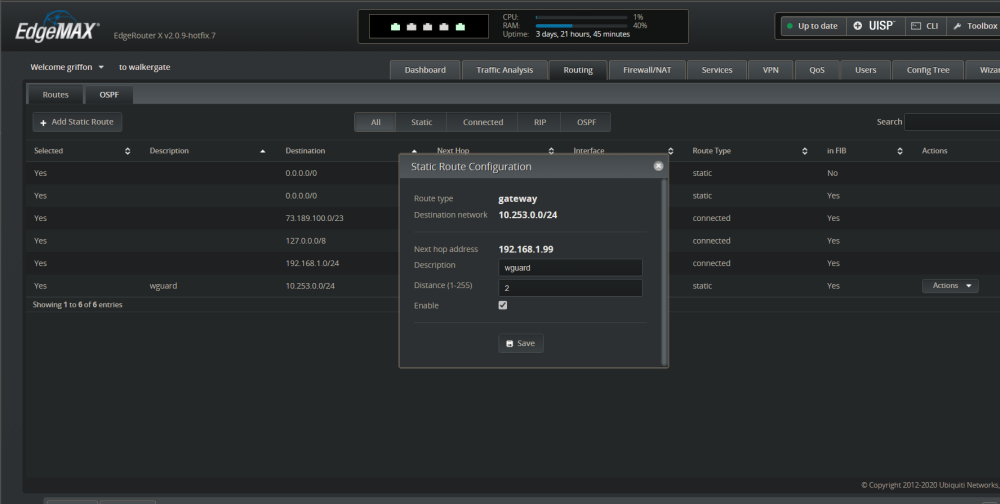
same issue with docker access. screen shot of my router with the static route for wireguard. root@nas-mass:~# ip route default via 192.168.1.1 dev br0 10.253.0.2 dev wg0 scope link 172.17.0.0/16 dev docker0 proto kernel scope link src 172.17.0.1 172.31.200.0/24 dev br-6340e4198bc5 proto kernel scope link src 172.31.200.1 linkdown 192.168.1.0/24 dev br0 proto kernel scope link src 192.168.1.99 metric 1 192.168.122.0/24 dev virbr0 proto kernel scope link src 192.168.122.1 linkdown Not sure what I'm missing. nat disabled in wg config. I tried adding the static route a could other way too with no luck. Docker network is all the 192.168.1.x same as the gateway and other devices getting DHCP from the gateway. Also see the route in the wireguard config. Address=10.253.0.1 ListenPort=51821 PostUp=logger -t wireguard 'Tunnel WireGuard-wg0 started';/usr/local/emhttp/webGui/scripts/update_services PostDown=logger -t wireguard 'Tunnel WireGuard-wg0 stopped';/usr/local/emhttp/webGui/scripts/update_services PostUp=ip -4 route flush table 200 PostUp=ip -4 route add default via 10.253.0.1 dev wg0 table 200 PostUp=ip -4
-
Same issue here, did you find a solution? this is very frustrating.
-
So my wireguard is connecting fine as remote tunneled access. I can reach my unraid box and my gateway and WAN, non docker hosts. However I can't access any of the docker IP's. The whole network is flat 192.168.1.x/24, so my reachable hosts and docker are the same IP range. I see a note Remark: docker containers on custom networks need static routing 10.253.0.0/24 to 192.168.1.99 Not sure what I need to change? I did try adding a custom route on my router, but didn't seem to help. I can I have wireguard just get an IP from the DHCP server instead or set aside a small pool from my existing private space?




