





Bushibot
Members
-
Joined
-
Last visited
Everything posted by Bushibot
-
Is there a better forum area for this? Some specific data I can provide? I tried adding a vlan route for the router but that didn't seem to help. It seems very unraid specific that I can only NOT access the docker app's but can access the rest of the IP range when in on wireguard tunneled.
-
So my wireguard is connecting fine as remote tunneled access. I can reach my unraid box and my gateway and WAN, non docker hosts. However I can't access any of the docker IP's. The whole network is flat 192.168.1.x/24, so my reachable hosts and docker are the same IP range. I see a note Remark: docker containers on custom networks need static routing 10.253.0.0/24 to 192.168.1.99 Not sure what I need to change?
-
Right soooo, turns out a had accidently unplugged the printer from the PC when moving cameras around. No serial in VM solved. So VM looks like it will work though YEEESH, huge resource waste compared to the docker. But zero luck with docker octoprint vidoe. I ran through every possible permutation of device and /dev/video* again just to make sure I hadn't missed some combo. Also tried same with MS life cam. I might try with some other container for vid over usb, I mean somebody has to have this working as general practice, octoprint being a little nich compared to video security etc. Mint VM runniing OCTO_deploy script, webcam up, printer up. This seems be some sort of function braking error from the octoprint docker log: but my dockerfu is not good enough to dig deeper and unraid is just as obtuse to me. MJPG Streamer Version.: 2.0 i: Using V4L2 device.: (null) i: Desired Resolution: 720 x 1280 i: Frames Per Second.: -1 i: Format............: YUYV i: JPEG Quality......: 80 i: TV-Norm...........: DEFAULT i: init_VideoIn failed
-
It’s not clear to me how to add the serial printer port to the VM. The printer doesn’t show up as a USB device, of course. With the doctor, there’s a way to pass the device. I don’t see an option for that in the VM set up except USB or PCI.
-
Yeah doesn’t work. As far as I can tell unraid is not passing a stream through /dev/video*. So their is nothing for the octocontainer to parse.
-
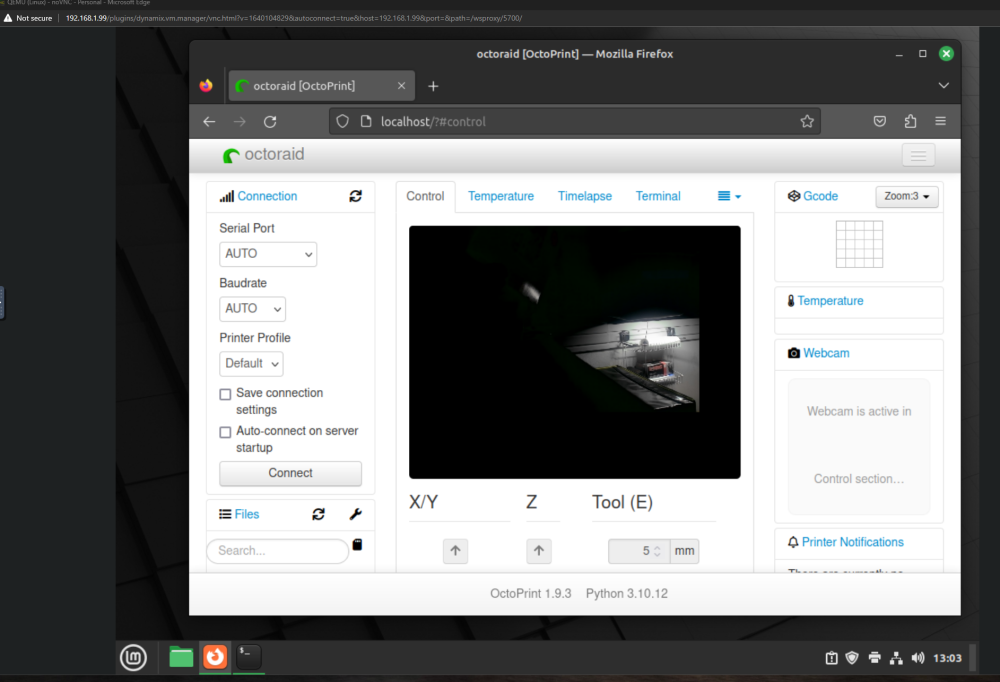
So I instaled mint and then used octo deploy. Now I'm having the reverse issue of getting the printer to show up, but the camera works fine, though a full VM seems over kill. But I think this limted the issue to the docker container or unraid config somewhere. Is there a way to see the camera feed from unraid maybe?
-
I just got mint running last night in van to rest too. it did work when I was running on the pi directly. The log error in the octo container says videoIN fail, I something is not connecting. Feels like a driver issue. I did reboot again. Also testing with a different camera (old ms life cam). I’m gonna try a different route I guess. Thanks for the suggestions, appreciate it.
-
So I'm reading the old dvb method is no longer valid and a custom kernel is needed. This seems kind of nuts though. I'm unclear if this outdated or stil lvalid. I don't see the kernel helper in apps though. google doc
-
I this still valid? A custom kernel is needed to pass video? I'm having this issue with tryign to get octoprint video working.
-
I setup a windows 11 vm and the usb camera worked fine mounted to that. I got a few suggestions over on the octopi forum but most of the nix commands don't work on the console (lsusb etc). Maybe I'll just setupa pi vm LOL.
-
I see this spamming the container logs MJPG Streamer Version.: 2.0 i: Using V4L2 device.: (null) i: Desired Resolution: 720 x 1280 i: Frames Per Second.: -1 i: Format............: YUYV i: JPEG Quality......: 80 i: TV-Norm...........: DEFAULT i: init_VideoIn failed Not sure what to do about it though :(.
-
Yeah pulled the camera off and tested it on a windows box, physically works fine.
-
I do see some errors but it's mostly complaining that it can't get the stream for images, which... yeah. :p. 2023-10-14 11:49:04,577 - octoprint.settings - WARNING - DeprecationWarning: Detected access to deprecated settings path ['webcam', 'snapshot'], returned value is derived from compatibility overlay. Please use the webcam system introduced with 1.9.0, this compatibility layer will be removed in a future release. 2023-10-14 11:49:04,578 - octoprint.settings - WARNING - DeprecationWarning: Detected access to deprecated settings path ['webcam', 'stream'], returned value is derived from compatibility overlay. Please use the webcam system introduced with 1.9.0, this compatibility layer will be removed in a future release. 2023-10-14 11:49:07,606 - octoprint.plugins.octoeverywhere - INFO - Main request http URL threw an exception: HTTPConnectionPool(host='192.168.1.23', port=5003): Max retries exceeded with url: /webcam/?action=stream (Caused by NewConnectionError('<urllib3.connection.HTTPConnection object at 0x14fa0fe8bbe0>: Failed to establish a new connection: [Errno 111] Connection refused')) 2023-10-14 11:49:07,606 - octoprint.plugins.octoeverywhere - ERROR - Main request failed and we have no more fallbacks. We DON'T have a main response. 2023-10-14 11:49:07,606 - octoprint.plugins.octoeverywhere - WARNING - Web Stream http [2] failed to make http request. octoHttpResult was None; url:/webcam/?action=snapshot 2023-10-14 11:49:12,505 - octoprint.plugins.octoeverywhere - INFO - Main request http URL threw an exception: HTTPConnectionPool(host='192.168.1.23', port=5003): Max retries exceeded with url: /webcam/?action=stream (Caused by NewConnectionError('<urllib3.connection.HTTPConnection object at 0x14fa6e9b16f0>: Failed to establish a new connection: [Errno 111] Connection refused')) 2023-10-14 11:49:12,505 - octoprint.plugins.octoeverywhere - ERROR - Main request failed and we have no more fallbacks. We DON'T have a main response. 2023-10-14 11:49:12,505 - octoprint.plugins.octoeverywhere - WARNING - Web Stream http [4] failed to make http request. octoHttpResult was None; url:/webcam/?action=snapshot 2023-10-14 11:49:13,508 - octoprint.server.util.sockjs - INFO - Client connection closed: 192.168.1.202 2023-10-14 11:49:17,503 - octoprint.plugins.octoeverywhere - INFO - We found a webcam classic but it doesn't support snapshots, so we are ignoring it. 2023-10-14 11:49:17,503 - octoprint.settings - WARNING - DeprecationWarning: Detected access to deprecated settings path ['webcam', 'snapshot'], returned value is derived from compatibility overlay. Please use the webcam system introduced with 1.9.0, this compatibility layer will be removed in a future release. 2023-10-14 11:49:17,504 - octoprint.settings - WARNING - DeprecationWarning: Detected access to deprecated settings path ['webcam', 'stream'], returned value is derived from compatibility overlay. Please use the webcam system introduced with 1.9.0, this compatibility layer will be removed in a future release. 2023-10-14 11:49:17,518 - octoprint.plugins.octoeverywhere - INFO - Main request http URL threw an exception: HTTPConnectionPool(host='192.168.1.23', port=5003): Max retries exceeded with url: /webcam/?action=stream (Caused by NewConnectionError('<urllib3.connection.HTTPConnection object at 0x14fa6caf4160>: Failed to establish a new connection: [Errno 111] Connection refused')) 2023-10-14 11:49:17,518 - octoprint.plugins.octoeverywhere - ERROR - Main request failed and we have no more fallbacks. We DON'T have a main response. 2023-10-14 11:49:17,518 - octoprint.plugins.octoeverywhere - WARNING - Web Stream http [5] failed to make http request. octoHttpResult was None; url:/webcam/?action=snapshot 2023-10-14 11:49:22,502 - octoprint.plugins.octoeverywhere - INFO - Main request http URL threw an exception: HTTPConnectionPool(host='192.168.1.23', port=5003): Max retries exceeded with url: /webcam/?action=stream (Caused by NewConnectionError('<urllib3.connection.HTTPConnection object at 0x14fa6e92cb80>: Failed to establish a new connection: [Errno 111] Connection refused')) 2023-10-14 11:49:22,502 - octoprint.plugins.octoeverywhere - ERROR - Main request failed and we have no more fallbacks. We DON'T have a main response. 2023-10-14 11:49:22,502 - octoprint.plugins.octoeverywhere - WARNING - Web Stream http [8] failed to make http request. octoHttpResult was None; url:/webcam/?action=snapshot 2023-10-14 11:49:28,906 - octoprint.server.util.sockjs - INFO - New connection from client: 192.168.1.202 2023-10-14 11:49:28,933 - octoprint.server.util.flask - INFO - Passively logging in user griffon from 192.168.1.202 2023-10-14 11:49:28,934 - octoprint.access.users - INFO - Logged in user: griffon 2023-10-14 11:49:29,005 - octoprint.server.util.sockjs - INFO - User griffon logged in on the socket from client 192.168.1.202 2023-10-14 11:50:08,275 - octoprint.server.util.sockjs - INFO - Client connection closed: 192.168.1.202 2023-10-14 11:50:47,190 - octoprint.plugins.octoeverywhere - INFO - We found a webcam classic but it doesn't support snapshots, so we are ignoring it. 2023-10-14 11:50:47,190 - octoprint.settings - WARNING - DeprecationWarning: Detected access to deprecated settings path ['webcam', 'snapshot'], returned value is derived from compatibility overlay. Please use the webcam system introduced with 1.9.0, this compatibility layer will be removed in a future release. 2023-10-14 11:50:47,190 - octoprint.settings - WARNING - DeprecationWarning: Detected access to deprecated settings path ['webcam', 'stream'], returned value is derived from compatibility overlay. Please use the webcam system introduced with 1.9.0, this compatibility layer will be removed in a future release. 2023-10-14 11:50:50,223 - octoprint.plugins.octoeverywhere - INFO - Main request http URL threw an exception: HTTPConnectionPool(host='192.168.1.23', port=5003): Max retries exceeded with url: /webcam/?action=stream (Caused by NewConnectionError('<urllib3.connection.HTTPConnection object at 0x14fa6ccd4490>: Failed to establish a new connection: [Errno 111] Connection refused')) 2023-10-14 11:50:50,223 - octoprint.plugins.octoeverywhere - ERROR - Main request failed and we have no more fallbacks. We DON'T have a main response. 2023-10-14 11:50:50,223 - octoprint.plugins.octoeverywhere - WARNING - Web Stream http [9] failed to make http request. octoHttpResult was None; url:/webcam/?action=snapshot 2023-10-14 11:50:55,126 - octoprint.plugins.octoeverywhere - INFO - Main request http URL threw an exception: HTTPConnectionPool(host='192.168.1.23', port=5003): Max retries exceeded with url: /webcam/?action=stream (Caused by NewConnectionError('<urllib3.connection.HTTPConnection object at 0x14fa0fe9ceb0>: Failed to establish a new connection: [Errno 111] Connection refused')) 2023-10-14 11:50:55,126 - octoprint.plugins.octoeverywhere - ERROR - Main request failed and we have no more fallbacks. We DON'T have a main response. 2023-10-14 11:50:55,126 - octoprint.plugins.octoeverywhere - WARNING - Web Stream http [11] failed to make http request. octoHttpResult was None; url:/webcam/?action=snapshot 2023-10-14 11:51:00,123 - octoprint.plugins.octoeverywhere - INFO - We found a webcam classic but it doesn't support snapshots, so we are ignoring it. 2023-10-14 11:51:00,123 - octoprint.settings - WARNING - DeprecationWarning: Detected access to deprecated settings path ['webcam', 'snapshot'], returned value is derived from compatibility overlay. Please use the webcam system introduced with 1.9.0, this compatibility layer will be removed in a future release. 2023-10-14 11:51:00,124 - octoprint.settings - WARNING - DeprecationWarning: Detected access to deprecated settings path ['webcam', 'stream'], returned value is derived from compatibility overlay. Please use the webcam system introduced with 1.9.0, this compatibility layer will be removed in a future release. 2023-10-14 11:51:00,138 - octoprint.plugins.octoeverywhere - INFO - Main request http URL threw an exception: HTTPConnectionPool(host='192.168.1.23', port=5003): Max retries exceeded with url: /webcam/?action=stream (Caused by NewConnectionError('<urllib3.connection.HTTPConnection object at 0x14fa0fe890c0>: Failed to establish a new connection: [Errno 111] Connection refused')) 2023-10-14 11:51:00,138 - octoprint.plugins.octoeverywhere - ERROR - Main request failed and we have no more fallbacks. We DON'T have a main response. 2023-10-14 11:51:00,138 - octoprint.plugins.octoeverywhere - WARNING - Web Stream http [12] failed to make http request. octoHttpResult was None; url:/webcam/?action=snapshot 2023-10-14 11:51:05,138 - octoprint.plugins.octoeverywhere - INFO - Main request http URL threw an exception: HTTPConnectionPool(host='192.168.1.23', port=5003): Max retries exceeded with url: /webcam/?action=stream (Caused by NewConnectionError('<urllib3.connection.HTTPConnection object at 0x14fa0fe9d510>: Failed to establish a new connection: [Errno 111] Connection refused')) 2023-10-14 11:51:05,138 - octoprint.plugins.octoeverywhere - ERROR - Main request failed and we have no more fallbacks. We DON'T have a main response. 2023-10-14 11:51:05,138 - octoprint.plugins.octoeverywhere - WARNING - Web Stream http [15] failed to make http request. octoHttpResult was None; url:/webcam/?action=snapshot 2023-10-14 11:51:10,121 - octoprint.plugins.octoeverywhere - INFO - Main request http URL threw an exception: HTTPConnectionPool(host='192.168.1.23', port=5003): Max retries exceeded with url: /webcam/?action=stream (Caused by NewConnectionError('<urllib3.connection.HTTPConnection object at 0x14fa0fe9d690>: Failed to establish a new connection: [Errno 111] Connection refused')) 2023-10-14 11:51:10,121 - octoprint.plugins.octoeverywhere - ERROR - Main request failed and we have no more fallbacks. We DON'T have a main response. 2023-10-14 11:51:10,121 - octoprint.plugins.octoeverywhere - WARNING - Web Stream http [17] failed to make http request. octoHttpResult was None; url:/webcam/?action=snapshot 2023-10-14 11:51:12,119 - octoprint.plugins.octoeverywhere - INFO - We found a webcam classic but it doesn't support snapshots, so we are ignoring it. 2023-10-14 11:51:12,119 - octoprint.settings - WARNING - DeprecationWarning: Detected access to deprecated settings path ['webcam', 'snapshot'], returned value is derived from compatibility overlay. Please use the webcam system introduced with 1.9.0, this compatibility layer will be removed in a future release. 2023-10-14 11:51:12,120 - octoprint.settings - WARNING - DeprecationWarning: Detected access to deprecated settings path ['webcam', 'stream'], returned value is derived from compatibility overlay. Please use the webcam system introduced with 1.9.0, this compatibility layer will be removed in a future release. 2023-10-14 11:51:15,148 - octoprint.plugins.octoeverywhere - INFO - Main request http URL threw an exception: HTTPConnectionPool(host='192.168.1.23', port=5003): Max retries exceeded with url: /webcam/?action=stream (Caused by NewConnectionError('<urllib3.connection.HTTPConnection object at 0x14fa6edd0790>: Failed to establish a new connection: [Errno 111] Connection refused')) 2023-10-14 11:51:15,148 - octoprint.plugins.octoeverywhere - ERROR - Main request failed and we have no more fallbacks. We DON'T have a main response. 2023-10-14 11:51:15,148 - octoprint.plugins.octoeverywhere - WARNING - Web Stream http [19] failed to make http request. octoHttpResult was None; url:/webcam/?action=snapshot 2023-10-14 11:51:20,130 - octoprint.plugins.octoeverywhere - INFO - Main request http URL threw an exception: HTTPConnectionPool(host='192.168.1.23', port=5003): Max retries exceeded with url: /webcam/?action=stream (Caused by NewConnectionError('<urllib3.connection.HTTPConnection object at 0x14fa6d898880>: Failed to establish a new connection: [Errno 111] Connection refused')) 2023-10-14 11:51:20,130 - octoprint.plugins.octoeverywhere - ERROR - Main request failed and we have no more fallbacks. We DON'T have a main response. 2023-10-14 11:51:20,130 - octoprint.plugins.octoeverywhere - WARNING - Web Stream http [21] failed to make http request. octoHttpResult was None; url:/webcam/?action=snapshot 2023-10-14 11:51:23,319 - octoprint.plugins.octoeverywhere - INFO - Slipstream got an index request but there's no OctoPrint session cookie found, so we aren't returning a cached index. 2023-10-14 11:51:25,124 - octoprint.plugins.octoeverywhere - INFO - We found a webcam classic but it doesn't support snapshots, so we are ignoring it. 2023-10-14 11:51:25,124 - octoprint.settings - WARNING - DeprecationWarning: Detected access to deprecated settings path ['webcam', 'snapshot'], returned value is derived from compatibility overlay. Please use the webcam system introduced with 1.9.0, this compatibility layer will be removed in a future release. 2023-10-14 11:51:25,125 - octoprint.settings - WARNING - DeprecationWarning: Detected access to deprecated settings path ['webcam', 'stream'], returned value is derived from compatibility overlay. Please use the webcam system introduced with 1.9.0, this compatibility layer will be removed in a future release. 2023-10-14 11:51:25,140 - octoprint.plugins.octoeverywhere - INFO - Main request http URL threw an exception: HTTPConnectionPool(host='192.168.1.23', port=5003): Max retries exceeded with url: /webcam/?action=stream (Caused by NewConnectionError('<urllib3.connection.HTTPConnection object at 0x14fa6d899360>: Failed to establish a new connection: [Errno 111] Connection refused')) 2023-10-14 11:51:25,140 - octoprint.plugins.octoeverywhere - ERROR - Main request failed and we have no more fallbacks. We DON'T have a main response. 2023-10-14 11:51:25,141 - octoprint.plugins.octoeverywhere - WARNING - Web Stream http [23] failed to make http request. octoHttpResult was None; url:/webcam/?action=snapshot 2023-10-14 11:51:25,158 - octoprint.plugins.octoeverywhere - INFO - Slipstream ignoring refresh request, a refresh is already running. 2023-10-14 11:51:25,158 - octoprint.plugins.octoeverywhere - INFO - Slipstream got an index request but there's no OctoPrint session cookie found, so we aren't returning a cached index. 2023-10-14 11:51:25,599 - octoprint.plugins.octoeverywhere - INFO - We corrected a response location header /login/?redirect=%2F%3F&permissions=STATUS,SETTINGS_READ -> https://vyper.octoeverywhere.com/login/?redirect=%2F%3F&permissions=STATUS,SETTINGS_READ 2023-10-14 11:51:27,920 - octoprint.plugins.octoeverywhere - INFO - We corrected a response location header /login/?redirect=%2F%3F&permissions=STATUS,SETTINGS_READ -> https://vyper.octoeverywhere.com/login/?redirect=%2F%3F&permissions=STATUS,SETTINGS_READ 2023-10-14 11:51:28,174 - octoprint.plugins.octoeverywhere - INFO - Local IP fallback failed and we have no more fallbacks. Returning the main URL response. 2023-10-14 11:51:28,180 - octoprint.plugins.octoeverywhere - INFO - Local IP fallback failed and we have no more fallbacks. Returning the main URL response. 2023-10-14 11:51:28,290 - octoprint.server.util.sockjs - INFO - New connection from client: 127.0.0.1 2023-10-14 11:51:28,297 - octoprint.plugins.octoeverywhere - INFO - Web Stream ws [42] opened, attempt 1 after 0.009490251541137695 seconds 2023-10-14 11:51:30,951 - octoprint.plugins.octoeverywhere - INFO - Main request http URL threw an exception: HTTPConnectionPool(host='192.168.1.23', port=5003): Max retries exceeded with url: /webcam/?action=stream (Caused by NewConnectionError('<urllib3.connection.HTTPConnection object at 0x14fa0fd1d060>: Failed to establish a new connection: [Errno 111] Connection refused')) 2023-10-14 11:51:30,952 - octoprint.plugins.octoeverywhere - ERROR - Main request failed and we have no more fallbacks. We DON'T have a main response. 2023-10-14 11:51:30,952 - octoprint.plugins.octoeverywhere - WARNING - Web Stream http [27] failed to make http request. octoHttpResult was None; url:/webcam/?action=snapshot 2023-10-14 11:51:41,308 - octoprint.access.users - INFO - Logged in user: griffon 2023-10-14 11:51:41,308 - octoprint.server.api - INFO - Actively logging in user griffon from 127.0.0.1 2023-10-14 11:51:41,411 - octoprint.plugins.octoeverywhere - INFO - Web Stream ws [42] websocket closed after 13.123833656311035 seconds 2023-10-14 11:51:41,413 - octoprint.server.util.sockjs - INFO - Client connection closed: 127.0.0.1 2023-10-14 11:51:41,819 - octoprint.server.util.flask - INFO - Passively logging in user griffon from 127.0.0.1 2023-10-14 11:51:41,819 - octoprint.access.users - INFO - Logged in user: griffon 2023-10-14 11:51:41,928 - octoprint.server.util.sockjs - INFO - New connection from client: 127.0.0.1 2023-10-14 11:51:41,935 - octoprint.plugins.octoeverywhere - INFO - Web Stream ws [62] opened, attempt 1 after 0.009620904922485352 seconds 2023-10-14 11:51:41,989 - octoprint.server.util.flask - INFO - Passively logging in user griffon from 127.0.0.1 2023-10-14 11:51:41,989 - octoprint.access.users - INFO - Logged in user: griffon 2023-10-14 11:51:42,693 - octoprint.plugins.octoeverywhere - INFO - Web Stream ws [62] first message sent to local server after 0.7679882049560547 seconds 2023-10-14 11:51:42,787 - octoprint.server.util.sockjs - INFO - User griffon logged in on the socket from client 127.0.0.1 2023-10-14 11:51:44,949 - octoprint.plugins.octoeverywhere - INFO - Value NoAccountConnectedLastInformDateTime has changed so we are updating the value in settings and saving. 2023-10-14 11:51:45,068 - octoprint.plugins.octoeverywhere - INFO - Printer has owner: True 2023-10-14 11:51:45,068 - octoprint.plugins.octoeverywhere - INFO - Value HasConnectedAccounts has changed so we are updating the value in settings and saving. 2023-10-14 11:51:45,758 - octoprint.plugins.tracking - INFO - Sent tracking event webui_load, payload: {'browser_name': 'Edge', 'browser_version': '117.0.2045.60', 'os_name': 'Windows', 'os_version': '10'} 2023-10-14 11:51:47,257 - octoprint.server.util.flask - INFO - Passively logging in user griffon from 127.0.0.1 2023-10-14 11:51:47,257 - octoprint.access.users - INFO - Logged in user: griffon 2023-10-14 11:51:47,705 - octoprint.plugins.octoeverywhere - INFO - Local IP fallback failed and we have no more fallbacks. Returning the main URL response. 2023-10-14 11:51:47,712 - octoprint.plugins.octoeverywhere - INFO - Local IP fallback failed and we have no more fallbacks. Returning the main URL response. 2023-10-14 11:51:47,894 - octoprint.plugins.octoeverywhere - INFO - Slipstream took 4.555729150772095 to fully update the cache 2023-10-14 11:52:01,387 - octoprint.server.util.flask - INFO - Passively logging in user griffon from 127.0.0.1 2023-10-14 11:52:01,387 - octoprint.access.users - INFO - Logged in user: griffon 2023-10-14 11:52:01,680 - octoprint.plugins.octoeverywhere - INFO - Slipstream took 0.3034934997558594 to fully update the cache 2023-10-14 11:52:24,504 - octoprint.plugins.octoeverywhere - INFO - We found a webcam classic but it doesn't support snapshots, so we are ignoring it. 2023-10-14 11:52:24,505 - octoprint.settings - WARNING - DeprecationWarning: Detected access to deprecated settings path ['webcam', 'snapshot'], returned value is derived from compatibility overlay. Please use the webcam system introduced with 1.9.0, this compatibility layer will be removed in a future release. 2023-10-14 11:52:24,505 - octoprint.settings - WARNING - DeprecationWarning: Detected access to deprecated settings path ['webcam', 'stream'], returned value is derived from compatibility overlay. Please use the webcam system introduced with 1.9.0, this compatibility layer will be removed in a future release. 2023-10-14 11:52:27,531 - octoprint.plugins.octoeverywhere - INFO - Main request http URL threw an exception: HTTPConnectionPool(host='192.168.1.23', port=5003): Max retries exceeded with url: /webcam/?action=stream (Caused by NewConnectionError('<urllib3.connection.HTTPConnection object at 0x14fa6edf0dc0>: Failed to establish a new connection: [Errno 111] Connection refused')) 2023-10-14 11:52:27,531 - octoprint.plugins.octoeverywhere - ERROR - Main request failed and we have no more fallbacks. We DON'T have a main response. 2023-10-14 11:52:27,531 - octoprint.plugins.octoeverywhere - WARNING - Web Stream http [102] failed to make http request. octoHttpResult was None; url:/webcam/?action=snapshot 2023-10-14 11:52:32,503 - octoprint.plugins.octoeverywhere - INFO - Main request http URL threw an exception: HTTPConnectionPool(host='192.168.1.23', port=5003): Max retries exceeded with url: /webcam/?action=stream (Caused by NewConnectionError('<urllib3.connection.HTTPConnection object at 0x14fa6edf1f60>: Failed to establish a new connection: [Errno 111] Connection refused')) 2023-10-14 11:52:32,503 - octoprint.plugins.octoeverywhere - ERROR - Main request failed and we have no more fallbacks. We DON'T have a main response. 2023-10-14 11:52:32,504 - octoprint.plugins.octoeverywhere - WARNING - Web Stream http [104] failed to make http request. octoHttpResult was None; url:/webcam/?action=snapshot 2023-10-14 11:52:37,514 - octoprint.plugins.octoeverywhere - INFO - We found a webcam classic but it doesn't support snapshots, so we are ignoring it. 2023-10-14 11:52:37,514 - octoprint.settings - WARNING - DeprecationWarning: Detected access to deprecated settings path ['webcam', 'snapshot'], returned value is derived from compatibility overlay. Please use the webcam system introduced with 1.9.0, this compatibility layer will be removed in a future release. 2023-10-14 11:52:37,514 - octoprint.settings - WARNING - DeprecationWarning: Detected access to deprecated settings path ['webcam', 'stream'], returned value is derived from compatibility overlay. Please use the webcam system introduced with 1.9.0, this compatibility layer will be removed in a future release. 2023-10-14 11:52:37,531 - octoprint.plugins.octoeverywhere - INFO - Main request http URL threw an exception: HTTPConnectionPool(host='192.168.1.23', port=5003): Max retries exceeded with url: /webcam/?action=stream (Caused by NewConnectionError('<urllib3.connection.HTTPConnection object at 0x14fa0fd1de10>: Failed to establish a new connection: [Errno 111] Connection refused')) 2023-10-14 11:52:37,531 - octoprint.plugins.octoeverywhere - ERROR - Main request failed and we have no more fallbacks. We DON'T have a main response. 2023-10-14 11:52:37,531 - octoprint.plugins.octoeverywhere - WARNING - Web Stream http [105] failed to make http request. octoHttpResult was None; url:/webcam/?action=snapshot 2023-10-14 11:52:43,644 - octoprint.plugins.octoeverywhere - INFO - Main request http URL threw an exception: HTTPConnectionPool(host='192.168.1.23', port=5003): Max retries exceeded with url: /webcam/?action=stream (Caused by NewConnectionError('<urllib3.connection.HTTPConnection object at 0x14fa6edf0eb0>: Failed to establish a new connection: [Errno 111] Connection refused')) 2023-10-14 11:52:43,644 - octoprint.plugins.octoeverywhere - ERROR - Main request failed and we have no more fallbacks. We DON'T have a main response. 2023-10-14 11:52:43,644 - octoprint.plugins.octoeverywhere - WARNING - Web Stream http [108] failed to make http request. octoHttpResult was None; url:/webcam/?action=snapshot 2023-10-14 11:52:47,904 - octoprint.plugins.octoeverywhere - INFO - We found a webcam classic but it doesn't support snapshots, so we are ignoring it. 2023-10-14 11:52:47,904 - octoprint.settings - WARNING - DeprecationWarning: Detected access to deprecated settings path ['webcam', 'snapshot'], returned value is derived from compatibility overlay. Please use the webcam system introduced with 1.9.0, this compatibility layer will be removed in a future release. 2023-10-14 11:52:47,904 - octoprint.settings - WARNING - DeprecationWarning: Detected access to deprecated settings path ['webcam', 'stream'], returned value is derived from compatibility overlay. Please use the webcam system introduced with 1.9.0, this compatibility layer will be removed in a future release. 2023-10-14 11:52:47,919 - octoprint.plugins.octoeverywhere - INFO - Main request http URL threw an exception: HTTPConnectionPool(host='192.168.1.23', port=5003): Max retries exceeded with url: /webcam/?action=stream (Caused by NewConnectionError('<urllib3.connection.HTTPConnection object at 0x14fa0ff38040>: Failed to establish a new connection: [Errno 111] Connection refused')) 2023-10-14 11:52:47,920 - octoprint.plugins.octoeverywhere - ERROR - Main request failed and we have no more fallbacks. We DON'T have a main response. 2023-10-14 11:52:47,920 - octoprint.plugins.octoeverywhere - WARNING - Web Stream http [109] failed to make http request. octoHttpResult was None; url:/webcam/?action=snapshot 2023-10-14 11:52:52,502 - octoprint.plugins.octoeverywhere - INFO - Main request http URL threw an exception: HTTPConnectionPool(host='192.168.1.23', port=5003): Max retries exceeded with url: /webcam/?action=stream (Caused by NewConnectionError('<urllib3.connection.HTTPConnection object at 0x14fa6edf0f10>: Failed to establish a new connection: [Errno 111] Connection refused')) 2023-10-14 11:52:52,502 - octoprint.plugins.octoeverywhere - ERROR - Main request failed and we have no more fallbacks. We DON'T have a main response. 2023-10-14 11:52:52,502 - octoprint.plugins.octoeverywhere - WARNING - Web Stream http [111] failed to make http request. octoHttpResult was None; url:/webcam/?action=snapshot 2023-10-14 11:53:00,442 - octoprint.server.util.flask - INFO - Passively logging in user griffon from 192.168.1.112
-
Originally I just tried 640x480 but that wasn’t working either.
-
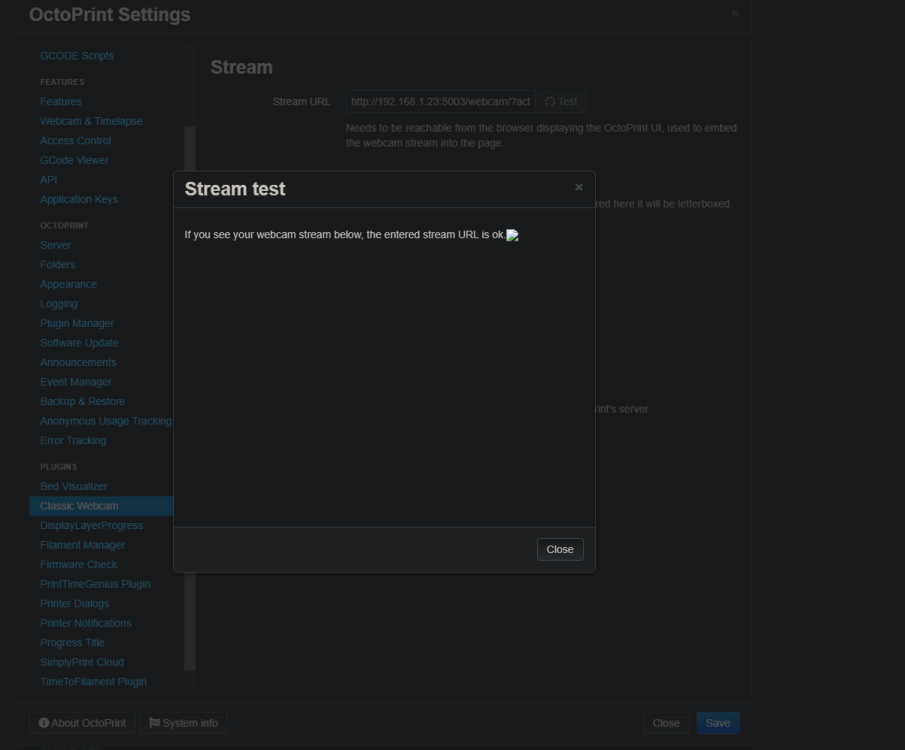
No error, just no image In the logs I see some warnings, i'll grab them on the next reboot, I don't see them now.
-
Just for anyone trying to get simpleprint to work with this octo-image.. from simpleprtint support: In particular the sentry_sdk dependency of sqlalchemy is more than 5 years out of date and can be fixed by upgrading it to the newest 1.x version 1.4.49. pip install sqlalchemy==1.4.49 Running this fixed it simple print hanging on code generation. A shout out to the sinpleprint support team, they were super helpful.
-
I was just poking at this. Could you share a working example? It shows -e host_hostname and set's it unraid. If I set a second variable it doesn't seem to take.
-
--net='br0' --ip='192.168.1.23' http://192.168.1.23:5003/webcam/?action=stream
-
I have tried /dev/video0 and video1. I see both in the the unraid /dev/. I don't have any vm's running. I do have the usb manger installed and it see's the camera and notes it as disconnected.
-
Any pointers? I have read through the previous threads but not having any luck with USB camera. I installed the usb plugin for unraid and I can see the device is connecting fine.
-
I have ongoing NPN issue where it just seems to stop routing traffic to the proxy hosts. Rebooting doesn't correct but if I go into the config of a proxy and turn off force ssl, save and then turn it back on everything starts working normally again. The only change is within NPN... any suggesting on how to troubleshoot? replaced dns address with dnsentry 2023/09/24 12:32:36 [warn] 279#279: *370 an upstream response is buffered to a temporary file /var/cache/nginx/proxy_temp/1/00/0000000001 while reading upstream, client: 192.168.1.1, server: dnsentry, request: "GET /api/v1/movie/569094 HTTP/2.0", upstream: "http://192.168.1.7:5055/api/v1/movie/569094", host: "dnsentry", referrer: "https://dnsentry" 2023/09/24 14:30:20 [warn] 204#204: *23 using uninitialized "server" variable while logging request, client: 167.248.133.127, server: dnsentry, request: "GET / HTTP/1.1", host: "dns:443" 2023/09/29 20:51:07 [warn] 380#380: *1037 an upstream response is buffered to a temporary file /var/cache/nginx/proxy_temp/9/52/0000000529 while reading upstream, client: 192.168.1.1, server: dnsentry, request: "GET /api/v1/movie/569094 HTTP/2.0", upstream: "http://192.168.1.7:5055/api/v1/movie/569094", host: "dnsentry", referrer: "https://dnsentry/" 2023/10/01 15:03:19 [warn] 300#300: *448 an upstream response is buffered to a temporary file /var/cache/nginx/proxy_temp/9/06/0000000069 while reading upstream, client: 54.229.225.204, server: dnsentry, request: "GET /login HTTP/1.0", upstream: "http://192.168.1.7:5055/login", host: "dnsentry" 2023/10/08 05:08:33 [warn] 5857#5857: *27602 using uninitialized "server" variable while logging request, client: 167.94.145.55, server: dnsentry, request: "GET / HTTP/1.1", host: "dnsentry:443" 2023/10/09 04:44:51 [warn] 596#596: *1230 an upstream response is buffered to a temporary file /var/cache/nginx/proxy_temp/0/51/0000000510 while reading upstream, client: 205.210.31.186, server: dnsentry, request: "GET /login HTTP/1.1", upstream: "http://192.168.1.7:5055/login", host: "dnsentry" 2023/10/09 08:24:51 [warn] 776#776: *1275 using uninitialized "server" variable while logging request, client: 162.142.125.221, server: dnsentry, request: "GET / HTTP/1.1", host: "dnsentry:443"
-
I have usb camera hooked up. I was hopping to use it for octoprint container but I'm having trouble getting that to work. Is there is an easy way. plug in or something, just to test the usb camera directly through unraid?
-
thanks that works, and yeah not ideal just need flexibility to access.
-
So I’m not really familiar with novnc, I assumed perhaps incorrectly that I could connect to the krusader instance over vnc from other devices like my phone? Is novnc browser only? I can open the container via a browser but that works poorly on mobile (novnc scale gets all whacked).
-
I got it seeing the printer so half the battle but not having any luck with getting the camera to to show. I installed the dvb drivers. In unraid dev I video0 and video1 (tried both). Only difference I can see I gave the container a local IP. Fumbling at this but can't get a stream. docker run -d --name='OctoPrint-Spants' --net='br0' --ip='192.168.1.23' -e TZ="America/Los_Angeles" -e HOST_OS="Unraid" -e HOST_HOSTNAME="nas-mass" -e HOST_CONTAINERNAME="OctoPrint-Spants" -e 'TCP_PORT_5002'='5002' -e 'ENABLE_MJPG_STREAMER'='true' -e 'CAMERA_DEV'='/dev/video1' -e 'MJPG_STREAMER_INPUT'='-y -n -r 640x480' -e 'TCP_PORT_5003'='5003' -e 'TCP_PORT_5004'='5004' -l net.unraid.docker.managed=dockerman -l net.unraid.docker.webui='http://[IP]:[PORT:5000]' -l net.unraid.docker.icon='https://octoprint.org/assets/img/logo.png' -v '/mnt/user/appdata/octoprint':'/octoprint':'rw' --device='/dev/serial/by-id/usb-1a86_USB_Serial-if00-port0' --device='/dev/serial/by-id/usb-SHENZHEN_Fullhan_webcam_20200506-if04' 'octoprint/octoprint:latest' 09988f88c394df41f0d5d5e1ccea8131a971af215e5edf86d19f3e6359a088f1 Also wondering where to mount my gcode folders. I tired adding a path for /mnt and /media but octo only seems to see the stuff on the card? Still no camera love but I sorted the other item: Add a path to your files in container config, then in docker under files to point the container path you set: Example: Path Name: data files Container Path: /upload Host Path: /mnt/user/userdata/3dprint/ Default Value: Access Mode: Read/Write Description: Path to my gcode Then in octorprint settings/files UI, change the upload path to your container path, in my example /upload I did have to restart the container for this change to take effect, that threw me a bit.

