





Bushibot
Members
-
Joined
-
Last visited
Everything posted by Bushibot
-
FTP to FTP via winscp produces the same problem. So far only thing that has worked is smb to smb copy with a windows system in the middle 🤮
-
I'm seeing a issue that looks like a bug. After I rsync data from my old nas or use Dynamix File Manager the sub folders are not accessible from the share via other computers (windows/ios/mac) all return a error when trying to access ONLY the sub folders. Top level folders/files seem to be fine. Uraid can access the sub folders via file manger (everything looks normal), but containers can't. My old Nas is mounted as SMB via Unassigned Devices. If I remove that mount and copy direct via rsync (rsync -arhz --progress [email protected]:/mnt/HD/HD_a2/Public/sshkeys /mnt/user/datapool/) the same problem persists. Working If I copy the data using a windows PC from one SMB mount to the other then everything works fine, sub folders and files are accessible (I need to move like 7T of data so that doesn't scale but is fine for testing). I'm new to unraid and no rsync export but this seems kind of broken. Noting magic about my setup. Happy to any data. I might try to rsync from the old nad but it's a pretty old busy box os not sure what I can do with it.
-
If I copy manually using windows to middleman, everything works fine. Subfolder is accessible and so is the test file. This seems to be some sort of issue copying the data from unraid, via rysnc or Dynamix File Manager. Both copy tests have the same error. I'm copying from a WD PR2100 NAS (raid 0) to my unraid host. Frustrating. This is a hard stop for migration.
-
Redid without compression -z. No change. Reran tool permissions just to be sure. No change New Permissions Processing: /mnt/user/datapool ... chmod -R u-x,go-rwx,go+u,ugo+X /mnt/user/datapool ... chown -R nobody:users /mnt/user/datapool ... sync Completed, elapsed time: 00:00:00
-
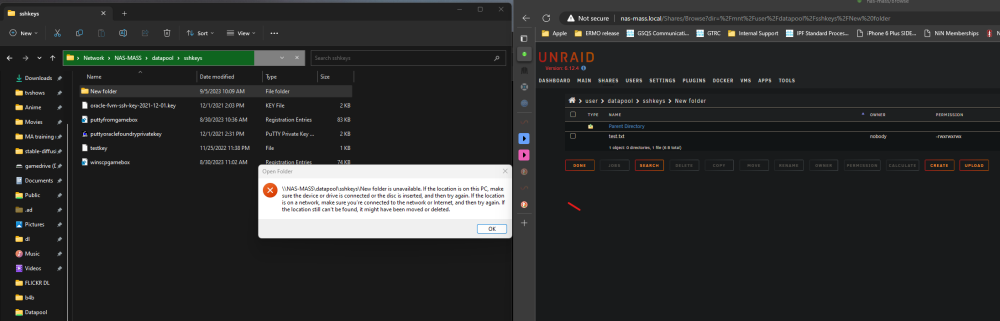
That did not appear to fix it. I did a simple rsync of 1 folder with 1 subfolder. rsync -azh --progress /mnt/remotes/192.168.1.90_Public/sshkeys /mnt/user/datapool/ The top level folder is fine, the lower level folder throws the same exact error when I try to open it. Source data is validated as good and is accessible. Permissions look fine? nobody drwxrwxrwx <FOLDER>
-
I couldn't see a difference but yes I think something was off.
-
Right so I went back through with cut and past to make sure there was not caps or funny business. They are a match now forsure. Course now I have a different error but I consider that progress 🙃 been a loooonnnggg weekend
-
Yup, I did that. both are /mnt/user/appdata/data/download/
-
They are both the same. Sonar and QB. Both binhex. /mnt/user/appdata/data/download/
-
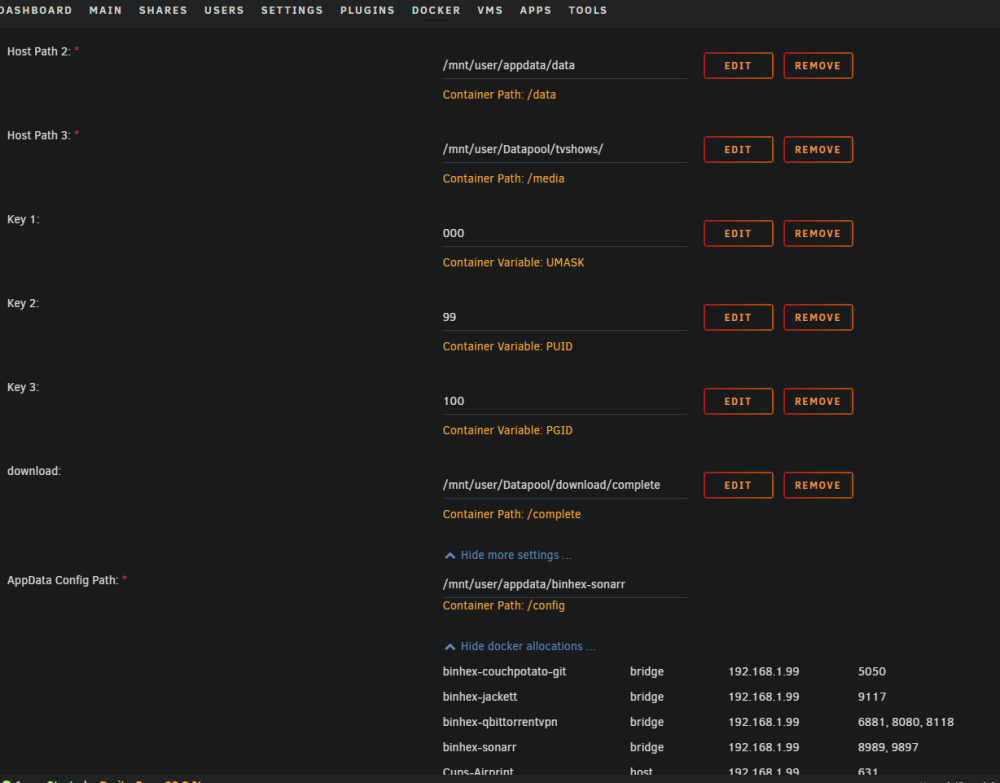
Tried again resetting back the /appdata/data default structures for both sonar and qb. Same error different file attempt. 2023-09-05 00:09:50,843 DEBG 'sonarr' stdout output: [Error] DownloadedEpisodesImportService: Import failed, path does not exist or is not accessible by Sonarr: /download/complete/Futurama.S08E07.Rage.Against.the.Vaccine.1080p.HULU.WEB-DL.DDP5.1.H.264-FLUX[TGx]. Ensure the path exists and the user running Sonarr has the correct permissions to access this file/folder Grrr I don't get it this sure seems like it should be straight forward.
-
Import failed, path does not exist or is not accessible by Sonarr: Except... it dose have access, so I'm not sure what's causing this. This is keeping it from picking the file and managing QB correctly as well (file is not seeding and is in paused state). full error: Import failed, path does not exist or is not accessible by Sonarr: /download/complete/tv-sonarr/American.Dad.S19E10.720p.WEBRip.x264-BAE[eztv.re].mkv. Ensure the path exists and the user running Sonarr has the correct permissions to access this file/folder Share is public no access restriction config paths -- I changed the data path to match the dl path but I thought same error... So data is now /mnt/user/Datapool/download/complete/tv-sonarr/ but same error. I browse to the file fine.
-
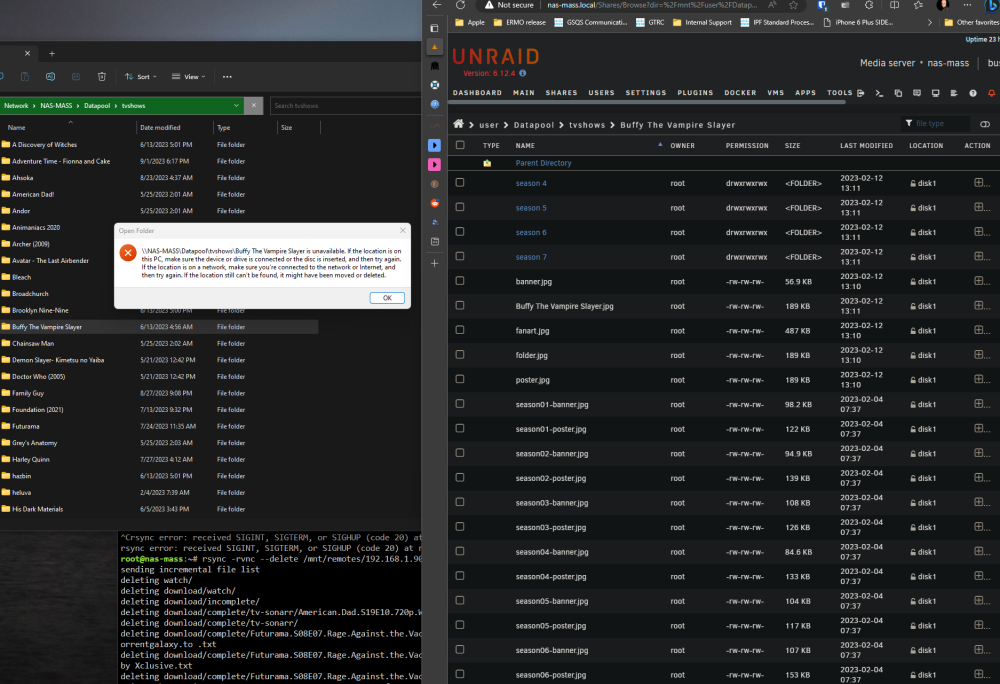
I have bunch of data I copied over from an old nas. Whenever I try open on those folders I get weird windows pop up saying the location in unavailable. I can brows to it fine via the unraid UI with no problem and everything looks intact. Other, non imported files and folders seem fine. Screen shot showing exact message attached. "[Window Title] Open Folder [Content] \\NAS-MASS\Datapool\tvshows\Buffy The Vampire Slayer is unavailable. If the location is on this PC, make sure the device or drive is connected or the disc is inserted, and then try again. If the location is on a network, make sure you’re connected to the network or Internet, and then try again. If the location still can’t be found, it might have been moved or deleted. [OK]"
-
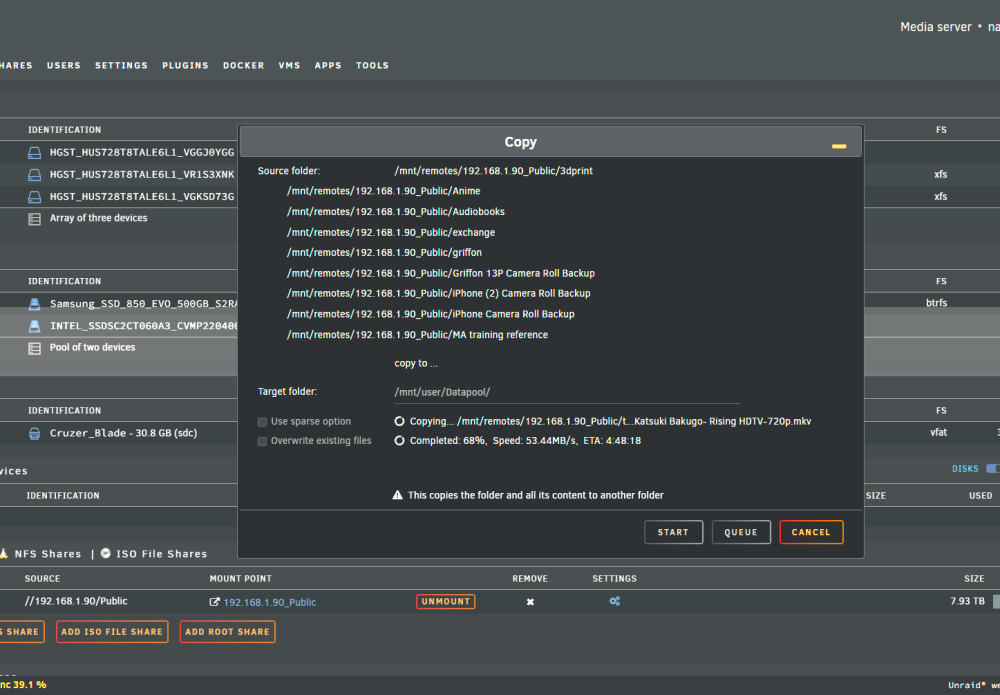
Okay now I'm extra confused the bottom/minimized progress bar had gone away... so it looked daed, but I just clicked into a share to look at a folder setup and re appeared and is still running...
-
I have a big 7T copy running from an smb mount of my old stuff nas to the my new unraid share. I'm notting that other docker contains can't seem to write any data to the unraid share. Is this as intended? Is there a better way to do a large copy like this that won't lock my share for... umm days? It's slowing down my ability to setup torrents and other things that need access to some of the folders (that are not write targets). I have also had this process stop twice unexpectedly, little frustrating. Not sure where to fish for why. I do see some errors: Sep 4 01:21:16 nas-mass kernel: docker0: port 5(vethdb6cece) entered disabled state Sep 4 01:21:16 nas-mass kernel: veth1380de3: renamed from eth0 Sep 4 01:21:17 nas-mass kernel: docker0: port 5(vethdb6cece) entered disabled state Sep 4 01:21:17 nas-mass kernel: device vethdb6cece left promiscuous mode Sep 4 01:21:17 nas-mass kernel: docker0: port 5(vethdb6cece) entered disabled state Sep 4 01:24:09 nas-mass unassigned.devices: Removing configuration '//PLEXSTORE/Public'. Sep 4 01:26:37 nas-mass nginx: 2023/09/04 01:26:37 [error] 7577#7577: *80325 open() "/usr/local/emhttp/images/file-types.png" failed (2: No such file or directory) while sending to client, client: 192.168.1.169, server: , request: "GET /images/file-types.png HTTP/1.1", host: "nas-mass.local", referrer: "http://nas-mass.local/Shares/Browse?dir=/mnt/user/T_Media" Sep 4 01:26:48 nas-mass nginx: 2023/09/04 01:26:48 [error] 7577#7577: *80310 open() "/usr/local/emhttp/images/file-types.png" failed (2: No such file or directory) while sending to client, client: 192.168.1.169, server: , request: "GET /images/file-types.png HTTP/1.1", host: "nas-mass.local", referrer: "http://nas-mass.local/Shares/Browse?dir=/mnt%2Fuser" Sep 4 01:27:05 nas-mass nginx: 2023/09/04 01:27:05 [error] 7577#7577: *80325 open() "/usr/local/emhttp/images/ui-icons_222222_256x240.png" failed (2: No such file or directory) while sending to client, client: 192.168.1.169, server: , request: "GET /images/ui-icons_222222_256x240.png HTTP/1.1", host: "nas-mass.local", referrer: "http://nas-mass.local/Shares/Browse?dir=/mnt%2Fuser" Sep 4 01:27:19 nas-mass nginx: 2023/09/04 01:27:19 [error] 7577#7577: *80325 open() "/usr/local/emhttp/images/file-types.png" failed (2: No such file or directory) while sending to client, client: 192.168.1.169, server: , request: "GET /images/file-types.png HTTP/1.1", host: "nas-mass.local", referrer: "http://nas-mass.local/Shares/Browse?dir=%2Fmnt%2Fuser%2Fappdata" Sep 4 01:27:26 nas-mass nginx: 2023/09/04 01:27:26 [error] 7577#7577: *80325 open() "/usr/local/emhttp/images/file-types.png" failed (2: No such file or directory) while sending to client, client: 192.168.1.169, server: , request: "GET /images/file-types.png HTTP/1.1", host: "nas-mass.local", referrer: "http://nas-mass.local/Shares/Browse?dir=%2Fmnt%2Fuser%2Fappdata%2Fbinhex-qbittorrentvpn" Sep 4 01:27:30 nas-mass nginx: 2023/09/04 01:27:30 [error] 7577#7577: *81249 open() "/usr/local/emhttp/images/file-types.png" failed (2: No such file or directory) while sending to client, client: 192.168.1.169, server: , request: "GET /images/file-types.png HTTP/1.1", host: "nas-mass.local", referrer: "http://nas-mass.local/Shares/Browse?dir=%2Fmnt%2Fuser%2Fappdata%2Fbinhex-qbittorrentvpn%2FqBittorrent" Sep 4 01:27:47 nas-mass nginx: 2023/09/04 01:27:47 [error] 7577#7577: *80324 open() "/usr/local/emhttp/images/file-types.png" failed (2: No such file or directory) while sending to client, client: 192.168.1.169, server: , request: "GET /images/file-types.png HTTP/1.1", host: "nas-mass.local", referrer: "http://nas-mass.local/Shares/Browse?dir=/mnt" Sep 4 01:28:03 nas-mass unassigned.devices: Mounting Remote Share '//192.168.1.90/Public'... Sep 4 01:28:03 nas-mass unassigned.devices: Mount SMB share '//192.168.1.90/Public' using SMB default protocol. Sep 4 01:28:03 nas-mass unassigned.devices: Mount SMB command: /sbin/mount -t 'cifs' -o rw,noserverino,nounix,iocharset=utf8,file_mode=0777,dir_mode=0777,uid=99,gid=100,credentials='/tmp/unassigned.devices/credentials_192.168.1.90_Public' '//192.168.1.90/Public' '/mnt/remotes/192.168.1.90_Public' Sep 4 01:28:04 nas-mass kernel: Key type dns_resolver registered Sep 4 01:28:04 nas-mass kernel: Key type cifs.idmap registered Sep 4 01:28:04 nas-mass kernel: CIFS: No dialect specified on mount. Default has changed to a more secure dialect, SMB2.1 or later (e.g. SMB3.1.1), from CIFS (SMB1). To use the less secure SMB1 dialect to access old servers which do not support SMB3.1.1 (or even SMB3 or SMB2.1) specify vers=1.0 on mount. Sep 4 01:28:04 nas-mass kernel: CIFS: Attempting to mount \\192.168.1.90\Public Sep 4 01:28:04 nas-mass unassigned.devices: Successfully mounted '//192.168.1.90/Public' on '/mnt/remotes/192.168.1.90_Public'. Sep 4 01:28:04 nas-mass unassigned.devices: Device '//192.168.1.90/Public' is not set to be shared. Sep 4 01:28:10 nas-mass nginx: 2023/09/04 01:28:10 [error] 7577#7577: *81906 open() "/usr/local/emhttp/images/file-types.png" failed (2: No such file or directory) while sending to client, client: 192.168.1.169, server: , request: "GET /images/file-types.png HTTP/1.1", host: "nas-mass.local", referrer: "http://nas-mass.local/Main/Browse?dir=/mnt/remotes/192.168.1.90_Public" Sep 4 01:28:17 nas-mass nginx: 2023/09/04 01:28:17 [error] 7577#7577: *81249 open() "/usr/local/emhttp/images/file-types.png" failed (2: No such file or directory) while sending to client, client: 192.168.1.169, server: , request: "GET /images/file-types.png HTTP/1.1", host: "nas-mass.local", referrer: "http://nas-mass.local/Main/Browse?dir=%2Fmnt%2Fremotes%2F192.168.1.90_Public%2F.gallery" Sep 4 01:28:24 nas-mass nginx: 2023/09/04 01:28:24 [error] 7577#7577: *81066 open() "/usr/local/emhttp/images/file-types.png" failed (2: No such file or directory) while sending to client, client: 192.168.1.169, server: , request: "GET /images/file-types.png HTTP/1.1", host: "nas-mass.local", referrer: "http://nas-mass.local/Main/Browse?dir=/mnt%2Fremotes%2F192.168.1.90_Public" Sep 4 01:29:08 nas-mass nginx: 2023/09/04 01:29:08 [error] 7577#7577: *82730 open() "/usr/local/emhttp/images/ui-icons_222222_256x240.png" failed (2: No such file or directory) while sending to client, client: 192.168.1.169, server: , request: "GET /images/ui-icons_222222_256x240.png HTTP/1.1", host: "nas-mass.local", referrer: "http://nas-mass.local/Main/Browse?dir=/mnt%2Fremotes%2F192.168.1.90_Public" Sep 4 01:35:55 nas-mass kernel: docker0: port 4(veth7140fcd) entered disabled state Sep 4 01:35:55 nas-mass kernel: veth6acee59: renamed from eth0 Sep 4 01:35:55 nas-mass kernel: docker0: port 4(veth7140fcd) entered disabled state Sep 4 01:35:55 nas-mass kernel: device veth7140fcd left promiscuous mode Sep 4 01:35:55 nas-mass kernel: docker0: port 4(veth7140fcd) entered disabled state Sep 4 01:35:55 nas-mass kernel: docker0: port 4(veth32c8a55) entered blocking state Sep 4 01:35:55 nas-mass kernel: docker0: port 4(veth32c8a55) entered disabled state Sep 4 01:35:55 nas-mass kernel: device veth32c8a55 entered promiscuous mode Sep 4 01:35:55 nas-mass kernel: docker0: port 4(veth32c8a55) entered blocking state Sep 4 01:35:55 nas-mass kernel: docker0: port 4(veth32c8a55) entered forwarding state Sep 4 01:35:55 nas-mass kernel: eth0: renamed from veth40fef6f Sep 4 01:35:55 nas-mass kernel: IPv6: ADDRCONF(NETDEV_CHANGE): veth32c8a55: link becomes ready Sep 4 02:10:22 nas-mass kernel: hp[29934]: segfault at 28 ip 00001481bdd7bd29 sp 00007ffc8b6ca328 error 4 in ld-musl-x86_64.so.1[1481bdd3d000+48000] likely on CPU 6 (core 2, socket 0) Sep 4 02:10:22 nas-mass kernel: Code: e8 a8 16 00 00 31 c0 5a c3 31 c0 c3 b8 16 00 00 00 c3 b9 0a 00 00 00 31 c0 48 89 fa f3 ab 48 85 f6 74 04 8b 06 89 02 31 c0 c3 <8b> 07 83 e0 0f 74 07 31 f6 e9 15 00 00 00 ba 10 00 00 00 f0 0f b1 Sep 4 02:10:50 nas-mass kernel: hp[30739]: segfault at 28 ip 0000152f7d3a3d29 sp 00007ffecd5d34d8 error 4 in ld-musl-x86_64.so.1[152f7d365000+48000] likely on CPU 3 (core 3, socket 0) Sep 4 02:10:50 nas-mass kernel: Code: e8 a8 16 00 00 31 c0 5a c3 31 c0 c3 b8 16 00 00 00 c3 b9 0a 00 00 00 31 c0 48 89 fa f3 ab 48 85 f6 74 04 8b 06 89 02 31 c0 c3 <8b> 07 83 e0 0f 74 07 31 f6 e9 15 00 00 00 ba 10 00 00 00 f0 0f b1 Sep 4 02:11:43 nas-mass kernel: hp[32230]: segfault at 28 ip 000014b4378b8d29 sp 00007ffdc5707128 error 4 in ld-musl-x86_64.so.1[14b43787a000+48000] likely on CPU 7 (core 3, socket 0) Sep 4 02:11:43 nas-mass kernel: Code: e8 a8 16 00 00 31 c0 5a c3 31 c0 c3 b8 16 00 00 00 c3 b9 0a 00 00 00 31 c0 48 89 fa f3 ab 48 85 f6 74 04 8b 06 89 02 31 c0 c3 <8b> 07 83 e0 0f 74 07 31 f6 e9 15 00 00 00 ba 10 00 00 00 f0 0f b1 Sep 4 02:12:57 nas-mass kernel: docker0: port 5(veth2333498) entered blocking state Sep 4 02:12:57 nas-mass kernel: docker0: port 5(veth2333498) entered disabled state Sep 4 02:12:57 nas-mass kernel: device veth2333498 entered promiscuous mode Sep 4 02:12:57 nas-mass kernel: docker0: port 5(veth2333498) entered blocking state Sep 4 02:12:57 nas-mass kernel: docker0: port 5(veth2333498) entered forwarding state Sep 4 02:12:57 nas-mass kernel: docker0: port 5(veth2333498) entered disabled state Sep 4 02:12:58 nas-mass kernel: eth0: renamed from vethe87c871 Sep 4 02:12:58 nas-mass kernel: IPv6: ADDRCONF(NETDEV_CHANGE): veth2333498: link becomes ready Sep 4 02:12:58 nas-mass kernel: docker0: port 5(veth2333498) entered blocking state Sep 4 02:12:58 nas-mass kernel: docker0: port 5(veth2333498) entered forwarding state Sep 4 02:14:47 nas-mass kernel: docker0: port 5(veth2333498) entered disabled state Sep 4 02:14:47 nas-mass kernel: vethe87c871: renamed from eth0 Sep 4 02:14:47 nas-mass kernel: docker0: port 5(veth2333498) entered disabled state Sep 4 02:14:47 nas-mass kernel: device veth2333498 left promiscuous mode Sep 4 02:14:47 nas-mass kernel: docker0: port 5(veth2333498) entered disabled state Sep 4 02:16:23 nas-mass kernel: hp[7093]: segfault at 28 ip 0000146101f86d29 sp 00007ffc9803fe78 error 4 in ld-musl-x86_64.so.1[146101f48000+48000] likely on CPU 5 (core 1, socket 0) Sep 4 02:16:23 nas-mass kernel: Code: e8 a8 16 00 00 31 c0 5a c3 31 c0 c3 b8 16 00 00 00 c3 b9 0a 00 00 00 31 c0 48 89 fa f3 ab 48 85 f6 74 04 8b 06 89 02 31 c0 c3 <8b> 07 83 e0 0f 74 07 31 f6 e9 15 00 00 00 ba 10 00 00 00 f0 0f b1 Sep 4 02:18:18 nas-mass kernel: hp[10574]: segfault at 28 ip 00001499f8fb5d29 sp 00007fff6fccf188 error 4 in ld-musl-x86_64.so.1[1499f8f77000+48000] likely on CPU 0 (core 0, socket 0) Sep 4 02:18:18 nas-mass kernel: Code: e8 a8 16 00 00 31 c0 5a c3 31 c0 c3 b8 16 00 00 00 c3 b9 0a 00 00 00 31 c0 48 89 fa f3 ab 48 85 f6 74 04 8b 06 89 02 31 c0 c3 <8b> 07 83 e0 0f 74 07 31 f6 e9 15 00 00 00 ba 10 00 00 00 f0 0f b1 Sep 4 02:24:11 nas-mass kernel: hp[20512]: segfault at 28 ip 000014dcad753d29 sp 00007ffd761623e8 error 4 in ld-musl-x86_64.so.1[14dcad715000+48000] likely on CPU 4 (core 0, socket 0) Sep 4 02:24:11 nas-mass kernel: Code: e8 a8 16 00 00 31 c0 5a c3 31 c0 c3 b8 16 00 00 00 c3 b9 0a 00 00 00 31 c0 48 89 fa f3 ab 48 85 f6 74 04 8b 06 89 02 31 c0 c3 <8b> 07 83 e0 0f 74 07 31 f6 e9 15 00 00 00 ba 10 00 00 00 f0 0f b1 Sep 4 02:27:24 nas-mass kernel: hp[26270]: segfault at 28 ip 000014b383af2d29 sp 00007fff54e25e88 error 4 in ld-musl-x86_64.so.1[14b383ab4000+48000] likely on CPU 0 (core 0, socket 0) Sep 4 02:27:24 nas-mass kernel: Code: e8 a8 16 00 00 31 c0 5a c3 31 c0 c3 b8 16 00 00 00 c3 b9 0a 00 00 00 31 c0 48 89 fa f3 ab 48 85 f6 74 04 8b 06 89 02 31 c0 c3 <8b> 07 83 e0 0f 74 07 31 f6 e9 15 00 00 00 ba 10 00 00 00 f0 0f b1 Sep 4 02:41:27 nas-mass kernel: hp[17881]: segfault at 28 ip 000014c9d4c71d29 sp 00007ffcd9917e08 error 4 in ld-musl-x86_64.so.1[14c9d4c33000+48000] likely on CPU 6 (core 2, socket 0) Sep 4 02:41:27 nas-mass kernel: Code: e8 a8 16 00 00 31 c0 5a c3 31 c0 c3 b8 16 00 00 00 c3 b9 0a 00 00 00 31 c0 48 89 fa f3 ab 48 85 f6 74 04 8b 06 89 02 31 c0 c3 <8b> 07 83 e0 0f 74 07 31 f6 e9 15 00 00 00 ba 10 00 00 00 f0 0f b1 Sep 4 02:42:06 nas-mass monitor: Stop running nchan processes Sep 4 02:50:29 nas-mass sshd[21691]: Connection from 192.168.1.189 port 64510 on 192.168.1.99 port 22 rdomain "" Sep 4 02:50:29 nas-mass sshd[21691]: error: kex_exchange_identification: Connection closed by remote host Sep 4 02:50:29 nas-mass sshd[21691]: Connection closed by 192.168.1.189 port 64510 Sep 4 02:50:30 nas-mass sshd[21695]: Connection from 192.168.1.189 port 64513 on 192.168.1.99 port 22 rdomain "" Sep 4 02:50:34 nas-mass sshd[21695]: Connection closed by 192.168.1.189 port 64513 [preauth] Sep 4 02:50:34 nas-mass sshd[21722]: Connection from 192.168.1.189 port 64519 on 192.168.1.99 port 22 rdomain "" Sep 4 02:50:34 nas-mass sshd[21722]: Accepted password for root from 192.168.1.189 port 64519 ssh2 Sep 4 02:50:34 nas-mass sshd[21722]: pam_unix(sshd:session): session opened for user root(uid=0) by (uid=0) Sep 4 02:50:34 nas-mass sshd[21722]: Starting session: shell on pts/0 for root from 192.168.1.189 port 64519 id 0 Sep 4 02:50:38 nas-mass sshd[21761]: Connection from 192.168.1.189 port 64522 on 192.168.1.99 port 22 rdomain "" Sep 4 02:50:38 nas-mass sshd[21761]: error: kex_exchange_identification: Connection closed by remote host Sep 4 02:50:38 nas-mass sshd[21761]: Connection closed by 192.168.1.189 port 64522 Sep 4 02:50:52 nas-mass sshd[21828]: Connection from 192.168.1.189 port 64533 on 192.168.1.99 port 22 rdomain "" Sep 4 02:50:52 nas-mass sshd[21828]: error: kex_exchange_identification: Connection closed by remote host Sep 4 02:50:52 nas-mass sshd[21828]: Connection closed by 192.168.1.189 port 64533 Sep 4 02:51:12 nas-mass sshd[21933]: Connection from 192.168.1.189 port 64544 on 192.168.1.99 port 22 rdomain "" Sep 4 02:51:12 nas-mass sshd[21933]: error: kex_exchange_identification: Connection closed by remote host Sep 4 02:51:12 nas-mass sshd[21933]: Connection closed by 192.168.1.189 port 64544 Sep 4 02:51:32 nas-mass sshd[22018]: Connection from 192.168.1.189 port 64555 on 192.168.1.99 port 22 rdomain "" Sep 4 02:51:32 nas-mass sshd[22018]: error: kex_exchange_identification: Connection closed by remote host Sep 4 02:51:32 nas-mass sshd[22018]: Connection closed by 192.168.1.189 port 64555 Sep 4 02:51:52 nas-mass sshd[22101]: Connection from 192.168.1.189 port 64566 on 192.168.1.99 port 22 rdomain "" Sep 4 02:51:52 nas-mass sshd[22101]: error: kex_exchange_identification: Connection closed by remote host Sep 4 02:51:52 nas-mass sshd[22101]: Connection closed by 192.168.1.189 port 64566 Sep 4 02:57:55 nas-mass sshd[25330]: Connection from 192.168.1.189 port 64578 on 192.168.1.99 port 22 rdomain "" Sep 4 02:57:55 nas-mass sshd[25330]: error: kex_exchange_identification: Connection closed by remote host Sep 4 02:57:55 nas-mass sshd[25330]: Connection closed by 192.168.1.189 port 64578 Sep 4 02:58:02 nas-mass sshd[25470]: Connection from 192.168.1.189 port 64587 on 192.168.1.99 port 22 rdomain "" Sep 4 02:58:02 nas-mass sshd[25470]: error: kex_exchange_identification: Connection closed by remote host Sep 4 02:58:02 nas-mass sshd[25470]: Connection closed by 192.168.1.189 port 64587 Sep 4 02:58:22 nas-mass sshd[25597]: Connection from 192.168.1.189 port 64599 on 192.168.1.99 port 22 rdomain "" Sep 4 02:58:22 nas-mass sshd[25597]: error: kex_exchange_identification: Connection closed by remote host Sep 4 02:58:22 nas-mass sshd[25597]: Connection closed by 192.168.1.189 port 64599 Sep 4 02:58:39 nas-mass monitor: Stop running nchan processes Sep 4 02:58:42 nas-mass sshd[25792]: Connection from 192.168.1.189 port 64610 on 192.168.1.99 port 22 rdomain "" Sep 4 02:58:42 nas-mass sshd[25792]: error: kex_exchange_identification: Connection closed by remote host Sep 4 02:58:42 nas-mass sshd[25792]: Connection closed by 192.168.1.189 port 64610 Sep 4 02:59:02 nas-mass sshd[25901]: Connection from 192.168.1.189 port 64621 on 192.168.1.99 port 22 rdomain "" Sep 4 02:59:02 nas-mass sshd[25901]: error: kex_exchange_identification: Connection closed by remote host Sep 4 02:59:02 nas-mass sshd[25901]: Connection closed by 192.168.1.189 port 64621 Sep 4 02:59:22 nas-mass sshd[25988]: Connection from 192.168.1.189 port 64632 on 192.168.1.99 port 22 rdomain "" Sep 4 02:59:22 nas-mass sshd[25988]: error: kex_exchange_identification: Connection closed by remote host Sep 4 02:59:22 nas-mass sshd[25988]: Connection closed by 192.168.1.189 port 64632 Sep 4 02:59:42 nas-mass sshd[26058]: Connection from 192.168.1.189 port 64643 on 192.168.1.99 port 22 rdomain "" Sep 4 02:59:42 nas-mass sshd[26058]: error: kex_exchange_identification: Connection closed by remote host Sep 4 02:59:42 nas-mass sshd[26058]: Connection closed by 192.168.1.189 port 64643 Sep 4 03:08:37 nas-mass sshd[21722]: Connection closed by 192.168.1.189 port 64519 Sep 4 03:08:37 nas-mass sshd[21722]: Close session: user root from 192.168.1.189 port 64519 id 0 Sep 4 03:08:37 nas-mass sshd[21722]: pam_unix(sshd:session): session closed for user root Sep 4 03:08:37 nas-mass sshd[21722]: pam_elogind(sshd:session): Failed to release session: Interrupted system call Sep 4 03:08:37 nas-mass sshd[21722]: Transferred: sent 9916, received 6260 bytes Sep 4 03:08:37 nas-mass sshd[21722]: Closing connection to 192.168.1.189 port 64519 Sep 4 11:22:43 nas-mass nginx: 2023/09/04 11:22:43 [error] 7577#7577: *251337 open() "/usr/local/emhttp/images/file-types.png" failed (2: No such file or directory) while sending to client, client: 192.168.1.169, server: , request: "GET /images/file-types.png HTTP/1.1", host: "nas-mass.local", referrer: "http://nas-mass.local/Shares/Browse?dir=/mnt/user/Datapool" Sep 4 11:23:05 nas-mass nginx: 2023/09/04 11:23:05 [error] 7577#7577: *251735 open() "/usr/local/emhttp/images/file-types.png" failed (2: No such file or directory) while sending to client, client: 192.168.1.169, server: , request: "GET /images/file-types.png HTTP/1.1", host: "nas-mass.local", referrer: "http://nas-mass.local/Shares/Browse?dir=%2Fmnt%2Fuser%2FDatapool%2FAnime" Sep 4 11:23:12 nas-mass nginx: 2023/09/04 11:23:12 [error] 7577#7577: *251336 open() "/usr/local/emhttp/images/file-types.png" failed (2: No such file or directory) while sending to client, client: 192.168.1.169, server: , request: "GET /images/file-types.png HTTP/1.1", host: "nas-mass.local", referrer: "http://nas-mass.local/Shares/Browse?dir=/mnt/user/Datapool" Sep 4 11:23:18 nas-mass nginx: 2023/09/04 11:23:18 [error] 7577#7577: *251336 open() "/usr/local/emhttp/images/file-types.png" failed (2: No such file or directory) while sending to client, client: 192.168.1.169, server: , request: "GET /images/file-types.png HTTP/1.1", host: "nas-mass.local", referrer: "http://nas-mass.local/Shares/Browse?dir=%2Fmnt%2Fuser%2FDatapool%2Fsshkeys" Sep 4 11:23:20 nas-mass nginx: 2023/09/04 11:23:20 [error] 7577#7577: *251336 open() "/usr/local/emhttp/images/file-types.png" failed (2: No such file or directory) while sending to client, client: 192.168.1.169, server: , request: "GET /images/file-types.png HTTP/1.1", host: "nas-mass.local", referrer: "http://nas-mass.local/Shares/Browse?dir=/mnt/user/Datapool" Sep 4 11:24:25 nas-mass nginx: 2023/09/04 11:24:25 [error] 7577#7577: *253049 open() "/usr/local/emhttp/images/file-types.png" failed (2: No such file or directory) while sending to client, client: 192.168.1.169, server: , request: "GET /images/file-types.png HTTP/1.1", host: "nas-mass.local", referrer: "http://nas-mass.local/Shares/Browse?dir=%2Fmnt%2Fuser%2FDatapool%2FMA%20training%20reference" Sep 4 11:35:25 nas-mass ool www[17084]: /usr/local/emhttp/plugins/dynamix/scripts/rsyslog_config Sep 4 11:35:27 nas-mass rsyslogd: [origin software="rsyslogd" swVersion="8.2102.0" x-pid="17149" x-info="https://www.rsyslog.com"] start Sep 4 11:47:34 nas-mass kernel: docker0: port 4(veth32c8a55) entered disabled state Sep 4 11:47:34 nas-mass kernel: veth40fef6f: renamed from eth0 Sep 4 11:47:34 nas-mass kernel: docker0: port 4(veth32c8a55) entered disabled state Sep 4 11:47:34 nas-mass kernel: device veth32c8a55 left promiscuous mode Sep 4 11:47:34 nas-mass kernel: docker0: port 4(veth32c8a55) entered disabled state Sep 4 11:47:36 nas-mass kernel: docker0: port 4(veth8e4db53) entered blocking state Sep 4 11:47:36 nas-mass kernel: docker0: port 4(veth8e4db53) entered disabled state Sep 4 11:47:36 nas-mass kernel: device veth8e4db53 entered promiscuous mode Sep 4 11:47:37 nas-mass kernel: eth0: renamed from veth8b387b8 Sep 4 11:47:37 nas-mass kernel: IPv6: ADDRCONF(NETDEV_CHANGE): veth8e4db53: link becomes ready Sep 4 11:47:37 nas-mass kernel: docker0: port 4(veth8e4db53) entered blocking state Sep 4 11:47:37 nas-mass kernel: docker0: port 4(veth8e4db53) entered forwarding state Sep 4 11:48:50 nas-mass smbd[9745]: [2023/09/04 11:48:50.044831, 0] ../../source3/smbd/smb2_service.c:772(make_connection_snum) Sep 4 11:48:50 nas-mass smbd[9745]: make_connection_snum: canonicalize_connect_path failed for service download, path /mnt/user/download Sep 4 11:48:50 nas-mass smbd[9745]: [2023/09/04 11:48:50.046206, 0] ../../source3/smbd/smb2_service.c:772(make_connection_snum) Sep 4 11:48:50 nas-mass smbd[9745]: make_connection_snum: canonicalize_connect_path failed for service download, path /mnt/user/download Sep 4 11:48:50 nas-mass smbd[9745]: [2023/09/04 11:48:50.047633, 0] ../../source3/smbd/smb2_service.c:772(make_connection_snum) Sep 4 11:48:50 nas-mass smbd[9745]: make_connection_snum: canonicalize_connect_path failed for service download, path /mnt/user/download Sep 4 11:48:50 nas-mass smbd[9745]: [2023/09/04 11:48:50.049217, 0] ../../source3/smbd/smb2_service.c:772(make_connection_snum) Sep 4 11:48:50 nas-mass smbd[9745]: make_connection_snum: canonicalize_connect_path failed for service download, path /mnt/user/download Sep 4 11:48:50 nas-mass smbd[9745]: [2023/09/04 11:48:50.050438, 0] ../../source3/smbd/smb2_service.c:772(make_connection_snum) Sep 4 11:48:50 nas-mass smbd[9745]: make_connection_snum: canonicalize_connect_path failed for service download, path /mnt/user/download Sep 4 11:48:50 nas-mass smbd[9745]: [2023/09/04 11:48:50.051586, 0] ../../source3/smbd/smb2_service.c:772(make_connection_snum) Sep 4 11:48:50 nas-mass smbd[9745]: make_connection_snum: canonicalize_connect_path failed for service download, path /mnt/user/download Sep 4 11:48:50 nas-mass smbd[9745]: [2023/09/04 11:48:50.052621, 0] ../../source3/smbd/smb2_service.c:772(make_connection_snum) Sep 4 11:48:50 nas-mass smbd[9745]: make_connection_snum: canonicalize_connect_path failed for service download, path /mnt/user/download Sep 4 11:48:50 nas-mass smbd[9745]: [2023/09/04 11:48:50.053609, 0] ../../source3/smbd/smb2_service.c:772(make_connection_snum) Sep 4 11:48:50 nas-mass smbd[9745]: make_connection_snum: canonicalize_connect_path failed for service download, path /mnt/user/download Sep 4 11:48:50 nas-mass smbd[9745]: [2023/09/04 11:48:50.232696, 0] ../../source3/smbd/smb2_service.c:772(make_connection_snum) Sep 4 11:48:50 nas-mass smbd[9745]: make_connection_snum: canonicalize_connect_path failed for service download, path /mnt/user/download Sep 4 11:48:50 nas-mass smbd[9745]: [2023/09/04 11:48:50.234060, 0] ../../source3/smbd/smb2_service.c:772(make_connection_snum) Sep 4 11:48:50 nas-mass smbd[9745]: make_connection_snum: canonicalize_connect_path failed for service download, path /mnt/user/download Sep 4 11:48:50 nas-mass smbd[9745]: [2023/09/04 11:48:50.235245, 0] ../../source3/smbd/smb2_service.c:772(make_connection_snum) Sep 4 11:48:50 nas-mass smbd[9745]: make_connection_snum: canonicalize_connect_path failed for service download, path /mnt/user/download Sep 4 11:48:50 nas-mass smbd[9745]: [2023/09/04 11:48:50.236436, 0] ../../source3/smbd/smb2_service.c:772(make_connection_snum) Sep 4 11:48:50 nas-mass smbd[9745]: make_connection_snum: canonicalize_connect_path failed for service download, path /mnt/user/download Sep 4 11:48:50 nas-mass smbd[9745]: [2023/09/04 11:48:50.237603, 0] ../../source3/smbd/smb2_service.c:772(make_connection_snum) Sep 4 11:48:50 nas-mass smbd[9745]: make_connection_snum: canonicalize_connect_path failed for service download, path /mnt/user/download Sep 4 11:48:50 nas-mass smbd[9745]: [2023/09/04 11:48:50.238596, 0] ../../source3/smbd/smb2_service.c:772(make_connection_snum) Sep 4 11:48:50 nas-mass smbd[9745]: make_connection_snum: canonicalize_connect_path failed for service download, path /mnt/user/download Sep 4 11:48:50 nas-mass smbd[9745]: [2023/09/04 11:48:50.302731, 0] ../../source3/smbd/smb2_service.c:772(make_connection_snum) Sep 4 11:48:50 nas-mass smbd[9745]: make_connection_snum: canonicalize_connect_path failed for service download, path /mnt/user/download Sep 4 11:48:50 nas-mass smbd[9745]: [2023/09/04 11:48:50.303732, 0] ../../source3/smbd/smb2_service.c:772(make_connection_snum) Sep 4 11:48:50 nas-mass smbd[9745]: make_connection_snum: canonicalize_connect_path failed for service download, path /mnt/user/download Sep 4 11:48:50 nas-mass smbd[9745]: [2023/09/04 11:48:50.304675, 0] ../../source3/smbd/smb2_service.c:772(make_connection_snum) Sep 4 11:48:50 nas-mass smbd[9745]: make_connection_snum: canonicalize_connect_path failed for service download, path /mnt/user/download Sep 4 11:48:50 nas-mass smbd[9745]: [2023/09/04 11:48:50.305578, 0] ../../source3/smbd/smb2_service.c:772(make_connection_snum) Sep 4 11:48:50 nas-mass smbd[9745]: make_connection_snum: canonicalize_connect_path failed for service download, path /mnt/user/download Sep 4 11:48:50 nas-mass smbd[9745]: [2023/09/04 11:48:50.306487, 0] ../../source3/smbd/smb2_service.c:772(make_connection_snum) Sep 4 11:48:50 nas-mass smbd[9745]: make_connection_snum: canonicalize_connect_path failed for service download, path /mnt/user/download Sep 4 11:48:50 nas-mass smbd[9745]: [2023/09/04 11:48:50.307372, 0] ../../source3/smbd/smb2_service.c:772(make_connection_snum) Sep 4 11:48:50 nas-mass smbd[9745]: make_connection_snum: canonicalize_connect_path failed for service download, path /mnt/user/download Sep 4 11:48:50 nas-mass smbd[9745]: [2023/09/04 11:48:50.308314, 0] ../../source3/smbd/smb2_service.c:772(make_connection_snum) Sep 4 11:48:50 nas-mass smbd[9745]: make_connection_snum: canonicalize_connect_path failed for service download, path /mnt/user/download Sep 4 11:48:50 nas-mass smbd[9745]: [2023/09/04 11:48:50.309191, 0] ../../source3/smbd/smb2_service.c:772(make_connection_snum) Sep 4 11:48:50 nas-mass smbd[9745]: make_connection_snum: canonicalize_connect_path failed for service download, path /mnt/user/download Sep 4 11:48:50 nas-mass smbd[9745]: [2023/09/04 11:48:50.333881, 0] ../../source3/smbd/smb2_service.c:772(make_connection_snum) Sep 4 11:48:50 nas-mass smbd[9745]: make_connection_snum: canonicalize_connect_path failed for service download, path /mnt/user/download Sep 4 11:48:50 nas-mass smbd[9745]: [2023/09/04 11:48:50.335332, 0] ../../source3/smbd/smb2_service.c:772(make_connection_snum) Sep 4 11:48:50 nas-mass smbd[9745]: make_connection_snum: canonicalize_connect_path failed for service download, path /mnt/user/download Sep 4 11:48:50 nas-mass smbd[9745]: [2023/09/04 11:48:50.336585, 0] ../../source3/smbd/smb2_service.c:772(make_connection_snum) Sep 4 11:48:50 nas-mass smbd[9745]: make_connection_snum: canonicalize_connect_path failed for service download, path /mnt/user/download Sep 4 11:48:50 nas-mass smbd[9745]: [2023/09/04 11:48:50.337819, 0] ../../source3/smbd/smb2_service.c:772(make_connection_snum) Sep 4 11:48:50 nas-mass smbd[9745]: make_connection_snum: canonicalize_connect_path failed for service download, path /mnt/user/download Sep 4 11:48:50 nas-mass smbd[9745]: [2023/09/04 11:48:50.339026, 0] ../../source3/smbd/smb2_service.c:772(make_connection_snum) Sep 4 11:48:50 nas-mass smbd[9745]: make_connection_snum: canonicalize_connect_path failed for service download, path /mnt/user/download Sep 4 11:48:50 nas-mass smbd[9745]: [2023/09/04 11:48:50.340279, 0] ../../source3/smbd/smb2_service.c:772(make_connection_snum) Sep 4 11:48:50 nas-mass smbd[9745]: make_connection_snum: canonicalize_connect_path failed for service download, path /mnt/user/download Sep 4 11:48:50 nas-mass smbd[9745]: [2023/09/04 11:48:50.341898, 0] ../../source3/smbd/smb2_service.c:772(make_connection_snum) Sep 4 11:48:50 nas-mass smbd[9745]: make_connection_snum: canonicalize_connect_path failed for service download, path /mnt/user/download Sep 4 11:48:50 nas-mass smbd[9745]: [2023/09/04 11:48:50.375225, 0] ../../source3/smbd/smb2_service.c:772(make_connection_snum) Sep 4 11:48:50 nas-mass smbd[9745]: make_connection_snum: canonicalize_connect_path failed for service download, path /mnt/user/download Sep 4 11:48:50 nas-mass smbd[9745]: [2023/09/04 11:48:50.376231, 0] ../../source3/smbd/smb2_service.c:772(make_connection_snum) Sep 4 11:48:50 nas-mass smbd[9745]: make_connection_snum: canonicalize_connect_path failed for service download, path /mnt/user/download Sep 4 11:48:50 nas-mass smbd[9745]: [2023/09/04 11:48:50.377275, 0] ../../source3/smbd/smb2_service.c:772(make_connection_snum) Sep 4 11:48:50 nas-mass smbd[9745]: make_connection_snum: canonicalize_connect_path failed for service download, path /mnt/user/download Sep 4 11:48:50 nas-mass smbd[9745]: [2023/09/04 11:48:50.378200, 0] ../../source3/smbd/smb2_service.c:772(make_connection_snum) Sep 4 11:48:50 nas-mass smbd[9745]: make_connection_snum: canonicalize_connect_path failed for service download, path /mnt/user/download Sep 4 11:48:50 nas-mass smbd[9745]: [2023/09/04 11:48:50.404282, 0] ../../source3/smbd/smb2_service.c:772(make_connection_snum) Sep 4 11:48:50 nas-mass smbd[9745]: make_connection_snum: canonicalize_connect_path failed for service download, path /mnt/user/download Sep 4 11:48:50 nas-mass smbd[9745]: [2023/09/04 11:48:50.405382, 0] ../../source3/smbd/smb2_service.c:772(make_connection_snum) Sep 4 11:48:50 nas-mass smbd[9745]: make_connection_snum: canonicalize_connect_path failed for service download, path /mnt/user/download Sep 4 11:48:50 nas-mass smbd[9745]: [2023/09/04 11:48:50.406433, 0] ../../source3/smbd/smb2_service.c:772(make_connection_snum) Sep 4 11:48:50 nas-mass smbd[9745]: make_connection_snum: canonicalize_connect_path failed for service download, path /mnt/user/download Sep 4 11:48:50 nas-mass smbd[9745]: [2023/09/04 11:48:50.407559, 0] ../../source3/smbd/smb2_service.c:772(make_connection_snum) Sep 4 11:48:50 nas-mass smbd[9745]: make_connection_snum: canonicalize_connect_path failed for service download, path /mnt/user/download Sep 4 11:48:50 nas-mass smbd[9745]: [2023/09/04 11:48:50.408552, 0] ../../source3/smbd/smb2_service.c:772(make_connection_snum) Sep 4 11:48:50 nas-mass smbd[9745]: make_connection_snum: canonicalize_connect_path failed for service download, path /mnt/user/download Sep 4 11:48:50 nas-mass smbd[9745]: [2023/09/04 11:48:50.409503, 0] ../../source3/smbd/smb2_service.c:772(make_connection_snum) Sep 4 11:48:50 nas-mass smbd[9745]: make_connection_snum: canonicalize_connect_path failed for service download, path /mnt/user/download Sep 4 11:48:50 nas-mass smbd[9745]: [2023/09/04 11:48:50.410470, 0] ../../source3/smbd/smb2_service.c:772(make_connection_snum) Sep 4 11:48:50 nas-mass smbd[9745]: make_connection_snum: canonicalize_connect_path failed for service download, path /mnt/user/download Sep 4 11:57:06 nas-mass kernel: docker0: port 3(veth1304500) entered disabled state Sep 4 11:57:06 nas-mass kernel: vethc85e8f4: renamed from eth0 Sep 4 11:57:06 nas-mass kernel: docker0: port 3(veth1304500) entered disabled state Sep 4 11:57:06 nas-mass kernel: device veth1304500 left promiscuous mode Sep 4 11:57:06 nas-mass kernel: docker0: port 3(veth1304500) entered disabled state Sep 4 11:57:06 nas-mass kernel: docker0: port 3(veth1637733) entered blocking state Sep 4 11:57:06 nas-mass kernel: docker0: port 3(veth1637733) entered disabled state Sep 4 11:57:06 nas-mass kernel: device veth1637733 entered promiscuous mode Sep 4 11:57:06 nas-mass kernel: docker0: port 3(veth1637733) entered blocking state Sep 4 11:57:06 nas-mass kernel: docker0: port 3(veth1637733) entered forwarding state Sep 4 11:57:07 nas-mass kernel: eth0: renamed from vetheee5eca Sep 4 11:57:07 nas-mass kernel: IPv6: ADDRCONF(NETDEV_CHANGE): veth1637733: link becomes ready Sep 4 11:57:17 nas-mass kernel: docker0: port 3(veth1637733) entered disabled state Sep 4 11:57:17 nas-mass kernel: vetheee5eca: renamed from eth0 Sep 4 11:57:17 nas-mass kernel: docker0: port 3(veth1637733) entered disabled state Sep 4 11:57:17 nas-mass kernel: device veth1637733 left promiscuous mode Sep 4 11:57:17 nas-mass kernel: docker0: port 3(veth1637733) entered disabled state Sep 4 11:57:37 nas-mass kernel: docker0: port 3(veth1842340) entered blocking state Sep 4 11:57:37 nas-mass kernel: docker0: port 3(veth1842340) entered disabled state Sep 4 11:57:37 nas-mass kernel: device veth1842340 entered promiscuous mode Sep 4 11:57:38 nas-mass kernel: eth0: renamed from veth495f9aa Sep 4 11:57:38 nas-mass kernel: IPv6: ADDRCONF(NETDEV_CHANGE): veth1842340: link becomes ready Sep 4 11:57:38 nas-mass kernel: docker0: port 3(veth1842340) entered blocking state Sep 4 11:57:38 nas-mass kernel: docker0: port 3(veth1842340) entered forwarding state Sep 4 11:58:46 nas-mass kernel: docker0: port 3(veth1842340) entered disabled state Sep 4 11:58:46 nas-mass kernel: veth495f9aa: renamed from eth0 Sep 4 11:58:46 nas-mass kernel: docker0: port 3(veth1842340) entered disabled state Sep 4 11:58:46 nas-mass kernel: device veth1842340 left promiscuous mode Sep 4 11:58:46 nas-mass kernel: docker0: port 3(veth1842340) entered disabled state Sep 4 11:59:01 nas-mass kernel: docker0: port 3(vethbec5965) entered blocking state Sep 4 11:59:01 nas-mass kernel: docker0: port 3(vethbec5965) entered disabled state Sep 4 11:59:01 nas-mass kernel: device vethbec5965 entered promiscuous mode Sep 4 11:59:01 nas-mass kernel: docker0: port 3(vethbec5965) entered blocking state Sep 4 11:59:01 nas-mass kernel: docker0: port 3(vethbec5965) entered forwarding state Sep 4 11:59:01 nas-mass kernel: docker0: port 3(vethbec5965) entered disabled state Sep 4 11:59:01 nas-mass kernel: eth0: renamed from veth54082bc Sep 4 11:59:01 nas-mass kernel: IPv6: ADDRCONF(NETDEV_CHANGE): vethbec5965: link becomes ready Sep 4 11:59:01 nas-mass kernel: docker0: port 3(vethbec5965) entered blocking state Sep 4 11:59:01 nas-mass kernel: docker0: port 3(vethbec5965) entered forwarding state Sep 4 12:25:18 nas-mass monitor: Stop running nchan processes Sep 4 14:24:53 nas-mass monitor: Stop running nchan processes nas-mass-syslog-20230904-2355.zip
-
Yes. I did that, paths are sorted. however torrents just sit in deluge moving no traffic. I got QB working, but only with wireguard, it has the save issue with open vpn. but I guess I’m good now, QB is good enough.
-
Setting that up. There wasn’t much in syslog file or the faillog, it was just empty. I saved the syslog but that was post reboot.
-
My hole system (new build) locked up after a couple days. I just had todo a hard reset. what data should I be collecting to determine fault point? I’m pretty new to unraid. This was pretty stable windows gaming box previously so known hardware issues.
-
Trying to setup transmission. I added my PIA info but the web UI doesnt seem to start. Other then he IPV6 errors (only running v4 locally) I'm not seeing anything else in the log. Help?! :). I didn't make any setup changes other then adding credentials (which work). text error warn system array login 2023-09-03 20:31:13 VERIFY EKU OK 2023-09-03 20:31:13 VERIFY OK: depth=0, C=US, ST=CA, L=LosAngeles, O=Private Internet Access, OU=Private Internet Access, CN=zurich405, name=zurich405 2023-09-03 20:31:14 Control Channel: TLSv1.3, cipher TLSv1.3 TLS_AES_256_GCM_SHA384, peer certificate: 2048 bit RSA, signature: RSA-SHA512 2023-09-03 20:31:14 [zurich405] Peer Connection Initiated with [AF_INET]212.102.36.20:502 2023-09-03 20:31:14 PUSH: Received control message: 'PUSH_REPLY,comp-lzo no,redirect-gateway def1,route-ipv6 2000::/3,dhcp-option DNS 10.0.0.243,route-gateway 10.19.111.1,topology subnet,ping 10,ping-restart 60,ifconfig 10.19.111.22 255.255.255.0,peer-id 0,cipher AES-128-GCM' 2023-09-03 20:31:14 OPTIONS IMPORT: timers and/or timeouts modified 2023-09-03 20:31:14 OPTIONS IMPORT: compression parms modified 2023-09-03 20:31:14 OPTIONS IMPORT: --ifconfig/up options modified 2023-09-03 20:31:14 OPTIONS IMPORT: route options modified 2023-09-03 20:31:14 OPTIONS IMPORT: route-related options modified 2023-09-03 20:31:14 OPTIONS IMPORT: --ip-win32 and/or --dhcp-option options modified 2023-09-03 20:31:14 OPTIONS IMPORT: peer-id set 2023-09-03 20:31:14 OPTIONS IMPORT: adjusting link_mtu to 1627 2023-09-03 20:31:14 OPTIONS IMPORT: data channel crypto options modified 2023-09-03 20:31:14 Data Channel: using negotiated cipher 'AES-128-GCM' 2023-09-03 20:31:14 Outgoing Data Channel: Cipher 'AES-128-GCM' initialized with 128 bit key 2023-09-03 20:31:14 Incoming Data Channel: Cipher 'AES-128-GCM' initialized with 128 bit key 2023-09-03 20:31:14 net_route_v4_best_gw query: dst 0.0.0.0 2023-09-03 20:31:14 net_route_v4_best_gw result: via 172.17.0.1 dev eth0 2023-09-03 20:31:14 ROUTE_GATEWAY 172.17.0.1/255.255.0.0 IFACE=eth0 HWADDR=02:42:ac:11:00:02 2023-09-03 20:31:14 GDG6: remote_host_ipv6=n/a 2023-09-03 20:31:14 net_route_v6_best_gw query: dst :: 2023-09-03 20:31:14 sitnl_send: rtnl: generic error (-101): Network is unreachable 2023-09-03 20:31:14 ROUTE6: default_gateway=UNDEF 2023-09-03 20:31:14 TUN/TAP device tun0 opened 2023-09-03 20:31:14 net_iface_mtu_set: mtu 1500 for tun0 2023-09-03 20:31:14 net_iface_up: set tun0 up 2023-09-03 20:31:14 net_addr_v4_add: 10.19.111.22/24 dev tun0 2023-09-03 20:31:14 net_route_v4_add: 212.102.36.20/32 via 172.17.0.1 dev [NULL] table 0 metric -1 2023-09-03 20:31:14 net_route_v4_add: 0.0.0.0/1 via 10.19.111.1 dev [NULL] table 0 metric -1 2023-09-03 20:31:14 net_route_v4_add: 128.0.0.0/1 via 10.19.111.1 dev [NULL] table 0 metric -1 2023-09-03 20:31:14 WARNING: OpenVPN was configured to add an IPv6 route. However, no IPv6 has been configured for tun0, therefore the route installation may fail or may not work as expected. 2023-09-03 20:31:14 add_route_ipv6(2000::/3 -> :: metric -1) dev tun0 2023-09-03 20:31:14 net_route_v6_add: 2000::/3 via :: dev tun0 table 0 metric -1 2023-09-03 20:31:14 sitnl_send: rtnl: generic error (-13): Permission denied 2023-09-03 20:31:14 ERROR: Linux IPv6 route can't be added Up script executed with device=tun0 ifconfig_local=10.19.111.22 Updating TRANSMISSION_BIND_ADDRESS_IPV4 to the ip of tun0 : 10.19.111.22 Using Transmission Web Control UI, overriding TRANSMISSION_WEB_HOME Enforcing ownership on transmission directories Applying permissions to transmission directories ------------------------------------- Transmission will run as ------------------------------------- User name: abc User uid: 99 User gid: 100 ------------------------------------- Updating Transmission settings.json with values from env variables Attempting to use existing settings.json for Transmission Could not read existing settings.json. Generating settings.json for Transmission from environment and defaults /etc/transmission/default-settings.json Overriding bind-address-ipv4 because TRANSMISSION_BIND_ADDRESS_IPV4 is set to 10.19.111.22 Overriding cache-size-mb because TRANSMISSION_CACHE_SIZE_MB is set to 10 Overriding download-dir because TRANSMISSION_DOWNLOAD_DIR is set to /downloads Overriding download-queue-size because TRANSMISSION_DOWNLOAD_QUEUE_SIZE is set to 15 Overriding incomplete-dir because TRANSMISSION_INCOMPLETE_DIR is set to /downloads/incomplete Overriding ratio-limit-enabled because TRANSMISSION_RATIO_LIMIT_ENABLED is set to true Overriding rpc-authentication-required because TRANSMISSION_RPC_AUTHENTICATION_REQUIRED is set to true Overriding rpc-password because TRANSMISSION_RPC_PASSWORD is set to [REDACTED] Overriding rpc-port because TRANSMISSION_RPC_PORT is set to 9091 Overriding rpc-username because TRANSMISSION_RPC_USERNAME is set to TRANS_USER Overriding watch-dir because TRANSMISSION_WATCH_DIR is set to /data/watch sed'ing True to true STARTING TRANSMISSION Provider PIA has a script for automatic port forwarding. Will run it now. If you want to disable this, set environment variable DISABLE_PORT_UPDATER=true Transmission startup script complete. 2023-09-03 20:31:14 WARNING: this configuration may cache passwords in memory -- use the auth-nocache option to prevent this 2023-09-03 20:31:14 Initialization Sequence Completed Running functions for token based port fowarding Reserved Port: 40516 Sun Sep 3 20:31:23 PDT 2023 transmission auth required waiting for transmission to become responsive transmission became responsive ID Done Have ETA Up Down Ratio Status Name Sum: None 0.0 0.0 setting transmission port to 40516 localhost:9091/transmission/rpc/ responded: success Checking port... Port is open: Yes ####################### SUCCESS ####################### Port: 40516 Expiration Sun Nov 5 07:31:22 PST 2023 ####################### Entering infinite while loop Every 15 minutes, check port status
-
Wow that is kind of confusing but a little more digging on my end suggests this is actually PIA vpn issue. Maybe port forward? The Logs show a couple warnings about can't detect external IP but eventual it says the VPN is up and starts the UI. However from the CLI I can't ping DNS sh-5.1# ping www.google.com PING www.google.com (0.0.0.1) 56(84) bytes of data. ^C --- www.google.com ping statistics --- 19 packets transmitted, 0 received, 100% packet loss, time 18450ms but I can external and internal IP's. sh-5.1# ping 192.168.1.1 PING 192.168.1.1 (192.168.1.1) 56(84) bytes of data. 64 bytes from 192.168.1.1: icmp_seq=1 ttl=63 time=0.443 ms 64 bytes from 192.168.1.1: icmp_seq=2 ttl=63 time=0.437 ms 64 bytes from 192.168.1.1: icmp_seq=3 ttl=63 time=0.507 ms ^C --- 192.168.1.1 ping statistics --- 3 packets transmitted, 3 received, 0% packet loss, time 2055ms rtt min/avg/max/mdev = 0.437/0.462/0.507/0.031 ms sh-5.1# sh-5.1# sh-5.1# ping 142.250.189.196 PING 142.250.189.196 (142.250.189.196) 56(84) bytes of data. 64 bytes from 142.250.189.196: icmp_seq=1 ttl=54 time=354 ms 64 bytes from 142.250.189.196: icmp_seq=2 ttl=54 time=353 ms ^C --- 142.250.189.196 ping statistics --- 2 packets transmitted, 2 received, 0% packet loss, time 1000ms rtt min/avg/max/mdev = 353.295/353.680/354.066/0.385 ms sh-5.1# So it looks like DNS is broken but only this one container, all the containers work fine. Argh!
-
I reset and tried again with a new share 'download'. I set the deluge Container Path: /data/mnt/users/downlaod but I get the same no such path complaint from autoadd module for setting a watch folder, not such path... and torrents do not seem to be creating data in download complete/incomplete folders as set in deluge config. Mmm test torrent is not writing data to the directories.
-
I have what I hope is a simple issue. I want to set the complete/incomplete and watch folder to something other than the default path /mnt/user/appdata/data. I have different share to use like /mnt/user/datapool/watch etc but deluge keeps telling the path doesn't exist (or any variation). Not sure what I'm missing or need to tweak for deluge to see the other share Outsite appdata? Otherwise working great! Thanks
-
Yeah I would just be copying it over what effectively is the default share. I'll check out those plugin's. Would I mount with the unassigned device plugin and then use rsync? Thanks for the tips!
-
Is there a way to copy the SMB share from my old active NAS over to my unraid nas without using a computer to man in the middle it? or even FTP? It's about 7T worth of data on the old box. New unraid so not sure the best way or plugin or whatever to handle this sort of task. Thanks!
-
Oh I see I didn’t realize that applied to both data disks. So really I would need another 8 to support the two 4T’s? Or something similar
-
I have a new unraid setup 6.12.3. 3x8T disks and a 850G ssd for caching pool. I assume two data, one for parity? I have to other 4T drives, I wanted to add them too, would I want to make one a second parity drive and one data?


