





MikeDelta
Members
-
Joined
-
Last visited
-
After update the plugin to 2024.09.03 it´s worked via QR-Code - thanks a lot!
-
Same problem here... can´t connect via QR-Code or manual to my server which is connecting via http in my local network...
-
+1 - that would be great!
-
Zuerst einmal vielen Dank für die reichliche und ausführliche Unterstützung! Es waren wohl die von euch aufgeführten Punkte - Eine Kopie der Bilder im Metadaten-Ordner des Servers zwischenzuspeichern. (war deaktiviert, hab ich aktiviert) - nfo Files aktiviert in emby (nfo read & write war aktiviert & habe ich beides deaktiviert) Jetzt geht nur noch eine HDD aus dem Standby wenn ich explizit in den Serien in einer Staffel auf die Beschreibung einer einzelnen Episode gehe, ansonsten kann ich durch alle Bibliotheken browsen ohne dass etwas passiert... perfekt! Damit ist das aktuell größte Problem aus dem Weg geschafft und ich kann mich an den "Umzug" meiner Musikbibliothek machen - da ich in Plex vieles in den Metadaten & Bildern manuell anpassen und zusammensuchen musste bis die Bibliothek soweit fertig war wird das noch eine abendfüllende Aufgabe... Eine abschliessende Frage in die Runde... welchen Client für Apple Geräte (Apple TV & iPads) würdet ihr eher empfehlen - den nativen Emby Client oder Infuse Pro (hab ich gekauft)? Bei Infuse ist die fehlende Multiuser Funktionalität ziemlich suboptimal...
-
Moin! Ich nutze aktuell noch Plex als Docker Container aber möchte auf Emby umsteigen und habe mir deshalb das offizielle Emby Docker heruntergeladen und installiert. Meine Medien liegen alle auf HDDs, alle Docker Container auf SSDs. Emby hat auf die Medienordner nur lesenden Zugriff, alle Metadaten & Logs werden innerhalb des Dockerverzeichnisses gespeichert, es sind so gut wie alle geplanten Aufgaben deaktiviert & ebenfalls die Echtzeitüberwachung der Bibliotheken - trotzdem werden immer eine oder mehrere Festplatten aus dem Ruhezustand aufgeweckt sobald ich die Startseite mit der Medienansicht aufrufe - das kenne ich von Plex so überhaupt nicht, da wurde erst eine Festplatte aufgeweckt wenn ich die Bibliothek durchsucht oder eine Wiedergabe gestartet habe! Ich habe schon Google bemüht aber was ich dazu gefunden habe hilft mir nicht wirklich weiter bzw. habe ich schon umgesetzt (DLNA & Portmapper Plugin sind deinstalliert) und mir gehen jetzt die Ideen aus - so ist Emby für mich nicht zu gebrauchen und ich frage mal in die Runde ob hier wer noch einen Tipp hat woran das liegen kann bzw. wie ich dieses gefixt bekomme...
-
I have now found the solution myself - Credential Guard must be switched off via the registry, even if the protection is not active! The Windows VM can then be added to Entra ID and Intune without any problems! More details here: 2 Effective Ways to Disable Credential Guard Windows 10/11
-
Nobody with an idea?
-
Hello! I have set up a Windows 11 VM to test something with my Azure AD account. As long as I log in with a local account everything works, but as soon as I use my Azure AD account to log in or alternatively join the system in Azure AD, the system goes into an automatic repair loop at the next boot or restart and the C: drive on which Windows is installed is no longer found. I have already reinstalled the VM several times because I suspected an error with me or in the configuration until I came across a thread on reddit where another user had exactly the same problem. He then found a cause and a solution himself: "After spending most of the day I have found that I needed to disable "Credential Guard" and possible also Application Guard in Windows. Seems like the current implementation of Hyper-V in the virtualization engine does not play along with these virtualization based security measures." Unfortunately, this does not work for me - Credential Guard is not active for me and deactivating Application Guard does not bring any improvement - even switching off Hyper-V in the configuration of the VM has no effect. Has anyone here had the same problem or any idea how I can solve it? I would be grateful for any tips! Here's the reddit thread about it (I've already asked for help there too): Win11 VM, Azure AD account and i7-12700
-
A few seconds before I ran diagnostics - the problem has not occurred for a good 30 minutes now...if there is nothing helpful in the diagnostic I would suggest I wait and see if the problem occurs again and if so I reboot and if that doesn't help I run diagnostic again and post it here! If it doesn't occur again by tomorrow I'll close the case! Thanks for the support!
-
Hello! For several hours I have had the problem that the WebUI can no longer up every few minutes and always for a few seconds or minutes... everything else (SSH, Docker, VMs, shares) works! I didn't find anything helpful in the nginx error log, not even in the Unraid error log. I found a thread about the problem from last year where it was recommended to disable ipv6, which is not active in my case. I have run diagnostics and attached them here - maybe someone has an idea where the problem lies ? skynet-diagnostics-20240306-1830.zip
-
Ich nutze das VM Backup aus den Community Apps - habe mehrere Windows & Linux VMs und sichere die alle zwei Tage auf eine Remote Freigabe!
-
Hi! Yes, of course I use a password, I just deleted it from the screen after the error... But I was just able to solve it by entering the hostname of the Unraid system in my DNS server (Adguard Home) in addition to the FQDN and after a few minutes I manually re-entered the server and now it works immediately via both the IP address and the hostname. Also the control options are back for Docker and VM. It still doesn't work via Discover and QR code, but that's not important for me as long as it can be done manually. Is it possible that the integration only works if the app can resolve the name of the Unraid server in the LAN that is entered under Identification - Server Name? In any case, many thanks for your support and the great app!
-
Thanks for the answer... the names of the containers and VMs have always been this long and until the update there were no problems - with the VMs they are also quite short... but I would test this with the containers, only I have to get the server back into the app at all...
-
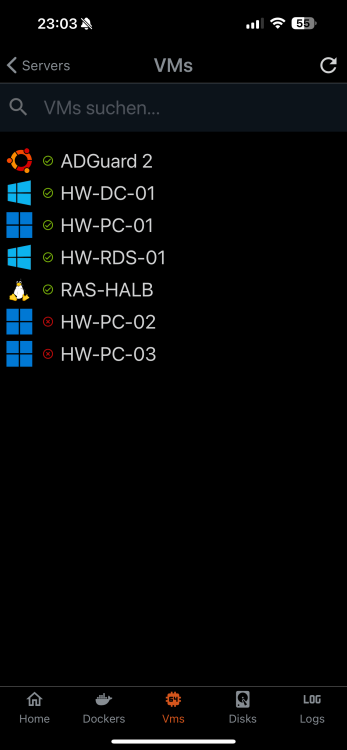
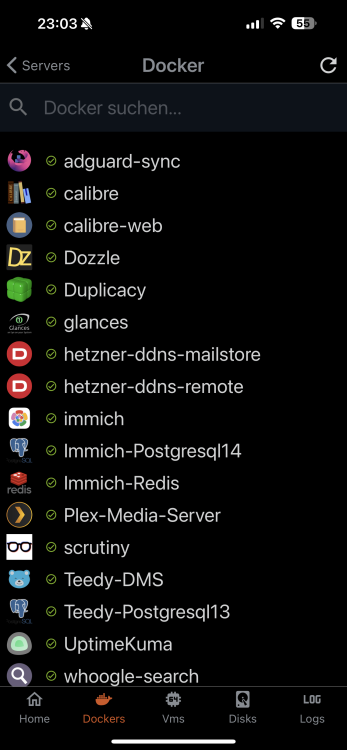
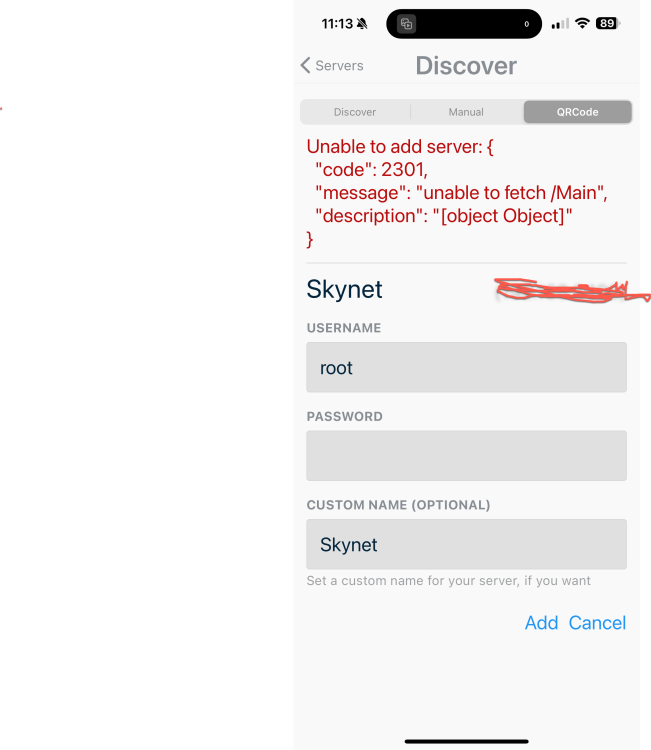
Hello! I use the app on my iPhone and everything worked fine until the last update. Since the update, however, I don't have any control options for Docker and VM, only the status is displayed. I then removed my Unraid system from the app and reintegrated it, error still occurs (see screenshots). I then removed and reinstalled both the app on the iPhone and the plugin in Unraid and now I can no longer add Unraid in the app... Discover: Server is found but after entering the login data only the spinning top turns. Manual: exactly the same. QRCode: I get the error 2301 (see screenshot) I'm at a bit of a loss as to what else I can do and would be grateful for any help - I use the app a lot and think it's pretty great!
-
Vielen Dank nochmal, mit dem Splitter funktioniert das 1a!




