BigDaddyDingDong
Members
-
Joined
-
Last visited
Everything posted by BigDaddyDingDong
-
I swapped my RX 7800 XT for a GTX 4070 S several weeks ago due to the VM issues I was having. Now that all that is fixed with the Nvidia card I am now having issues with my system crashing whenever the GPU is under load. I first thought it was the GPU so I sent the PNY card back and got an Asus and low and behold I have the same issue. If I'm running Unmanic docker (Tdarr alternative) or gaming in the VM (never at the same time) the system will last for a few minutes then just suddenly crash and reboot. If I play low end graphic games or run very few transcodes in Unmanic then the system runs fine. It's once I put a heavy load on the system that it crashes. My head instantly goes to the PSU since the new 4070 S has a PCIe 5.0 power connector I'm thinking power spikes are killing my system. Anyway to confirm this? It's not high temps as I've validated that. I attached my hardware components in the pdf. TheMonster.pdf
-
That's interesting because I have 4 sticks of 64G of ram. I see where is says ****M/64G which is weird because I have 128G of ram total. TheMonster.pdf
-
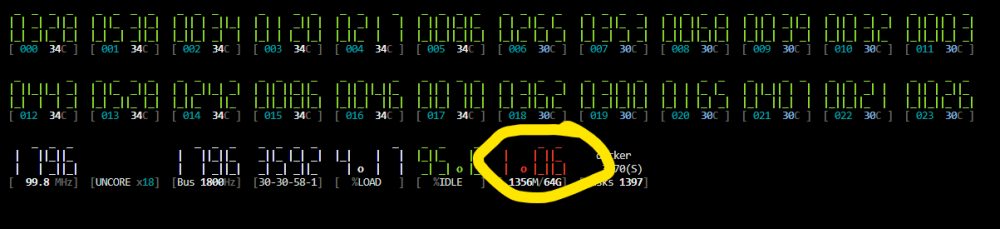
I installed CoreFreq because I'm see erratic swings in my CPU temps. I have a Vetroo V240 water cooling system which seems to be doing it's job, but I had my tower in a corner under a coffee table and when putting somewhat of a load on the CPU my server would crash. I rarely push my CPU past 50% with gaming and decoding video (H265 conversion). Do I have a shitty watercooling system for the X3D CPU or is there fan control settings in Unraid I'm unaware of? Also what does the red number circled in yellow represent?
-
You know! You're absolutely right! My AVG antivirus is probably doing this. This is absolutely annoying!
-
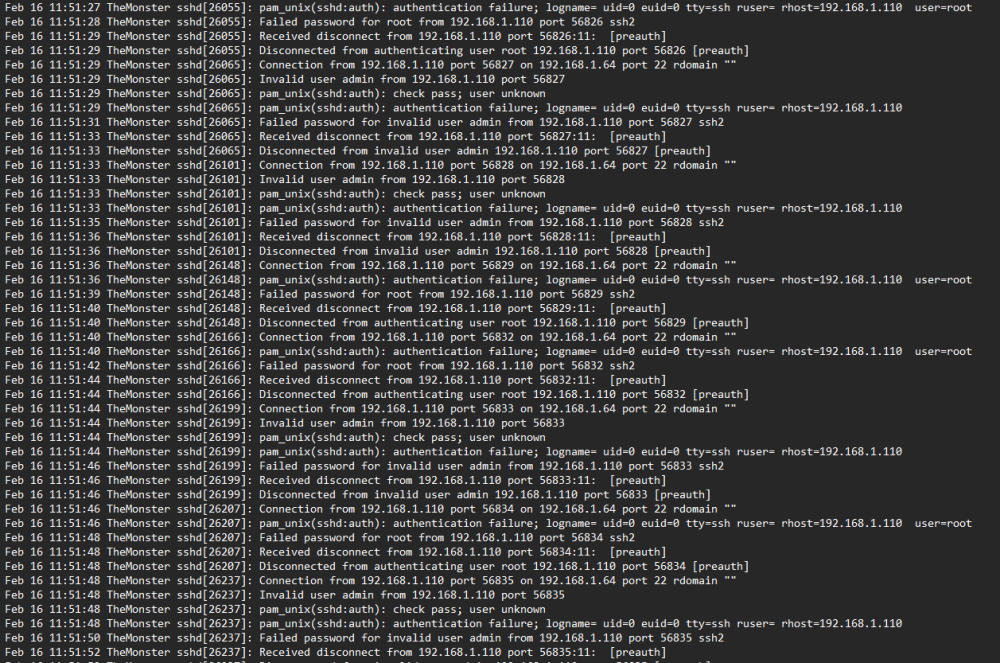
I just looked up the syslog and it appears my main home PC is causing the "hack attempt" warnings. Not 100% sure why it's doing this though. I mapped one of the raid shares to this PC so I can access movies and what not if need be. How do I fix this?
-
Possible Hack Attempt - "On Feb 16 there were 69 invalid login attempts. This could either be yourself attempting to login to your server (SSH / Telnet) with the wrong user or password, or you could be actively be the victim of hack attacks. A common cause of this would be placing your server within your routers DMZ, or improperly forwarding ports." I've gone through my port forwarding in my router and disabled everything except Plex and Jellyfin several weeks ago and this is become a daily occurrence. I've validated the IP address to my Unraid server is unable to be accessed outside of my network. I do use OpenVPN to remote in to my network outside of the home. themonster-diagnostics-20240216-1624.zip
-
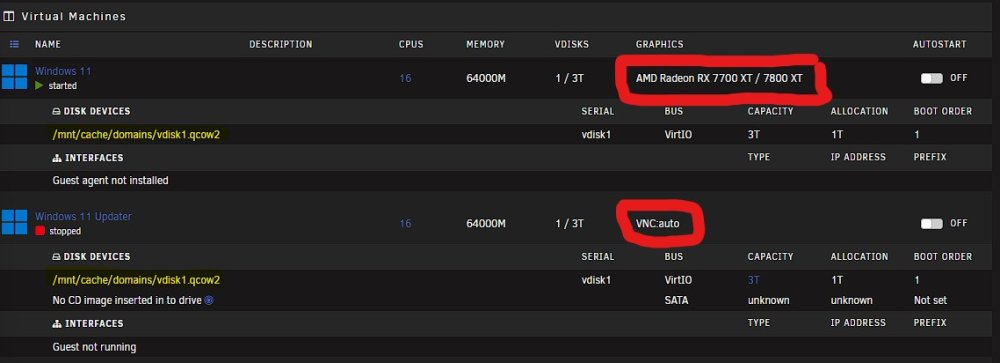
Hi all, I have a love/hate relationship with Unraid's VM stability but after goofing around with Proxmox it seems to be more of a hardware issue than a OS/Software issue. I've read countless posts about those with newer AMD GPU's passing through unable to reboot or shutdown your VM's properly. I've found the only way I can shutdown my VM w/ my 7800XT passed through is to "💣 Force Stop" from the VMS tab in Unraid. Which was working fine and dandy as I rarely shut down the VM. But I knew the day would come when I'd have some sort of an update and would need to "restart" for the update to take effect. Today was that day. I have a work around for those of you in the same boat. Here's what I've done. - You cannot flip flop your setting within the VM setting or the next time you boot the v-disk you'll have issues. I've created two VM's pointing to the same vdisk file but running two different graphic settings. Obviously you never want to run them together but if you need to update anything that requires a "restart" you do it within the VNC graphics setup. tried it today and it worked flawless.
-
You're 100% spot on. I think Unraid is great for file handling & docker containers. Unraid Gamers This is the nonsense I believed...
-
So I dove head first into Unraid after watching the video of building a gaming PC w/ a media center all in one. Thought this was an amazing idea and something worth getting into since I was already running a mini media server and a gaming PC that I planned on updating anyway. After all this I found that Unraid is about the most unbaked software I've ever dealt with. constantly crashing while running a VM. I read a gentleman's comparison of Unraid vs Proxmox and he stated when running Unraid it's like stubbing your toe every step of the way and he 100% right. just when you think you have your VM all tuned in and running smooth something crazy within Unraid freaks out and corrupts the vdisk img. Audio will randomly stop, Unraid will randomly restart, I can't shutdown or reboot the VM without crashing Unraid, there's 0 support for this. After trying to make this system work for over 2 months I am tapping out. Reading countless forum posts of users having the exact same problems with no true resolution, only work arounds and temporary fixes I'm switching to Proxmox. It's ridiculous to charge customers and make them the guinea pigs of your unstable half baked OS and advertise it as if it can do all these things reliably on your homepage when it clearly can't. 👎
-
So I figured it all out! I am going to post a tutorial on how to install an AMD GPU properly. My 7800 XT Cannot run with a "Graphics Card: Virtual" enabled. Causes nothing but issues. You have to use a 3rd party remote access client such as Splashtop, Chrome Remote, Hyper-v and so on... Once I removed the Virtual GPU everything ran flawless!
-
So I've tried everything I can think of to get this damn Win 11 VM to run with my GPU and I'm almost ready to tap out. Can someone please help me. I've tried everything... I've tried using Spice & VNC with no luck. I've tried UEFI boot and Legacy (CSM). I've got enabled SVM and IOMMU in the BIOS. I've tried Q35 & i440fx. Please take a look at my XML and let me know if you have any clues...
-
aaahhh Yes! I see this make_bootable.bat in the root! I am not near my Server due to the holiday week but once I get back I will do this for sure! Thank you for this!That doesn't seem to work. I get a black screen or failed to find bootable device. Like I mentioned, if I use a freshly created Unraid bootable drive it fires up perfectly fine in CSM, but if I try and boot the existing drive I get nothing. So I guess I have 2 options: - Figure out how to fix my existing Unraid drive to work... which I am not finding any answers to. - Create a fresh Unraid drive and re-configure all my dockers and array and start over. If this is the only route, would I have to reformat my drives and lose all my data?My issue is I'm trying to get my GPU to run correctly in my VM. When creating my Unraid boot drive I stuck with the default settings and left "Allow UEFI Boot" selected. I've now enabling CSM boot in my bios and adding the "-" to the end of the EFI folder in the USB and now whenever I bootup the Server I get a black screen most times or unable to find bootable device. I know my Bios settings are correct because I created a new bootable Unraid USB with a trial version on it and didn't select "Allow UEFI Boot" and it started up fine. So the correct question is, How do I convert my current Flash Drive from UEFI boot to Legacy without starting over with a fresh Unraid install or losing anything? I'm using SpaceInvaders GPU GuideLong story short I have a large amount of media on my server that I do not want to lose. I've tried adding the "-" at the end of the EFI folder in the USB drive and enabling CSM boot in my bios and this is a fail over and over regardless of what I try. I installed a fresh Unraid trial on the same USB and "unticked" Allow UEFI Boot and the system started up just fine except I would lose all my data if I moved forward with setting up my array and what have you. How do I convert my USB to Legacy without losing any of my data???Exactly! If I try to restart or shutdown the VM my whole system crashes and Unraid reboots. Frustrating to spend that kind of $ on a GPU that can't function properly on a VM. I've read countless threads on reddit and other forums of people using either 7800 or 7900 GPU's having the exact same issues. If I can't get this thing figured out I'm sending this 7800 XT back to amazon and getting a 4070 ti. I've always been an AMD/ATI guy for 20+ years but this is on whole different level of frustration.So I've been battling with getting my 7800 XT to passthrough into my Win11 VM. It's insane how difficult it is to even get this thing to post inside the VM. I continue to get the same "amduw23g" device not started error. At this point I'm about ready to send it back to Amazon and shop for something a little more unraid VM friendly like an Nvidia GPU. I haven't seen much support for AMD GPU's or newer guides that seem to work for this hardware. If I send this back and get an Nvidia GPU such as a 4070 ti would this be an easier setup? Would my AMD 7900X3D CPU be an issue as well? not sure how the AMD integrated graphics pay into this but could it be causing issues as well?Looks like it's a Win-11 & AMD Driver issue. I did some research and it appears others are having this issue as well in barebones Win 11 installs. I've reached out to XFX and am awaiting their feedback.
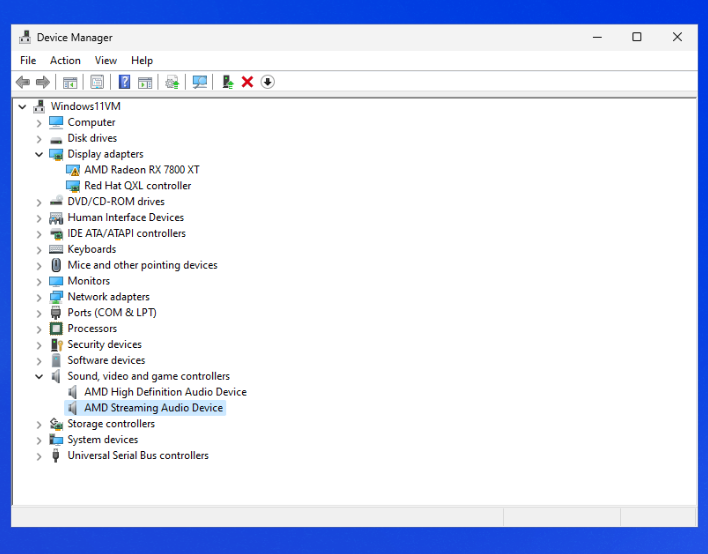
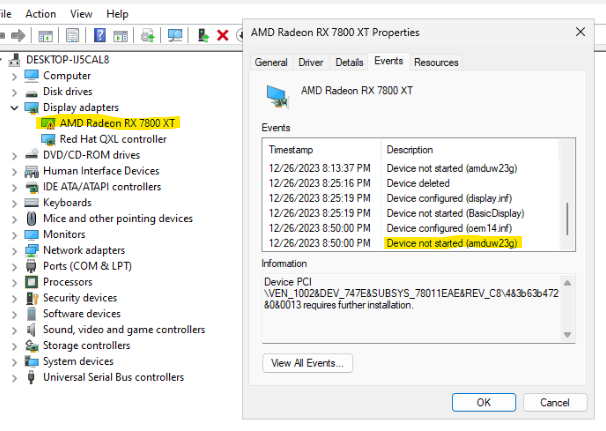 So I was able to get it to boot up with the GPU passed through by using a GPU Bios found here VGA Bios Collection . Only issue is mines an XFX and none of these fit the bill. and now I'm stuck with this in my device manager after installing the driver and updating and choppy video...
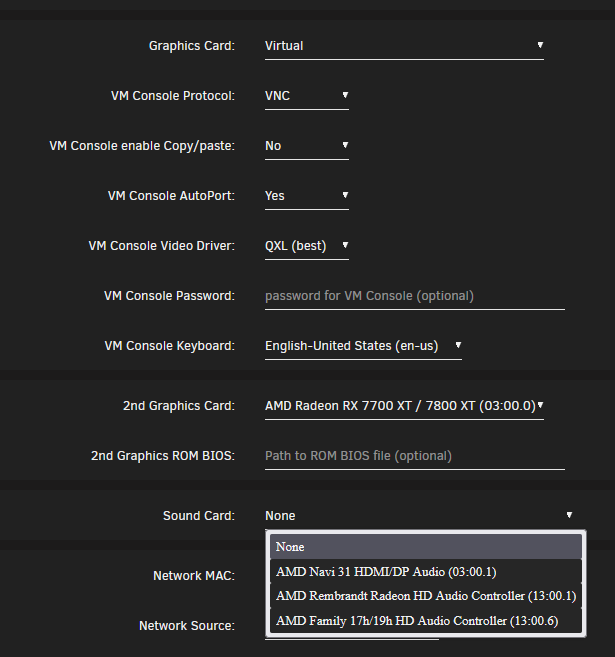
 I appreciate any help with this one. I'm able to get the Win 11 VM running perfectly fine right before I add the GPU & Audio. I followed this guide: Windows 11 Atlas OS Unraid and everything is perfect until I follow "Step VII: Pass Through GPU and Reallocating Resources". Once I add in this info and start the VM the Unraid OS freezes and reboots. It doesn't matter if I am using Q35-7.2 or i440fx-3.1. I built this setup as a media server and remote gaming rig but for the life of me I can't get this GPU to work within the VM. Also I'm not sure which audio device I should be putting into the "Sound Card"
 For those of you struggling with this issue, I plan on making a video tutorial on how to fix this.I've been trying to get my VM to install for a week now and every time I run into issues. This is what I get when I load the official windows ISO and virtIO ver 0.1.240-1. I'm leaving almost all of the settings default except: Machine: Q35-7.1 Bios: does not matter if it's OVMF TPM or OVMF Please help 🙏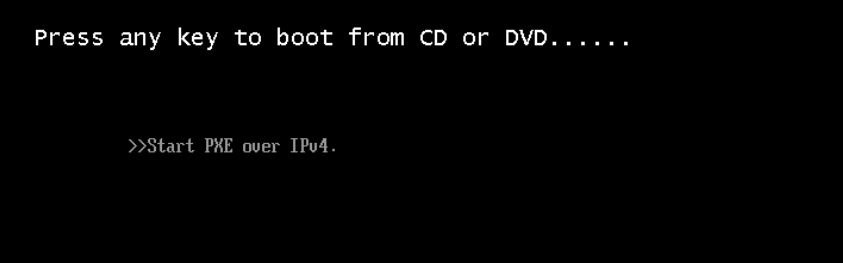
 Well that sucks, but I should be able to use this GPU for VM gaming correct? I've seen "A" video describing that process. Can you suggest any guides on setting up an AMD GPU for VM's? I typically nerd up as much as I can before performing something new.Hi, I've had unraid going on a new build for about a week now and can't find any real guides or videos on how to setup my Radeon 7800xt. I have an AMD 7900X3D CPU that's doing all the heavy transcoding within Tdarr currently but I'd like to utilize this GPU and on a few of my docker containers. I see a ton of easy info on Nvidia GPUs but none on AMD GPUs. Can someone please point me in the right direction?