bonienl
Community Developer
-
Joined
-
Last visited
Everything posted by bonienl
-
For this type of access it is recommended that the peer uses a DNS server which is reachable over the tunnel. When your router (gateway) is acting as local DNS server to your LAN, then use its IP address as DNS server for the peer. You can add DNS setting manually or if you update to the latest version of the plugin, it is configurable (still need to update the peer though) How do you access the docker containers? Try this from the GUI -> Docker -> click container -> WebUI
-
What "type of access" do you use for the peer?
-
See also this explanation
-
I have added a new field to the peer configuration called "Peer DNS server" This field allows to overwrite the current DNS server setting at the peer when the WireGuard tunnel is activated.
-
The peer-subnet + peer-mask are not necessary, just the tunnel-endpoints subnet. (I have updated the original post)
-
There is nothing that Unraid can do to solve the issue. Have you tried Crucial and ask them?
-
The default gateway is still your router (192.168.20.1) and VMs will still use that. The only destinations (remote peers) which go over the tunnel are the 10.253.0.X addresses.
-
You are testing this from the client (peer) side, right? When you activate the WG tunnel, it will send ALL traffic over the WG tunnel because you have selected "Remote tunneled access", you need "Remote server access". Change the type of the second (and first) peer to "Remote server access". Next reconfigure the client(s) with the updated changes. You are thinking wrong
-
What kind of VPN access are you configuring on Unraid?
-
With SSL enabled, it requires DNS to work properly. If the DNS server is not reachable when the tunnel is active, it makes the GUI not reachable.
-
Local access should not be affected, no clue what you did. You can delete the files wg0.cfg and wg0.conf in folder /boot/config/wireguard using your ssh session. A "reboot" is required to restore.
-
This plugin adds new pages to the GUI and certainly doesn't screw up the GUI. There MUST be something else in your system going on. You can manually remove the plugin: delete the file "dynamix.wireguard.plg" in the folder /config/plugins on your USB stick and restart your server.
-
Is there anything to move? The mover stops almost immediately when there are no files to move.
-
Can you make a report under Bug reports, it will make it easier to track.
-
I'll have a look ... done
-
You should add the entry manually in the configuration of the client afterwards. Update: there is now a DNS field in the peer configuration of Unraid
-
Sounds like your Docker image was corrupted.
-
Unraid uses a mechanism to automatically assign IP addresses to tunnel endpoints (both server and peers). These IP addresses are taken from the subnet 10.253.0.0/24. Normally not needed to change this subnet unless it is already in use by the server or its peers. Note subsequent WireGuard tunnels get the next /24 subnet, e.g. WG1 gets 10.253.1.0/24 to connect to its peers.
-
Couple of observations 1. UPnP is not working on your router. You can disable auto setting in WG settings (see advanced mode) Oct 13 10:34:20 Tower upnpc: Failed to add port 51820/udp 2. When WG is enabled there is interference with eth0, which would explain the docker containers not being pingable. Oct 13 10:34:20 Tower wireguard: Tunnel WireGuard-wg0 started Oct 13 10:34:44 Tower kernel: eth0: renamed from veth1862cc6 Oct 13 10:34:44 Tower kernel: device br0 entered promiscuous mode Oct 13 10:36:47 Tower kernel: device br0 left promiscuous mode Oct 13 10:36:47 Tower kernel: veth1862cc6: renamed from eth0 Some things to try a. Disable bonding for eth0 (see network settings) and use interface eth0 only b. Disable VMs
-
That looks alright. From where are you pinging the docker containers? Can you also post diagnostics?
-
For those having local issues, please post the output of (open a terminal session) ip route
-
The WireGuard VPN tunnel should have no effect on the reachability of local devices on the same LAN. What kind of connection are you trying to set up?
-
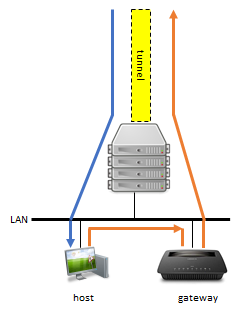
The challenge is to make routing complete, because the VPN tunnel lives on the Unraid server, while other devices in the LAN have the router as gateway.
-
You need this entry: Network Mask Gateway 10.253.0.0 255.255.0.0 Unraid LAN IP Updated: just route the tunnel addresses from your router to the Unraid server
-
LAN hosts or docker containers/VMs with their own IP address, need a return path back to the WireGuard VPN tunnel which exists on the Unraid server to reach any remote destination. This is achieved by adding the tunnel endpoint subnet to the gateway (router) which provides the regular access to remote destinations. By default Unraid uses the 10.253.x.x/16 subnet for tunnel endpoint assignments. This subnet needs to be added to the router and points to the LAN (eth0) address of the Unraid server. Below is an example of static routes added to a Ubiquiti router (other brands should offer something similar). It is also needed to disable the "Local Server uses NAT" setting (switch on advanced view).