





m411b
Members
-
Joined
-
Last visited
-
I went ahead with a controlled upgrade from 7.3.2 to 7.3.4. After reboot, the startup script reapplied the speed fix because the affected DefaultPageLayout.php file is unchanged in 7.3.4. The web UI is still loading quickly, and I haven’t noticed any side effects so far. That confirms it’s working on my 7.3.4 setup, but I’d check the file again before assuming the same patch will work on a future release.
-
My Unraid 7.3.2 web UI had gotten irritatingly slow. Dashboard and several other pages could take 10-15 seconds to finish loading. After some digging, I found a process check in the web UI code that runs over and over while a page loads. Changing it to make one scan instead of a separate scan for every helper made a big difference here. One thing I want to be clear about up front, I'm not blaming a third party plugin. The file path contains "plugins/dynamix", but this is part of the Unraid web UI that came with my 7.3.2 install. This is also my own workaround, not an official fix. What I saw before and after I used Chrome DevTools to get some actual numbers instead of just going by feel: - The Dashboard page request took 5.72 seconds: 4.29 seconds waiting for a response, then 1.43 seconds downloading the 293 KB HTML. - A separate DashboardApps.php request took 9.28 seconds: 1.72 seconds waiting and 7.56 seconds downloading. That's a different request, so don't add the two times together. - Chrome showed about 18.16 seconds for all Dashboard network activity to finish. That includes background requests, it doesn't mean the main page took 18 seconds to appear. The most useful comparison was Favorites on the same machine: 5.08 seconds with the stock code and 1.30 seconds with the change. That's about 74% less time in that test. After the change, I also saw Main at 1.12 seconds and Shares at 1.87 seconds, although I didn't record before numbers for those two pages. I left the temporary change running for several days. The pages stayed fast, and I haven't noticed anything broken. In a later check, Favorites loaded in about 1.2 seconds and Dashboard hit its load event at about 2.3 seconds. Dashboard widgets kept filling in after that. Of course, timings will vary with load and caching. The change The file is: /usr/local/emhttp/plugins/dynamix/include/DefaultPageLayout.php That file checks whether Nchan web UI helper scripts are running. In the stock code I tested, it launches a separate "pgrep" for each helper as the page renders. I saw around a dozen entries on Dashboard. This change asks for the process list once, then checks that list for each helper. It still starts a helper if one is missing. Here's the diff. Please compare it against your own file first. Don't force it onto a different Unraid version or a file another change has already touched. Lines starting with - are the original code being removed. Lines starting with + are the replacement code. The other lines show where the change goes. --- DefaultPageLayout.php +++ DefaultPageLayout.php @@ -77,11 +77,18 @@ // start nchan scripts which are new or have been terminated but still should be running if (count($running)) { file_put_contents_atomic($nchan_pid, implode("\n", $running) . "\n"); + $processes = []; + exec('pgrep --ns $$ -af ' . escapeshellarg($docroot . '/'), $processes); foreach ($running as $row) { $script = explode(':', $row, 2)[0]; - $output = []; - exec('pgrep --ns $$ -f ' . escapeshellarg("$docroot/$script"),$output,$retval); - if ($retval !== 0) { // 0=found; 1=none; 2=error + $found = false; + foreach ($processes as $process) { + if (preg_match('~(?:^|\\s)' . preg_quote("$docroot/$script", '~') . '(?:\\s|$)~', $process)) { + $found = true; + break; + } + } + if (!$found) { exec(escapeshellarg("$docroot/$script") . ' >/dev/null 2>&1 &'); } } If you want to test it 1. Check your Unraid version and compare the code above with your own DefaultPageLayout.php. If it doesn't match, stop there. 2. Back up your original file somewhere outside /usr/local, which Unraid rebuilds at boot. Record a checksum of your own file so you can tell later whether it changed. 3. Dry-run the patch first. Apply it to a separate copy, run "php -l" on that copy, and inspect the diff before atomically replacing the live file. Don't edit the live PHP file line by line. 4. Time the same pages before and after. Also check Dashboard widgets, notifications, Nchan helpers, PHP-FPM, and Unraid's own nginx error log. A page loading fast doesn't necessarily mean everything behind it works. 5. Keep the original for rollback. Before restoring it, make sure the live file is still the one you patched, don't overwrite a file that changed for some other reason. Making it stick, and a few caveats Unraid rebuilds /usr/local/emhttp at boot, so editing that PHP file directly won't survive a reboot. I have a script called from /boot/config/go before emhttp starts. It checks the file before doing anything. If the expected patch is already there, it leaves it alone. If it sees the exact original, it can apply the patch. If it sees anything else, it stops. That's important after an Unraid update. The script also works on a temporary copy, checks PHP syntax, keeps the original, and logs what happened. Don't copy somebody else's entire go file over your own. I'm not posting that boot script as a ready made installer. It runs as root, so its script and lock file belong in a root-only directory. I did complete a controlled reboot, the hook logged that it applied the verified patch to a fresh 7.3.2 boot, and the patched file passed a PHP syntax check afterward. The live PHP change had also been running for several days before that test. For what it's worth, the PHP change passed "php -l" and matched the working live file byte for byte when I tested it on a separate copy. The boot script passed a shell syntax check, and running it again against the already patched live file made no changes. After the reboot, Dashboard, Main, Favorites, and Shares opened normally, Dashboard widgets populated, PHP-FPM and the Nchan helpers were running, and the array, pools, VMs, and the containers I checked were healthy. I didn't find new errors in Unraid's nginx or PHP logs tied to this change. Those post reboot page checks were functional checks, not another timed A/B benchmark. I'm not claiming this is why every Unraid web UI is slow. But the before and after difference on mine was too big to ignore. I’d be interested to hear whether others see the same repeated checks, whether they serve a purpose I’ve missed, and whether the Unraid team thinks this change belongs upstream in a future release.
-
Love the widget. But in Unraid 7.3 I cannot move the widget to a location that suits me. It is stuck in the lower right quadrant on the dashboard without any way to move it around the dashboard. How can I fix this? Thanks.
-
Updated one of my servers today. 7.2.4 - 7.3.0. The server is only running Nextcloud AIO and Vaultwarden. But all is well so far. I'm waiting to update the other server(7.2.4) which has everything else on it. Cannot afford for that server to go down.
-
Are the Military discounts something new? I asked when I bought 2 Unleashed licenses and was ignored both times.
-
They don't offer ANY discounts on lifetime. Never have as far as I can tell. Lime Tech doesn't even offer a Military discount for the lesser licenses.
-
I remember when hacking the host file was a thing. If your network is setup correctly, hacking a Windows host file is incredibly hard to do from the outside these days. Not saying it can't be done. If I were going to go through the trouble of hacking someones host file on their Windows PC, I wouldn't start or stop there. There are plenty other files that can be hacked well before you get to the host file and plenty other Windows features that would be much easier to hack than the host file. Like port 3389 for RDP. Solid credentials can shield against a lot of hacking attempts. Editing the Windows host file is an easy thing. Open notepad/notepad++ with admin privileges and open C:\Windows\System32\drivers\etc\hosts with notepad/notepad++. Then add your IP and server name to the file, save and close, reboot and that's it. Very easy. I also have a problem with telling someone to do something I'm not comfortable with and if I wasn't comfortable telling people to do this I wouldn't suggest it.
-
My apologies then. Why wouldn't it work if your server has multiple users? You can add users to the host file. Not that you would need to because all you're doing is telling your Windows client that a certain IP on the network belongs to a certain server on the same network. Having multiple Windows clients is way different than using one Windows client for multiple connections to the same server at one time. You're right, you can. But again, you can only make one connection to the server from a Windows client at a time.
-
My dog in this is to help gain access to user shares in Windows Explorer using the Windows host file by telling the Windows client that a specific IP belongs to a specific server on the network. Which worked for me and makes my solution a general solution. If it works for my situation there is no reason why it can't work for others. What you're suggesting is there is no other Unraid users who use Unraid in a similar way as I do(all private, single user). I tried all the other ideas and advice on this forum and the internet to get it to work when I was having a problem with this and none of it worked even with fresh, un-molested Windows installs. When I entered the server information into the Windows host file without changing anything else, everything magically started working and I haven't had a problem since. On any Windows client. Neither the OP or the other user who asked about this problem in this thread mentioned anything about multiple users. Which is a completely different setup. If you have a solution for allowing a Windows client to connect to the same server more than once at a time with multiple users accounts I'm all ears. Though I have no use for that and I'm sure there are plenty other Unraid users who don't either.
-
All private shares. Also to correct myself, I do have a second user under Users for shares. I'll add this. The way I access Unraid shares in thru Windows Explorer. I open Windows Explorer then click on Network in the left column and then the Unraid server. If you've never accessed your server this way, when you double click on the server a window will pop up asking for credentials. Enter the credentials you entered in the User Share settings and tell it to remember the credentials you entered. Basically the same as going to Windows Credentials Manager and manually entering the creds but with way less steps. Of course for this to work you have to have network discovery turned on. Just enter you server IP and server name into your Windows Host file and test it. If it works - wallah. If not, it was worth a try. Chances are, it'll work just fine. These are my settings for Windows sharing and it's set for Private network.
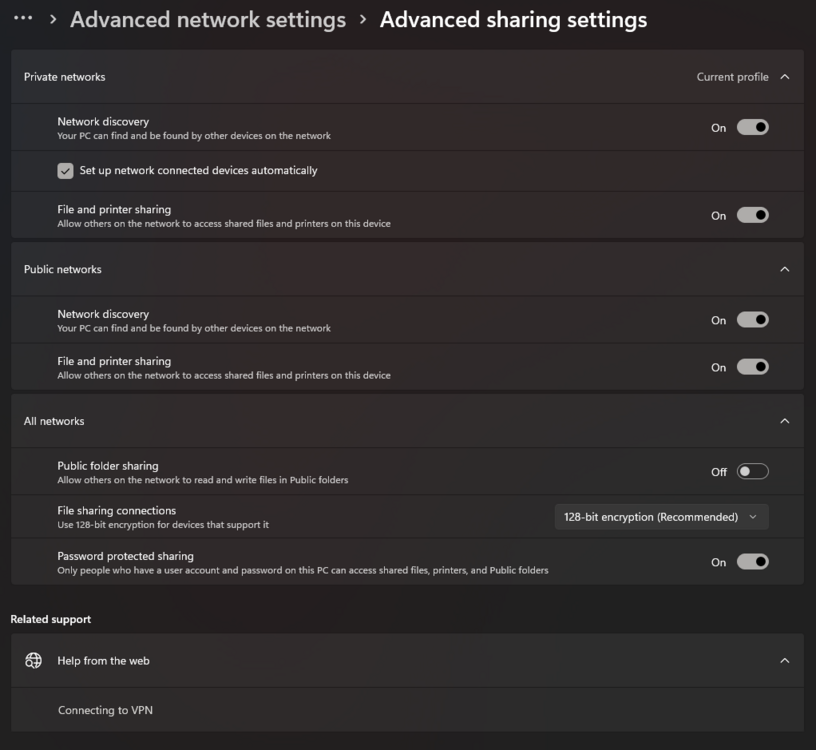
-
When I added my Unraid server IP to my Windows host file when I had issues with this, I never had problems again accessing shares. Some say you have to have a user on the Unraid server with the same credentials as the Windows PC you're using for access but I don't. I have one user on my Unraid server and my Windows credentials are completely different. There's also some posts going around saying you have to do something with the Windows Credentials Manager. I didn't. Still no issues with accessing Unraid shares. Everyone must've forgotten how to use Windows or never learned to begin with. It's an easy fix.
-
Why aren't there ever any sales on lifetime licenses or upgrades to lifetime licenses?
-
Got it to work as advertised by changing the interface that serves the server. Totally. I originally had unraid on a 10GB Network. The only thing that worked for me is changing unraid back to the original 10Gb network to get this plugin to work as advertised. Telling me, this plugin uses cache at some point. Somewhere in it's process. Not very efficient. But works. Still have the problem of showing two per stream on the plex streams tab. I'll figure that out on my own also.
-
It may be harsh. But none the less true. If you don't like the truth then maybe you should go to a different forum. If it "just works" then no one would be having issues with it. Yet, here we are!
-
I've done everything to get this plugin to work. Added ports to forward Changed network types(multiple times) which creates a whole situation when you have users trying to get served Plex media. Created firewall rules Rebooted Uninstalled/Reinstalled Used SSL Added custom IP Nothing works. I give this plugin a rating of 0 because not only does the plugin not work as it should. But there is nearly zero support for it. The support you do get is like talking to a robot with general responses. You would think the "author" of the plugin would know. But nah! I will not recommend this plugin to anyone. The only thing I'm happy about with this plugin is the fact it hasn't ruined my Unraid. Very easy to uninstall. The plugin itself hasn't been updated since November 27 2023 despite many users asking for it to be updated. Which says a lot. So there is that! Honestly think this plugin should be removed from Community Applications. Since it hasn't been updated in nearly 2 years and the support is like going through a McDonald's drive thru...

