





manilx
Members
-
Joined
-
Last visited
-
I'm not an expert but this looks like corruption on the USB stick. I would backup the /boot/config folder (on a desktop), then recreate the USB stick with Unraid USB creator, restore the /boot/config to the stick and boot.
-
Also having this constantly now, filling the logs so fast I can't see.... Reboot fixes this but I had to reboot 5 times in the last 2 weeks because of this. Unacceptable! I resorted to Claude creating a script, which I run frequently that copies a backup of that png to the missing location when it detects it's missing. At least I don't have to reboot any longer.
-
I do think that Unraid themselves should clear this up in General. What happens to plugins once the developer abandons it? Or the project itself is abandoned? With the "opening" of the Appstore lately by them and the daily avalanche of Vibe-coded/helped containers and the certainly uncurated nature of them (one day we'll have an issue, I bet on it.....)
-
What about the Intel-GPU-TOP plugin?
-
Yes, the issue was I had it at a higher number and it froze Firefox.

-
They will eventually release a docker compose plugin or integration into the OS this year (I hope). BUT it should nothing be less than something like Dockhand. Powerful and modern
-
Latest version of this plugin freezes the browser tab completely, after browsing the apps for a while. Browser informs that tab should be stopped. This is repeatable in Firefox/Brave. The plugin is buggy as hell. The old version was flawless. How do I downgrade?
-
a reboot of the server fixed this
-
Running 7.3.2, 2 servers. On both I find that the terminal window popup no longer works. When I click the icon the status menus on the right a window opens for a very short time and then closes. Tried on Firefox/Brave same issue. Was working fine a few days ago. I'm not aware of any change I made.
-
Question: when I restore a container (or VM for that matter) do you start the container after the restore or leave it off (which I would prefer). Reason: I manage most of my containers via docker compose using stacks in Dockhand (Unraid docker compose plugin is very weak). And to recreate a stack I have to restore all the individual containers of a stack one by one (and they depend on each other, so if one starts without the other having been restored.....) Ideally I could restore a whole stack 😉 But this I don't even know on how the best way to implement / Interface in the GUI.....
-
All the things I had in mind are already here 😊 Especially the restore stuff.....: https://github.com/junkerderprovinz/bombvault/issues/19
-
Great job!
-
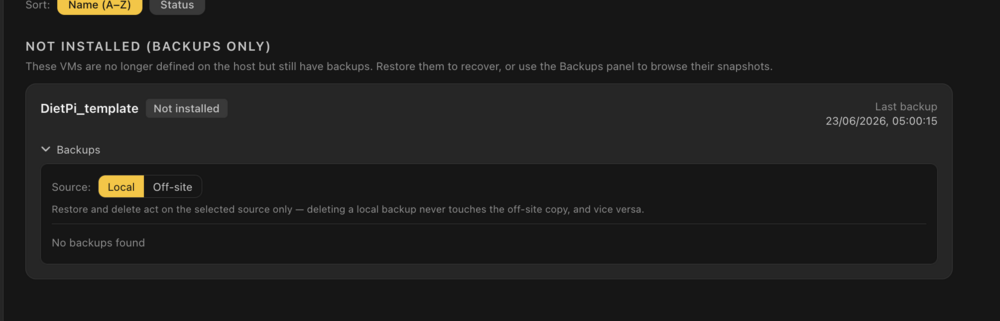
I get this error "2026/06/28 05:00:04 virshcli: "dumpxml" failed: error: failed to get domain 'DietPi_template" now each time, how do I get rid of it. I find this: There are no local/offsite backups any more. How do I delete this entry
-
One more change. My normal backup plan in Backrest is daily local and weekly remote. I have different retention times (prune schedules) for each, remote I keep longer (archive). In Bombvault I have one single prune schedule.....
-
Small GUI error. When I do a manual prune (local/offsite) I get the healthy indicator. But when I switch to the other repo (local/offsite) the healthy stays, in spite of no prune having been run. It should clear this flag when switching repo selector

