spyder
Members
-
Joined
-
Last visited
Everything posted by spyder
-
I just came across this with a different error, although I had the same symptoms (libvirt img showing up in losetup -l and fuser -c showing all the docker containers). After stopping the VM service, starting it gave this error: Apr 17 20:47:46 Media emhttpd: shcmd (2867675): /usr/local/sbin/mount_image '/mnt/user/system/libvirt/libvirt.img' /etc/libvirt 1 Apr 17 20:47:46 Media root: '/mnt/windows/system/libvirt/libvirt.img' attached to loop device, cannot mount Apr 17 20:47:46 Media emhttpd: shcmd (2867675): exit status: 1The workaround of stopping the docker service was successful, it released libvirt from the loop device immediately without any extra messages in the syslog.
-
@paradoxum parity doesn't protect against file corruption. But swapping the array drives to BTRFS would also detect bit flips, so that's an alternative to this plugin.
-
Just found this from the reddit thread where you posted a link over the weekend. I know you said you tried changing the ram, but have you run memtest? If you're having inconsistent freezes maybe leave the tests running for a few hours (or overnight). It could be somewhere else in the memory subsystem rather than the RAM stick specifically.
-
After poking around a bit more I realised this docker setup was a bit more fragile than I'm comfortable with for critical backups. I've installed PBS into a debian LXC on unraid, using the proxmox apt repo, and migrated the config from appdata into there. Everything seems to be working. So don't rush to fix this on my account - @Dro might still be waiting though.
-
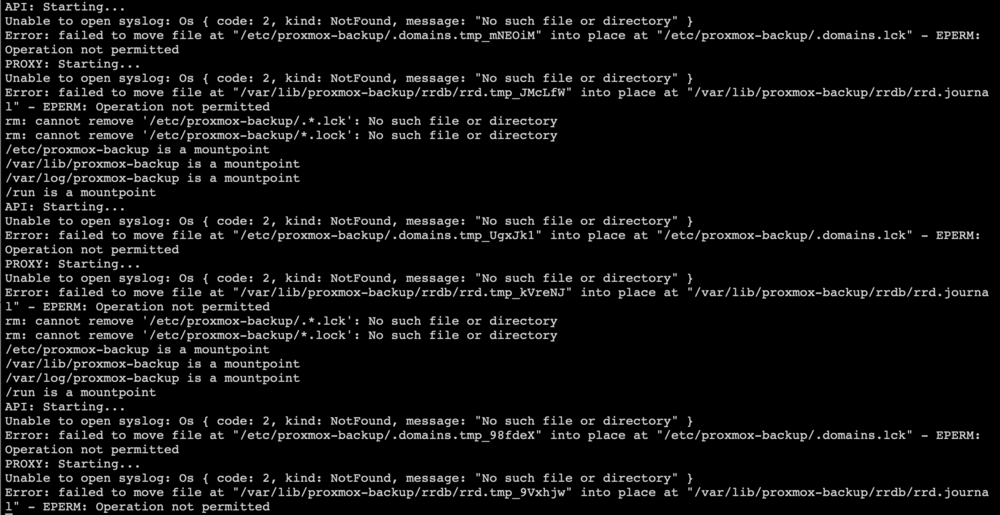
I just realised my PBS was down, I've been running this container for months and now it has the same issue. I tracked down when it failed and I believe it's the same night that I messed up and had to delete my docker.img. The re-deployed PBS container has this issue. I'm fairly confident I was running an up-do-date copy of the docker image before it happened. The config hasn't changed, the permissions are all user and group 34. I shelled into the container and confirmed that the mappings are working; I also confirmed that the backup user is able to write files to /var/lib/proxmox-backup/rrd and /etc/proxmox-backup. I think despite the error saying operation not permitted it's not a file permissions error. Something about the move is the operation not permitted, perhaps related to the syslog error?
-
I followed the instructions to do a parity swap: https://docs.unraid.net/unraid-os/using-unraid-to/manage-storage/array/replacing-disks-in-array/#parity-swap Nowhere in these instructions does it mention that I should disable the spin down delay, but when I woke up this morning I found this in the logs: Dec 15 00:38:05 Media emhttpd: spinning down /dev/sdd Dec 15 00:38:05 Media emhttpd: spinning down /dev/sde Dec 15 00:38:44 Media emhttpd: spinning down /dev/sdc Dec 15 00:38:47 Media emhttpd: read SMART /dev/sdc Dec 15 00:38:48 Media emhttpd: spinning down /dev/sdb Dec 15 00:38:50 Media emhttpd: read SMART /dev/sdb Dec 15 00:39:10 Media emhttpd: read SMART /dev/sdd Dec 15 01:21:14 Media monitor_nchan: Stop running nchan processes Dec 15 02:38:47 Media emhttpd: spinning down /dev/sdc Dec 15 02:38:50 Media emhttpd: read SMART /dev/sdc Dec 15 02:38:52 Media emhttpd: spinning down /dev/sdb Dec 15 02:38:53 Media emhttpd: read SMART /dev/sdb Dec 15 02:39:02 Media emhttpd: spinning down /dev/sdd Dec 15 02:39:12 Media emhttpd: spinning down /dev/sde Dec 15 02:40:10 Media emhttpd: read SMART /dev/sdd Dec 15 02:40:18 Media emhttpd: read SMART /dev/sdeThe parity swap started 2 hours earlier (10:38pm on Dec 14). This repeated every 2 hours, which is my spin down delay, until I woke up and set spin down to Never. I'm copying parity data from sdb to sdc but every drive is doing this, not just the two that are active, even though the array has not started. The swap is ongoing during the diagnostics (sdb is now inactive and it's writing zeros into the extra space). I suggest either advise users to disable spin down during this process, or add some logic to avoid spinning down drives particularly the ones actively involved in a parity swap. media-diagnostics-20251215-0838.zip
-
It's not clear why this uses a fork of the repo that makes no changes. And now it's 2 months out of date. Editing the docker image to use automaticrippingmachine/automatic-ripping-machine:latest directly instead of 1337server/automatic-ripping-machine:latest worked just fine and now I get regular updates?
-
I'm afraid I can't help with that, my server rebooted not long after upgrading plugins. Maybe it was just not throwing an unraid notification error before? I could perhaps downgrade the plugin to check, but I'm not sure it matters exactly why I suddenly had the issue. Your patch fixed it. Thank you. ab.debug.log
-
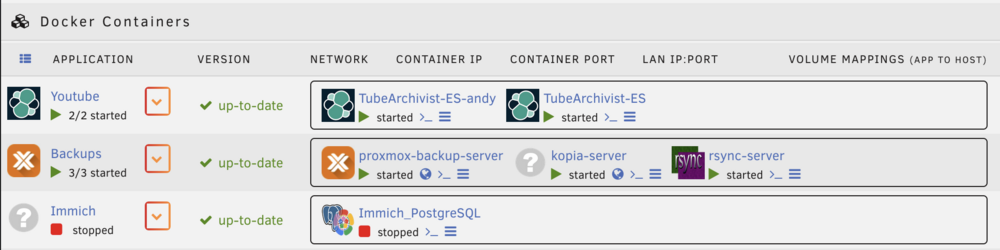
After updating to version 2025.09.17 the plugin throws an error after every backup. It seems to be caused by my use of folder groups (the FolderView2 plugin). It's done this multiple nights in a row now (set to daily backup). It knows about the group, but ends up duplicating the group name as a container (i.e [backups][backups]. I have multiple groups, but there is one group that I've ignored two of the 3 containers inside and that's where the problem happens. The debug log indicates that it hasn't identified the groups correctly; it only shows one, "backups", and my proxmox backup server container isn't in it. The other two (kopia and rsync) are set to skip. ab.debug.log