





Fireball3
Members
-
Joined
-
Last visited
Everything posted by Fireball3
-
Do pretty much that, what is written in the notes you quoted: Please remove the full quote of that post and insert a link instead. Thanks!
-
Welcome to the forum! You're not the first being concerned about the thumb drive linked license. Of course you can move the content off the stick. Start here. @1812 I'm scared! What make?
-
PCI-e(xpress) Bus (per lane): v1.x: ~0,250 GByte/s v2.x: ~0,500 GByte/s v3.0: ~0,985 GByte/s v4.0: ~1,969 GByte/s 0,5GB x 4 Lanes : 8 drives = 250 MB/s per drive. This should be enough for a regular spinner drive.
-
This kind of info is not necessary. I need the adapters properties before it is flashed. I expect some differences in firmware versions that are responsible for success or failure. No, it's OK. As already said, I didn't expect this to happen. I even thought of removing the ...b-files completely from the set. I will also issue a new version with some advice in case of failure.
-
Too bad, and from what I can see there is no log from this second card also. I can't check what is in that referenced zip but from the commands you issued, I can say that this zip is not necessary. Those commands are used in the ...b.bat files (1b.bat and 3b.bat) in case of failure. I didn't mention this as I didn't expect such a scenario, but the files are included in the latest toolset v1. This is what 1b.bat and 3b.bat also do. Why execute the megarec... twice? Once step 3 is executed (3b.bat) it makes no sense to query adapters settings because it was cleaned. Here, I can't tell exactly what should happen. Clear once again and the flash DELL fw!? Fail will most likely occur after 3.bat, not after 5ITDELL.bat... This fails because the adapters.txt from step 1 is not present. TLDR: If 1.bat fails, revert to 1b.bat! Ignore the error thrown from step 2 - it's only the backup step. Use 3b.bat if 3.bat fails. PM me the adapters.txt if you had to use the ...b.bat files.
-
Apparently the toolset used for the H310 and H200 controllers won't do the job with that 1068e chipset! If you followed the whole conversation, that I previously linked for you, between us and ghostboarder, you would have finally come to this post: Now you just need to find out which package @ghostboarder downloaded and use that one! If you're not sure, drop him a pm and see if he can assist in detail.
-
This means sas2flsh.exe can't detect the card. I wonder why. MegaCli seems to get the job done. With the H200 controllers this usually throws the "Exit Code: 0x01" error. Not sure if this is related to the controller or the DOS4GW not working properly with freeDOS. Can you pm me the zipped logs directory with all the logs? @landS Would you please also pm me your zipped logs directory (without the .sbr and .bin files)? Yes, the backups are also done with sas2flsh.exe. I hope there is some info in the Adapters.txt why sas2flsh is not recognizing those card. Maybe an old firmware revision? I experienced this issue the other way round when using the old toolset on the H200 cards. (1b.bat was 1.bat at that time) That would have been 3b.bat. In fact, step 2 is just doing backups. You could have continued with 3b.bat without problems. After the 3b step and a mandatory reboot, sas2flsh should detect the card without issue so that steps 4 to 6 should have worked too. I will point that out in the readme.
-
You can try this. https://unetbootin.github.io/ It is similar to rufus but for other platforms too. @landS Thanks for your feedback with that H310! Hope you meant that 6.bat pulled that SAS address
-
Hi and welcome to the forum! From how you try to flash this and that, it seems you're quite a brave one! I didn't read your linked guide, but it sounds pretty much like what ghostboarder has done recently. You may want to read up the whole story and see if you can get it done.
-
Well, there were lots of posts since then... Either a settings isse or a forum bug. The new forum software remembered you though.
-
Since that is also an IBM machine, maybe there is some check for "IBM" hardware that throws this out. Maybe there is an option to disable this feature in BIOS?
-
Which progam is returning that? megacli? megarec? sas2flsh? Sure, but the 9260-8i is not an HBA isn't it?
-
I'm not sure about the M50xx, are they compatible for cross-flashing? Edit: My google-fu reveals that those cards are not convertible to a plain HBA! You can overcome the PAL error by using an UEFI boot stick. See Rich's post. It should be possible to do everything in an UEFI environment - at least for the M1015, which seems easier to flash than the DELL cards.
-
Is there a way I can improve something for better understanding or did you just not read the instructions first?
-
If the USB drive has been set up according to the instructions, himemx should be running already. "DOS=HIGH, UMB" will be added in the next update of the tool. I need to test the recent changes on my own first. ETA about 1-2 days.
-
I have been working on some improvements for the DELL toolset. The M1015 toolset was the base for it. With the experience shared from this thread, I decided to update the M1015 toolset. It is now based on freeDOS and incorporates the latest P20.00.07.00 firmware. I use sed to grab the SAS address, so no need to reboot and edit things by hand. I did several dry runs and it seems to work, but I have no M1015 controller at hand, so please give it a try and provide some feedback.
-
Take the H310 toolset, extract the adapter info (step 1) to have your SAS address. Then go directly to step 5_LSI_P20. Finally write the SAS address in step 6. I'm not sure if step 6 is really needed though. It won't hurt if you set it again, but you could also play nice and check by running step 1 again and see if it has a SAS address.
-
I have read all of your posts once again. Please note, the P20 firmware as well as the toolset I linked are for an SAS2008 chipset, not a 1068 card! The executables should work, but do not flash SAS2008 firmware! Since you see the adapter in Windows, can you run the tools from within Windows? Have you searched for specific experience with this board? e.g. http://www.webhostingtalk.com/showthread.php?t=909545 http://www.omniweb.com/wordpress/?p=346
-
Sure, but he wrote he tried step 2 from the H310 toolset.
-
Step 1 is a megacli command to grab the controller info. This step will fail on controllers with newer firmware for some reason. Try to use sas2flsh instead. In the latest DELL toolset you will find the files 1e.bat and 3e.bat, which use the sas2flsh instead of the megacli respectively megarec. 1e.bat is for grabbing the adaptors info - harmless. 3e.bat is for deleting the ROM - now this is an one way ticket as I can't tell if the subsequent flashing step will work. In contrast to the deleting step, there are several checks when a firmware is flashed. It's a bit of a risk here. Anyway, once you decide to take that risk, it should be clear that you need to specify the correct ROM for your board in one of the 5IT...bat files! Good luck! Edit: It might be useful to have a look at Supermicros tools for updating the firmware (and as a backup just in case). Maybe you can use that but just switch the ROM?
-
The latest toolset for crossflashing the Dell H310 contains both. Rufus, FreeDOS as well as Megarec.
-
If you have the "fix common problems" plugin installed, it's most likely responsible for the boot delay.
-
It's generally not a good idea to do the hardware flashing in Windows. You never know, how Windows treats your hardware, what kind of drivers are in between etc. It can work but the risk is higher to fail than in DOS. What is your card type exactly? Link to the tools you are trying to use? Why IR firmware?
-
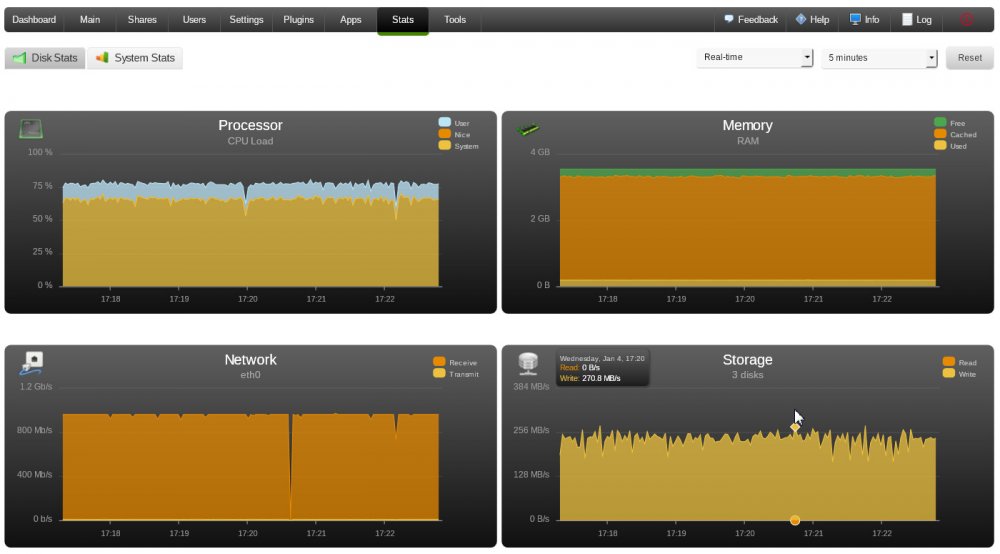
I'm just fiddling around with a N54L Microserver (which ich a nice peace of hardware - by the way). I have 2x4TB drives for testing. Parity set up and all green so far. No cache drive. I just copied ~300GB to the array with ~105 megabytes/s. <---- this is the first thing that seems strange to me, although not related to the Dynamix plugins. I'm used to 40-50MB/s when writing straight to the array. The second thing I'm wondering about is attached as screenshot. Peak writes ~270 MB/s.? (average @~200MB/s.?) If necessary I can post the diagnostics as well.
-
I'm not sure which toolset you're using but in principle you need: sas2flsh.exe -l eraselog.txt -o -e 6 to erase the card (megarec is probably not working anymore once the card is on P20) and then sas2flsh.exe -l Flashlog.txt -o -f 2118it.bin to flash the firmware. If I remember correctly, there is an option to erase only the BIOS (must be another number than 6) but I have no time to search right now.



