





t33j4y
Members
-
Joined
-
Last visited
Everything posted by t33j4y
-
I've been migrating from another NAS to a new unraid NAS (in addition to my primary unraid server which I've had for ages :-) ) Unfortunately, time got away from me and my trial expired (4 days into overtime now) before I completed testing and setup. When I try to extend my key, I get an error: Any suggestions on how to succeed in this endeavour? I'm using Brave and have disabled pop-up blocking for account.unraid.net Thanks in advance!

-
Awesome - that did the trick :-) Thank you!
-
I don't know about 7 since it's still in beta, I think. <End> taking you to the bottom wouldn't solve my issue since I'd like the action buttons to stay visible during scrolling.
-
@bonienl A humble suggestion for a change in UI. When you have directories with many entries, you have to scroll to the bottom of the page to get to the action buttons. Would be nice if the action buttons could be frozen at the top of the page to allow scrolling through files without it disapperaring out of view. Perhaps as a customizable option as some would likely prefer it as is.
-
It would appear so. Been running for 17 hours now, then again it had been running fine earlier on and then out of nowhere got weird as per 1st post. Maybe the MicroSD + card reader in the particular port was the culprit all along and the port change fixed it - who knows. I'll keep an eye on it and have enabled SSH so I have that way in as well. Thank you for your responses and suggestions!
-
Rebooted after removing network.cfg. Server now responds to both IP and .local addresses. Shortly after logging in (hadn't even started the array), I got this warning: Oh bother. Flash drive is actually a Micro SD card on Kingston card reader (USB3.0) Did manage to get a diagsnostic download, though. I think I'm gonna try and migrate to a USB2.0 flash drive (actual thumb drive, Kingston DataTraveler) Edit: Removed card reader and MicroSD and ran a disk check which found no errors. Moved the card reader to another USB port (USB2.0 this time) and seems to be well now. hesiod-diagnostics-20240921-2321.zip

-
Didn't even get around to this :-/ I did run Parity build last night, so that's done. Installed Dynamix File Plugin earlier today (before reading your answer) and set it to move some files around. Came back and the WebUI was not responding on .local either. Weirdly enough, it now responds on IP but no useable GUI: Server responds to ping, but is not serving shares. Since I haven't enabled SSH, I'm just gonna have to power down and restart :-( Will remove network.cfg before restarting
-
@bonienlI can't believe I've missed this plugin being released - just added it and am loving it already! Thank you for effort and making my Unraid administration even easier :-)
-
I think I might have backed myself into a corner here Sorry for being long winded, but I thought it important to show what happened, what I did and how I ended up where I currently am. I'm setting up a new unraid server (trial key for now) in addition to my existing unraid server. It's an older AsRock H270m itx board with two Intel NICs. 1. After a few reboots, it suddenly didn't get an IP-address anymore (which was dynamic but setup in router to hand out the same every time) 2. After reading posts I deleted network.cfg and network-rules.cfg to get it to refresh. No dice. 3. Then I rebooted into GUI mode to access unraid and modify network settings through GUI. Changed eth0 IP to static and disabled eth1 (port down) and removed it from br0. Rebooted - still no dice. At this point I was starting to think that NIC might be faulty, so I unplugged power from all drives and booted on a Tails thumb drive to see if I could get access at all. Worked like a charm on both NICs. 4. Started from scratch. Identified LAN1 (eth0) port and rebooted in GUI to ensure that eth0 was the for the right NIC (matched the MAC address) and double checked that LAN2 (eth1) was disabled (prot down) and removed from br0. Reboot into GUI. Started array from GUI (still by console access). So far, so good. Then tried to access WebGUI. Nothing. But I could see the shares were presented and I could access them from my Mac. Ok, figured something was hogging the port for web access. More reading on forum revealed that sometimes, WebGUI is not accessible by IP address but if .local address is used, it works. Tried that and lo and behold, that worked. I could now login to the WebGUI from my Mac. Further reading reveals that one way of fixing this is to delete the ident.cfg file and rebooting as this has to do with SSL somehow getting borked. But - at this point, I'd like to know if this is the right course of action or if there is something else I should do or try first. If there's anyhthing related to the network settings I should go back and fix, advice on that is also welcome! Thanks in advance for any insight and help! BR Notes I have a backup of the flash as it is right now, but sadly I hadn't gotten arround to backing it up prior to all of this I am aware that one of my parity drives shows faulty but I haven't run a parity build yet and refrained from freeing up another disk to replace with until I have all of this sorted out (to keep focus on solving the main problem right now instead of being distracted, hehe) hesiod-diagnostics-20240920-2020.zip
-
Ah!! Stupid me! That did the trick! Thank you so much - it was messing with my OCD
-
Went into the advanced settings and tweaked a password setting to trigger an update. It re-did the container, but still shows up with no version number. Strange.
-
Umm... huh? Version not available?

-
Which is why I am asking - to show a demand
-
Anyone looking at doing a Jitsi docker for UnRaid? https://jitsi.org/
-
Just wanted to report back that it is now working. For some odd reason the server now shows up under LAN filter in the in-game server browser, which it never did before. But hey, kids are happy again and I don't get nagged every day about dinos dying because they're not getting fed and stuff, so all is good 🙂 Thanks again!
-
So, I am not able to test it out right now but will tomorrow. But a big Thank You! for the fast response - very much appreciated!
-
It seems that after I applied the last update of the Ark docker, the server no longer announces itself. I cannot see it in the in-game server browser. I didn't change any settings, only applied the update. Port forwards are the same. These are the last entries in the log: Connecting anonymously to Steam Public...Loaded client id: 14768019353233213554 Listening for IPv4 broadcast on: 27036 Logged in OK Waiting for user info...OK ---Update Server--- ---Validating installation--- Waiting for user info...OK ---Update Server--- ---Validating installation--- Redirecting stderr to '/serverdata/Steam/logs/stderr.txt' [ 0%] Checking for available updates... [----] Verifying installation... Steam Console Client (c) Valve Corporation -- type 'quit' to exit -- Loading Steam API...Failed to init SDL priority manager: SDL not found Failed to set thread priority: per-thread setup failed Failed to set thread priority: per-thread setup failed OK. Connecting anonymously to Steam Public...Loaded client id: 14768019353233213554 Listening for IPv4 broadcast on: 27036 Logged in OK Any ideas as to where to look, or for what? Thanks in advance!
-
It is working now 🙂 So, I have some save-files from a server I used to run dedicated. They are probably 6 months old. Would you happen to now if it would work dumping them in the saved games and picking up from where I left? I guess I could just try
-
Thanks! That progressed thing a little further 🙂 Everything seems to start up fine but I get this error message in the end: [S_API FAIL] SteamAPI_Init() failed; SteamAPI_IsSteamRunning() failed. EDIT: Looking back in the thread, I can see that this is apparently only a warning because SteamCMD is not running. I'll try to muck about with it and see if I can find the server in the browser in-game.
-
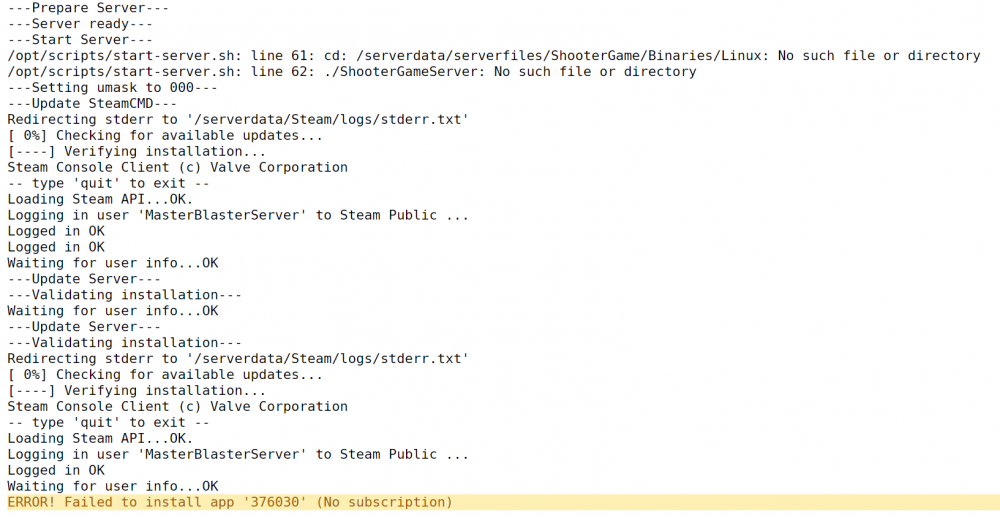
I'm trying to get an Ark:SE server running. However, seems to not work as expected. I have went with the settings in the Docker template (standard ports etc, no custom configs). SteamCMD folder seems populated but ark-se folder is not, as per the log indication. Not really sure what to change? Might I just be experiencing connection trouble with Steam?
-
That would definitely be nice and put a smile on my kids' faces - but don't go out of your way to do it - no rush!
-
Will the Terraria server work for IOS clients as well? Anything special that needs to be done or observed? Or is it PC only?
-
Thank you very much 🙂 Been hoping for this one for a while!
-
Thanks - nice to hear from others who also have problems getting this to work - one starts to think he is the only one who can't get it working when there are no responses 🙂 Anyway, I've fixed the trailing slash which unfortunately didn't fix anything 😕 Regarding the enabling of Sonarr, that is unfortunately part of the next setup page in the WebGUI which I can't access (it is greyed out in the background while it loads) So I'm still stuck 😞 Btw, the template also didn't suggest bridge or host for network mode for me, so I manually chose bridge.
-
Anyone? 😕





