





joelones
Members
-
Joined
-
Last visited
Everything posted by joelones
-
@gridrunner thanks for the suggestion. I issued the command and redownloaded high sierra from the mac store and following the commands as per my original post and same, "macOS could not be installed on your computer...OSInstall.mpkg appears missing or damaged" I tried the "macOS High Sierra Patcher" app to download the the dmg and and used install disk creator with better success. Just curious how to manage passthrough of the HD 6450 being the only GPU in my system.
-
Just to confirm, you need some sort of rom file if running only one GPU and want to passthrough the card? I've currently got a single HD 6450 card and my options for a second GPU are somewhat limited by space/slots.
-
Muchas gracias!
-
Just updated to the recent on 6.4.1, is anyone else seeing this on click of the "Apps" tab? Warning: explode() expects parameter 2 to be string, array given in /usr/local/emhttp/plugins/community.applications/include/helpers.php on line 156
-
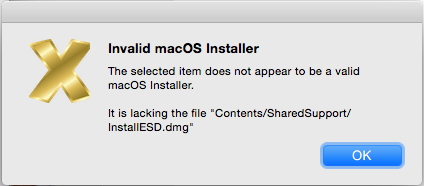
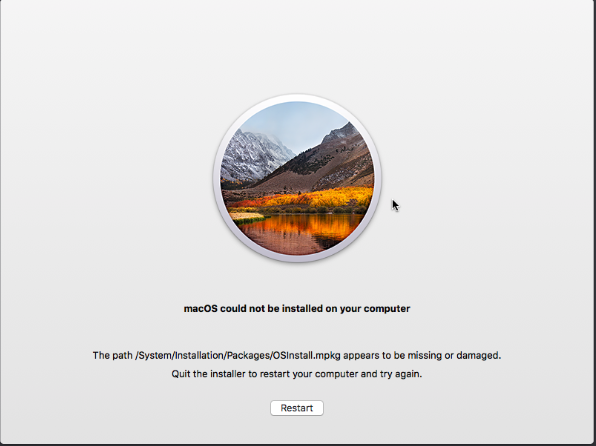
Another issue, some help here would be kindly appreciated. I'm trying to download the latest 10.13.3 from the app store, but because my real mac is running an older version, the app store doesn't download the complete installer instead the stub installer of ~20MB. "Install Disk Creator" of course won't work. I then clicked the stub installer and it downloads the real files into /macOS\ Install\ Data/. Googling lead me to do the following to plot it back into /Applications: mkdir /Applications/Install\ macOS\ High\ Sierra.app/Contents/SharedSupport cd /macOS\ Install\ Data find . -mount | cpio -pvdm /Applications/Install\ macOS\ High\ Sierra.app/Contents/SharedSupport Now trying "Install Disk Creator" once more gives me the following error: "invalid macOS Installer, lacking InstallESD.dmg". It would appear that it downloadeed InstallESDdmg.pkg and is not in .dmg. More googling, and I tried this command to create the USB on the command line (without Install Disk Creator), which, I thought worked, until I reboot the VM. This is the command I used to create the USB: /Applications/Install\ macOS\ High\ Sierra.app/Contents/Resources/createinstallmedia --volume /Volumes/SierraInstaller --applicationpath /Applications/Install\ macOS\ High\ Sierra.app --nointeraction The initial booting of the VM works and I'm able to format the Qemu disk but the subsequent reboot gives me, "macOS could not be installed on your computer, the path...." (see second screenshot).
-
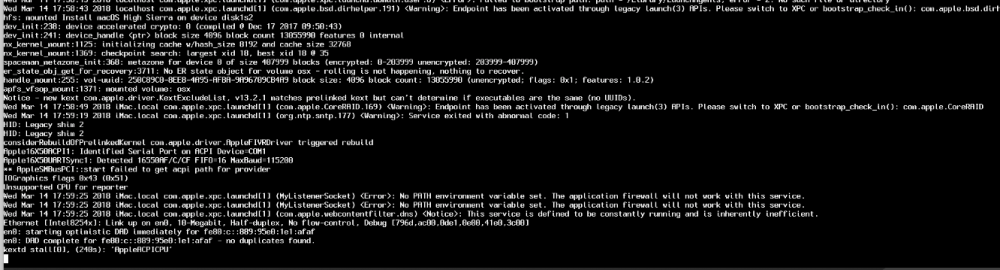
Copied all necessary files and added the XML lines and Using clover r4411. I was able to boot up the usb install image and format the qemu disk with apfs and on the next subsequent reboot it seems to hang at the apple logo, at least I think it's hanging - the progress bar does not appear to be moving. With verbose on, it's seems to stall at AppleACPICPU, some kind of timeout. Not sure why this happens on the second boot.
-
Thanks, concerning the footer, I'm on Chrome and yes, using v5.
-
Unfortunately, I can't provide any additional logs and/or specifics but I twice tried to use the scatter feature to move all data off of one drive and disperse it across several other drives and once ran into the issue of unbalance filling up one drive first ( and quitting due to an out of space error ) and the second attempt, I needed to kill the rsync processes before it did the same. Which begs the question, how does one kill the current rsync process (or the entire operation) from the GUI, is there a way, or I'm missing something? I tried the little icons before the source field, it didn't do it. To elaborate on my second attempt, I had about 1TB to move off of one drive, so I selected it as the source drive (with all folders selected), I then proceeded to select two drives (with about 900GB free on each) as targets. I did the plan and move and ended up killing unbalance as I got an unRAID low disk warning (>90% full) on the first target drive and nothing got allocated to the second. So when I manually killed unbalance, the first target drive had 175GB left and the second still had ~900GB, I'm sure had I let it run it's course, I would have end the same out of space error as on my first attempt. Perhaps it's just my setup but I'm assuming it's suppose to adequately calculate total moveable GB and plan accordingly taken into consideration the space available on the target disks selected, no? If I do it piecemeal, where the target is one drive then it's fine. Also I notice the footer breaking when source directories are uncollapsed and list is quite long. And I also notice the {"message":"Not Found"} output when I reload the "/transfer" URL from some reason. Thanks for your work.
-
Seems like headers is up to 22 now.
-
I'm assuming if you leave DHCP pool empty then it disables the internal dhcp server? I ask, 'cause I have a pfSense doing the serving of the IPs for this vlan.
-
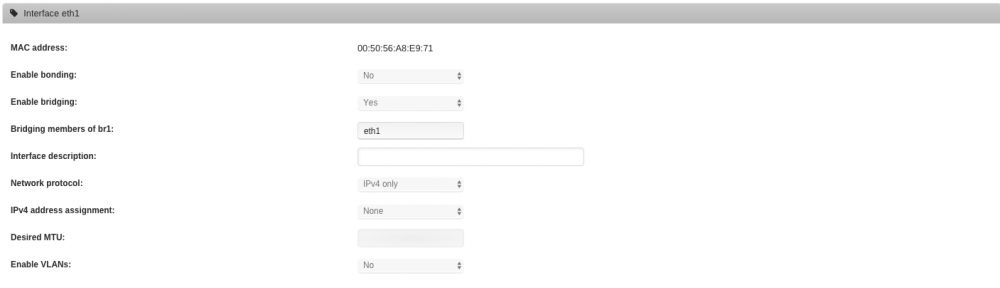
I'm assuming this is what needs to get commented out to persist custom networks now in /etc/rc.d/rc.docker now? # get existing custom networks NETWORKS=$(docker network ls --filter driver='macvlan' --format='{{.Name}}'|tr '\n' ' ') for NETWORK in $NETWORKS; do # remove networks which have been replaced [[ $EXCLUDE =~ "$NETWORK " ]] && docker network rm $NETWORK 1>/dev/null 2>&1 # remove user defined networks [[ $DOCKER_USER_NETWORKS != preserve && ! $ACTIVE =~ "$NETWORK " ]] && docker network rm $NETWORK 1>/dev/null 2>&1 done Not sure , maybe someone could explain? eth1 (vlan 10 for me) is configured as per the attachment. ifconfig reports: br1: flags=4163<UP,BROADCAST,RUNNING,MULTICAST> mtu 1500 inet6 fe80::c8a8:6aff:fe05:7e2d prefixlen 64 scopeid 0x20<link> ether 00:50:56:a8:e9:71 txqueuelen 1000 (Ethernet) RX packets 998135 bytes 1584184370 (1.4 GiB) RX errors 0 dropped 0 overruns 0 frame 0 TX packets 165324 bytes 20552626 (19.6 MiB) TX errors 0 dropped 0 overruns 0 carrier 0 collisions 0 yet "docker network ls" reports the following without br1 NETWORK ID NAME DRIVER SCOPE b89f4a20a05f br0 macvlan local 6f115d5cc668 bridge bridge local 76cfe74c0cc3 host host local cdd2a35da12d none null local I can manually create a docker network with the command line and using the parent interface br1 to get my vlan working. But if I use a non-standard name for the network the it won't survive reboots. Should I instead disable bridging from the GUI for eth1 and then use the docker create command and use as parent "eth1" and create a docker network with the name "br1" instead of using something like "docker1"???? Maybe that makes more sense here.
-
So I'm trying something different here (instead of everything go out through the same pipe.) I have a free physical NIC so I created a new port group in ESXi (VLAN10) and assigned it the id of 10. I then added another NIC to unRAID and created a br1 bridge and gave it an address on that subnet. So alls fine until here. Kernel IP routing table Destination Gateway Genmask Flags Metric Ref Use Iface default pfSense.localdo 0.0.0.0 UG 1 0 0 br0 default 192.168.10.1 0.0.0.0 UG 10 0 0 br1 192.168.3.0 * 255.255.255.0 U 0 0 0 br0 192.168.10.0 * 255.255.255.0 U 0 0 0 br1 Now, I figure I could assign a container to br1 and give it an appropriate address in the subnet it question. I do so, but cannot ping it. I also can't ping the default gateway for this VLAN within this container. Although I can ping the default gateway (pfsense) on this subnet from unRAID. Thought this would be an easier approach to have two nics, any thoughts on what I'm missing? EDIT: Works now...I reread this thread and noticed the insight about not assign an ip to br1. That did it...
-
I'm trying to change the port from 22 to 2222 and was wondering why I cannot? It always defaults back to 22. I've deleted the plugin and reinstalled. /etc/ssh/sshd_config appears to be empty... EDIT: Never mind, delete /boot/config/ssh/* and rebooted
-
Any thoughts about this error and have to complete the operation, it no longer wants to... I: 2018/02/15 10:13:16 core.go:655: Running Move operation ... I: 2018/02/15 10:13:16 core.go:678: Command Started: (src: /mnt/disk2) rsync -avPRX --append-verify "personal/Documents" "/mnt/disk8/" I: 2018/02/15 10:13:16 core.go:158: Sending operation W: 2018/02/15 10:13:17 shell.go:171: rsync:exit:(exit status 23) W: 2018/02/15 10:13:17 core.go:818: Command Interrupted: rsync -avPRX --append-verify "personal/Documents" "/mnt/disk8/" (exit status 23 : Partial transfer due to error) I: 2018/02/15 10:13:17 core.go:980: unBALANCE - MOVE operation INTERRUPTED I tried the --append-verify switch to no avail. EDIT: Never mind, it seems to be a file with the user.com.apple.quarantine attribute. BTW the log didn't indicate that this way the case, it was only until I ran a rsync from the command line did i finally get to the bottom of this. In any case, when it bombed it ended up creating duplicates, I'm assuming because it couldn't complete - which was a bit of a mess - otherwise a cool app and much needed functionality in unRAID.
-
Tried on 6.4, looks good. Thanks for your effort @StevenD.
-
I also appreciate your efforts here. I know there are still quite a few still virtualization unraid....
-
I posted some more info in your thread.
-
Have you tried adding a static route from the docker ip range to be reached via the default gateway (i guess 192.168.7.1 in your case)? I'm able to get br1 to br0 communication.
-
It would be a container on the VLAN10 subnet (192.168.10.0/24), ideally it would be the kodi-headless docker with needs access to 192.168.3.99 via the smb shares. EDIT: I added the following route which appears to semi-work from (not sure if this is the right way to do it though). I'm able to ping 192.168.3.99 from 192.168.10.0/24 but not the other way around but I think it should be good for my needs. route add -net 192.168.10.0 netmask 255.255.255.0 gw 192.168.3.1 A couple of questions: Anything else I have to be aware of with respect to this static route after subsequent reboots? I'm assuming it's as simple as adding it to the go file? Can anyone elaborate on how to force a specific mac address for a docker such that it does not change? A better question is, does a particular mac address change for a docker on subsequent reboots? Probably on container removal/recreation... Another point, I'm not sure why I cannot select br0 for a docker's interface, I thought I saw it selectable earlier, not sure if it disappeared for some odd reason. Should I not be able to see it as part of the network type dropdown?
-
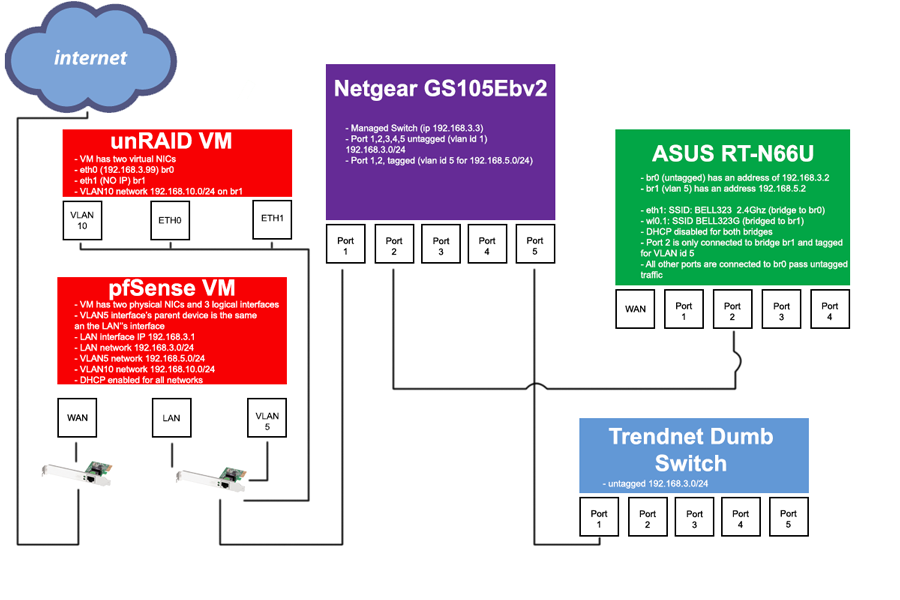
Perhaps someone could clarify as to how to implement the work-around to have a container speak to the host. My ESXi box has two physical NICs (LAN/WAN), I've attached my topology diagram - unRAID is virtualized both NICs below have the same parent interface. VLAN5 is for my guest wifi, so disregard. VLAN10 is what I want configured for dockers. I also have pfSense running virtualized using both LAN/WAN and have and has interfaces for VLAN5/10. My details are as follows for my unRAID VM: Virtual NIC eth0: bridging member: br0 IP: 192.168.3.99 Gateway: 192.168.3.1(pfSense) Virtual NIC eth1: bridging member: br1 IP: None Gateway: None VLAN Enabled: Yes VLAN #: 10 VLAN Static IP: 192.168.10.99 VLAN gateway: 192.168.10.1 Test Container: Network Type: br1.10 Fixed IP address:192.168.10.96 Bashing into this container, I'm able to ping every client on 192.168.3.0/24 except 192.168.3.99 (unRAID). Thoughts? docker network ls: NETWORK ID NAME DRIVER SCOPE f1e931e72f79 br1.10 macvlan local a763720d03b3 bridge bridge local f9aa41a1e4cb host host local f90f49050874 none null local route: Destination Gateway Genmask Flags Metric Ref Use Iface default 192.168.10.1 0.0.0.0 UG 1 0 0 br1.10 default pfsense.lan 0.0.0.0 UG 2 0 0 br0 172.17.0.0 * 255.255.0.0 U 0 0 0 docker0 192.168.3.0 * 255.255.255.0 U 0 0 0 br0 192.168.10.0 * 255.255.255.0 U 0 0 0 br1.10
-
Has anybody figured out a way to put this docker on a separate IP address in 6.4 and still have access to the smb shares? From what I remember, when you initiate a database scan (once you've added a source/path) it connects via smb on the unRAID IP (as all entries are stored in the mariandb for kodi as smb:// paths). More so, when sonarr sends an update (new episode added) request, it needs access to the meta data file stored on the smb share. Unless I'm missing something the kodi-headless docker needs access to the unRAID IP for smb shares? If someone knows better, please correct me if I'm wrong.
-
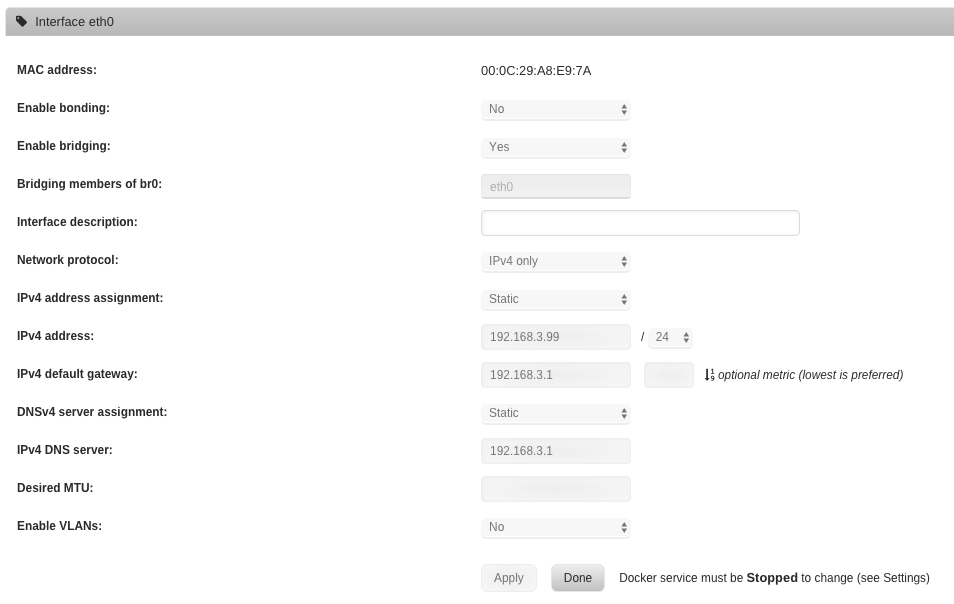
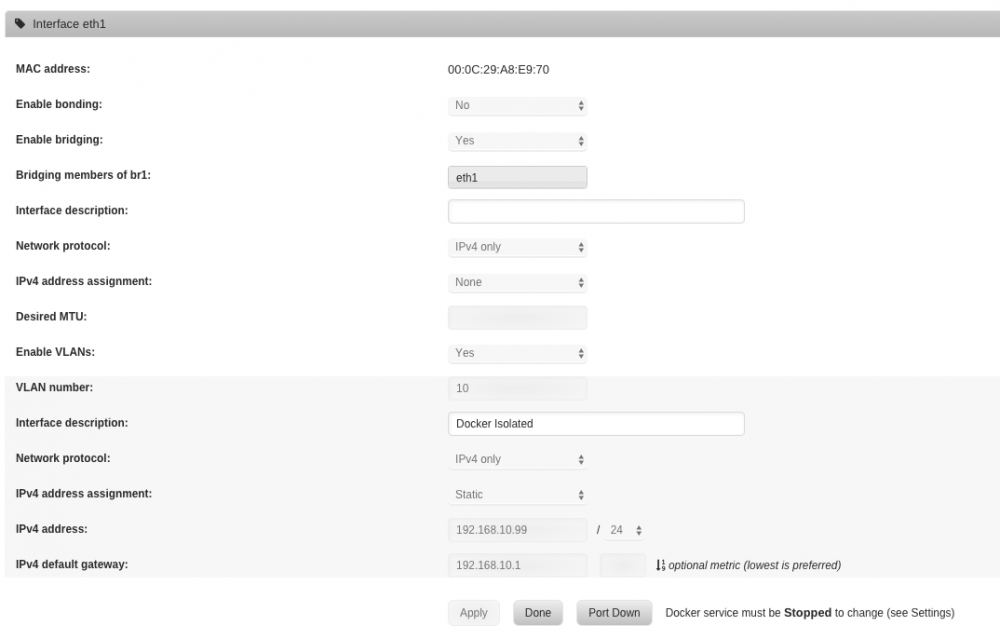
Thanks for the reply. For security, I'd like to put at least the deluge docker on a separate VLAN as I will port forward from my router. More so, at the router level, I can easily redirect traffic from this VLAN out via the already established VPN connection. I get that when sharing information on the host, this should be done thru the regular folder mapping not SMB shares but I'm trying to think of my particular case with the kodi-headless container, which from what I remember, when you initiate a database scan it connects via smb on the unRAID IP (as all entries are stored in the mariandb for kodi as smb:// paths). More so, when sonarr sends an update (new episode added) request it needs access to the meta data file stored on the smb share. You're right though, it's probably much simpler to give each docker its own IP address within your existing network but even if I give each docker its own IP address within my existing network, the kodi-headless docker still won't work to connect to the smb shares on the unRAID IP, so back to square one. Unless I'm missing something the kodi-headless docker needs access to the unRAID IP for smb shares? If someone knows better, please correct me if I'm wrong. Edit1: I'm running unRAID under ESXi any way around this, perhaps adding a second virtual NIC eth1 and creating a new bridge on that interface and leave eth0 as the host IP? Edit2: Well that didn't work. I added another virtual NIC to my unRAID VM as eth1 and recreated a new bridge br1 and gave a container a br1 (where i got a vlan) address and still couldn't ping eth0 from within the container. Pinging any other IP but the unRAID IP works from my vlan docker. Everything was done from the GUI in 6.4. Attached some screens of the interfaces. Not sure if the fact that both eth0 & eth1 are the same physical adapter has something to do with this not working. NETWORK ID NAME DRIVER SCOPE f1e931e72f79 br1.10 macvlan local a763720d03b3 bridge bridge local f9aa41a1e4cb host host local f90f49050874 none null local
-
I'm basically trying to restructure my dockers I currently have running on the unRAID host as separate IPs / VLANs. The dockers in question are the customary sabnzbd/deluge/kodi-headless(mariadb)/sonarr. I'd like to put sabnzbd/deluge on a separate VLAN but that means that I have to put sonarr on a separate IP address (as from what I understand the host cannot communicate directly with an IPs / VLANs). Now if I put sonarr on a separate IP, I need to do the same with kodi-headless(mariadb) because sonarr updates the central DB. But I run into the same issue with communication, as kodi-headless needs to access the smb shares on the unRAID host. Thoughts here? Or an I missing something?
-
Not sure if anyone else is having this problem. I'm having problems getting some deluge settings to stick after a restart of the docker, namely, enabling Plugins. I enable a plugin, restart the container and it's not enabled. Thoughts?
-
Question, I currently have pfsense redirecting my unRAID IP though a PIA VPN connection already (basically I connect at the router level). If I were to use this container what would be the ramifications? Would I infact be going out two tunnels?



