





WingmanNZ
Members
-
Joined
-
Last visited
Everything posted by WingmanNZ
-
@scot how has Timemachine been with the ZFS SLOG?
-
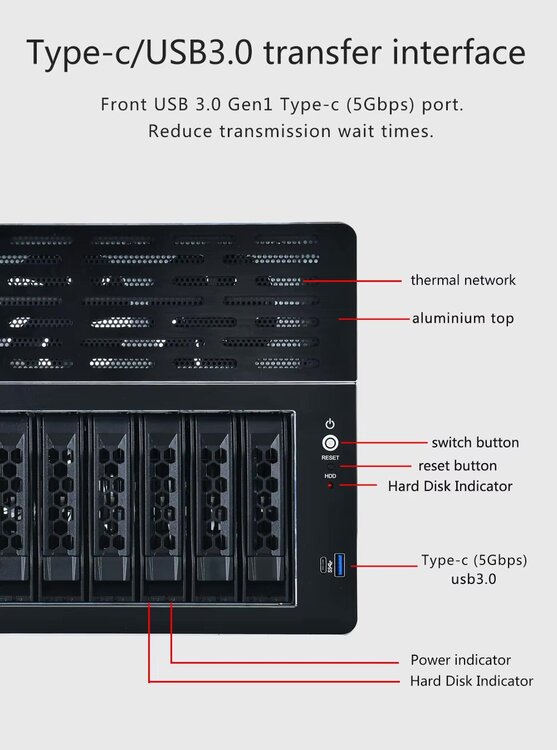
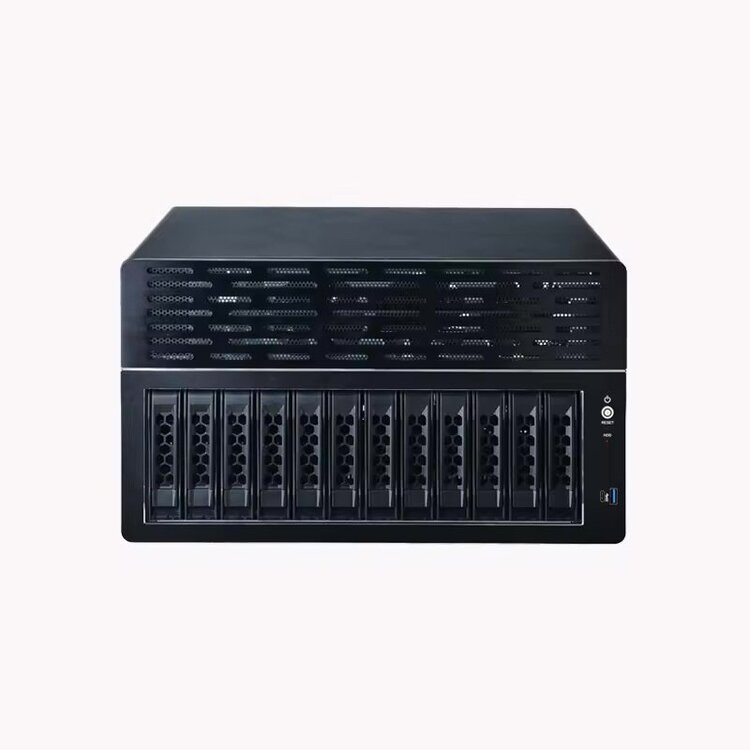
Would someone be able to make a case icon for this FANLONG NAS-12 Case? https://www.alibaba.com/product-detail/Fanlong-12-bay-half-height-NAS_1600905481914.html
-
@spasszeit How did you get on with the BPN-SAS3-846EL1? Do you have working activity lights with this?
-
Thank you. I have installed that from https://raw.githubusercontent.com/SimonFair/gpustat-unraid/master/gpustat.plg and can confirm it resolves the issue
-
Unraid Version: 6.12.0-rc2.9 Plugin Version: 2023.03.27
-
No I don't have the plug-in installed. here is the output you requested; note: I have the ASPEED VGA adaptor as my primary to allow HTML5 KVM access to the machine, and the Intel UHD GPU is enabled in the bios so that I can use it in docker for HW transcoding. root@NAS:~# lspci -nnmm 00:00.0 "Host bridge [0600]" "Intel Corporation [8086]" "Device [a703]" -r01 -p00 "Super Micro Computer Inc [15d9]" "Device [1c48]" 00:01.0 "PCI bridge [0604]" "Intel Corporation [8086]" "Device [a70d]" -r01 -p00 "Super Micro Computer Inc [15d9]" "Device [1c48]" 00:02.0 "Display controller [0380]" "Intel Corporation [8086]" "Raptor Lake-S GT1 [UHD Graphics 770] [a780]" -r04 -p00 "Super Micro Computer Inc [15d9]" "Device [1c48]" 00:06.0 "PCI bridge [0604]" "Intel Corporation [8086]" "Device [a74d]" -r01 -p00 "" "" 00:0a.0 "Signal processing controller [1180]" "Intel Corporation [8086]" "Device [a77d]" -r01 -p00 "" "" 00:14.0 "USB controller [0c03]" "Intel Corporation [8086]" "Alder Lake-S PCH USB 3.2 Gen 2x2 XHCI Controller [7ae0]" -r11 -p30 "Super Micro Computer Inc [15d9]" "Device [1c48]" 00:14.2 "RAM memory [0500]" "Intel Corporation [8086]" "Alder Lake-S PCH Shared SRAM [7aa7]" -r11 -p00 "" "" 00:15.0 "Serial bus controller [0c80]" "Intel Corporation [8086]" "Alder Lake-S PCH Serial IO I2C Controller #0 [7acc]" -r11 -p00 "Super Micro Computer Inc [15d9]" "Device [1c48]" 00:15.1 "Serial bus controller [0c80]" "Intel Corporation [8086]" "Alder Lake-S PCH Serial IO I2C Controller #1 [7acd]" -r11 -p00 "Super Micro Computer Inc [15d9]" "Device [1c48]" 00:16.0 "Communication controller [0780]" "Intel Corporation [8086]" "Alder Lake-S PCH HECI Controller #1 [7ae8]" -r11 -p00 "Super Micro Computer Inc [15d9]" "Device [1c48]" 00:16.3 "Serial controller [0700]" "Intel Corporation [8086]" "Device [7aeb]" -r11 -p02 "Super Micro Computer Inc [15d9]" "Device [1c48]" 00:17.0 "SATA controller [0106]" "Intel Corporation [8086]" "Alder Lake-S PCH SATA Controller [AHCI Mode] [7ae2]" -r11 -p01 "Super Micro Computer Inc [15d9]" "Device [1c48]" 00:1c.0 "PCI bridge [0604]" "Intel Corporation [8086]" "Alder Lake-S PCH PCI Express Root Port #1 [7ab8]" -r11 -p00 "Super Micro Computer Inc [15d9]" "Device [1c48]" 00:1c.1 "PCI bridge [0604]" "Intel Corporation [8086]" "Alder Lake-S PCH PCI Express Root Port #2 [7ab9]" -r11 -p00 "Super Micro Computer Inc [15d9]" "Device [1c48]" 00:1c.3 "PCI bridge [0604]" "Intel Corporation [8086]" "Device [7abb]" -r11 -p00 "Super Micro Computer Inc [15d9]" "Device [1c48]" 00:1f.0 "ISA bridge [0601]" "Intel Corporation [8086]" "Device [7a88]" -r11 -p00 "Super Micro Computer Inc [15d9]" "Device [1c48]" 00:1f.3 "Audio device [0403]" "Intel Corporation [8086]" "Alder Lake-S HD Audio Controller [7ad0]" -r11 -p00 "Super Micro Computer Inc [15d9]" "Device [1c48]" 00:1f.4 "SMBus [0c05]" "Intel Corporation [8086]" "Alder Lake-S PCH SMBus Controller [7aa3]" -r11 -p00 "Super Micro Computer Inc [15d9]" "Device [1c48]" 00:1f.5 "Serial bus controller [0c80]" "Intel Corporation [8086]" "Alder Lake-S PCH SPI Controller [7aa4]" -r11 -p00 "Super Micro Computer Inc [15d9]" "Device [1c48]" 00:1f.6 "Ethernet controller [0200]" "Intel Corporation [8086]" "Ethernet Connection (17) I219-LM [1a1c]" -r11 -p00 "Super Micro Computer Inc [15d9]" "Ethernet Connection (17) I219-LM [1a1c]" 01:00.0 "Serial Attached SCSI controller [0107]" "Broadcom / LSI [1000]" "SAS2008 PCI-Express Fusion-MPT SAS-2 [Falcon] [0072]" -r03 -p00 "Broadcom / LSI [1000]" "9211-8i [3020]" 02:00.0 "Non-Volatile memory controller [0108]" "ADATA Technology Co., Ltd. [1cc1]" "XPG SX8200 Pro PCIe Gen3x4 M.2 2280 Solid State Drive [8201]" -r03 -p02 "ADATA Technology Co., Ltd. [1cc1]" "XPG SX8200 Pro PCIe Gen3x4 M.2 2280 Solid State Drive [8201]" 03:00.0 "PCI bridge [0604]" "Integrated Technology Express, Inc. [1283]" "IT8893E PCIe to PCI Bridge [8893]" -r41 -p01 "" "" 05:00.0 "Ethernet controller [0200]" "Intel Corporation [8086]" "Ethernet Controller I225-LM [15f2]" -r03 -p00 "Super Micro Computer Inc [15d9]" "Ethernet Controller I225-LM [15f2]" 06:00.0 "PCI bridge [0604]" "ASPEED Technology, Inc. [1a03]" "AST1150 PCI-to-PCI Bridge [1150]" -r06 -p00 "Super Micro Computer Inc [15d9]" "AST1150 PCI-to-PCI Bridge [1c48]" 07:00.0 "VGA compatible controller [0300]" "ASPEED Technology, Inc. [1a03]" "ASPEED Graphics Family [2000]" -r52 -p00 "Super Micro Computer Inc [15d9]" "ASPEED Graphics Family [1c48]" root@NAS:~# I ended up changing `VGA` in the grep search to `lspci -Dmm | grep -E 'Display|VGA'` in /usr/local/emhttp/plugins/gpustat/lib/Intel.php and the plug-in now works for me.
-
My UHD 770 does not have VGA in the name... It has Display controller 00:02.0 Display controller: Intel Corporation Raptor Lake-S GT1 [UHD Graphics 770] (rev 04)
-
Try ticking all the boxes for that IOMMU group, then restarting Unraid, you can then assign the GPU to your VM and start your VM.
-
I'm using UEFI only. I don't have a GPU installed yet for VM pass through. I can try this week with a Quadro P2000. Do you mind checking your idle power drawer with just your cpu/ram/motherboard connected to the power supply?
-
I am also curious about Jon Panozzo's departure. I have not seen him around for awhile and couldn't find any news about it...
-
I had an issue with my LSI 9200-8i adaptor not working in the second slot, it only works in the first 16x slot (closest) to the CPU. I have 24 drives connected to it via a SAS expander and it works great. I also have 4 SATA SSD's connected to 4 of the onboard SATA ports which are all working correctly. So far my only issue has been trying to get the CPU to drop down to C-States/P-States lower than C1/C2....
-
I would love to know what the output of running `powertop` on your system is. Also, what BIOS settings do you have configured. I have a similar CPU/RAM/Motherboard combo, but cannot get the CPU (Intel 13700) to move any lower than C2 power states
-
Elves are keeping busy..... Ni4xMi4wLWJldGE0
-
Do you mind sharing the link to the vendor? I am going to be purchasing this motherboard in the next few weeks and plan to pair it with the upcoming i9-13900 (non-K) and 64GB ECC DDR5
-
@clarkg888 you could give this a try https://tql.ink/ipmi/
-
I just discovered these awesome tools and wondered if they respect hardlinks?
-
Time to shuffle data around from five 10TB drives
-
I am running 6.10-RC4 and still have five 10TB disks that all report xfs_growfs: XFS_IOC_FSGROWFSDATA xfsctl failed: No space left on device when I run xfs_growfs /mnt/diskX Is there some way to fix this or do I need to offload the data and reformat these?
-
I would like to know this as well. I have one 10TB drive that shows this error upon every boot. I have been following this thread closely and look forward to RC4. Thank you @JorgeB for your investigations!
-
Looks like 6.8.0 RC's are not far away The new remote access management plugin appears to be live and testing internally as it requires `6.8.0-rc0p` https://raw.githubusercontent.com/limetech/Unraid.net/master/Unraid.net.plg <?xml version='1.0' standalone='yes'?> <!DOCTYPE PLUGIN [ <!ENTITY name "Unraid.net"> <!ENTITY launch "Settings/ManagementAccess"> <!ENTITY author "limetech"> <!ENTITY version "2019.03.07a"> <!ENTITY pluginURL "https://raw.githubusercontent.com/limetech/&name;/master/&name;.plg"> ]> <PLUGIN name="&name;" author="&author;" version="&version;" launch="&launch;" min="6.8.0-rc0p">
-
Does anyone know how to have the Unraid GUI stop the macOS VM? I have a High Sierra VM that was created using the latest guides, but It doesn't shutdown when I try to stop it from the Unraid VM GUI.
-
That link is old and might not reflect current status. I know it's old because the second screenshot shows "Allow higher bitrate over 3G". This option was removed from recent plex server versions as it is considered obsolete now. The age of the link may or may not validate your position, but I think something more recent must be found / communicated before we take it as fact. It's now updated https://support.plex.tv/hc/en-us/articles/200250347-Transcoder
-
It is no longer configurable via environment variable, yes, but users can still use the normal advanced setting in Plex Web to change the Transcoder temporary directory https://support.plex.tv/hc/en-us/articles/200250347-Transcoder
-
Hi Lonix, I feel I should clarify this, Plex removed the ability to set the transcoding temp directory via environment variable, not the ability altogether. Users can still change the advanced Transcoder temporary directory preference via Plex Web. https://support.plex.tv/hc/en-us/articles/200250347-Transcoder
-
Cheers for that mate, any known issues with 5.0b8d?


