






craigr
Members
-
Joined
-
Last visited
Everything posted by craigr
-
So I have suddenly started having an issue... I did update the DD-WRT firmware on my router a few days ago, but I don't think that's it. I tried resetting the router to defaults today as well. When I launch the docker it opens fine and I start seeding right away. Then, it seems that deluge keeps losing the connection to my VPN so deluge attempts to reconnect and does. The PIA connection keeps getting lost and reconnected. I tried changing the PIA gateway from Montreal (which had been working fine) to Toronto and I am getting the same results. Even while I am downloading the PIA connection will get lost, the download will stop, and then reconnect. I can't understand why this has started seemingly out of the blue. Attached is my log (supervisord.log). I can get a longer log if that will help anyone, but I think it shows at least one of the lost connections and then a reconnection. Thanks for any help! I am so frustrated. craigr
-
Don't ask me how I didn't see that. Thanks, craigr
-
Could someone please tell me where I can find the value for the key "NAME_SERVERS"? I checked all the files in appdata/binhex-delugevpn and could not find them. Do I need to somehow create a new "key" on the "Update Container" docker setup page? If so, could someone please walk me through doing this? I would like to use the PIA name servers. Thank you and kind regards, craigr
-
It depends how you setup the VPN on the router. You probably have an option for excluding or including specific IP addresses. Like with “policy based routing” any IP you put in will go through the router VPN and all others will not. craigr
-
binhex, thanks for this docker. I’ve been fighting trying to get DD-WRT, PIA, and ports open for two years on and off. Got it all done in less than a day with your docker. I love the way you pull the PIA open ports automatically. Fantastic, craigr
-
So now I totally get it and once that happens it’s easy craigr
-
LOL. I was thinking the same thing. I’m going to reed the whole faq. thanks again for pointing me in the right direction. craigr
-
Thank you! Thank you! Those two posts were all it took. Got it craigr
-
Thanks for this and any other tips. I don't understand Docker volume mappings well at all. I don't know much about docker really. I've been able to slog through installing dockers and getting them to work. Here is my run command: I see the "-v '/data':'/data':'rw'" and the "-v '/mnt/cache/appdata/binhex-delugevpn'" and it's created those directories on my chach drive. But the torrent that I downloaded isn't in the /data directory (as deluge was originally configured) and if I change "data" in the docker GUI to a different directory nothing seems to change... Thanks, craigr
-
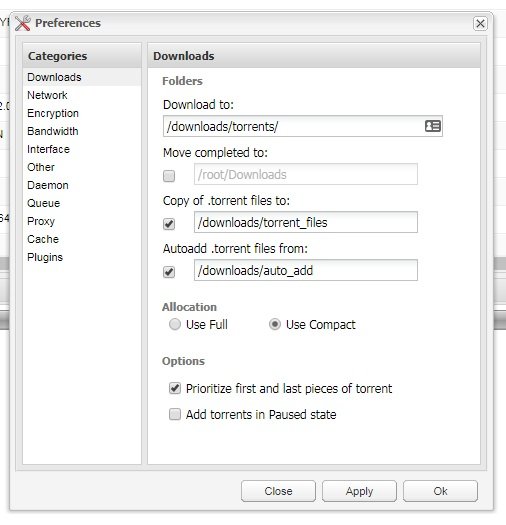
I have been using linuxserver/deluge for years without problems configuring it. With binhex-delugevpn I have everything working well with PIA; I thought that would be the difficult part but it took only five minutes or less. However I am having trouble with what I think is the easiest thing of all. How do I make this happen? I have been working on this for hours and must be missing something simple! Also, where does binhex-delugevpn put torrents files and downloaded torrents by default. I added one torrent and downloaded it, but I have no idea where it is located on my server?!? I would have thought that it would be located in /mnt/cache/appdata/data but that file is empty. I tried changing the "Container Path: /data" to "/downloads" and "/mnt/cache/downloads" and also tried "/mnt/cache/appdata/downloads" and still no difference. What stupid thing am I doing wrong? Can someone please take pitty on me and help with this most basic question? Thank you! craigr
-
Is there a setting to adjust such that cache_dirs will NEVER spin up a disc that's spun down? I don't want discs spinning up randomly which is what's happening now. It causes whatever I'm (and family) is watch to freeze up on screen while the disc spins up and is also putting unnecessary wear and tear on discs. The whole point of spinning dicks down is to reduce wear and tear, not increase it... I appreciate all the help with this app, but for me it has turned into a disaster. Also, the reset to defaults button is not working for me. I guess I will lust reinstall it again with Alex's files... Thanks again and kind regards, craigr
-
So did putting -L in the "User defined options:" along with using the txz and plg solve your issues? Does -U or -u still work for caching user shares? I'm running preclear on two 8TB drives so it will be a day and a half before I can try it because I think I need to reboot? I did copy the txz and plg along with adding -L to "User defined options:" but cache_dirs says it is not running. It shows version: 2.2.0j in settings and version 2018.09.30 in Plugins. Plugins shows a newer release but I'm assuming this is not pertinent after overwriting the txz and plg? Thanks craigr
-
+100 Thanks to all who are helping and to all who have helped in the past. For now I have removed the script because it's working so poorly for me. But I agree that it is essential for unRAID. Kind regards, craigr
-
Never mind. Uninstalled and reinstalled and now it works. craigr
-
Sorry if this has been covered, but I searched and can't find the answer. In Folder Caching I cannot change any of the following parameters: Disk Idle Timer (sec): 60 Scan timeout for a scan during disk-idle period (sec):150 Scan timeout for a scan during initial startup or less-idle period (sec):30 Scan timeout for a scan when all directories have been succesfully cached (sec):20 Minimum interval between folder scans (sec):1 Maximum interval between folder scans (sec):10 Cache pressure of directories on system:10 Limit the memory available to the shell in which the script runs (increase if it dies):50000 I've had used cache_dirs for some time before it was renamed Folder Caching, but for a long time now I have had trouble with discs spinning up when the directories I am browsing should be cached or even all the discs spinning up when a user share uses all of the discs. Discs are constantly being spun up when file browsing and in the past I didn't have this issue. I would like to try and tweak the settings, but can't change any of the values. I've tried disabling Folder Caching and then changing, but no joy there either. This has to be something simple right? Thanks craigr
-
It seems that the script is more aggressive on testing the drive and takes a lot longer. Is that my imagination? craigr
-
Are others having this issue? I just picked up 5x 8TB drives and want to preclear. I’ll avoid updating unRAID until this is resolved. craigr
-
Avoid running cables parallel to each other. Having them cross over each other isn’t usually an issue, but if run side by side the EM fields can cause errors. craigr
-
This is what I was just thinking; maybe all cables are tied together or are running too closely to other components or power wires. I miss read the original post and thought it was one CRC on one drive, not one on all four. You could have not so great SATA cables or a marginal controller on the motherboard. Once you you get the array built I would run two or three parity checks to make sure the numbers don’t rise. Also, if the SATA power cable terminator is not so great or poorly connected, or if you don’t have a large enough power supply you can sometimes get these error. I once racked up thousands of CRC’s on four drives connected to the same 4-way power splitter... and discovered my SATA powered splitter was not plugged in all the was to the power supply SATA power connector. Unplug and replug and problem was gone. Many years later no CRC has never increased. craigr
-
Probably a SATA cable issue, or even low on power. craigr
-
It ran fine on a known bad 2TB drive and failed when it hit errors. It seems to be working correctly. I’m running it again on same drive, but can slap in a good 100GB drive once it’s finished. craigr
-
AwesomeTHANK YOU @gfjardim so much! Very kind regards, craigr
-
Thanks for this post. Right now I have one SSD in my array that has been there for years and has not been at all problematic. It uses "Deterministic read data after TRIM." However, this drive is getting too small for my needs and I want to get a larger drive now, so naturally I want to make sure it is compatible with unRAID TRIM in the future. If only DZ_TRIM is going to be supported, I want to find a disc that supports this. I however can't figure out a way to discover what type of TRIM any given SSD supports short of buying it and putting it into a Linux machine and checking. Is there a list or any reference available to figure out what SSD drives support DZ_TRIM TRIM? That said, there are also several hardware versions of the 840 PRO so who knows if they all handle TRIM the same way?!? I read a random post in some random Linux forum that the Samsung EVO 840 PRO supports DZ_TRIM but that the 850 does not. That is literally all the info I can find about SSD drive trim types after a lot of Googling. Anyone have any guidance? Thanks, craigr
-
Darn, but also thanks. craigr
-
So does that include SSD drives in the array than? That would be excellent! Thank you, craigr


