






craigr
Members
-
Joined
-
Last visited
Everything posted by craigr
-
Actually a follow up. Do you specifically have beta 35? This is where the new video drivers have been added. craigr
-
Thank you. craigr
-
Has anyone using this method to enable i915 in PLEX tried unRAID 6.9.0-BETA35? If so, did you need to change anything? Thanks, craigr
-
Every country except the USA supports port forwarding now. However, I cannot get a port forwarded from Canada Toronto. I have used the other three servers in Canada, Mexico, Greenland, and Albania. Actually I tried several other countries too and successfully and easily received open ports from them. craigr
-
I think I figured this out from the binhex delugevpn log. https://github.com/binhex/documentation/blob/master/docker/faq/vpn.md See Question 19. I used the new PIA files from the link therre and now NZB get is working again with VPN. PIA must have disabled their old servers. I am getting much better speed now in torrents and usenet. craigr
-
I too just started having the problem yesterday. The web GUI is not found. Uninstall reinstall change location... nothing works. This docker container is suddenly for inexplicable reasons unusable now! Please help. This seems to be getting to be a widespread issue. Thanks, craigr
-
dmacias just want to say thanks for your continued support of this app. I really appreciate it. Kind regards, craigr
-
I'd also put in that I would love to use this with the iGPU in my E3-1275 v6 while running PLEX. I've used the two dockers available, but having the info right in the dashboard would be much nicer than running an entire additional docker just to get the info. Kind regards, craigr
-
So changing the CPU caused the MB to also automatically change settings back to defaults in the BIOS. I just had to go back in and turn on my onboard graphics. The i915 and i965 both use the same module so that could never have been it. Best, craigr
-
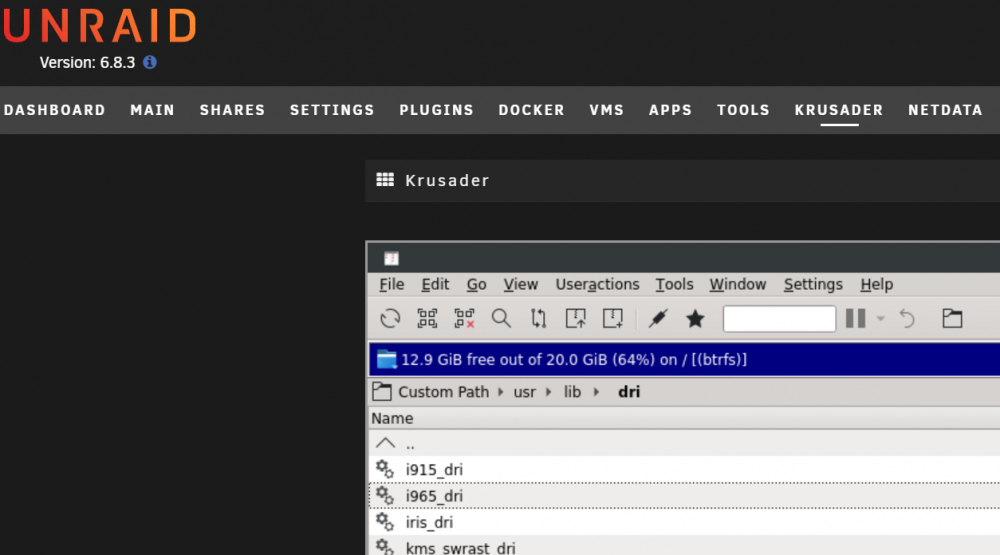
Looks like it uses the i965? I tried this: root@unRAID:~# modprobe i965 modprobe: FATAL: Module i965 not found in directory /lib/modules/4.19.107-Unraid root@unRAID:~# I checked and I don't even have a "lib" directory, just some other directories that start with lib. Do have the i965 driver in unRAID though.
-
What CPU do you have? I just changed from an E3-1275 v5 to the same but v6. The v6 can hardware encode hvec. I am however now frustrated because with the new v6 CPU no /dev/dri folder is created after typing modprobe i915. I even tried modprobe -r i915 and then redid modprobe i915 with no lock. There is just no dri folder ever created. Does the v6 have something other than i915? Any thoughts as to how I can get this running with the E3-1275 v6? Thanks, craigr
-
Also, don't forget to turn "Link State Power Management" back on in the Windows 10 advanced power options settings. craigr
-
No idea. I just did this today. I will have to test this though. I've got my UPS set to shutdown unRAID if I lose power for 10 seconds (it's not a big UPS and I have 22 drives). I don't know if unRAID would give Windows the default 60 seconds to shutdown gracefully or not. My guess is that it would try and shutdown windows gracefully, but I think that could be a problem because I don't want my UPS to have to work for an extra 60 seconds shutting down Windows. I also doubt Windows could wake from sleep and then shutdown in less than 60 seconds... than again, unRAID may not even know to wake a sleeping VM to shut it down gracefully 😬 I'd actually rather unRAID just yank Windows with a hard shutdown. The next time I have to power down the server I will pull the power on the UPS with Windows asleep and see what happens under controlled conditions. I'll report back with results. I know I am going to be doing some hardware changes next Tuesday or Wednesday so I'll find out then or before. Kind regards, craigr
-
I know many people scoff at sleeping a VM, but I really want to put my Windows 10 VM's to sleep because they are constantly doing things in the background and utilizing a lot of CPU. It costs me about 50 watts to not sleep the VM and to me that is just a waste. The trouble has been how to wake them up easily without using another device. All you have to do to make the mouse and keyboard wake Windows from sleep is use evdev to pass them through instead of the Windows template. The easiest way to learn how to do this is to watch and mostly follow Spaceinvader's new tutorial on evdev: I'm sure he will fix it, but please note that Spaceinvader doesn't quite have the syntax correct in the qemu.conf. The correct syntax is in my post just below his in the linked thread. Once you get it right, your mouse and keyboard will be able to wake your Windows VM from sleep 🤩 Also, don't forget to turn "Link State Power Management" back on in the Advanced settings of the Windows 10 Power Options, otherwise your computer may just hard shutdown instead of sleep. I am finally happy! Best regards, craigr
-
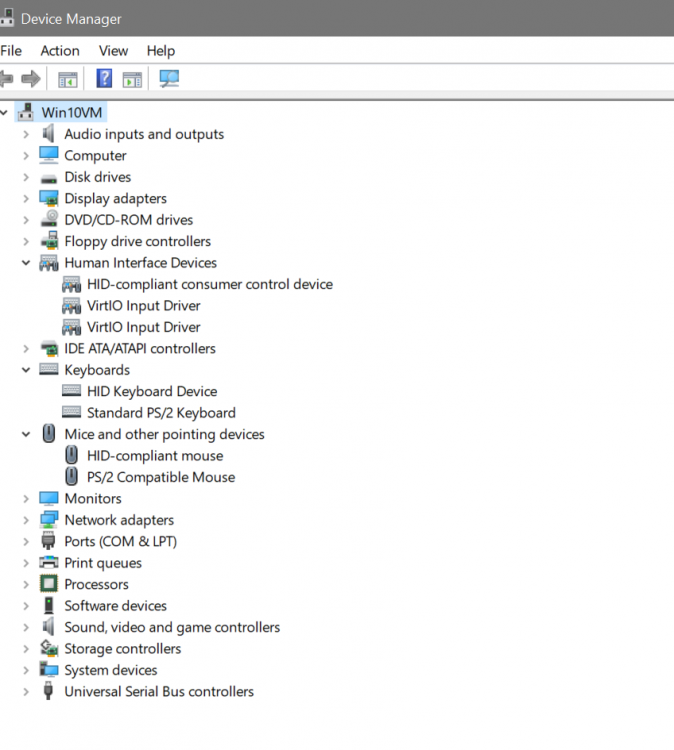
Question for you though. I did the "optional" virtio driver install for Windows 10 and then did install the virtio drivers and things were very snappy after that. However, I mucked about with my xml again after the fact, and am afraid that I may not have the virtio drivers installed properly now. Is there a way that I can verify that I have the virtio drivers installed in Windows 10 for my mouse and keyboard? I attached a grab of my device manager. For the keyboard and mouse the drivers both say Microsoft. Under "Human Interface Devices," are the VirtIO Input Drivers the actual virtio drivers for my moue and keyboard, or did I screw something up when I was later mucking about? The mouse and keyboard don't seem as snappy anymore compared to right after I installed their virtio drivers, but it could easily be my imagination. I have attached a copy of my current XML file as well. Kind regards, craigr current.xml
-
I just used this tutorial SpaceInvader, thanks for another great one! I had just started looking at evdev as a means to use the mouse and keyboard to wake my Windows 10 VM up from sleep. I know a lot of people don't like to sleep their VM's, but I do to save electricity. And, the good news is that it works 🙂 You do have a couple errors in the tutorial syntax for the qemu.conf though. In the qemu.conf, you are missing a comma at the end of the line after "/dev/hpet", and you should not have a comma after the final device. This is what you have in your video and in your text instruction file: 3/. Next we need to add our input devices to the qemu conf file nano /etc/libvirt/qemu.conf use (ctrl _ ) to goto line 451 find this part #cgroup_device_acl = [ # "/dev/null", "/dev/full", "/dev/zero", # "/dev/random", "/dev/urandom", # "/dev/ptmx", "/dev/kvm", "/dev/kqemu", # "/dev/rtc","/dev/hpet" # ] Remove hashtags then add the parts in that you want to use cgroup_device_acl = [ "/dev/null", "/dev/full", "/dev/zero", "/dev/random", "/dev/urandom", "/dev/ptmx", "/dev/kvm", "/dev/kqemu", "/dev/rtc","/dev/hpet" "/dev/input/by-id/usb-Logitech_USB_Receiver-event-kbd", "/dev/input/by-id/usb-Logitech_USB_Receiver-if01-event-mouse", ] Instead, you should have: cgroup_device_acl = [ "/dev/null", "/dev/full", "/dev/zero", "/dev/random", "/dev/urandom", "/dev/ptmx", "/dev/kvm", "/dev/kqemu", "/dev/rtc","/dev/hpet", "/dev/input/by-id/usb-Logitech_USB_Receiver-event-kbd", "/dev/input/by-id/usb-Logitech_USB_Receiver-if01-event-mouse" ] So a comma after dev/hpet", and no comma after /usb-Logitech_USB_Receiver-if01-event-mouse". If you type it in according to your example, after the reboot you'll get a "Libvirt Service failed to start" and obviously no VM support... that's what happened to me until I corrected it. Anyway, your videos save me sooooo much time, so thanks again. I literally started looking at evdev yesterday evening and was like, "is it really worth learning all this just to get my VM to wake up." Then I quickly just happened to look at your channel, and your tutorial for exactly what I wanted to do was right on top. You're the best man! Kind regards, craigr
-
Thanks. I can live with it as-is since the web based terminal or Putty is easy enough. I do have another GPU, but it's allocated to my Windows 10 VM. Kind regards, craigr
-
This app rocks. Both of my USB controllers are in the same IOMMU group and I am out of PCIe slots so adding another controller would not be an option. Not quite as good as hot swapping natively Windows, but certainly much much much better than nothing. Thanks for pointing it out! Best regards, craigr
-
So unfortunately my Tampermonkey script makes other parts uf the unRAID GUI unusable :( So I have had to disable it. craigr
-
EDIT: Never mind. I took Quick Sync away from PLEX and it did not solve the problem. Well, perhaps the saga continues for me. I tried to setup a Win10 VM today and I cannot connect to it through VNC. Is this the reason? When I click VNC Remote on my VM I get the error "Failed to connect to server." Or is this unrelated? Thanks again, craigr
-
I used tampermonkey to install the script on my primary desktop running Chrome. Thanks! craigr
-
Oh, well cool! I'll give it a try soon than. Thanks again, Craig
-
I'll look forward to this being in the new release as I don't think it will work inside of Chrome? Thanks for the effort, it is much appreciated. craigr
-
Yup, thanks for your confirmation. I was just hoping for a workaround. Oh well, not a big deal to use PuTTY. Only disadvantage I see is the loss of the GUI from the VGA, but that is a relatively new feature anyway. Best regards, craigr
-
So now I do have a question after all. Once this is done, I only get a blank screen when unRAID finishes booting up (durring boot I see all the normal text). Then, normally when I would see the login prompt, the screen goes black. I think this is because of my motherboard's implementation; it's a Supermicro X11SSH-LN4F. I tried this: After that, I do get my unRAID VGA port back after booting, but not surprisingly the PLEX docker no longer functions unless I remove the /dev/dri device. So is there any way to get my VGA port to work at the same time as Quick Sync on my motherboard? My full system is in my sig. Thanks for any help! craigr




