






craigr
Members
-
Joined
-
Last visited
Everything posted by craigr
-
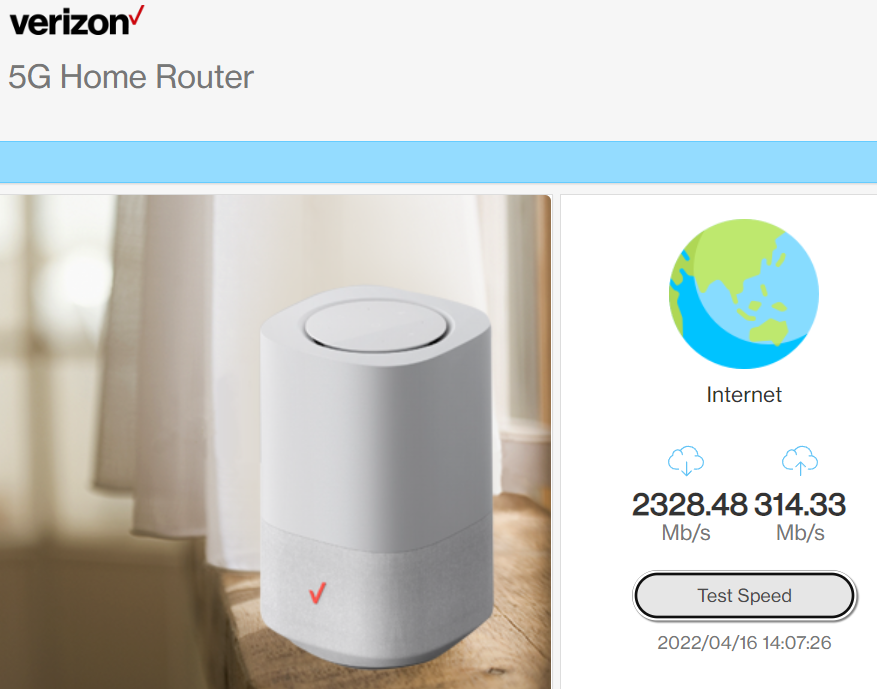
Outstanding post. This is exactly the information I needed! I have an Intel X550-T2 NBASE-T PCI NIC. The two NIC's on my MB are only 1GB. I have 2.5Gb WAN and 10Gb LAN, so I want to only use the to 10Gb ports; one for WAN and the other for LAN. However, I still want unRAID to have full access to 2.5GB internet service. unRAID is my primary OS with VM's, so at my desk I want it all. Right now the only router I have found that has separate (two ports) multi-gig ports for WAN and LAN is the Verizon 5G router I am using. ASUS has a couple new ones out, but they are junk too so this will push me to finally dive into pfSense. Thank you, craigr
-
Screenshot of binhex-nzbget docker pulling in files from the internet at ~250MB/sec: This is totally sick!!! Some days I can pull in 3000Mb/s, but obviously than it saturates the 2.5Gb LAN port. craigr

-
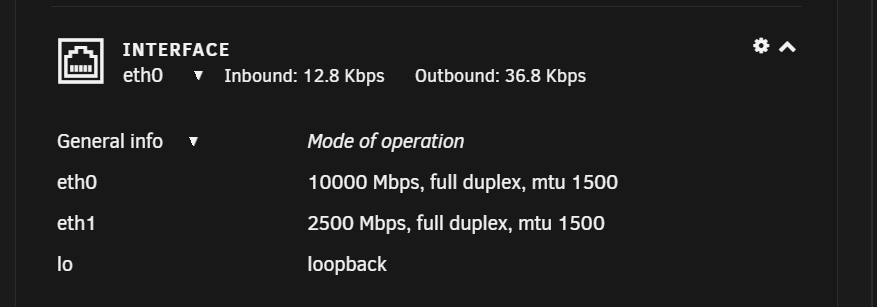
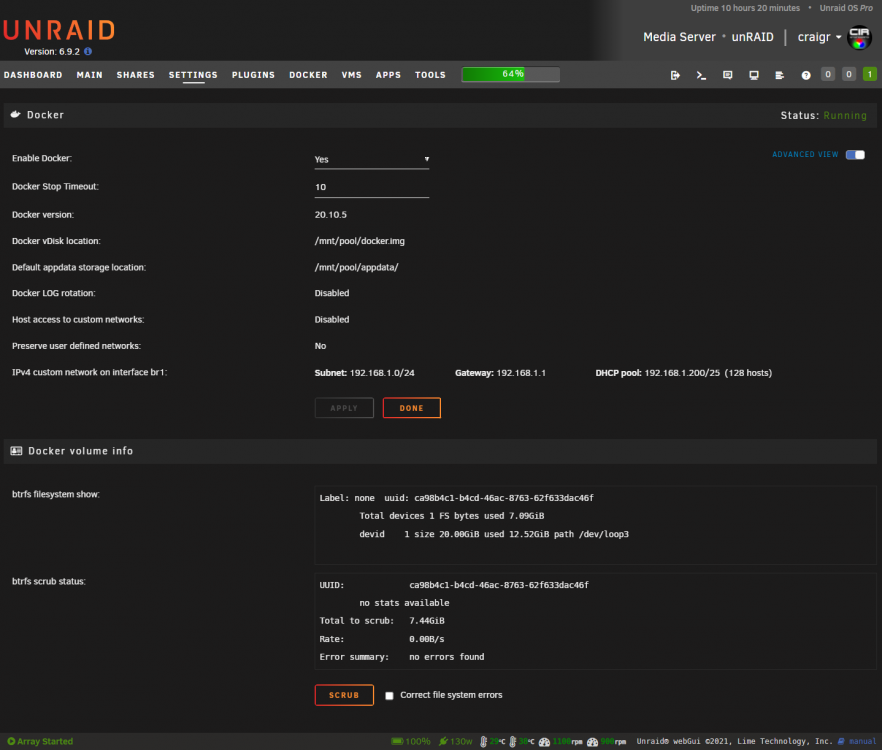
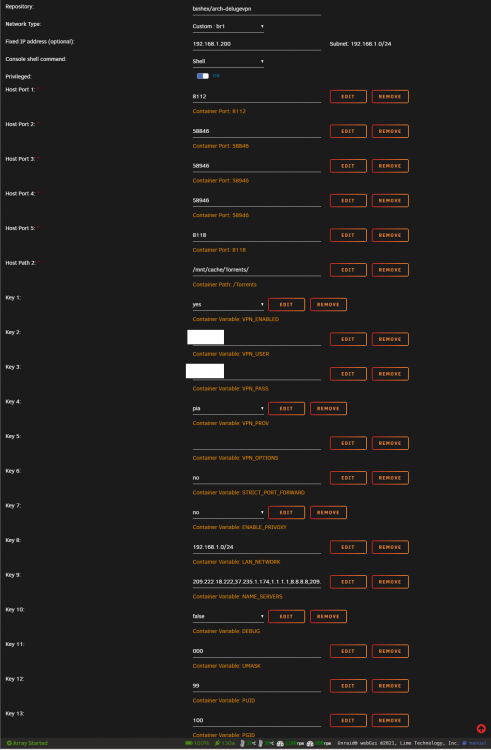
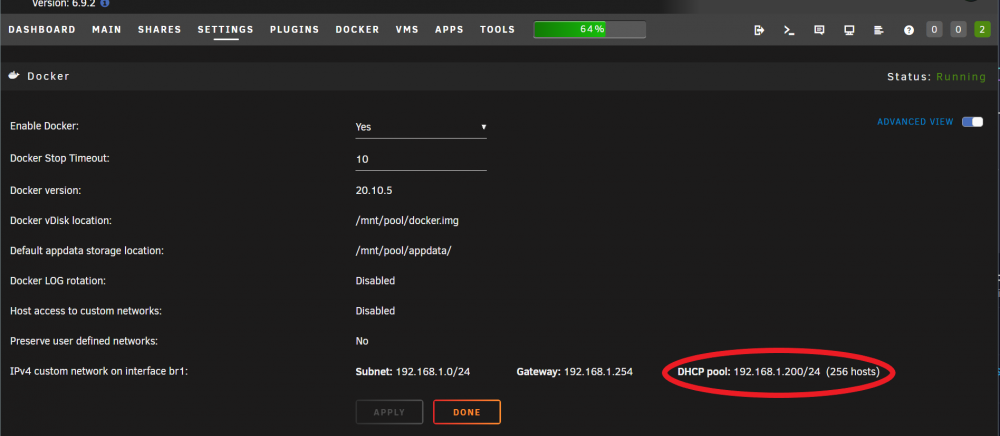
I have dual nics; one for direct internet connection of dockers and VM's to the multi-gig LAN port on my router. The other nic is for unRAID server. The docker and VM NIC connects to my router's 2.5Gb LAN port. The second nic connects to my Brocade ICX6450-24P at 10Gb to serve video's all over the house. When I setup the second nic, I could no longer get the Binhex-DelugeVPN docker WebGUI anymore and couldn't figure out why. I could connect to it through Deluge installed on Windows in thin client mode, but not with a browser. The problem was, that in the DOCKER setup page in unRAID for DHCP pool, I had /25 (default) and it obviously needed to be /24 because the IP address I assigned the Binhex-DelugeVPN docker is 192.168.1.200. Now the WebGUI works as it should. craigr
-
Finally figured it out. Settings > Docker > IPv4 custom network on interface br1: Don't know why I didn't see it sooner. craigr
-
Have you checked the log file? I bet you are having an issue reconnecting to your VPN. craigr
-
EDIT: Solution Thanks Jonathan. I had read that already and just went through the motions anyway to be sure. However, I don't see where my error lies? Could you please give me just a little bit more of a push? For what it's worth, I had things running well, but not quite technically correct. I used Ronaldus' posts in this thread to get it to what I thought is perfect: I have other questions, but I don't want to derail this thread by going off topic. Thank you so much! craigr
-
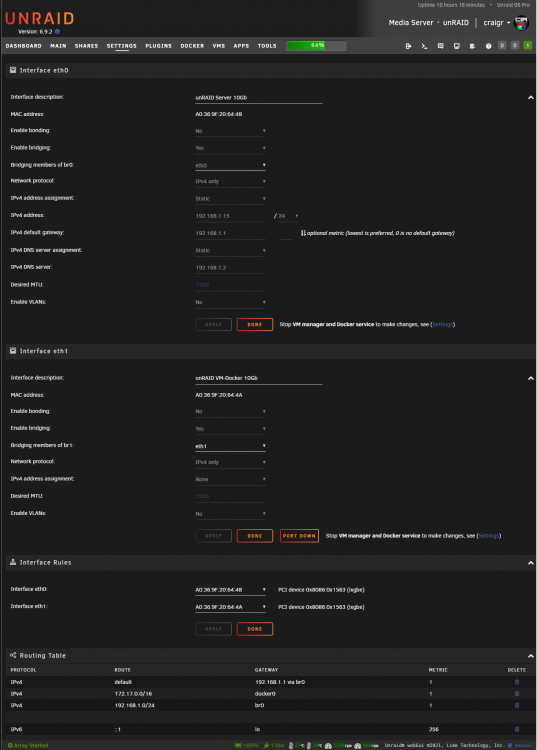
EDIT: Solution Today I setup a separate physical nic for unRAID server and another physical nic for my docker containers and VM's. I have everything working perfectly except for the fact that I cannot access the WebGUI for binhex-delugevpn. I can access binhex-delugevpn GUI by using my Win10 VM with Deluge 2.0.4.dev38 setup as a thin client and connecting to the binhex-delugevpn docker that way. This is not a VPN issue or normal WebGUI issue. In fact, this is the supervisor.log: 2022-04-09 02:01:49,314 DEBG 'watchdog-script' stdout output: [info] Starting Deluge Web UI... 2022-04-09 02:01:49,314 DEBG 'watchdog-script' stdout output: [info] Deluge Web UI started I can access all other docker WebGUI's including binhex-nzbget, binhex-krusader, PlexServer... This is my network config in unRAID, docker config, and delugevpn config. Any ideas on what the problem may be? Thanks, craigr
-
Hey this problem still exists in a different way on binhex-delugevpn. There is no way to get to the WebGUI even typing it in directly. The only possibility I have found is to use deluge running (in my case on Windows 10) as a thin client. Anyone have any ideas? Also bonienl, thanks for your help as always. I had everything working well, but what I did was not quite technically correct. Your guidance stopped the errors in Fix Common Problems In my case, I have one 10Gb connection for unRAID server and another 10Gb connection for my Win10 VM, deluge, and binhex-nzbget. It's working nicely because I have 2.5Gb internet service and my switches only support 1Gb and 10Gb, but my router has a 5Gb WAN and one 5Gb LAN, so I can hook the 5Gb LAN directly to unRAID now and have it for downloading torrents and nzb files and for my VM's. Another 1Gb ethernet port connects my router to my switch. Interestingly, the binhex-nzbget WebGUI works fine even though it is on br1 along with binhex-delugevpn. What's up with that?1? craigr
-
So I asked my friend who found that case how he found it. He said he started searching for "mining server case." I don't know why mining cases apply as mining generally doesn't need lots of storage, but that was the key for him. I'm curious if you guys ever come up with any other cases that way. craigr
-
I just found it here at Lazada as well. https://www.lazada.com.ph/products/14bay-hard-drive-tower-multi-disk-storage-server-desktop-computer-chassis-atx-compatible-main-box-quasi-power-supply-chia-mining-i2529032021.html craigr
-
A friend of mine found this case on Ali: https://www.aliexpress.com/item/1005003148866235.html 14x 3.5 bays up the whole front. Anyone tried it? It's pretty pricey at $257 without power supply (PS is optional). Looks ideal if it's not garbage. Is it similar to any other cases? Thanks, craigr
-
Man I always read the release notes too. Don't know how I missed that. Thank you! craigr
-
Sorry if this has been covered, but how are we supposed to run automated backups of the USB boot drive now? In Appdata Backup/Restore v2 it clearly states, "NOTE: USB Backup is deprecated on Unraid version 6.9.0 It is advised to use the Unraid.net plugin instead." However, I have searched for this "Unraid.net plugin" in CA with no luck and have googled many variants also with no luck. What's the deal? Right now I continue to use Appdata Backup/Restore v2 for USB backup despite the fact that it's deprecated. Thanks, craigr
-
I'm having the issue with cacert.pem. I replaced the modified cacert.pem file, but it does not help me. I am unable to upgrade to 21.1 when prompted. Any ideas? Spaceinvader to the resque again: Thanks craigr
-
Running 6.9.2 and my full hardware info is in my signature. I am using an Intel X550-T2 NBASE-T network adaptor. When I first startup unRAID the System Information correctly reports 10000 Mbps, but after some time unRAID will report 1000 Mbps. My Brocade ICX6450 correctly reports a proper 10G connection and iperf3 (from nerd tools) confirms that unRAID is truly using the full 10G. It seems to just be a reporting error by unRAID and that the system is actually at 10000 Mbps. Thoughts? craigr
-
Could you please point out where in the release notes where the workaround is. I have looked and do not see it. Sometimes release notes become scatter. I looked at these: https://wiki.unraid.net/Manual/Release_Notes/Unraid_OS_6.9.0 https://wiki.unraid.net/Manual/Release_Notes/Unraid_OS_6.9.2 I can't get pihole to run with the custom servers. I'd like to get that working, but for now I have just substituted 1.1.1.1 and 1.0.0.1. Thanks, craigr
-
I'd really appreciate a link, thanks. I'd like to know because I am not sure I understand. When the container launches it does so quickly so I don't think it's downloading any updated version or anything. For me, with the official PLEX docker it was the only repository that actually allows me to get the PLEXPass version properly. I now have been suspecting this may be why I wasn't having issues when others were. Kind regards, craigr
-
If you are running the official PLEX docker and want to run the PLEXPASS version, you should also change your repository to: plexinc/pms-docker:plexpass craigr
-
Yeah, it doesn't matter if the file or directory is there or not, just create it. You can use: touch /boot/config/modprobe.d/i915.conf Or simply navigate to the directory in your FLASH share and use Windows or whatever OS you are running. I did it in my VM's GUI. craigr
-
For whatever reason, I do not need to downgrade PLEX. On my system hardware acceleration of all kinds including h.265 4k HDR with tone mapping is working properly on all of the newest PLEX Server releases. My config is in my signature. Just saying not everyone may need to downgrade PLEX. I have no idea why it works fine for some and not others. craigr
-
Updated from 6.9.1 with no issues so far. VM's and dockers all working fine. craigr
-
https://forums.plex.tv/t/4k-hdr-hevc-hw-transcoding-is-broken-on-1-22-1-4200/702328/39 This is what I am wondering about for you? craigr
-
I just crawled out of bed and tried with tone mapping on or off, both work fine. I am using the official PLEX server docker. Based on your thread, the problem may be only with certain CPU's. I'm running an Xeon E-2288G. craigr
-
I think I read somewhere this was an issue but I thought it was solved. I’ll try turning mine off and on later if I can (got second covid shot yesterday and it kicked my butt). It may be that you need plexpass for it? Do you have a license? craigr
-
All the info is in the documentation. There is also plenty on runnin the Nvidia drivers. https://wiki.unraid.net/Unraid_OS_6.9.0#GPU_Driver_Integration See what happens if you leave “chmod -R 777 /dev/dri” in your go file. Mine didn’t need it, but some may. craigr


