






Lev
Members
-
Joined
-
Last visited
Everything posted by Lev
-
I'm wondering if UnBalance can help me in this situation now, or perhaps this is in the roadmap for the future... I'm wanting to migrate to use Split Levels on my User Shares which are presently just a big mess of multiple shares across all disks. I've found a manual approach that works to do this, but it's, well manual with some steps involved. Here's what I do that is working, just it's time consuming. I first check that I have enough availbile free space on the array for the share that I want to migrate. Right now I'm ensuring I have >= free space than the share I'm trying to re-distribute, but if automated, this safety measure could be reduced to perhaps the >= the largest file in the source. I use the built in compute space feature on the shares page. I rename the share that I want to re-distribute, example: "TV" gets rename to "TV_old" On the rename share I exclude all disks that have the free space that are part of my new share that will be created I create a new share called "TV" and I set the appropriate 'split level' I want to obtain I exclude all the disks that are part of "TV_Old" Then I list all the disks that have data on the from "TV_Old" and I pick the first disk and do a move of that data to /mnt/user/TV which then allows UnRAID to redistributes the data across that share using Split Level After that's complete, I move to the next drive and repeat until I'm done. Many ways to make this more efficient using UnBALANCE. All of the above could be automated, also as a drive from the previous "old" share is emptied, it could be then removed from each of the shares 'excluded disks' list, making it possible to migrate with less free space available. But it's still kind of an in-elegant solution... Plus to save anyone the effort, yes I'm aware of the warning that moving from a disk share to a user share is not a recommended. This is on my test server. Or it could take a much smarter approach which is possible in code, but way too much work to even consider manually.... identify the existing data on disks that meet the requirements of the new Split Level to be applied, and only move the data between disks that does not meet that requirement. This is closest to the 'Gather' function that UnBALANCE does now, just with some more intelligence added to determine this. It keeps the data transfers as disk to disk and avoids the risk of the user shares, if that is still a risk given how I mitigated it by using the 'excluded disk' option
-
I've bought two cards with cables from this seller. Using for exactly as described in this post which I'd never seen before. Thanks for updating, great deal.
-
I tried I recall, at least I'm aware that was a method. All I remember at some point whether it was that, or trying Window's NFS or iSCSI support, I ran into the feature not being supporting on the licensed version of Windows I was using at the time. i.e. Home vs Pro vs Enterprise editions.
-
I suggest to anyone, do a self assessment of how much data do you really need to back up that is not replaceable thru some means. Whatever that size is, ensure you've got a multiple backups in plan for that irreplaceable data first and foremost, always. I've got two backups I employ... 1) CrashPlan or another real-time system. 2) Multiple hard drives that I've retired from use in my array that were functioning fine, just too small. Each has the same data on it and every few months I go to the bank and swap in a fresh backup on a drive and remove the oldest one in safety deposit box to use next time I go.
-
Last time I attempted it, I couldn't do it in a few hours of best effort. Let me put it this way, it's not easy intentionally by their design to ensure that it only backs up local drives on Windows PC's. I wouldn't say it's impossible cause there was still a few more methods I didn't try, but at that point I gave up. They win, and I have to give them credit to for it. I was a good lesson I needed to learn, asking myself what extremes was I willing to go thru to make this work that even if I was to find a way, my confidence was lost should I have to restore from it someday, that it'd work. What good is any backup if you have no confidence you cannot restore it.
-
I did some quick research, here's the facts I found that told me all I needed to know to form an opinion. -- The screenshots for the GUI of CrashPlan's Small Business app look different than this one we currently use as Home users. -- The pricing is $10/month, which is roughly double what we pay now as Home users for 12 months -- Small business won't have all the same features we presently have. I'll save the effort of expressing my opinion and use it more constructively on finding an alternative during the next year, as I had recently renewed for another year prior to this announcement. @gfjardim thank you for your contribution to providing and supporting this container. It's been solid and proved it's value over the last 14 months I've used it. If it continues to be supported until it's final end a year from now, that's 2+ years to be proud of. Cheers!
-
@jbrodriguez I'm a huge fan of where this app is going! I tried it earlier this week to move files off a single disk that I wanted to exclude from a user share and re-disturbe it across the existing shares still remaining. Worked flawlessly. I'm very interested as it might be a means by which I can migrate to using the split level feature in UnRaid. Without UnBalance, such a migration would involve a lot of work. You've saved me countless hours I'd otherwise be spending using midnight commander to do this manually. Thank you!!! I'd glad buy you beers and more beers. Can you update your donation link in your first post to include BitCoin or Ether?
-
Well done @peter_sm, I get the joke is on me in your latest update. Well played indeed... <3
-
-
@Squid Thanks for this tool. I used every part of it last night to fully get a server to be in tip top shape. Love the extended scan. Great work!
-
@peter_sm I greatly appreciate the work you've done on this plugin. I've used it for a year and it's been simple and always working. Thank you. In light of what I'm about to say, having not expressed that to you previously, I feel to blame for the changes you most recently added to the plug-in. In the most recent version of the plugin, the release notes say 'support form link' to here, but this thread. And the is now also a donate button. Screenshot attached. - No issues with the support link, others place it where you did as well. Be aware there is a whole description field though on the plugins page that's not being used. See other screenshot attached. Maybe you want to add something there, also with a link, or move the link there. - The donate button. I'll gladly by you some beers. I love the work you put into this plug-in. But please, put it here in the forum in your first post, not in the plug-in itself. I don't run ad-blocker with UnRaid. I don't want to have to do that for your plugin or the 15 others that follow your lead and do this too. I have auto-update of plug-ins and docker containers disabled out of fear the code might not be fully tested. I don't want to have to add donation solicitations or advertisement to the list of fears. Peter I politely ask you to please consider and roll back your changes.
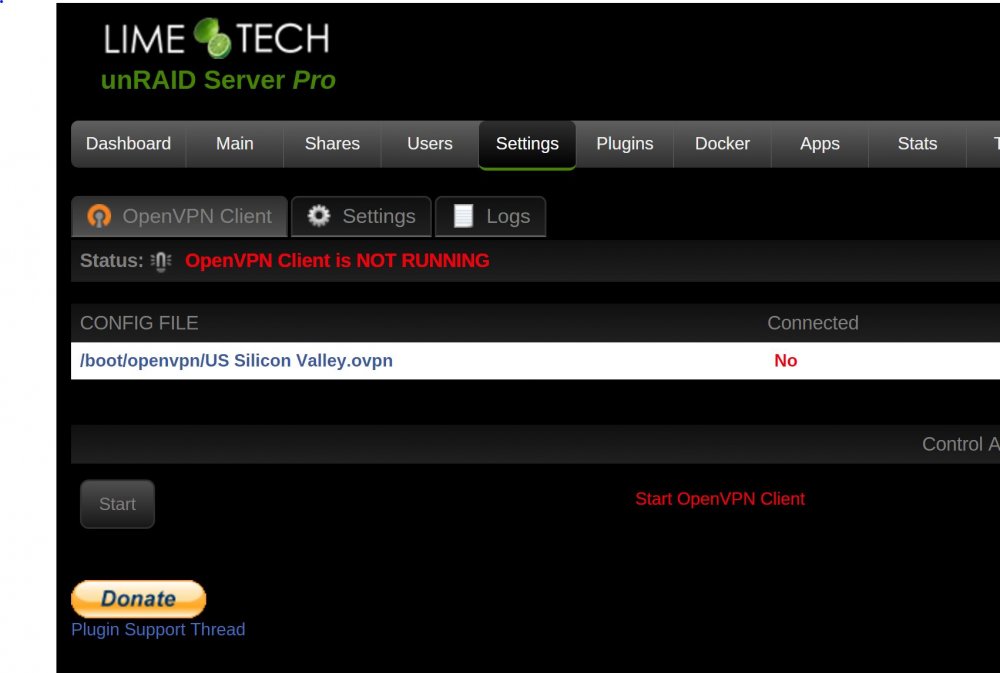
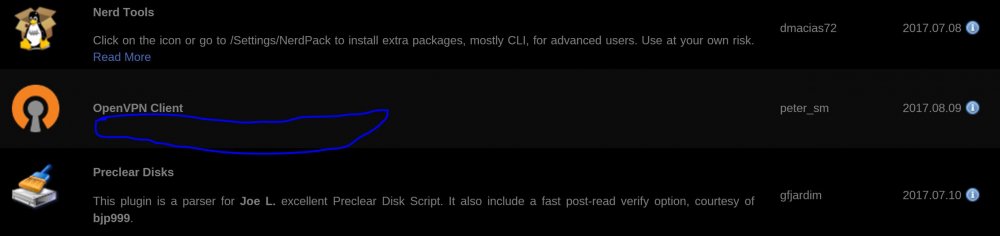
-
@shEiD that's a very well written post. I like the ideas. There's the technical and the business side, here's a suggestion that is hopefully a good marriage of both and a win for Lime-tech. Allow two pro licenses to be assigned to the same USB GUID. Or add a whole new license offering. Copy and paste much of the code to allow for a second 30 drive max, dual parity array. I don't see why it can't stop/start one array array complete independent of the second array. The merge/fuse of user shares could still combine from both first and second array.If one array is stopped, those files just won't be visible. Parity, whether single or dual is unchanged, still tied to the array. So if you want 2 arrays up to 30 drives max, dual parity on both would mean 4 drives. Or run one array with dual and the second array with single parity, shouldn't matter. Extra licensed feature... add a hot-spare disk. It's pre-cleared, it's ready to go to replace a failed disk on either the first or second array. Either with user acknowledgement or once confidence in the feature builds, then allow for it to be automatic. Cache drives remain unchanged.
-
Very minor cosmetic item... when the plug-in is installed it doesn't return with the 'Done' button like most other scripts. Everything still installs successfully. Seen it happen twice now on two different servers.
-
I love this app, thank you @Squid, many times in the past I wish I had set this up to run automatically. Would of saved myself a lot of grief! The script works great and I could use some advice on what the best way to make it more efficient. As it's been noted many times already in this thread, metadata folders from plex, sonarr, radarr...etc contain a lot of small files. Working with or storing such a large number of small files is inefficient both disk operations or file system block size. After reading this thread there seems to be a few ways to solve it: Add a feature to tar or compress. Seems like the right solution, but feature doesn't exist today. Exclude the sub-directories with the metadata causing this inefficiency to be exclude from the backup. This isn't much of a solution IMO, as it's not being backed up. One could argue if it's even worth backing up in the first place, given it just takes time to easily re-download. Do not use the dated back-up option. This would allow rsync to much more quickly compare and only replace files that have changed. All this media metadata is pretty static. So this may be the best option to pick? What's everyone's thoughts?
-
@coppit thanks! looking forward to trying this!


