






Lev
Members
-
Joined
-
Last visited
Everything posted by Lev
-
Dynamix color theme is Black. The shadow box windows and confirmation windows do not appear to adhere to the style guide and remain white, some examples are PluginUpdate.png and UpdateConfirmation.png On the other hand, some window boxes seem to have a light shade of gray, see SystemInfo.png I wasn't sure the right place to report this one @bonienl. If this is a feature request, feel free to move it.
-
Edits: Found in 6.7.0-rc1, rc2, rc3, rc4, rc5 After upgrade I was greeted with this warning message in the GUI. I removed all plug-ins and it still persisted. I cleared all browser cache and cookies, it still persisted. Starting array and everything else seems to work fine. Just a visual warning. Any ideas what else to check? tower-diagnostics-20190124-1754.zip tower-diagnostics-20190124-2245.zip
-
I miss testing the RC of upcoming releases. Did I miss an announcement regarding why there hasn't been any lately?
-
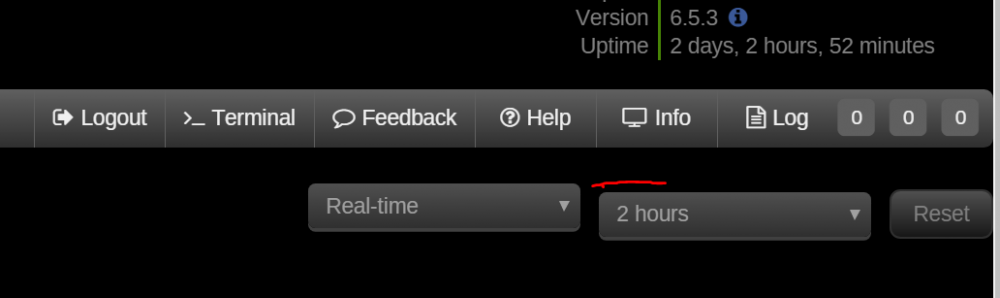
@bonienl I couldn't find this previously reported... Dynamix System Stats very small cosmetic nit I noticed over the years, it's more noticeable now that you've done such a great job polishing the rest of the UI. The vertical align of the Dynamix Stats plug-in.
-
If it's a choice between having a UPS or no UPS, forget compatibility concerns! I'll take whatever I could get my hands on in Alaska. Do it brother!
-
Thanks! this makes me want to give it another try someday with the usb cable and see if I get results like yours. I've only had luck using NET with the optional remote access add on card Cyberpower offers.
-
@jonathanm I was able to finally get mine working a year ago using the network snmp after many hours wasted on trying the direct connect usb cable. Is that the same method you're describing? Ever try the usb cable? Did it work for you?
-
Great decision to add a UPS! I also think cyberpower products and their customer support are excellent! However the apc library in linux and thus included in unraid doesn't marry well to the point of your question. I'd advise you stick to tried and proceed compatibility recommendations from others.
-
Update got it working. It was as I thought "something painfully simple"... It works as you'd expect. What caught me up was having a existing queue in NZBget. I now know that each of those items in the queue, are set to the paths configured in NZBget at the time they are added to the queue. So with my existing queue, it wasn't until it got caught up to when I made the path changes changes that I saw log messages of those new downloads trying to hit my container path mapping for /InterDir/ (nzbget.conf) that was mapped to /tmp (unRAID Docker container path settings for NZBget container) Thanks @neilt0 this thread continues to deliver over 4 years later since your OP! @trurl thanks for helping me keep my sanity that what I was doing was doing all along was correct.
-
So far I've killed one SSD every 1.5 years, and the cheap ones die. It's not the cost, like you said they are cheap, but ugh I'd rather be spending my time on so many other projects than replacing them. RAM maybe my answer.
-
Yes, I was thinking the same thing, but so far have failed miserably in my attempts to try it. I've tried multiple different ways mounting /tmp or tmpfs, that part works, best I can tell. I'm able to successful from the bash shell within the NZBget container see the mapped mount point and even create and edit files, and see them back on host. A+, I'm solid here. Where the trouble lies is getting the app NZBget to use that mount point. I've edited the appropriate /InterDir in the 'Paths' section of settings. I've double checked the nzbget.conf file to ensure it matches, but no matter what, NZB get ignores it and falls back to $MainDir/intermediate I've yet to enable debug logging for NZBget, but that's where I'll look next. I expect it must be some permission problem with the mount and tmpfs as a device type. All I know is it shouldn't be this painful, I must be missing something painful simple.
-
Maybe I'm asking in the wrong way, or I'm missing something cause here's what I'm observing having tested this for the last hour and getting a bit frustrated that I searched and foudn your thread Article cache based on what I'm observing keeps all of these individual of a RAR in RAM, like you have in your example here, all of these guys are in RAM. Only once all of the pieces of a RAR have been downloaded, it moved out of the article cache (RAM) and written to disk (/InterDir) as you show in your written into the complete single RAR file, just like you explained here: What I'm trying to do is keep all those completed RAR files in RAM rather than written to the /InterDir disk, therefore I'm trying to make InterDir be a ramdisk. I think this is the next logical step beyond what you were doing in 2013 (glad you're still here!) using temp (tmp). You're right that article cache solves the problem you were curious about, however based on my tests it does not also apply to keeping the completed RAR's in memory as well. I'm still observing those written to /InterDir, until they are all downloaded and finally unpacked and moved to /DestDir. Does this align with what you know? Expect to be called crazy for wanting this, as it means gigabytes of RAR's stored in memory that could easily be lost and have to redownload again in the event of a server reboot.
-
I like this old thread, shows how far things have progressed such that we have so much RAM to ask the question... what if we never want to write the RAR file to SSD or Disk, we want it to remain in RAM, such that the only thing ever written to SSD or Disk is the final contents of the RAR?
-
If you know of a better place to post it, let me know. I'll post a link back to it from the Sparky-Repo thread. I found this thread by searching to see a answer existed. If someone ever takes over the Sparky Krusader to update it, this was one of two possible solutions to the problem, the one I posted is the easiest and requires no changes to the container. The other solution (assuming it works) that I first started going down the path of trying to build wmctrl inside the container. Seems like wmctrl would make it possible to add a button inside the container on the Krusader GUI and Menu, but it requires some additional work.
-
@tillkrueger @jenskolson @trurl @unrateable @jonathanm @1812 @Squid since all of you were active in this thread. I found a way to get the file transfer back. Bring up the Guacamole left panel menu (CTRL ALT SHIFT) Input Method = On Screen Keyboard In the On Screen Keyboard, use ALT (it'll stay on, 'pressed') then TAB, select it using TAB, then ALT again (to turn off) A tip I found too, is that anytime doing a copy or move, always best to use the 'queue' button in the pop-up confirmation dialog so that multiple transfers are sequentially handled. It's easy to get to the queue, I found using this it often mitigates much of my need to see the file transfer progress window. The 'Queue Manager' is easy to get back on the screen by using the top menu, Tools > Queue Manager
-
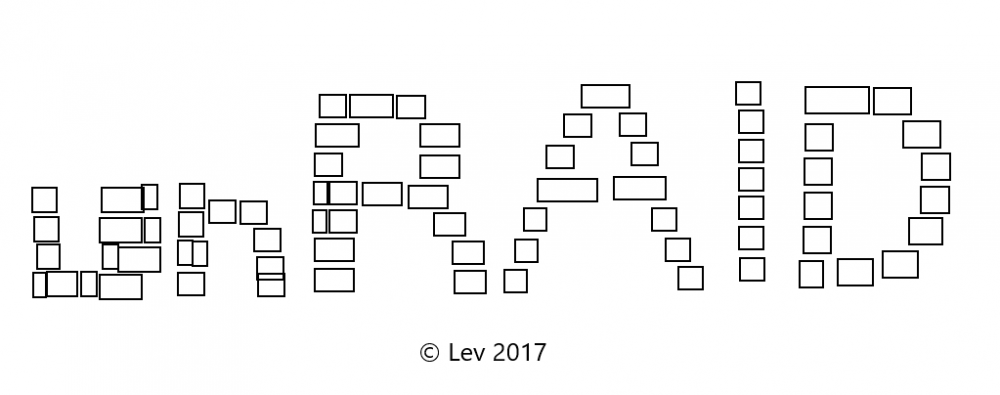
This is 3 minute mock up I cooked up in MS Paint while at my in-laws away from my graphic workstation. It's just convey the concept and if it's of interest, then I can take it further with some more concepts. Vector is easy as you can see, and Adobe Illustrator is also easy. It's the logo build of blocks of different sizes to represent the different hard drive sizes, one of unRAID's long-time core features: I got a bit lazy one I got to the 'AID' letters in terms of the blocks
-
Wow this is big idea. You have me thinking of an array where each disk in the array points to a iSCSI target that is another unRAID server. OMG fun!
-
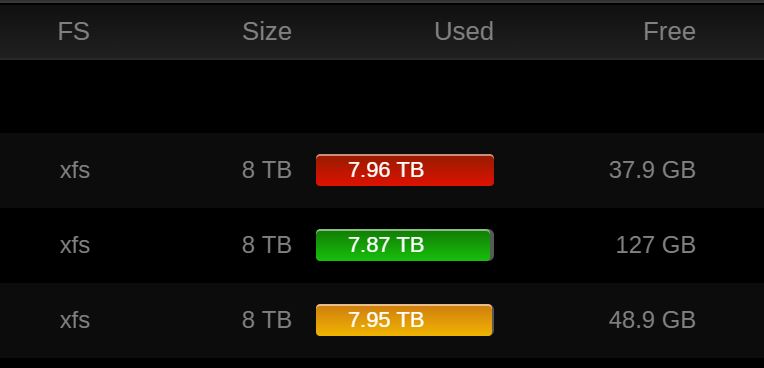
Thanks, I did some research on this. Ok first the problem... First I attached a picture below to illustrate the problem. Warning is set to 99%, Critical 100% using a 8TB drive as an example. 1% seems to be equal to roughly 40GB in size based on how unRAID is calculating it. The GUI then recieves this 'critical' state and shows red. 40GB doesn't seem like that big of a deal as a single drive, but when I multiply this across all my drives, potentially the unRAID max drive limit (28? 30? I forget) Let's just use 28 for the math... 28 * 40GB = 1.1TB of free space remaining, yet I'd be in critical state. That sounds like a lot, but if I had 28 drives at 8TB in size, that means I'd have 224TB of total space. Am I really going to care about only having 223TB out of 224TB due to this loss? I think the decimal place is still a good idea. It's curious that it's not a setting in the /config/disk.cfg, how does this work @limetech ?
-
Thanks, glad you're thinking about it. My problem is too many NICs and trying to see them all easily at a glance.
-
Thank you for the quick reply!
-
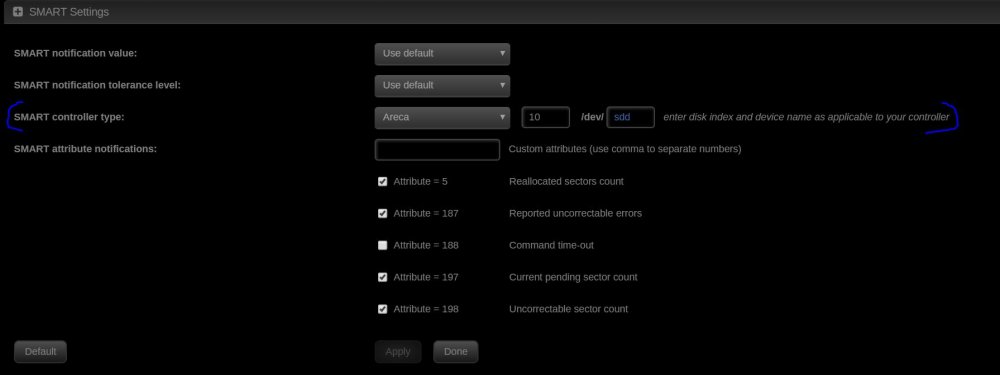
@dlandon UD is triggering the following message... Log Message: Nov 19 10:53:18 tower kernel: sd 1:0:0:1: [sdc] tag#0 UNKNOWN(0x2003) Result: hostbyte=0x00 driverbyte=0x08 Nov 19 10:53:18 tower kernel: sd 1:0:0:1: [sdc] tag#0 Sense Key : 0x5 [current] Nov 19 10:53:18 tower kernel: sd 1:0:0:1: [sdc] tag#0 ASC=0x20 ASCQ=0x0 Nov 19 10:53:18 tower kernel: sd 1:0:0:1: [sdc] tag#0 CDB: opcode=0x85 85 06 20 00 00 00 00 00 00 00 00 00 00 40 e5 00 because I need to define a custom Smart Controller Type like how unRAID has settings for in their disk details page. see attached picture. Is there anyway to to define a custom smart controller per disk managed by UD?
-
See the screenshot, showing RED. it's showing red yet not sure why. In unRAID disk settings my warning is set to 99%, critical set to 100%, not sure if there is a different property or variable that UD is looking at for reference.

-
I did some research on this same question a month ago, I had the same question. First depends on your filesystem type. I'll assume XFS, cause IMHO that's really the only one worth picking. I've linked others internet sites where the best I could find recommended 5% free space because of the default optimal inode size of the filesystem is something like 4Gb or 4GB. Doesn't matter which cause either is small relative to the size of the disks we using especially at 8TB. If I find the link again I'll post it, or search through my history, you my find it in an earlier post I made. Point is 5% is huge amount of space with 8TB drive, and it was recommend as the % to allow for enough space for defraging of XFS filesystems based on the inode size. I don't care about defragging at this point, so could care less about that aspect. I only mention all this cause you wanted to know, as I did, so that's all I found searching for the answer to this same question. I came away thinking there'd be more science or a solid good number to recommend, but there wasn't. There was no nugget of knowlege I found, so if anyone else found something, I'd be happy to know as well. My advice is this based on finding nothing and only though simply experimentation over the last two months on this very question. At 8TB drives, I set 1% free as a target. That's roughly 120GB IIRC in my settings that I set on shares as a minimum free space limit to enforce. In the Disk Settings as well I set 99% as the warning level and 100% as the critcal level simply cause I don't want to see the color red in the GUI. I wish this setting allowed decimal place, cause I'd set 99% as the warning and 99.5% as the critcal if I could. Long post, but hope there was something of value in it if you read this far.
-
Welcome to the party! I take a humble satisfaction when a post of mine draws out a new contributor. This forum needs more of us!
-
It's only a worthwhile use if you think you can use the 10Gbps cards directly linked to be >= the 1Gbps you likely already have. If not, don't bother. 99% of use cases would not be applicable, so if you have to ask then that likely means you.






