





CHBMB
Community Developer
-
Joined
Everything posted by CHBMB
-
Thought I'd post this here as it might be useful to some. I worte a brief guide on how to setup bitwarden with a reverse proxy using our LetsEncrypt container. It's on the LinuxServer.io blog. It's directed at docker from a command line perspective, but Unraid makes it easier with @cheesemarathon's template. (I've submitted a PR to your repo for some template changes cheesemarathon.
-
Some links would be helpful
-
They may be useful if that's what you need, but they are way beyond an install of Nginx. They won't be included by default. Sent from my Mi A1 using Tapatalk
-
Try a different port, clear browser cache, try a different browser? Otherwise post logs.
-
It's not something we advocate nor support. Go down this road and you're on your own I'm afraid.
-
It's not possible to easily add plugins to this.
-
Do you reckon you'll ever finish CA? [emoji14] Sent from my Mi A1 using Tapatalk
-
I'm not 100% sure on default behaviour. Worth checking what's in the zip? But regardless of that, if you haven't enabled docker as a service you're then resigned to having an appdata folder solely for network stats which seems a little extravagant. Just trying to think through all the use cases here with you, ultimately you do what you think best. Sent from my Mi A1 using Tapatalk
-
Problem with that is there will still be your existing docker.cfg file present to parse.
-
Isn't eth0 what @Squid is using? Anyways, fresh install tonight and it's created the folder in my appdata folder and appear to be working. Good work! I still think for a plugin to be installable for everyone, including those that don't use Docker you probably need to rethink where to store data, but that's just an opinion.
-
Yeah, I'm not 100% convinced your plugin is responsible, I suppose with the creation of folders it might be possible, but now that has been ironed out. Should be good. One other thought though. What about people who don't run docker and won't have an appdata folder defined. Might be an idea to do the RAM -> FLASH thing Squid suggested. Sent from my Mi A1 using Tapatalk
-
No, true, but most plugins don't have a continuous stream of data though. Sent from my Mi A1 using Tapatalk
-
NP, it's all shaping up quite nicely now though I reckon. Looking good! Sent from my Mi A1 using Tapatalk
-
RAM usually, and flash. Probably more historical than anything to be fair as appdata never used to exist in the V5 days. Sent from my Mi A1 using Tapatalk
-
I'm afraid I've just got in bed, however I have faith, I'm sure it's working now. Will test tomorrow. Other thing, did you remember to put stats.page in your source as suggested by Squid? Sent from my Mi A1 using Tapatalk
-
Yeah, I mean afaik yours is the first plugin to use appdata. Only issue I can see with using RAM is in the case of a dirty shutdown and the fact any issues are going to take a fair bit of time to surface due to the time between reboots. Sent from my Mi A1 using Tapatalk
-
Ah, my bad, missed that one.
-
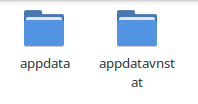
Actually you must be somewhere as now I'm getting two folders created on plugin install. /mnt/user/appdata/.... and /mnt/disks/virtualisation/appdatanetworkstats/ So there's still a trailing slash missing.
-
I still can't see anywhere that you're actually defining the variable for DOCKER_APP_CONFIG_PATH..... Only references I can see to it in your .plg file are in these lines here.... https://github.com/dorgan/Unraid-networkstats/blob/master/networkstats.plg#L146-L151
-
I was just about to point that out.....
-
I think if you add the / to line 147 and define the DOCKER_APP_CONFIG_PATH variable somewhere you'll be good.... https://github.com/dorgan/Unraid-networkstats/blob/master/networkstats.plg#L146-L147
-
That's kind of immaterial, as ! = /mnt/user/appdata/ but as you asked. root@server:/# cat /boot/config/docker.cfg | grep DOCKER_APP_CONFIG_PATH | cut -d'"' -f 2 /mnt/disks/virtualisation/appdata
-
OK. There's nothing inside appdata at all. appdatavnstat has an empty subfolder with nothing in it. I deleted /mnt/user/appdata/ and also /appdatavnstat and removed then reinstalled your plugin and it's recreated the /mnt/user/appdata/vnstat/ folder. I can see in your plugin you're using a variable like I highlighted in the link above, but I might be mistaken, I can't see where the variable is defined during the plugin install. root@server:/# ls -la /mnt/user/appdata/ total 4 drwxrwxr-x 1 root root 19 Oct 8 00:25 ./ drwxrwxrwx 1 nobody users 4096 Oct 8 00:25 ../ drwxrwxr-x 1 root root 23 Oct 8 00:25 vnstat/
-
Didn't realise the first point, but now I looked I think you missed a trailing slash buddy.... https://github.com/dorgan/Unraid-networkstats/blob/master/networkstats.plg#L147 On the second point, If Dynamix System Statistics isn't installed then there's no "STATS" page.
-
Nice work, just installed this and it's cool. I got a couple of suggestions though. 1. Probably need to make it clearer that a prerequisite is having Dynamix System Statistics installed, or perhaps install it as part of your own install routine. 2. I don't use /mnt/user/appdata/ on my array. Instead I use a SSD mounted via unassigned devices, so by installing your plugin I've now got an appdata share on my array of which the only subfolder is vnstat, so I think this should be either configurable by the user, or even grab their current appdata location with something like this. cat /boot/config/docker.cfg | grep DOCKER_APP_CONFIG_PATH | cut -d'"' -f 2



